Claude Skills Tutorial for Founders | Coding Capybaras
A Claude skills tutorial for non-technical founders: what a skill is, three you can build this week, and when a skill beats a prompt you keep re-pasting.
· Justin Boggs

Photo by Ilya Semenov on Unsplash
A Claude skill is a folder with a SKILL.md file in it that teaches Claude how you do one specific recurring job — and Claude loads it on its own, only when the job comes up. That's the whole idea. If you keep pasting the same five paragraphs of context into a new chat every Monday, that's a skill waiting to be written. This Claude skills tutorial covers what a skill actually is under the hood, three I built for Coding Capybaras that a non-technical founder could ship this week, and the honest line between "this should be a skill" and "this should stay a prompt."
TL;DR
- A skill is a directory containing a
SKILL.mdfile — YAML frontmatter with anameanddescription, then Markdown instructions. Two required fields. That's the entire format.- Claude reads the description at startup (about 100 tokens per skill) and only opens the full body when your request matches. Anthropic calls this progressive disclosure.
- The
descriptionfield is the whole ballgame. It's what Claude matches your request against, so it has to say what the skill does and when to use it.- Build a skill when the work repeats and the instructions are stable. Keep it a prompt when the task is one-off or the details change every time.
- Start by doing the job manually once, then ask Claude to turn that conversation into a skill. That's the fastest path from "I keep re-explaining this" to "it just knows."
What is a Claude skill, exactly?
Here's the least glamorous definition, which is also the correct one: a skill is a folder on your computer with a Markdown file in it.
The file is called SKILL.md. It opens with YAML frontmatter that has two required fields, name and description, and then the rest is plain Markdown instructions. Anthropic's Agent Skills documentation is explicit that everything else is optional. No build step, no config file, no API call.
---
name: drafting-changelog-entries
description: Writes customer-facing changelog entries from a git diff or a list of merged PRs. Use when the user asks for a changelog, release notes, or a "what shipped this week" summary.
---

# Drafting changelog entries

## Voice
Second person, present tense. "You can now export to CSV." Never "we've added."
No version numbers in the headline — customers don't track them.

## Structure
Group into: New, Improved, Fixed. Drop any section with no entries.
One line per entry. If an entry needs two lines, it's two entries.

## Skip these
Dependency bumps, internal refactors, CI changes, anything behind a flag
that isn't on for customers yet.
That's a complete, working skill. Drop that folder in ~/.claude/skills/ for personal use or .claude/skills/ inside a project, and Claude Code discovers it. No upload step — custom skills in Claude Code are filesystem-based. It's the same "it's just files on disk" design as most of the Claude Code features people underuse, which is why it's approachable if you don't write code.
The part that took me a while to internalize is when Claude reads it. It doesn't read the whole file at startup. At startup, Claude loads only the name and description from every installed skill — roughly 100 tokens each, per Anthropic's own numbers. Those descriptions sit in the system prompt like an index. When your request matches one, Claude goes and reads the body, which the docs target at under 5,000 tokens.
Anthropic calls this progressive disclosure, and it's the reason you can install a dozen skills without paying for a dozen skills. The card catalog metaphor is almost exact: the labels on the drawers are always visible, and you only pull one open when you need what's inside.
There's a third level too. A skill folder can bundle extra reference files and scripts — REFERENCE.md, EXAMPLES.md, a scripts/validate.py. Those cost nothing until Claude actually reads or runs them. A script that Claude executes never enters the context window at all; only its output does.
Why a skill beats a prompt you keep re-pasting
The economics are the argument.
Say you've written a really good 600-word prompt that explains how your changelog should read. Every time you want a changelog, you dig it out and paste it. It works. But it costs you the paste, it costs you remembering the prompt exists, and it costs full price in context every single time — including the times you were doing something unrelated and the prompt happened to still be scrolled up in the conversation.
A skill inverts that. The 600 words live on disk. What sits in context permanently is one sentence: the description. Claude pays the full cost only on the turns where it's actually doing changelog work.
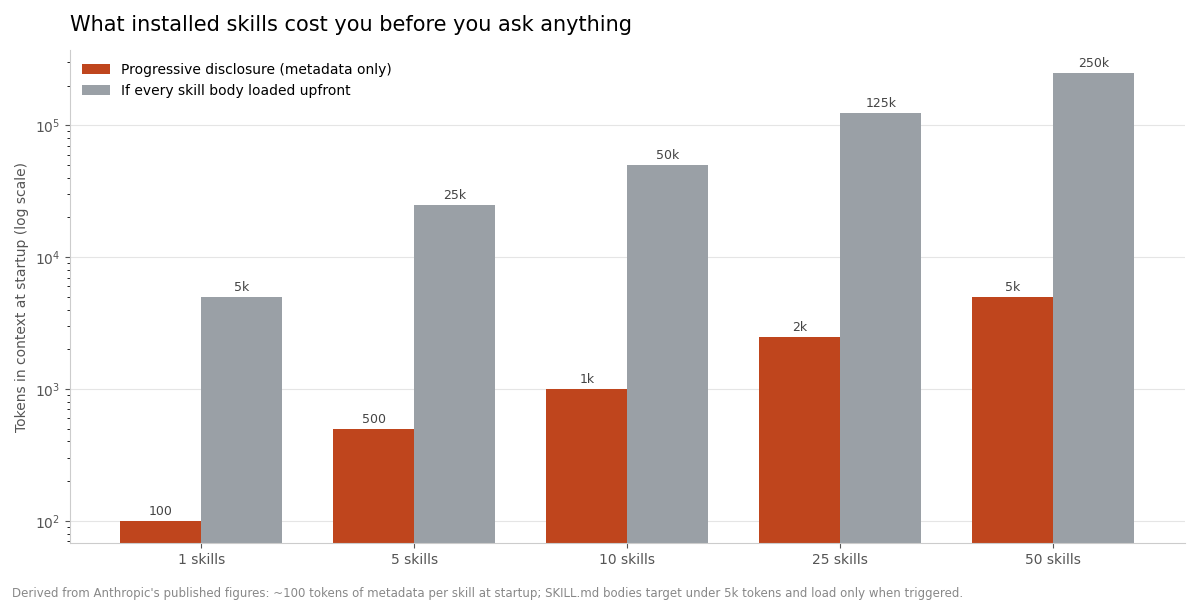
That chart is arithmetic on Anthropic's published figures, not a benchmark I ran. But the shape is the point: fifty installed skills cost about the same at startup as one moderately long prompt. Fifty prompt bodies loaded upfront would swamp the window before you typed anything. If you've read my post on context window management, this is the same fight — you're spending context on the thing you're actually doing instead of on everything you might do.
There's a second, less obvious win. A prompt you paste is a prompt you can edit in the moment, which sounds like flexibility and is actually drift. Six weeks in, you've got four slightly different versions of the changelog prompt in four old chats and no idea which one is current. A skill is one file, in git, with a history.
The third win is discovery. You don't have to remember the skill exists. Claude matches your request against the description and pulls it in. That only works if the description is good, which is why the docs spend more words on that one field than on almost anything else.
The best-practices guide is blunt about the rules: write the description in third person, include both what the skill does and the specific triggers for when to use it, and be concrete. "Helps with documents" is a description that will never fire. "Extract text and tables from PDF files, fill forms, merge documents. Use when working with PDF files or when the user mentions PDFs, forms, or document extraction" is one that will.
I got this wrong on my first skill. I wrote a beautiful body and a lazy description, and then spent two days wondering why Claude never used it.
Three skills worth building this week
These are the three I'd build first if I were starting over. All three came from noticing I'd explained the same thing three times.
1. Your writing voice
The one with the highest return, and the one most founders skip because it feels soft.
Every time you ask Claude for a landing page headline, a support reply, or a launch tweet, you're implicitly asking it to guess your voice. It guesses toward the median of the internet, which is why the first draft always has "unlock," "seamless," and a triplet of adjectives in it.
Put your actual rules in a skill. Mine has a banned-phrases list, a note that I write in first person and admit when something didn't work, a rule against exclamation marks, and three before/after examples of copy I rewrote. The examples do more work than the rules — showing input/output pairs conveys style better than describing it.
Trigger phrasing that works: "Use when drafting or editing any customer-facing copy: marketing pages, emails, changelogs, social posts, or support replies."
2. Your release checklist
Not "how to code." How you ship.
Mine encodes the boring, forgettable sequence: run typecheck and lint, never run a build while the dev server is up, check that no .env file is staged, write the commit message in a specific format, push to origin and never to upstream. Some of that lives in my CLAUDE.md file because it's always-on project law. The procedural part — the ordered checklist you only need at ship time — belongs in a skill, because it's dead weight in context the other 95% of the time.
This is also where the docs' advice about degrees of freedom matters. For a code review, you want to give Claude room: "check for bugs, edge cases, readability." For a deploy sequence, you want the opposite: run exactly this command, do not add flags, do not reorder. Fragile operations get narrow instructions. Judgment calls get wide ones.
3. Your weekly content or reporting job
Anything you do on a calendar is a skill candidate by definition.
For me it's the daily blog task: load the strategy doc, pull the next topics off a queue, research, source a hero image, write, save, update the queue. That's nine steps with real ordering constraints, and I would absolutely forget step 4 if I retyped it every morning.
The pattern that makes multi-step skills reliable is a checklist Claude copies into its own response and ticks off as it goes. It sounds like a gimmick. It isn't — it's the difference between Claude doing seven of nine steps and Claude doing nine.
flowchart TD
    A[Startup: Claude loads<br/>name + description only<br/>~100 tokens per skill] --> B{Does your request<br/>match a description?}
    B -->|No| C[Skill stays on disk<br/>zero context cost]
    B -->|Yes| D[Claude reads SKILL.md body<br/>under 5k tokens]
    D --> E{Does the body point to<br/>reference files or scripts?}
    E -->|No| F[Claude does the work]
    E -->|Reference file| G[Claude reads only<br/>the file it needs]
    E -->|Script| H[Claude runs it<br/>only output enters context]
    G --> F
    H --> F
When a skill beats a prompt, a CLAUDE.md, or an MCP server
These four things get confused constantly, and picking wrong is the main reason people's setups feel cluttered. Here's how I decide.
| | Prompt | CLAUDE.md | Skill | MCP server |
| --- | --- | --- | --- | --- |
| Lives where | The chat you're in | Repo root, committed | A folder with SKILL.md | A running connector process |
| Loaded when | You paste it | Every session, always | Only when triggered | When the tool is called |
| Best for | One-off asks | Always-true project law | Repeatable procedures | Reaching real systems |
| Costs context when idle | Yes, if left in the thread | Yes, always | ~100 tokens | Tool definitions only |
| Versioned in git | No | Yes | Yes | Config only |
| Setup effort | None | Minutes | Minutes | Install + credentials |
The decision rule I use, in order:
Does it need to touch a live system? Read your database, open a GitHub issue, check last night's errors. That's an MCP server, not a skill — a skill is knowledge, a server is access. I wrote up the five MCP servers worth connecting if that's the gap.
Is it true for every single task in this repo? "Never edit files in /app/ directly." "App tables get the app_ prefix." That's CLAUDE.md. It has to be loaded always, so it should be short.
Does it repeat, with stable instructions, but only sometimes? Skill.
Everything else? Prompt. Not every good instruction needs a home. If you've done a task twice and might never do it again, writing a skill for it is procrastination with a productive costume on.
One more filter, from Anthropic's own guidance: only add context Claude doesn't already have. The single most common mistake in a first skill is explaining things Claude knows cold — what a PDF is, how git branches work, what "churn" means. Every one of those sentences competes for room with your actual instructions. Ruthless deletion makes skills better, not worse.
How to write a Claude skill, step by step
The fastest path is not to sit down and write a skill. It's to do the job once, badly, in a normal conversation.
Step 1: do the task manually with Claude. Work through the real thing. As you go, you'll naturally supply context — file paths, preferences, "no, we always exclude test accounts," "put the summary at the top." Notice what you're supplying.
Step 2: ask Claude to turn the conversation into a skill. Literally: "Create a skill that captures the changelog process we just did. Include the voice rules and the section structure." Claude models understand the skill format natively; you don't need a special prompt or a meta-skill to get properly structured output.
Step 3: cut it in half. Claude will over-explain. Go through and delete every sentence that teaches Claude something it already knows. Then check the description — is it third person, does it name the trigger?
Step 4: test it cold. Open a fresh session and make a request you'd normally make. Did the skill fire? If not, the description is the problem, not the body. Did it fire and miss a step? The body's ordering is the problem.
Step 5: iterate from real usage, not imagination. Anthropic's guidance here is to build your test cases before writing extensive documentation — run Claude on representative tasks without the skill, document exactly where it falls down, and write only enough instruction to fix those specific failures. It's the same discipline as not building features nobody asked for.
Keep the body under 500 lines. If it's growing past that, split the extra material into sibling files and link them from SKILL.md — but keep those links one level deep. If SKILL.md points to advanced.md which points to details.md, Claude may only skim the nested file instead of reading it fully. Everything important links straight from the top.
Two last mechanical things worth knowing. Skills don't sync across surfaces: one you put in ~/.claude/skills/ for Claude Code isn't automatically available in claude.ai or through the API. And treat a skill from a stranger the way you'd treat any downloaded executable — a skill can tell Claude to run code, so Anthropic's security guidance is to use skills only from sources you trust and audit anything else thoroughly before installing.
Frequently asked questions
Do I need to know how to code to write a Claude skill?
No. A skill is a Markdown file with two lines of frontmatter. If you can write a clear set of instructions for a new contractor, you can write a skill — and the fastest way to produce one is to describe the job to Claude and ask it to write the file for you.
Where do I put the skill folder?
For Claude Code, ~/.claude/skills/your-skill-name/SKILL.md makes it available everywhere on your machine, and .claude/skills/your-skill-name/SKILL.md inside a project scopes it to that repo and lets you commit it. Claude discovers them automatically; there's no install command.
How many skills is too many?
Because only the metadata loads at startup, the ceiling is much higher than people assume — Anthropic's docs discuss selecting from 100+ available skills. The practical limit is description overlap. If two skills describe similar triggers, Claude has to guess between them, so sharpen the descriptions before you worry about the count.
What's the difference between a skill and an MCP server?
A skill gives Claude knowledge — how you want a job done. An MCP server gives Claude access — the ability to read your database or open a GitHub issue. They compose well: a skill can tell Claude which MCP tool to call and in what order. If you use both, reference MCP tools by their fully qualified ServerName:tool_name so Claude can find them.
Why isn't my skill triggering?
Almost always the description. It needs to be third person, name the specific work, and state the trigger conditions — "Use when the user asks for a changelog, release notes, or a summary of what shipped." Vague descriptions like "helps with writing" never match anything.
Can I share a skill with someone else?
Yes, but it depends on the surface. Claude Code skills are files, so you can commit them to a repo or share them through a plugin. claude.ai custom skills are uploaded per user and aren't shared org-wide. API skills are workspace-wide. There's no automatic sync between the three.
Where to start
Pick the thing you explained twice this week. Not the most impressive workflow you can imagine — the most annoying one you actually repeat. Do it once with Claude, ask Claude to write the skill, cut the result in half, and test it in a fresh session.
The build takes about twenty minutes. That's the real lesson of any Claude skills tutorial: the payoff isn't the file format, it's that a chunk of your operating knowledge stops living in your head and starts living somewhere you can edit, version, and hand to someone else. That's a bigger deal for a solo founder than it sounds, because right now you are the documentation.
If you want to see what this looks like on a real project, the Coding Capybaras boilerplate ships with its conventions written down the same way — a CLAUDE.md for the always-on rules and skills for the procedures — and the whole codebase is free to download and read.
Sources