The 7 Mistakes I Made Learning to Code With AI
The seven learning to code with AI mistakes I made as a non-developer — silent failures, giant diffs, misplaced trust — and the fixes that actually work.
· Justin Boggs

The biggest learning to code with AI mistakes aren't syntax errors — they're workflow errors. I spent a year building Coding Capybaras as a non-developer working with Claude Code, and almost every painful week traced back to one of seven habits: trusting code because it ran, reviewing diffs too big to read, skipping the "explain this to me" step, and measuring progress by speed instead of understanding. None of these are fixed by a better model. They're fixed by changing how you work. Here are the seven mistakes, what each one cost me, and the specific fix for each.
TL;DR
- "It runs" is not "it works." Modern AI failures are silent — verify outputs, not just execution.
- Small tasks and small diffs beat long autonomous sessions. Big diffs hide bugs you'll never spot.
- Ask the AI to explain its own code. The 10 minutes you save by skipping that costs hours in debugging.
- Speed is a feeling, not a measurement. Developers in a controlled study felt 20% faster while being 19% slower.
Mistake 1: I treated "it runs" as "it works"
Early on, my entire verification process was: paste the prompt, wait for the code, run the app, click around. If nothing crashed, I shipped it. That worked fine for landing-page copy changes. It failed catastrophically the first time I touched billing logic.
The problem is that AI coding failures have changed shape. A January 2026 IEEE Spectrum analysis found that where older models failed loudly — syntax errors, obvious crashes — newer models increasingly fail silently. In the author's test, when given an impossible bug to fix, newer models didn't refuse or flag the problem. They generated code that executed cleanly and produced plausible-looking garbage. The code ran. The output was meaningless.
I hit exactly this with a date-handling function in my email scheduling logic. The code ran without errors for two weeks. It was also quietly computing send dates off the wrong timezone, which I only noticed when a welcome email landed at 3 a.m. The app never crashed. Nothing was red. It was just wrong.
The fix: verify outputs, not execution. For anything that computes a value — a price, a date, a permission check — I now write down what the correct answer should be for two or three real inputs before asking the AI to build it. Then I check those exact cases by hand. It's the cheapest QA process in existence, and it would have caught my timezone bug on day one. If you can't predict what the right answer should be, that's the signal you don't understand the feature well enough to delegate it yet.
Mistake 2: I let the AI produce diffs too big to review
When I discovered that Claude Code could run for twenty minutes and touch fifteen files, it felt like a superpower. One prompt, an entire feature. I stopped reading the changes — who could? Five hundred lines across fifteen files, full of code I half understood.
The data says this is exactly backwards. CodeRabbit's analysis of 470 open-source repos, published on the Stack Overflow blog, found AI-assisted pull requests carried 1.7x as many bugs as human-written ones — and 75% more logic and correctness errors, the exact category that looks like reasonable code unless you walk through it line by line. The same analysis points at the law of triviality: small PRs get scrutiny, huge PRs get rubber-stamped. AI makes huge PRs effortless, so the code most likely to contain logic errors is also the code least likely to get read.
As a non-developer, my review capacity is the bottleneck in the entire system. A 40-line diff, I can genuinely read. A 500-line diff, I'm pretending.
The fix: break work into tasks that produce diffs you can actually read. Instead of "build the referral system," I prompt one slice at a time: the database table, then the server action, then the UI. Each step lands as a change small enough that I can read every line and ask questions about the ones I don't follow. It feels slower. It is dramatically faster than debugging a 500-line mystery three weeks later. I wrote more about structuring these requests in prompt engineering for non-developers.
Mistake 3: I never asked the AI to explain its own code
For my first few months, I treated explanations as a luxury for real developers. The AI wrote the code, the code seemed to work, and asking "what does this do?" felt like slowing down for a lecture I didn't need.
Then I'd hit a bug in that code a month later and have nothing. No mental model of how the feature worked, no idea which file to even look at. The 2025 Stack Overflow Developer Survey found 45.2% of developers say debugging AI-generated code is more time-consuming than debugging their own — and these are people who can read code fluently. For a non-developer, debugging code you never understood isn't slower. It's often impossible without starting over.
The asymmetry finally clicked for me: an explanation costs three minutes at generation time. The same understanding, reconstructed during a production bug, costs hours — if you can reconstruct it at all.
The fix: after any meaningful change, I ask one question: "Explain what this code does and what would break it, in plain English." Then — this is the part that matters — I try to repeat the explanation back in my own words. If I can't, I ask again. I keep a running file of these explanations per feature. It's the closest thing I have to the knowledge a developer carries in their head, and it has paid for itself every single time something broke. My full workflow for this is in the Claude Code starter guide for non-developers.
Mistake 4: I read confidence as correctness
AI assistants deliver wrong answers in exactly the same tone as right ones. Fluent, structured, certain. For months, my brain used that tone as a quality signal — if the answer came back polished and assured, I trusted it more.
The survey data shows how common the underlying failure is: 66% of developers in the Stack Overflow survey cited "AI solutions that are almost right, but not quite" as their top frustration. Almost-right is the most dangerous kind of wrong, because it survives a skim. The code references real functions, follows real patterns, and contains one quietly incorrect assumption — a wrong column name, an inverted condition, a webhook handler that skips signature verification in dev.
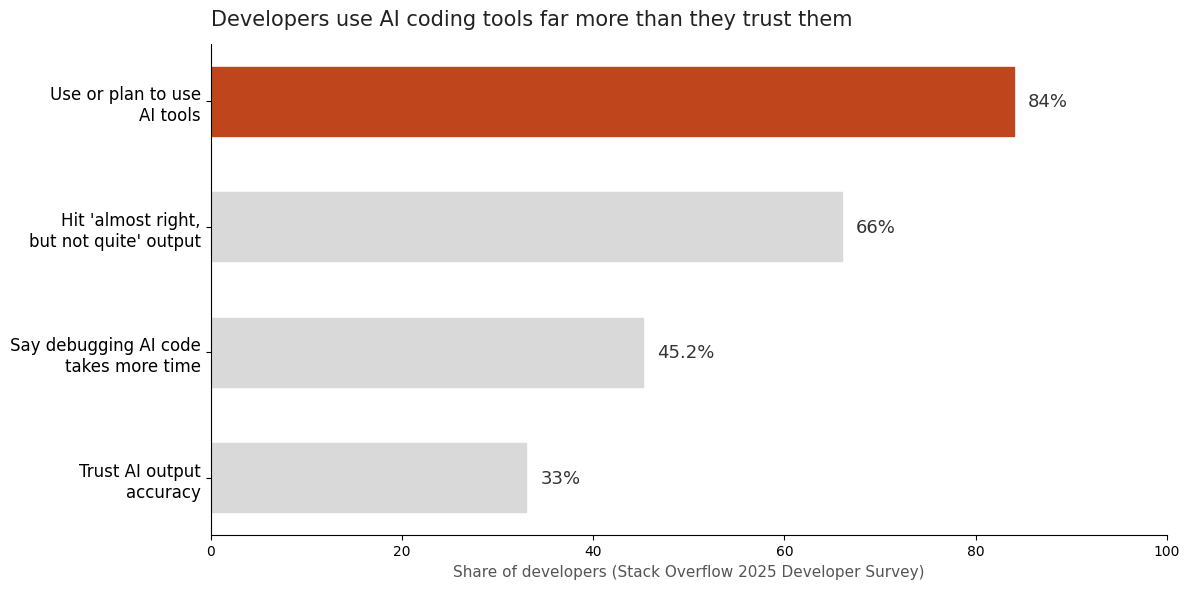
The chart above is the whole story of this post in one image: 84% of developers use or plan to use AI tools, but only 33% trust the accuracy of the output. The people with the most experience using these tools trust them the least — not because the tools are useless, but because experience teaches you that fluency and correctness are unrelated.
The fix: I built a short list of "smell tests" that ignore tone entirely. Does the code reference files that actually exist in my project? Does it handle the failure case, or only the happy path? If it touches money, auth, or user data, did it validate inputs? Confidence answers none of those questions. Five minutes of checking does.
Mistake 5: I optimized for feeling fast instead of being fast
This one stung the most, because the feeling is so convincing. Watching code stream onto the screen feels like progress in a way that reading, planning, and testing never does.
Then METR ran a controlled study on experienced open-source developers and found something uncomfortable: with AI tools, developers took 19% longer to complete real tasks. The devastating detail is the perception gap — before the study, they predicted AI would make them 24% faster. After finishing, having been measurably slower, they still believed it had made them 20% faster. The feeling of speed completely detached from the reality of it.
Now, those were experienced developers on mature codebases — the study's authors are careful about generalizing, and for someone like me who literally couldn't write the code myself, AI is obviously a net gain. But the lesson transfers: the feeling of velocity is not evidence of velocity. My own version of this was rewriting the same feature four times across a weekend because each AI-generated attempt felt fast and none of them was planned.
The fix: I measure shipped outcomes per week, not lines generated per hour. One planned feature that survives contact with real users beats four exhilarating rewrites. Before any session, I write three sentences: what I'm building, how I'll know it works, what I will not touch. That 90-second ritual has saved more time than any prompt trick I know.
Mistake 6: I gave the AI a blank slate every session
For months, every session started from zero. The AI didn't know my stack, my file layout, my naming conventions, or the three architectural decisions I'd already made. So it guessed — differently each time. One day my emails sent through a helper function, the next day a new feature called the email API directly, because the AI had no idea the helper existed.
The fix wasn't a better model. It was context. Tools like Claude Code read project instruction files (CLAUDE.md) that travel with the repo — your stack, your rules, your "never do this" list. The first time I wrote one, repeat mistakes dropped off a cliff. The AI stopped inventing parallel ways to do things it couldn't see I'd already solved.
This is also, honestly, why I structure the Coding Capybaras boilerplate the way I do — rule files in every region so the AI knows that billing code lives in one place and marketing pages in another before it writes a single line. But you don't need a boilerplate to apply the principle. A plain markdown file listing your stack, your conventions, and your past mistakes will transform your sessions.
The fix, concretely: keep one instructions file per project, and treat every repeated AI mistake as a missing line in that file. The AI invented a file path? Add "always check existing file structure before creating files." It hardcoded a config value? Add "all config comes from the config module." The file becomes a vaccine log — every bug you've ever had, encoded so it can't recur.
Mistake 7: I tried to learn everything instead of the load-bearing 20%
In month two, I panicked and decided I needed to actually learn to code — a proper course, JavaScript from first principles, the works. I lasted three weeks, learned almost nothing useful for my actual project, and nearly quit the whole thing. (That spiral deserves its own post, and got one: non-tech founder syndrome.)
The mistake wasn't wanting to learn. It was learning bottom-up — syntax first, concepts later — when AI-assisted building rewards exactly the opposite. I didn't need to write a for loop from memory. I needed to understand what a database migration is and why running one against production without a backup is terrifying. What an environment variable is and why secrets never go in code. What a webhook is and why Stripe signs them.
Here's the breakdown that actually mattered for me:
| Concept | Why it's load-bearing | Where I used it | | --- | --- | --- | | Environment variables & secrets | One leaked key can end your business | Every single integration | | Database migrations | Schema changes are the riskiest routine operation | Every feature with stored data | | Webhooks & signatures | Payments and email events arrive this way | Stripe, Resend | | Git basics (commit, branch, revert) | The undo button for everything | Every working day | | Client vs. server | Determines what's secret and what's public | Auth, API keys, forms |
The fix: learn concepts on demand, in the context of the feature you're building, by asking the AI to teach you the specific idea your current task depends on. "I'm about to run a database migration — explain what could go wrong and how to undo it" teaches more usable knowledge in ten minutes than a week of syntax exercises. Bottom-up learning builds developers over years. Top-down learning builds founders who can ship this month.
Frequently asked questions
Can a non-developer really learn to code with AI tools?
Yes, with an important caveat: what you learn is closer to technical literacy than traditional programming. You learn to read code roughly, direct an AI precisely, and verify results rigorously. That combination ships real software — this site is proof — but it's a different skill than writing code from scratch, and pretending otherwise causes most of the mistakes in this post.
What's the single most important habit when learning to code with AI?
Verification. Every other mistake on this list is survivable if you catch it, and catastrophic if you don't. Decide what correct output looks like before the AI writes anything, then check it against real cases. "It runs without errors" is not a verification step.
Should I trust AI-generated code less than human code?
Treat it with the same skepticism a senior engineer applies to any pull request — but know the failure profile differs. The CodeRabbit study found AI code carries more logic and correctness errors, which look fine on the surface, while humans make more typos and obvious slips. AI mistakes specifically hide from skim-reading.
How long does it take a non-developer to ship something real with AI?
A working prototype: days. A production app handling payments and real users: months — and most of that time is the learning in this post, not the code generation. The code was never the bottleneck. Understanding what to verify, and how things connect, is.
Do I need to take a programming course first?
I'd say no — start building, and learn concepts on demand as your project requires them. The exception: if you genuinely enjoy structured learning, a short course on web fundamentals (what a server is, what a database does) gives useful scaffolding. Skip anything that drills syntax.
Conclusion: learning to code with AI means budgeting for mistakes
Looking back, every one of these learning to code with AI mistakes came from the same root: I treated the AI as a vending machine for code, when the working relationship is closer to managing a brilliant contractor who has never seen your project, forgets everything between meetings, and never says "I'm not sure." Once I started managing that relationship — small reviewable tasks, explanations on demand, written context, outputs verified against known answers — the same tools that burned my weekends started shipping my product.
If you're starting this journey, you don't have to make all seven mistakes yourself. And if you want a codebase that has the guardrails built in — context files in every region, an architecture AI assistants navigate without guessing — Coding Capybaras is the free boilerplate I built after making every mistake on this list so you don't have to.