Claude Code for Non-Developers: The 2026 Starter Guide
A non-tech founder's walkthrough of Claude Code in 2026 — install, the first session, the common pitfalls, and the workflow that actually ships software.
· Justin Boggs

Photo by Arnold Francisca on Unsplash
Claude Code for non-developers is Anthropic's terminal-based AI coding agent — the same Claude that lives in the chat app, but with permission to read, edit, and run code on your computer. For a non-tech founder shipping a SaaS in 2026, it is the closest thing to having a senior engineer pair-programming with you for the price of a Claude Pro subscription. This guide is the starter walkthrough I wish I had had when I installed it: how to set it up, what your first session should look like, the four pitfalls that burn every beginner, and the workflow that takes you from "I have an idea" to "my SaaS is live" without a computer science degree.
TL;DR
- Claude Code is a CLI agent — you run
claudein your terminal, it reads your repo, and it edits files with your approval.- Install with one line:
curl -fsSL https://claude.ai/install.sh | bashon macOS/Linux, the matching PowerShell command on Windows.- Authenticate with a Claude Pro/Max/Team subscription (recommended) or pre-paid Console credits — no API key wrangling required in 2026.
- The pitfalls are predictable: skipping plan mode, no
CLAUDE.mdfile, asking for "the whole feature" at once, and trusting code you haven't actually read.- For a non-tech founder, the real unlock isn't speed — it's that you can finally fix the thing you're stuck on instead of waiting on someone else.
What Claude Code actually is (and isn't)
Claude Code is a command-line program you install on your computer that gives Claude the ability to read your files, edit them, and run commands — with your approval. Per the official quickstart, it works against a code project you already have on disk. You open a terminal in that project's folder, type claude, and a conversational interface starts. You describe what you want; it goes and does it.
What it is not: a chat sidebar in an editor like Cursor, a no-code visual builder, or a magic "build me an app" prompt box. It is a terminal-native agent. It runs in the same place your developer friends run git and npm. That feels alien for about a day; after that, it feels like the right place for it to live, because every other thing in software development happens in the terminal too.
It also is not Claude Code the desktop app (a separate product Anthropic released in 2026), Claude in Chrome, or Cowork. Those are siblings. The terminal CLI is the one I'm walking through here, because it's the version most likely to be on every founder's machine for the next decade — and the one with the deepest integration into the actual mechanics of shipping code. If you want a fuller breakdown of the three Anthropic coding surfaces, the Coding Capybaras blog has a comparison post in the queue.
A practical mental model: think of Claude Code as a junior engineer who reads exceptionally fast, has memorized every public API, will absolutely follow your instructions, and has zero context for your codebase until you give it some. The rest of this post is about how to give it that context efficiently, and how to keep it from confidently inventing things.
Installing Claude Code on macOS, Windows, and Linux
In 2026, the install is one line. The Claude Code quickstart documents three official methods; the recommended one is the native installer because it auto-updates in the background.
On macOS, Linux, or Windows Subsystem for Linux, open a terminal and paste:
curl -fsSL https://claude.ai/install.sh | bash
On Windows PowerShell:
irm https://claude.ai/install.ps1 | iex
Two notes for non-developers about that command. The first time you paste a shell command from the internet, you're going to feel like you're handing your computer to a stranger. Anthropic's install script comes from claude.ai over HTTPS — it's signed and audited — but the instinct to be suspicious is correct, and it's the same instinct that will keep you safe later when an AI assistant suggests running something destructive. Read what you paste. The second note: on native Windows, you'll want Git for Windows installed beforehand so Claude Code can use the Bash tool; without it, Claude Code falls back to PowerShell.
After install, run claude --version to confirm it landed. Then cd into your project folder and type claude. The first time, you'll be prompted to log in. The 2026 default is OAuth — a browser window opens, you log into your Claude account (a Pro, Max, Team, or Enterprise subscription, or a Claude Console account with pre-paid credits), and you're done. No API key copy-pasting, no .env file gymnastics. Your credentials are stored locally and re-used on every subsequent session.
If you don't have a project on disk yet: this is the right moment to download a SaaS boilerplate so Claude Code has something real to work on. I built Coding Capybaras for exactly this — the free tier ships the complete Next.js + Supabase + Stripe + Resend codebase, the same one this site runs on. You clone it, you cd into the folder, you run claude, and you're already in the right shape of conversation. The SaaS boilerplate comparison post covers the alternatives if you want to make the choice with eyes open.
Your first 30 minutes: a session that builds the right reflexes
Don't ask Claude Code to "build me a SaaS" on the first try. The reflex you want to build is small ask, verify, repeat. Here's the session I recommend, step by step.
Start with a tour. Ask:
what does this project do?
Claude Code will read your repo and produce a summary. This is not a flex — it's how you verify Claude can actually see your files and is interpreting them the way you'd want. If the summary is wrong, you have a context problem to fix before you ask for anything else.
Then ask:
explain the folder structure
For a boilerplate like Coding Capybaras, this surfaces the three-region architecture (/platform, /website, /product) and the routing shims under /app. For a different boilerplate, it'll surface whatever convention that one uses. Read the response and ask follow-up questions about anything you don't understand. This is the cheapest way to learn a new codebase, full stop.
Now make a small change. Something visible. Something safe:
on the home page, change the headline to "Hello from my first Claude Code session"
Claude Code will find the file, show you the diff it wants to apply, and ask for permission. Approve it. Then run the project locally (the boilerplate's README will say how) and look. The change is real. You shipped a code change without writing code.
The reason this matters: the dopamine hit of seeing a real-on-screen result from a real prompt is what unlocks the rest. You now know the loop works. Every harder ask — "wire up Stripe webhooks," "add a settings page," "make the dashboard load faster" — is the same loop, just bigger. The Coding Capybaras origin story post (and the introducing post) talks about this loop being the entire reason the boilerplate exists in the shape it does.
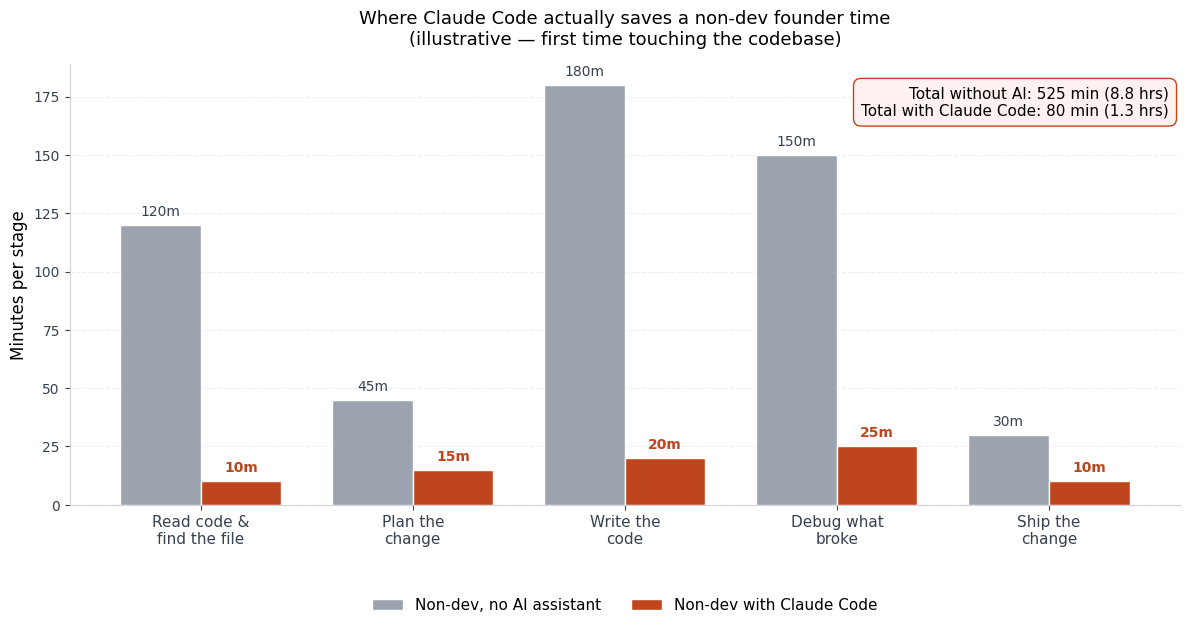
The chart above is illustrative, not measured — but the shape is honest. The thing Claude Code collapses the hardest is reading existing code and recovering from your own debugging dead-ends. The thing it collapses the least is the actual implementation, because for an experienced engineer, typing the code was never the bottleneck. For a non-developer, all five stages were bottlenecks. That's why the gap is so wide.
The features that change everything: CLAUDE.md, plan mode, slash commands
Three Claude Code features matter disproportionately for non-developers. If you ignore them, you'll spend your first month wondering why your AI assistant keeps making the same mistake.
CLAUDE.md is a file you place at the root of your project (and optionally in subfolders). Claude Code reads it automatically at the start of every session. Per the Claude Code documentation index, this file is the agent's project-specific constitution — it tells Claude how your repo is organized, which commands run the tests, which directories are off-limits, and any project conventions that aren't obvious from reading the code. Coding Capybaras ships with a 200-line CLAUDE.md at the root that walks Claude through the three-region architecture, the import path conventions, and the "never edit /app/ directly" rule. The first time you watch Claude follow those rules without you having to repeat them, you'll understand why this file is the highest-ROI thing you'll write all month.
Plan mode is the feature that prevents 90% of non-developer mistakes. You activate it by pressing Shift+Tab once at the prompt. In plan mode, Claude tells you what it intends to do — which files it would change, what the diff would look like, why it picked that approach — before it does any of it. You approve the plan or push back. Armin Ronacher's writeup of plan mode makes the case for it bluntly: the pattern of beginner mistakes is always the same — complex multi-file task, no plan mode, execution started before the agent's interpretation was confirmed. Leave plan mode on for the first month of using Claude Code. Taper it off as your judgment about Claude's scope-reading sharpens, but don't taper before then.
Slash commands are reusable prompt templates you invoke with /<name>. Built-ins like /help, /clear, and /model ship with the tool. Custom slash commands live as Markdown files under .claude/commands/ in your repo (or ~/.claude/commands/ for your whole machine). The boilerplate ships with a few — /init to write a starter CLAUDE.md, /review to do a code review of pending changes, /security-review to scan for secrets and dangerous patterns. You don't need to write your own on day one. You do need to know they exist, so when you find yourself typing the same long prompt for the third time, you can save it as a slash command and just call /that-thing from then on.
These three features are why I keep telling non-tech founders to learn Claude Code first and Cursor second. Cursor is a great editor; Claude Code is an agent harness. The harness matters more when you can't catch mistakes by reading the code yourself.
The four pitfalls every non-developer hits in their first week
If you're a non-developer using Claude Code, you will hit these. Pre-reading them won't prevent them entirely — but it'll make them resolvable instead of demoralizing.
Pitfall 1: skipping plan mode. Covered above. The fix is Shift+Tab until it's a reflex. Note that plan mode resets to off when you close and reopen Claude Code, so the muscle memory is to turn it on at the start of every session, not just once.
Pitfall 2: no CLAUDE.md, so Claude reinvents your conventions every session. You'll notice this when Claude keeps using the wrong import path, the wrong folder, or the wrong testing framework. The fix is to spend 20 minutes writing a CLAUDE.md with the five things Claude wouldn't know from reading the code: where new routes go, what files are off-limits, which database tables are which, and which commands run the build and tests. If you started from the Coding Capybaras boilerplate, this is already done — but you should still read the file and customize it as your product diverges from the starter.
Pitfall 3: asking for "the whole feature" at once. Non-developers, in my experience, are less afraid to ask for big things than developers are, because they don't know what's hard. That sounds like an advantage and is sometimes — but when you ask Claude to "build the entire billing flow including the dashboard and the webhooks and the email receipts," what you get back is a sprawling change you can't review, with mistakes you won't catch. The fix is to break the ask into vertical slices: "wire the Stripe checkout button," verify it works, "add the success page," verify it works, "wire the webhook to record the purchase," verify it works. Each slice is a separate Claude Code session if it has to be.
Pitfall 4: trusting code you haven't read. Claude Code will sometimes invent file paths that don't exist, import functions that aren't there, or add packages that don't quite do what it claims they do. The category is AI hallucinations, and they don't go away with a smarter model — they get rarer but never zero. The fix is procedural: never approve a diff you haven't at least scanned. You don't need to understand every line. You do need to be able to spot when Claude has invented a new file, added a // TODO: implement this comment, or skipped a piece of the work and pretended it was done. Reading diffs is the single trainable skill that separates non-developers who ship with AI from non-developers who blow up their codebase with AI.
The deeper version of pitfall 4 — the patterns AI assistants fall into and how to defend against them — is its own post. For now: every change Claude proposes gets at least a 30-second look from you before you press y.
When Claude Code is the wrong tool
Honest caveats, because the strategy doc is right that founder trust is built by saying when something isn't the answer.
Claude Code is not the right tool for tiny one-off tasks. If you want to rename a file or write a single function, a chat conversation with Claude in your browser is faster — no terminal, no context window to load. The overhead of opening a terminal session for a 30-second task is real.
It's also not the right tool for visual design iteration. If you want to nudge a layout, change a color, or compare two button styles, an editor with a live preview (Cursor, the VS Code extension, or Figma → handoff) is better. Claude Code can change CSS, but the feedback loop is slower than seeing the change live.
And it's not magic for things the underlying language model can't do. Real-time multiplayer game logic, niche hardware drivers, novel cryptography — Claude is good but not infallible on these, and a non-developer can't catch a subtle bug in a security-critical path. For those, you want a human engineer in the loop. For "I'm shipping a paid B2B SaaS with auth, billing, and a dashboard," which is what most non-tech founders are actually building, Claude Code is the right tool nearly all of the time.
If you're picking the Next.js + Supabase + Stripe + Resend stack that dominates indie SaaS in 2026 — and if you're a non-developer reading this, you probably should be — Claude Code is the tool that makes that stack shippable without an engineering hire. The two were built for each other, even though they came from different companies.
Frequently asked questions
Do I need a Claude subscription to use Claude Code, or can I pay per token?
You need either a Claude subscription (Pro, Max, Team, or Enterprise) or a Claude Console account with pre-paid credits. The subscription path is what Anthropic recommends in the quickstart — usage is included in your plan, and there's no per-token math to think about. The Console path makes sense if you're using Claude programmatically across multiple tools or if your usage will be small.
How do I know when Claude Code is about to do something destructive?
Claude Code asks for permission before every file edit and every shell command that mutates state. The default mode is "ask every time," which is the right default while you're learning. You can switch to "auto-accept" for a single session, but I would not recommend doing this in the first three months. Reading the diff before you approve is the habit that keeps your repo intact.
Can Claude Code work with a codebase I didn't write?
Yes — and that's actually its highest-leverage use case for non-developers. You can drop into someone else's open-source project, an existing client codebase, or a boilerplate you've never seen, and have Claude give you a tour, summarize the architecture, and explain how a specific feature works. The Coding Capybaras boilerplate is built on the assumption that this is how non-developers will start — they'll download a working SaaS, then customize it with Claude Code.
What's the difference between Claude Code and Cursor?
Cursor is a fork of VS Code with AI features baked in — it's primarily an editor that happens to have an AI assistant. Claude Code is an AI agent that happens to live in your terminal. The practical difference: Cursor is better for code you're actively reading and editing line-by-line; Claude Code is better for tasks where you'd rather describe the outcome and verify the result than touch the code directly. Most non-developers I know end up using both, but they start with Claude Code because the cognitive overhead of the editor itself is lower when you're already in a terminal running other tools.
Will Claude Code break my project?
It can — and the prevention is plan mode plus version control. Every project you work on with Claude Code should be a Git repository. That way, if Claude makes a change you don't like, git restore puts you back where you started. The single biggest mistake I see non-developers make is not committing often enough, so when something goes wrong, three days of work are tangled together and impossible to revert cleanly. Commit after every working feature. Push to GitHub at the end of every session.
Is it safe to give Claude Code access to my whole computer?
Claude Code is scoped to the project folder you started it in. It can read files in that folder, edit them, and run shell commands — but it doesn't have implicit access to your whole system. That said, shell commands themselves can do destructive things (deleting files, modifying global state), which is why the permission prompts matter. The other thing to be careful about: secrets. Don't paste API keys into Claude Code. Put them in .env.local, add .env.local to .gitignore, and let Claude read the variable names without ever seeing the values.
The honest take
Claude Code, for a non-developer in 2026, is the closest thing we've ever had to an actual coding cofounder you can hire for $20 a month. It is not infallible. It will sometimes confidently lie. It will sometimes spend an hour going in circles on a problem you could solve in five minutes if you knew enough to spot the symptom. But it will also sit with you at 2 a.m. on a launch night, work through a Stripe webhook bug while you sleep, and produce a working integration by morning — and there is no other tool in 2026 that does that for someone without a CS degree.
If you're building a SaaS as a non-tech founder and you want a boilerplate built around exactly this workflow, Coding Capybaras is the free, opinionated starter I built for it. The complete codebase ships free; the integration marketplace has copy-paste prompts for Claude Code that wire up the most-asked-for integrations in a single session.