SaaS Secrets Management for Founders | Coding Capybaras
SaaS secrets management for non-technical founders: where API keys belong, what stays out of git, local vs production, and what to do after a key leaks.
· Justin Boggs

Photo by FlyD on Unsplash
SaaS secrets management is the practice of keeping your API keys, database passwords, and signing secrets out of your code and out of git — storing them in environment variables locally and in your host's secret store in production, and rotating any that leak. For a non-technical founder, the single rule that prevents most disasters is this: a secret goes in a .env.local file that git never tracks, and it is referenced by name in your code, never pasted into it. Get that one habit right and you've closed the door most founders leave wide open. Get it wrong and you can leak a live credential to the entire internet in the time it takes to run git push — where, as the data below shows, attackers find it in minutes.
TL;DR
- A "secret" is any value that grants access: API keys, database URLs with passwords, webhook signing secrets, auth tokens.
- Secrets live in environment variables — a
.env.localfile locally, your host's secret store in production — and are referenced by name in code, never hardcoded..env.localmust be listed in.gitignoreso it's never committed. This is the whole ballgame.- AI-assisted coding is leaking secrets faster than ever: 28.65 million new hardcoded secrets hit public GitHub in 2025, up 34% year over year.
- If a key leaks, deleting the code doesn't fix it. Rotation does: generate a new key, kill the old one, update your systems.
What counts as a secret
Before you can protect secrets, you have to recognize them, and this trips up first-time founders more than anything else. A secret is any value that, in the wrong hands, lets someone act as you or reach something you own.
The obvious ones are API keys — your Stripe secret key, your Resend key, your OpenAI or Anthropic key. But the category is wider. Your database connection string is a secret, because it usually contains the password right there in the URL. Your webhook signing secret is a secret — it's what proves an incoming request really came from Stripe. Auth tokens, session-signing keys, cloud provider credentials: all secrets.
The tell is simple. If a value would let a stranger spend your money, read your users' data, or impersonate your service, it's a secret. Ask that question about every credential your app touches, and you'll catch the non-obvious ones — the database URL especially, which people paste around casually because it "looks like a URL" rather than a password.
Everything else — your app's name, your public site URL, a feature flag that's on or off — is configuration, not a secret. Configuration can live in code or in a settings table. Secrets can't. Keeping that line clear is the foundation everything else in this post builds on.
Where secrets actually belong
The mechanism that keeps a secret out of your code is the environment variable. Instead of writing your Stripe key into a file, you store it in the environment your app runs in and reference it by name — the code says "give me the value called STRIPE_SECRET_KEY," and the actual value lives somewhere the code can read but your repository can't.
Locally, that "somewhere" is a file conventionally named .env.local. It sits in your project folder, holds your keys as name-value pairs, and — this is the part that matters — it is listed in your .gitignore file, which tells git to never track it. Your code reads from it; your repository never sees it. In the Coding Capybaras boilerplate this is a hard rule: secrets live only in .env.local, and that file is in .gitignore by default, so the moment you clone the repo you're already on the safe path.
In production, you don't ship the .env.local file at all. Instead your host holds the secrets. Platforms like Vercel let you set environment variables in the project dashboard, encrypted at rest, injected into your app at runtime. Same idea as local — reference by name — but the values live in the platform's secret store, not on your laptop. This local-versus-production split is a core part of any production deployment checklist, and it's where a surprising number of launches stumble: the app works locally, then breaks in production because a variable was set in one place and not the other.
The reason this pattern is worth internalizing: it means the value of a secret only ever exists in two safe places — your gitignored local file and your host's encrypted store. It never travels through the one channel that broadcasts to the world, which is your git history.
Why git is the dangerous part
Git feels private until the moment it isn't. Here's the mechanism that catches people: git keeps a permanent history of every change. If you commit a file containing a key, then "remove" it in a later commit, the key is still sitting in the history — recoverable by anyone with the repo. Deleting it forward does nothing to the past.
And the exposure window is brutal. Truffle Security tested this directly: they published an AWS key to a brand-new GitHub repository and someone used it within 10 minutes. Their broader scan found that 0.1% of all pushes to GitHub — not commits, pushes — contain a valid leaked secret. Automated bots watch the public firehose specifically to harvest keys the instant they appear.
The scale of the problem is climbing, and AI-assisted coding is part of why. GitGuardian's 2026 report counted 28.65 million new hardcoded secrets added to public GitHub in 2025 — a 34% jump year over year and the largest single-year increase ever recorded. More telling for our audience: commits made with an AI coding assistant leaked secrets at more than double the baseline rate.
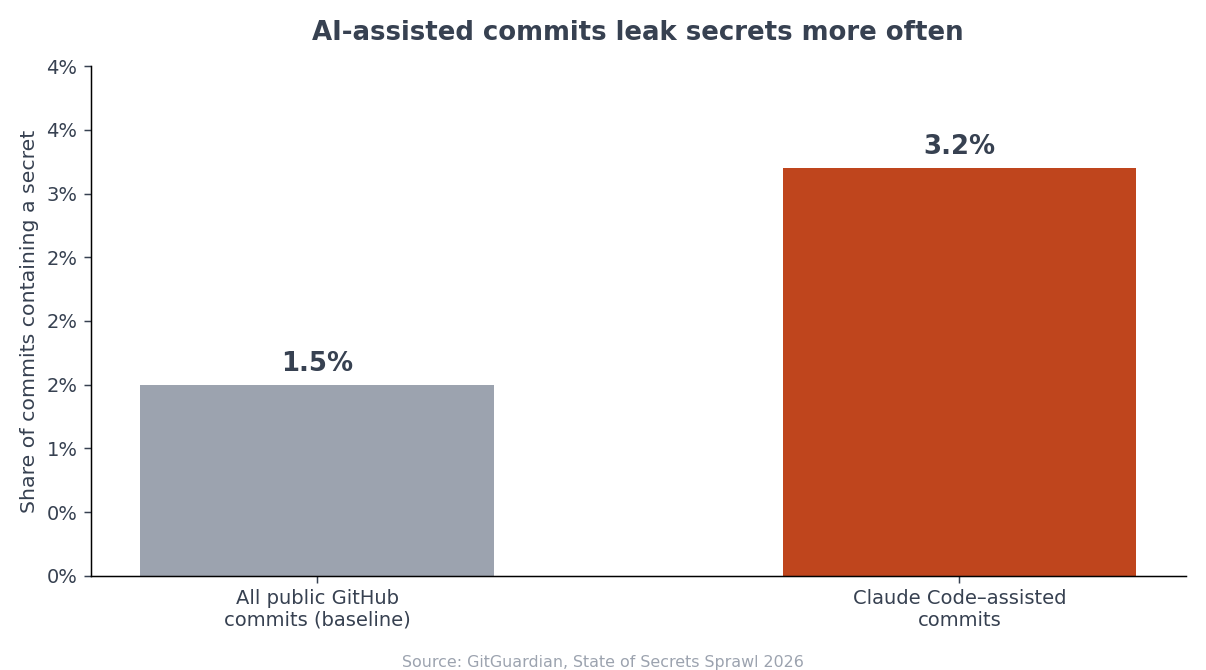
The report is careful about what that gap means, and so am I. It's not that the tool is careless — GitGuardian notes "developers remain in control of what gets accepted, edited, ignored, or pushed," and "the leak still happens through a human workflow." The assistant moves fast; the human still approves the push. Which means the human — you — is the last line of defense, and the defense is knowing what should never be in a commit in the first place. If you're still getting comfortable with version control, my git basics for non-developers covers the commands that keep you safe here.
And don't let "my repo is private" lull you. GitGuardian found internal repositories are roughly six times more likely than public ones to contain a hardcoded secret, precisely because the exposure feels less immediate so people get sloppy. A private repo is one accidental visibility toggle, one added collaborator, or one compromised account away from public — and every secret you casually left in its history goes with it. The habit of keeping secrets out of git should not depend on whether the repo is public today, because "today" is not a permanent setting.
The habits that prevent 95% of leaks
Most secret leaks aren't sophisticated. They're the same handful of mistakes, and a short list of habits closes them.
First, confirm .env.local is in .gitignore before your first commit. Run git status and make sure your env file does not appear in the list of tracked or staged files. If it shows up, stop and fix .gitignore before you push anything. This one check prevents the most common disaster outright.
Second, never paste a key into a file your assistant or repo can see — not into source code, not into a config file, not into a committed script. This is exactly the trap that catches founders setting up MCP servers, where quickstart guides casually suggest hardcoding keys into config; I cover that specific failure in the companion piece on connecting MCP servers safely. The rule is identical everywhere: reference by name, store the value in the environment.
Third, turn on push protection. GitHub and similar hosts can scan your commits for secret patterns and block a push that contains one before it ever reaches the server. It's free and it's the automated version of the git status check — a safety net for the day you're tired and miss something.
Fourth, keep secrets out of the side channels. GitGuardian found that about 28% of secret exposures happen entirely outside code repositories — in Slack messages, support tickets, and shared docs, often during urgent troubleshooting. When you're debugging at 11pm and someone asks for "the key," the reflex is to paste it into chat. Don't. Send it through a proper secret-sharing tool or read it from the dashboard together on a call.
Fifth, scope your keys down where the provider lets you. Many services offer restricted keys — a Stripe key limited to specific permissions, a database role that can only read certain tables, a token that expires. A leaked key that can only read one table is a far smaller emergency than a root credential that can do anything. You won't always have this option, but when you do, the narrow key is free insurance: it shrinks the blast radius of the leak you haven't had yet.
None of these require you to understand cryptography. They're procedural, and once they're habits you stop thinking about them. The founders who get burned aren't the ones who don't understand encryption — they're the ones who never made these five checks automatic and got caught on a tired evening.
What to do the moment a key leaks
Someday you'll do it anyway — paste a key somewhere it shouldn't go, or push a file you meant to ignore. The instinct is to panic and delete the offending code. That instinct is wrong, and understanding why saves you.
Deleting the code does not neutralize the leak. As Truffle Security puts it plainly, the exposed key persists in your git history, in every fork and clone others have made, and in mirror sites — none of which you can force to update. The key is out. What you can do is make it worthless.
That's key rotation, and it's three steps: generate a new key, invalidate the old one, and update your systems to use the new one. Once the leaked key is revoked, it's a dead string — an attacker can copy it all they like and it opens nothing. Rotation is the actual remediation; scrubbing git history is optional cleanup you do afterward if the situation warrants it.
flowchart TD
    A[A secret leaked] --> B[Generate a new key<br/>in the provider dashboard]
    B --> C[Revoke / invalidate<br/>the old key]
    C --> D[Update .env.local<br/>and production store]
    D --> E[Check the provider's<br/>access logs for misuse]
    E --> F[Optional: scrub git history]
Then check the logs. Most providers show recent API usage, so look at the window between when the key leaked and when you rotated it, and watch for requests you didn't make. The urgency is real: GitGuardian found that 64% of secrets confirmed valid in 2022 were still live and exploitable in early 2026 — because people delete the code and assume they're done. Rotate, don't just delete.
One more thing about the moment itself: rotate first, investigate second. Founders lose time trying to figure out exactly how a key leaked before they've killed it — reading git blame, retracing which commit exposed it, wondering if it really got out. None of that matters while the key is still live. Revoke it, and the forensic questions become unhurried instead of urgent. You can always reconstruct the how afterward; you cannot un-leak a working credential, so the working credential dies first.
Rotation is also worth doing on a schedule, not only after a scare. Periodically issuing fresh keys shortens the window any silently-stolen key stays useful. You don't need enterprise tooling for this as a solo founder — a calendar reminder and ten minutes a quarter is a meaningful upgrade over never.
Frequently asked questions
What's the difference between an environment variable and a secret?
An environment variable is the mechanism — a named value supplied to your app at runtime. A secret is a type of value that needs protecting. You store secrets in environment variables, but not every environment variable is a secret; your public site URL might be one too. The point of the mechanism is to keep the sensitive values out of your code.
Is it safe to commit a .env.example file?
Yes, and it's good practice. A .env.example file lists the names of the variables your app needs — STRIPE_SECRET_KEY=, DATABASE_URL= — with the values left blank. It documents what someone needs to fill in without exposing any real secret. Just make sure the example file has empty values and your real .env.local stays gitignored.
I accidentally pushed an API key to GitHub. Is deleting the commit enough?
No. The key survives in git history, in forks and clones, and on mirror sites you can't control, and bots may have grabbed it within minutes. Rotate the key immediately — generate a new one, revoke the leaked one, update your environment — then check the provider's logs for unauthorized use. History cleanup is secondary to rotation.
Where do secrets go in production if not in a file?
In your host's secret store. Platforms like Vercel, Netlify, and Railway let you set environment variables in their dashboard, encrypted at rest and injected into your app at runtime. You configure them once per environment; you never ship your local .env.local file to production.
How often should I rotate keys?
Rotate immediately any time a key is exposed. Beyond that, a periodic rotation — quarterly is a reasonable starting cadence for a solo founder — limits how long a quietly-stolen key stays useful. The exact interval matters less than having a habit at all, since the data shows most leaked keys are simply never rotated.
Make the safe path the default path
Secrets management sounds like a security-team concern, but for a solo founder it collapses into a few plain habits: know what a secret is, keep it in an environment variable, make sure .env.local is gitignored before you push, and rotate anything that leaks instead of just deleting it. The failure mode isn't ignorance of cryptography — it's a rushed git push with a key in the diff. The defense is a slower, boring routine that you only have to build once.
If you'd rather start from a codebase where this is already wired correctly — .env.local gitignored by default, secrets referenced by name, the Stripe and Resend keys isolated to single files — Coding Capybaras is the free boilerplate I built for non-technical founders shipping with AI tools, with the safe path set as the default.