Next.js + Supabase + Stripe + Resend: 2026 Indie SaaS Stack
A non-tech founder's tour of the Next.js + Supabase + Stripe + Resend indie SaaS tech stack in 2026 — what each piece does, what it replaces, and what it costs.
· Justin Boggs

Photo by Christopher Gower on Unsplash
The four-piece indie SaaS tech stack that dominates 2026 launches — Next.js, Supabase, Stripe, and Resend — is not the only viable stack. It's the one I picked for Coding Capybaras, and the one most first-time founders shipping with AI coding tools end up with after a weekend of research. The reason isn't hype: it's that each piece collapses a category of infrastructure work that used to require its own specialist, and the four pieces compose cleanly without you writing glue code that breaks at 3 a.m. This post is a tour of each layer, what it replaces, and what it costs.
TL;DR
- Next.js 15 is the framework: front-end, back-end, server actions, deploys to Vercel in one push.
- Supabase is the data layer: managed Postgres, authentication, file storage, all behind one console.
- Stripe handles payments, subscriptions, tax, and the customer portal; the only file in your repo that talks to Stripe is the webhook handler.
- Resend is transactional email — React templates, deliverability handled, free up to 3,000 emails per month.
- At zero customers, this stack costs $0/month. At 10K users with paid revenue, it lands around the low hundreds.
The four-piece stack at a glance
Think of an indie SaaS as four problems: hosting code, storing data, taking money, and sending email. Every stack you've seen — MERN, T3, the LAMP throwback — is a different answer to those four problems. The 2026 indie SaaS tech stack is the answer that asks AI coding tools to write the least glue code.
Here's the at-a-glance mapping:
| Problem | Tool | What it replaces | | --- | --- | --- | | Hosting + framework | Next.js on Vercel | Express + EC2, separate front-end repo + S3 | | Database + auth + storage | Supabase | Postgres on RDS, NextAuth/Clerk, S3 buckets | | Payments + subscriptions + tax | Stripe | Paddle, FastSpring, custom billing schemas | | Transactional email | Resend | SendGrid, Postmark, Mailgun |
A working SaaS in this stack has roughly six surfaces: a marketing page, an auth flow, a paid-checkout flow, a dashboard, an admin page, and a small number of webhook handlers. Everything else is content. You don't run a server, you don't pick a queue, you don't pick a CDN. The tools have opinions about those things and they're correct opinions for a one-person company.
What this stack is not good at: heavy background processing, large file pipelines, real-time gaming, anything where you need an actual cluster. If your idea needs that, this is the wrong stack. But "founder shipping a paid B2B SaaS in 2026" is exactly what this stack is shaped like.
The rest of this post takes each piece in turn — what it does, what it doesn't do, the gotchas first-time founders hit, and what it costs as you grow. I'll stay honest about the rough edges; the goal is for you to make this choice with eyes open, not to upsell you.
Next.js 15: the front-end and the back-end in one file tree
Next.js 15 with the App Router is the framework. Calling it a "front-end framework" undersells it: you write React pages, server components, and server actions in the same file tree, and the framework decides what runs in the browser and what runs on the server. For a non-tech founder, that's the single most important property of the stack — you stop choosing where code "lives" and start writing features.
Server actions are the unlock. In Next.js 15, you write a function, slap "use server" on it, and call it from a form on the client. Next.js generates the API endpoint, validates the call, and runs the function on the server with your database credentials in scope. There is no /api/create-thing.ts file you have to remember to write, no fetch call that gets the parameter shape wrong. The Next.js team has spent the last year hardening that surface — security improvements in 15 include unguessable action endpoints and origin checks for CSRF, which used to be on your shoulders.
You deploy this to Vercel with one push to GitHub. The Hobby (free) plan gets you a real production deploy with HTTPS, automatic preview environments per pull request, 100 GB of bandwidth, 100,000 function invocations, and 1 million edge requests per month, per the official Vercel limits page. The license restriction matters: Hobby is non-commercial only, so the moment you take a paying customer you graduate to the $20/month Pro plan. Plan for that line item from day one — it's not optional once you're a business.
Where you'll get bitten: client components vs. server components is a real mental model, not a buzzword. Anything that uses useState, useEffect, or browser APIs has to be in a file marked "use client". Anything that talks to your database, reads secrets from environment variables, or runs trusted logic stays a server component. Mix them up and you'll either leak server data to the browser or get a build error you don't understand. AI coding tools usually get this right if you describe the page in plain English ("this is a form that posts to the server and shows a success message") — but verify the file boundaries before shipping.
The Next.js docs are the source of truth here, and they're unusually good. Read the App Router section once before you start; it'll save you a weekend of confusion.
Supabase: Postgres, auth, and storage behind one console
Supabase is the data layer. Three things live behind one URL: a managed Postgres database, an auth service that handles sign-up, sign-in, password reset, and OAuth, and a file storage layer that's S3 underneath. The reason this matters for indie founders is that each of those was a separate vendor in 2019 and is now one console.
The Postgres database is real Postgres, not a managed key-value store with SQL on top. You write SQL or use an ORM (Drizzle is what I use; Drizzle vs. Prisma is its own decision and both are fine). Row Level Security policies — the rules that say "user A can only read rows where user_id = A" — live in the database, which means a bug in your application code can't accidentally hand the wrong user's data to the browser. That's the safety property that makes Supabase appropriate for a one-person operation.
The auth piece is the one most founders underweight when they pick a stack. Wiring email/password, magic link, Google OAuth, GitHub OAuth, password reset, session refresh, and "remember me" by hand is at least two weekends. Supabase Auth gives you all of it behind a configuration screen. You write one callback route at /auth/callback and you're done.
The free tier, per the Supabase pricing page, gives you two projects with 500 MB of database storage, 1 GB of file storage, 50,000 monthly active users for auth, and 500,000 edge function invocations. That's enough to launch and earn your first 1,000 users without paying. The catch — and you will hit it — is that free projects pause after one week of inactivity and the free tier has no automatic backups. For a real product, the $25/month Pro plan is correct from day one of paying customers; the daily backups alone justify it.
Where you'll get bitten: the three-clients pattern in Next.js 15. You need a Supabase client for browser code, a separate client for server components and server actions, and a third "service role" client for admin tasks that bypass RLS. Get those mixed up and you'll either expose admin powers to the browser or fail to write to the database from a server action. Every Supabase + Next.js boilerplate has its own opinion on this; copy the pattern, don't invent yours.
If you're choosing between Supabase and the alternatives, Supabase vs. Firebase is its own decision worth a separate post — Supabase wins for SaaS with rows, Firebase wins for mobile-first real-time apps. For the indie SaaS shape, Supabase is the safer default.
Stripe: payments, subscriptions, and the customer portal
Stripe is the payments layer. It is the boring, correct answer for an indie SaaS in 2026, and you shouldn't think too hard about it. Stripe's standard US online card rate is 2.9% + 30¢ per successful charge, with no setup fees and no monthly fees. If you sell subscriptions, the Billing add-on charges an additional 0.7% of billing volume for the recurring infrastructure — subscription schedules, proration, dunning, the customer portal.
What you actually get for those fees is the part that's hard to value until you've tried to build it yourself: PCI compliance is on Stripe's side, the hosted checkout page handles a hundred currencies and tax forms, the customer portal lets your users cancel or upgrade their own subscriptions without a support ticket, and Stripe Tax (an additional fee) handles VAT and US sales tax registration for you. If you've ever read someone's "I tried to handle EU VAT myself" thread on X, you know what you're buying.
Three rules for Stripe in a Next.js app, in order of how badly each one will burn you if you ignore it:
- The Stripe SDK gets imported in exactly one file. In Coding Capybaras that's
/platform/lib/payments/stripe.ts. Every other file calls a thin abstraction layer. This sounds pedantic until you want to swap Stripe for Lemon Squeezy in two years. - Verify webhook signatures. Stripe sends a
Stripe-Signatureheader on every webhook. If you skip the verification, anyone on the internet can hit your webhook endpoint with a fake "subscription canceled" event and lock real customers out of their accounts. The signature check is six lines of code. Write them. - Webhook handlers must be idempotent. Stripe will retry events. Your handler will see the same
customer.subscription.updatedevent twice. Store the event ID, check for duplicates, no-op the second time. If you skip this, you'll grant double credits, send double receipts, and explain it to your first ten paying customers individually.
The Coding Capybaras boilerplate gets the webhook plumbing right out of the box — that's specifically the part I wanted to never have to think about again. If you're choosing how to ship payments today, the Coding Capybaras boilerplate comparison post walks through how the four major options handle this. Stripe vs. Lemon Squeezy vs. Paddle is the other branch of this decision — Stripe wins for the US-centric, dev-experience-first founder; Paddle wins for the EU founder who wants merchant-of-record handling.
What you'll get bitten by: dev vs. prod webhook secrets. They're different. The Stripe CLI's stripe listen command generates a fresh secret for your local environment that won't work in production. Keep both in .env.local and .env.production respectively, and never let a deploy ship with the dev secret.
Resend: transactional email without the deliverability tax
Resend is the email layer. Welcome emails, password resets, payment receipts, "your subscription is expiring" — all transactional, all going through one provider, all logged in your own database so you can prove what was sent when.
The Resend free tier gives you 3,000 emails per month and 100 per day. The Pro plan is $20/month for 50,000 emails. Both include React Email, which is the actual reason Resend won the indie SaaS bracket in 2025 — you write email templates as React components in the same repo as your app, with the same TypeScript types. There is no separate template editor, no "preview in Outlook" tab. The same component you preview in the Next.js dev server is the one that gets sent.
Why this matters: every founder I know has lost a half-day to a Postmark template that didn't render right in Gmail, or to a SendGrid template that broke when the marketing team renamed a merge tag. React Email moves the templates into the file tree, where your AI coding tool can read them and your linter can yell about typos. The deliverability infrastructure — SPF, DKIM, DMARC, IP warm-up, multi-region sending — Resend handles in the background. You buy a custom domain, paste three DNS records into your registrar, and email starts arriving in inboxes.
The pattern I use in the boilerplate: every transactional send goes through one helper function (sendEmail()), and that helper writes a row to a platform_email_log table before calling Resend. When a customer says "I never got the receipt," you check the log first, see whether Resend accepted the message, and only then dig into the user's spam folder. Founder support gets significantly less frustrating when you can prove what was actually sent.
What you'll get bitten by: domain verification can take up to 48 hours after you add DNS records (it's usually minutes, but the long tail exists). Set this up the same day you set up your Stripe account, not the morning of your launch.
If you're comparing Resend to alternatives, the Coding Capybaras blog post on the file-based blog system is a good example of how I treat email-template files the same way I treat blog-post files — version-controlled, in the repo, deployable with a git push. The deeper Resend vs. Postmark vs. Mailgun comparison is its own post; the short version is that Resend wins for an indie SaaS that writes templates in code, Postmark wins for a team that wants a UI editor, and Mailgun wins on raw scale.
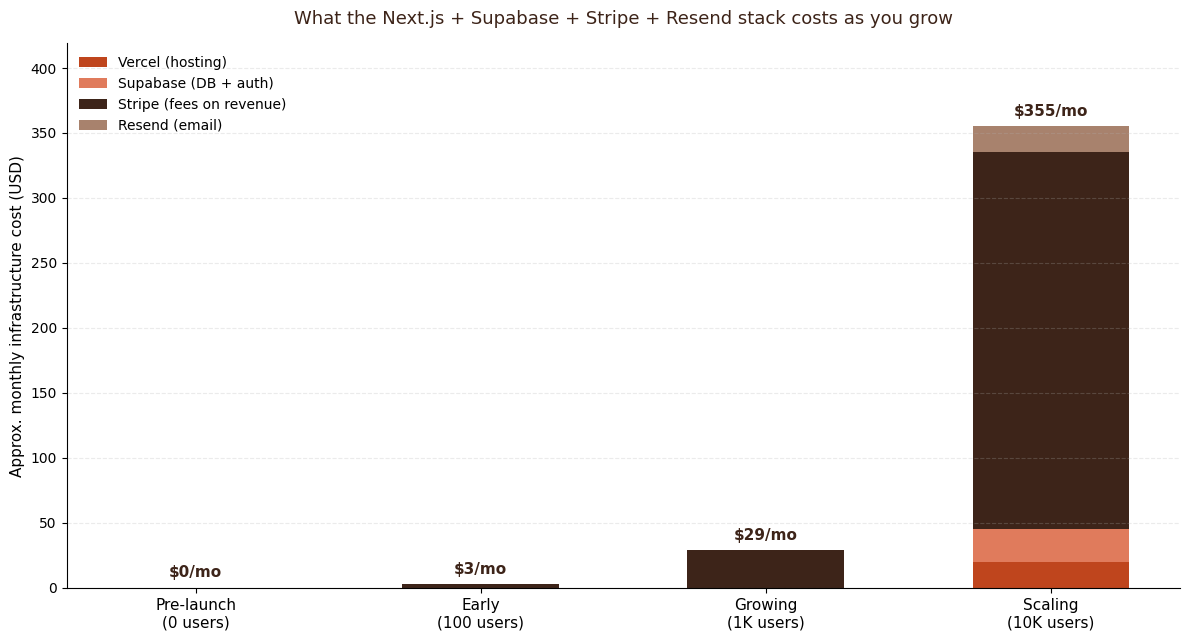
What this stack actually costs from $0 to 10K users
The honest cost picture, end-to-end:
| Stage | Hosting | Database | Payments | Email | Total | | --- | --- | --- | --- | --- | --- | | Pre-launch (0 users) | Vercel Hobby ($0) | Supabase Free ($0) | Stripe ($0) | Resend Free ($0) | $0/mo | | First paying customer | Vercel Pro ($20) | Supabase Free ($0) | ~3% of revenue | Resend Free ($0) | ~$23/mo | | 1,000 users, paid | Vercel Pro ($20) | Supabase Pro ($25) | ~3% of revenue | Resend Free ($0) | ~$74/mo | | 10,000 users, paid | Vercel Pro ($20) | Supabase Pro ($25) | ~3% of revenue | Resend Pro ($20) | ~$355/mo |
A few honest caveats on that table. Stripe's percentage isn't a fixed cost — it's a fee on revenue, and the line above is a back-of-envelope at $1,000/month MRR scaling to ~$10K MRR. The day you take your first paying customer is the day Vercel Hobby's non-commercial license stops applying — graduate to Pro. The Supabase free tier is genuinely usable for a paid product technically, but the lack of backups is the wrong gamble. None of these numbers include domain registration ($12/year), Stripe Tax (a per-jurisdiction fee that's worth it the day you have international revenue), or Sentry/PostHog/analytics — those are separate marketplace decisions.
If you want the line-item version with usage caveats, the Vercel limits documentation and the Supabase pricing page are the canonical sources. I update the numbers in the Coding Capybaras integration marketplace whenever the providers change them.
Frequently asked questions
Is Next.js really the right framework for a non-tech founder?
For a SaaS in 2026, yes. Next.js has the largest community, the most LLM training data, and the best AI-coding-tool support of any React framework. Your AI assistant will produce working Next.js code more reliably than working Remix or SvelteKit code, simply because there are more examples for it to draw from. That community-size effect is decisive when you're not the one debugging at 2 a.m.
Can I swap Supabase for Firebase later?
You can, but it's a real migration — auth schemas differ, the database models differ, and Firebase's real-time primitives don't map cleanly to Postgres. Pick the one you'll be on in two years and commit. For most indie SaaS shapes — B2B subscription, rows of data, RLS-style permissions — Supabase is the safer pick. Firebase wins if you're building a mobile-first app with heavy real-time sync.
What if Stripe isn't available in my country?
Stripe is live in 47+ countries as of 2026. If yours isn't on the list, Paddle or Lemon Squeezy are the merchant-of-record alternatives — they handle the legal entity that takes the money on your behalf, in exchange for a higher fee. You give up Stripe's developer experience and you pick up tax compliance. Whether that's worth it depends entirely on your geography.
Do I really need Resend if Supabase Auth sends emails?
Supabase Auth sends transactional emails (sign-up confirmation, password reset) on its own infrastructure, which is fine for those specific flows. The moment you want to send anything else — receipts, lifecycle emails, "your trial expires in three days" — you need a real email provider. Resend is the cheapest correct answer; Postmark is the next step up if you want a UI template editor.
Is this stack overkill for a side project I haven't validated yet?
It costs $0 to find out. The free tiers of all four services let you build a real, working SaaS, take a real payment, and email a real customer without spending a dollar on infrastructure. The "overkill" question shows up after launch, when you're paying $355/month for 10K users — and at that point you have revenue.
Should I learn this stack myself or have AI write it?
Both, in that order. Have the AI assistant write the first version so you can ship something. Read the code it produces. Ask why it made each decision. By the third feature you'll know enough Next.js to debug what your AI assistant gets wrong — and that's the point at which AI coding stops being a parlor trick and starts being a real engineering multiplier.
The honest take
This stack works because the four pieces have spent the last three years getting better at the same problem from different angles. Next.js made the framework decision easier. Supabase made the database/auth decision easier. Stripe was already the boring correct answer for payments. Resend brought email into the file tree where it belongs. None of them are the only viable choice for their layer — they're the layer-best choices for a founder shipping a paid B2B SaaS with AI coding tools in 2026.
If you're building exactly that shape of company, Coding Capybaras is the free boilerplate I built around this stack — every piece wired up, AI rule files in every region, GUI for the configuration most boilerplates make you edit in code. The complete codebase ships free.