SaaS Boilerplate Comparison: ShipFast, Makerkit, Supastarter, CC 2026
An honest SaaS boilerplate comparison for 2026: ShipFast, Makerkit, Supastarter, and Coding Capybaras. Pricing, stack, AI-coding fit, and who each one is for.
· Justin Boggs

Photo by Domenico Loia on Unsplash
A useful SaaS boilerplate comparison in 2026 doesn't crown a winner. It tells you which one is shaped like your project. The four contenders covered here — ShipFast, Makerkit, Supastarter, and Coding Capybaras — all ship the same outer surface (Next.js, Stripe, transactional email, a landing page, an auth flow) and then diverge sharply on multi-tenancy, plugin systems, opinion density, and price model. This post walks through each one honestly — including where Coding Capybaras (the boilerplate I built and use to run codingcapybaras.com itself) is not the right call.
TL;DR
- ShipFast wins on time-to-first-deploy for a solo founder who doesn't need teams.
- Makerkit wins on architecture and plugin ecosystem for a B2B product with teams.
- Supastarter wins on lifetime-license value and multi-framework flexibility.
- Coding Capybaras wins for a first-time non-tech founder shipping with AI coding tools, and is free.
- The honest comparison: a paid boilerplate saves you 15–40 hours of plumbing work. Whether that's worth the license depends on your time, your stack confidence, and your patience.
How to actually compare boilerplates
Most "best SaaS boilerplate" posts compare on stack — "Next.js + Supabase vs. Next.js + Convex." That's the wrong axis. Every option in this comparison runs Next.js and offers Stripe out of the box. The decisions that matter are softer and harder to grep:
- Who is this designed for? A solo dev shipping a paid MVP this weekend is a different user than a founder building a B2B platform with teams and org-level billing.
- How opinionated is the configuration? Some boilerplates expect you to edit
config.ts. Some give you an admin GUI. Some assume you'll fork the file structure and rename a third of it. - Does it assume you can write code? Or is it built for the AI-coding workflow, where a non-technical founder pastes prompts into Claude Code and reads the diff?
- What's the pricing model — one-time, subscription, lifetime, free? And what does an "update" feel like in each model?
I'll walk through each contender against those four axes. The comparison tables are in section three.
ShipFast: the speed-of-launch option
ShipFast is the famous one. Marc Lou's ShipFast boilerplate is the boilerplate that put "ship a SaaS this weekend" into the indie-hacker vocabulary. The stack is Next.js, NextAuth, MongoDB or Supabase, Stripe, Mailgun. A single-app template, no multi-tenancy, no admin panel beyond the basics. You buy it, follow the install video, deploy by Sunday.
What ShipFast is good at:
- Time-to-first-deploy. If you have a paid idea you want to test by next weekend, ShipFast is the fastest correct answer. The opinion density is high, the file count is low, the install video is short.
- The community. ShipFast has thousands of paying users, which means searching "ShipFast Stripe webhook problem" returns real answers from real founders, not AI-generated content marketing.
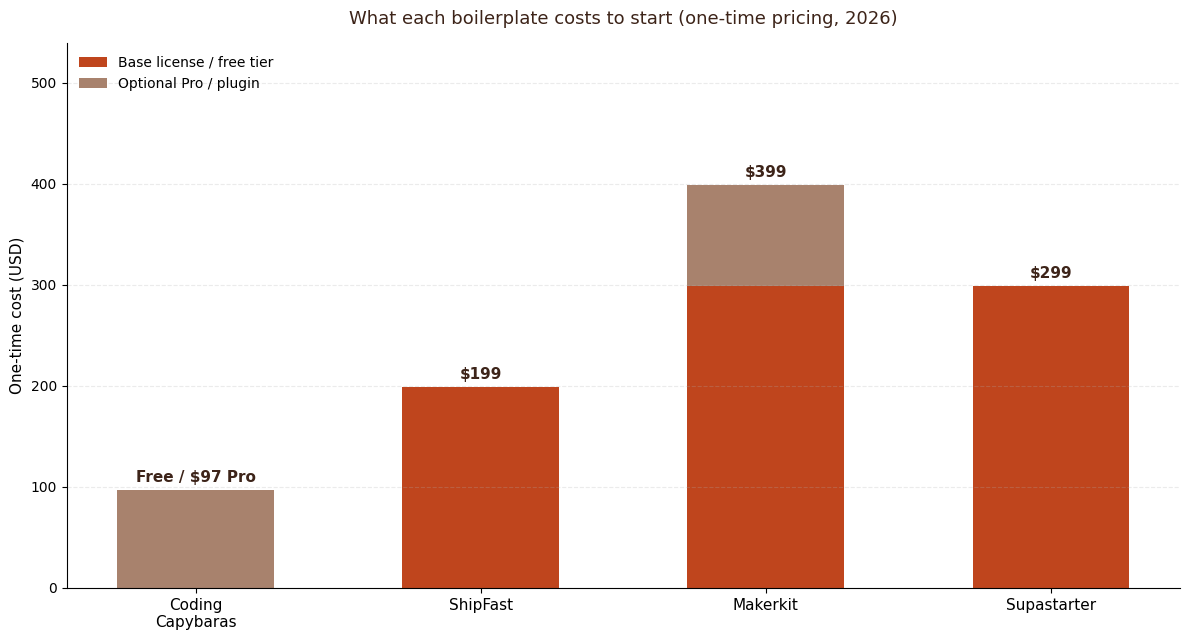
- Lifetime pricing. ShipFast is sold at $199 (Pro tier) or $299 depending on the bundle, one-time, with lifetime updates. The math is simple: pay once, ship forever.
What ShipFast isn't good at:
- B2B with teams. No multi-tenancy, no organization model, no role-based permissions. If your product needs any of that, you'll be building it on top of a codebase that wasn't designed for it. Founders regularly migrate off ShipFast to Makerkit or Supastarter once they hit that ceiling — at which point you've paid for the boilerplate twice.
- Non-tech founders. ShipFast assumes you can read TypeScript, understand the file structure, and edit config files directly. There's no admin GUI. The install video is fast because the founder it's aimed at already knows what each step does.
- Opinionated stack swaps. Want to replace MongoDB with a different database? You're editing the boilerplate, not configuring it.
Pick ShipFast if you're a working developer with a SaaS idea, want a single-app template, and care more about shipping the next weekend than about a long-term plugin ecosystem. Marc Lou himself launched dozens of products on it.
Makerkit: the architecture-first option
Makerkit is the architecture nerd's boilerplate. The stack is Next.js, Supabase, Stripe, Tailwind, shadcn/ui. The code is well-organized, the patterns are consistent, and the plugin system is the killer feature: you can bolt on an AI chatbot, a public roadmap, or a referral system as separate plugins instead of forking the core repo.
What Makerkit is good at:
- Multi-tenancy and teams. Makerkit's core strength is organization management — team invitations, per-organization billing, role-based access. Rebuilding multi-tenancy from scratch is a real 3–4 week project. If your product needs it, the Makerkit license pays for itself.
- Code quality. Makerkit ships clean, idiomatic Next.js 15 code. Reading the source is educational. The patterns are the patterns you'd want to copy into your own future projects.
- Supabase depth. Makerkit goes deep on Supabase — RLS policies, schema, auth flows — in a way that ShipFast doesn't bother with. If you're committed to Supabase, Makerkit's the boilerplate that uses it best.
What Makerkit isn't good at:
- Pricing transparency. Makerkit runs roughly $299/year on subscription, with plugins priced separately at $99–199 each. A fully-loaded Makerkit setup with 2–3 plugins runs $500–700 in year one, $299/year after that. That's correct value for the codebase you get, but it's a recurring cost that surprises founders who expected one-time pricing.
- Non-tech founder onboarding. Makerkit is documentation-heavy in the right way for developers and document-light in the wrong way for non-devs. You'll be reading code to understand the auth flow.
- Stack lock-in. Makerkit ties tightly to Supabase or Firebase. Swapping the auth layer is not a five-minute job.
Pick Makerkit if you're shipping a real B2B SaaS with teams, you're comfortable in code, and you want the plugin ecosystem more than the one-time-license cost savings.
Supastarter: the multi-framework lifetime-license option
Supastarter is the most feature-rich option. It supports Next.js, Nuxt, and TanStack Start, ships with multi-tenancy, team management, i18n, and a billing layer that supports five payment providers — Stripe, Lemon Squeezy, Polar, Creem, and Dodo Payments. Lifetime license, unlimited projects.
What Supastarter is good at:
- Lifetime license, unlimited projects. €299 one-time, use it on every project you ever ship. If you're a serial founder, the math is unbeatable.
- Payment provider flexibility. Five payment providers is overkill for most projects, but if you're an EU founder shipping to EU customers, having Lemon Squeezy or Paddle as a one-config-flag option is real value.
- Framework optionality. Next.js is the default, but if you've been waiting for a TanStack Start boilerplate, Supastarter has one.
What Supastarter isn't good at:
- Time-to-first-deploy. The feature density costs onboarding time. You spend longer learning the conventions before you can ship.
- First-time founders. Like Makerkit, Supastarter assumes a developer. The configuration model is code-first, not GUI-first.
- Opinionation. Supastarter wants to support every choice you might make. That flexibility is the opposite of "ship by Sunday" — a first-time founder benefits more from a boilerplate that picks for them.
Pick Supastarter if you're shipping multiple projects, you want a lifetime license, and you're a working developer who values flexibility over opinion.
Coding Capybaras: the non-tech-founder option
Coding Capybaras is the boilerplate I built and use to run this site. Free tier ships the complete codebase — there's no watered-down trial. Pro ($97, one-time, founding price) unlocks attribution removal, ongoing updates, and a growing set of Pro features. The stack is Next.js 15, Supabase, Stripe, Resend — the Next.js + Supabase + Stripe + Resend stack covered in detail in the companion post.
What Coding Capybaras is built around:
- The AI-coding workflow. Every region of the codebase ships with a
CLAUDE.mdrule file telling your AI assistant what the architecture is. Pasting a feature request into Claude Code produces code that fits the patterns, instead of code that fights them. The integration marketplace ships copy-paste prompts for adding Sentry, PostHog, Cloudinary, and more — you paste the prompt into your AI assistant and the integration wires itself in. - GUI for configuration. Pricing, branding, email templates, feature flags — all editable from the admin dashboard, not by editing
config.ts. For a non-tech founder, this is the difference between "I changed my landing page tagline" and "I'm stuck in TypeScript syntax errors at 11 p.m." - The three-region architecture. The codebase is split into
/platform/(locked plumbing — auth, billing, payments),/website/(your marketing layer), and/product/(your actual app). AI agents stay focused on the right surface and don't accidentally edit the auth flow when you ask for a new landing page section. - Dogfood loop. codingcapybaras.com itself is built on the boilerplate. Improvements I ship for this site flow downstream to your deploy. There's no maintainer divergence where the boilerplate gets shabbier than the product.
What Coding Capybaras isn't good at:
- Multi-tenancy out of the box. Teams are on the Pro roadmap; v1 is single-user-per-account. If you need org-level billing today, Makerkit or Supastarter is the better pick.
- Mature community. ShipFast has had years to accumulate "I hit this and here's how I fixed it" threads. Coding Capybaras is brand-new. The dogfood loop catches a lot of those bugs before you do, but the public corpus of help is small.
- Developer ego. If you're a working engineer who already knows the stack, the GUI-driven configuration will feel like training wheels. ShipFast or Supastarter is a better fit for you.
Pick Coding Capybaras if you're a first-time or non-technical founder shipping with Claude Code, Cursor, or Cowork, you want a free tier that's actually free, and you care more about the AI-coding ergonomics than the absolute deepest plugin ecosystem.
The honest comparison table
The thing you actually came here for:
| Feature | Coding Capybaras | ShipFast | Makerkit | Supastarter | | --- | --- | --- | --- | --- | | Base price | Free | $199 one-time | ~$299/year | €299 lifetime | | Pricing model | Free + $97 Pro one-time | One-time, lifetime updates | Subscription | Lifetime, unlimited projects | | Stack | Next.js, Supabase, Stripe, Resend | Next.js, NextAuth, Mongo/Supabase, Stripe | Next.js, Supabase, Stripe | Next.js / Nuxt / TanStack Start, Supabase, 5 payment providers | | Multi-tenancy | Roadmap (Pro tier) | No | Yes | Yes | | Admin GUI | Yes | No | Partial | Partial | | AI-coding rule files | Yes (per region) | No | No | No | | Integration marketplace with prompts | Yes | No | Plugin system (paid) | No | | Target user | First-time + non-tech founders | Solo developers | B2B teams | Serial founders, multi-framework | | Community size | New (2026) | Large | Mid | Mid | | License | MIT (free), proprietary (Pro) | Proprietary, lifetime | Subscription | Proprietary, lifetime |
A few notes on that table. Pricing changes; check the vendor sites for current numbers. Multi-tenancy is binary in the table but graded in reality — ShipFast technically supports it via your own implementation, Makerkit ships organizations, Supastarter ships organizations with billing, Coding Capybaras has it on the roadmap. The "AI-coding rule files" row is the one most non-tech founders underweight: it's the difference between asking your AI assistant to "add a referral page" and getting working code, versus getting plausible-looking code that doesn't fit your architecture.
How to choose without overthinking it
If you've spent more than two hours on this decision, you've spent enough. Heuristics:
- You're a working developer with a paid idea you want to test next weekend. Buy ShipFast. The community + the speed-of-launch beats every other axis at that horizon.
- You're building a real B2B SaaS with teams, organizations, and per-org billing. Buy Makerkit or Supastarter. The multi-tenancy work you'd skip is worth the license either way.
- You're a first-time or non-technical founder shipping with AI coding tools. Start with Coding Capybaras. Free tier ships the whole codebase. If it doesn't fit you, you've lost a weekend, not $300.
- You're a serial founder shipping 3+ products. Buy Supastarter. The lifetime, unlimited-projects license dominates over a five-year horizon.
The wrong way to choose is to pick the one with the biggest feature list. Every feature you don't use is a file you have to read past when you're trying to understand what the boilerplate is doing.
Frequently asked questions
Is a free boilerplate good enough to launch a real SaaS?
It can be, depending on the boilerplate. Coding Capybaras' free tier ships the complete production codebase that powers codingcapybaras.com — no rate-limited features, no "upgrade to deploy." Other free options vary: some free GitHub-published boilerplates are abandoned or one-person experiments. Check commit recency and maintainer activity before you commit.
Can I migrate from one boilerplate to another later?
Yes, but it's a real project — not a weekend. Auth schemas differ, the org/team model differs, file structures differ. The migration risk is the strongest argument for choosing the right boilerplate the first time, especially for the multi-tenancy decision. Building org-level billing on top of a single-user boilerplate is a 3–4 week migration even with AI tooling.
Do I need a boilerplate at all if I'm shipping with Claude Code or Cursor?
You can build from scratch with AI assistance. People do it. But the cold-start problem is real — Claude Code is great at filling in patterns inside an existing codebase and weaker at architecting the same codebase from a blank pnpm create next-app. A boilerplate gives the AI assistant a clear set of conventions to extend, which is why "AI-coding rule files" is the row I'd weight highest in the comparison table.
What about open-source boilerplates like the official Next.js SaaS starter?
The Next.js Official SaaS Starter is the strongest free option and a real choice. It ships App Router, Auth.js, Prisma, Stripe subscriptions, and Tailwind. The tradeoff: no plugin ecosystem, no admin GUI, no AI-coding rule files, no marketplace prompts. If you want strictly free and you're comfortable in code, it's a serious option. Coding Capybaras is the free option built specifically for the non-tech-founder + AI-coding workflow.
How often do these boilerplates update, and does it matter?
It matters more than founders expect. The Next.js, Supabase, and Stripe APIs all moved meaningfully in 2025 — Next.js 15 changed the server actions model, Supabase changed the auth client API in v0.5, Stripe changed the customer portal flow. Boilerplates that haven't shipped updates in six months are silently broken against current docs. Check the GitHub commit history before you buy.
What does "founding price" mean for Coding Capybaras Pro?
The current $97 one-time price is the founding-customer price. It goes up as more Pro features ship. Founding-price buyers keep the $97 price on all future Pro features forever — there's no "old plan is dead, please upgrade" line in the future. It's the same forever-grandfathered model Stripe used in its early years.
What I'd do if I were starting today
I'd pick the boilerplate that fits me, not the one with the longest feature list. If I were a working dev shipping a paid weekend project, ShipFast. If I were building real B2B with teams, Makerkit. If I were serial-launching, Supastarter.
But I'm a first-time non-tech founder, which is why I built Coding Capybaras — the boilerplate, the integration marketplace, and the AI-coding workflow I wished existed when I started. The full codebase is free; if it fits the way you ship, you'll know inside a weekend.