How to Review AI-Generated Code You Can't Write Yourself
A non-technical founder's guide to reviewing AI-generated code: the six questions to ask every change, what to check by hand, and when to demand an explanation.
· Justin Boggs
Photo by Mohammad Rahmani on Unsplash
You can review AI-generated code without being able to write it — not by reading every line, but by interrogating each change with a fixed set of questions and verifying behavior instead of syntax. Reviewing AI-generated code as a non-developer means checking what the code does, what it touches, and what it assumes — rather than judging whether the code is elegantly written. The reason this matters is uncomfortable: AI writes functional code far more reliably than it writes safe code. When you accept a change you didn't read, you're accepting the model's guesses about security, edge cases, and your specific situation. This guide gives you a repeatable process to catch the worst of those guesses, using judgment you already have as a founder.
TL;DR
- AI is good at syntax and bad at security. Veracode found models chose the insecure option in 45% of cases where security mattered.
- You review by behavior and intent, not by reading every line. Ask what changed, what it touches, and what it assumes.
- Six questions catch most problems: scope, secrets, data access, edge cases, dependencies, and "explain this to me."
- Verify by running it and trying to break it — happy path, then the nasty inputs the AI probably skipped.
- Some categories (auth, payments, anything with a password or key) always deserve extra scrutiny or a second opinion.
Why AI-generated code needs a different kind of review
Start with the thing nobody selling you an AI tool wants to dwell on: the code usually works, and that's exactly what makes it dangerous. Modern assistants produce syntactically correct, runnable code the large majority of the time. The problem is the gap between "runs" and "safe."
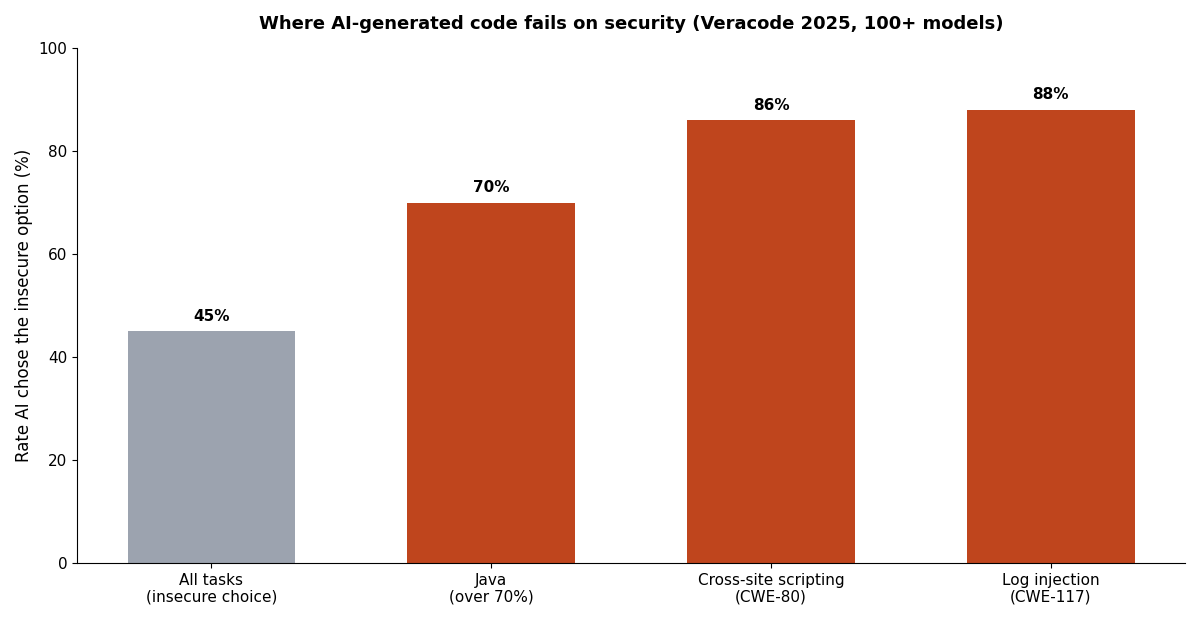
The numbers are stark. Veracode's 2025 GenAI Code Security Report tested more than 100 large language models across 80 coding tasks that had a secure and an insecure way to be completed. When it mattered, the models chose the insecure option 45% of the time — and that rate wasn't improving with newer, larger models. Some categories were far worse: the models failed to defend against cross-site scripting in 86% of cases and log injection in 88%.
It's not just isolated vulnerabilities, either. A large study by the security firm Apiiro found that while AI assistants cut shallow mistakes dramatically — syntax errors dropped 76% and logic bugs fell 60% — the deeper architectural problems went the other way, with privilege-escalation paths up 322% and architectural design flaws up 153%. AI makes the small errors you'd catch easily rarer, and the big errors you'd never notice more common. That inversion is the entire reason a founder's review can't just be "does it look clean."
So your job isn't to find typos. It's to catch the model's dangerous assumptions. And you're better positioned for that than you think, because most of those assumptions are about your business — who should see what, what happens when a customer does something weird, what data is sensitive — and you know your business better than the AI does. This is the same caution the when-to-trust-your-AI-assistant framework applies to the whole workflow; code review is where it gets concrete.
Review behavior, not syntax
Here's the reframe that makes this possible for a non-coder: you are not grading the code as writing. You are auditing it as behavior. A developer reading a diff asks "is this well-written?" You ask "what will this actually do, and is that what I want?"
That means you lean on the parts of a change you can read. You can read the AI's explanation of what it did. You can read the file paths it touched. You can read variable and function names, which in decent code describe intent — deleteUserAccount, chargeCustomer, isAdmin all tell you something even if the logic inside is opaque. You can read the commit message. And crucially, you can run the thing and watch what happens.
Get comfortable making the assistant do the reading for you. After it writes a change, ask it to explain the change back to you in plain English: what files it modified, what each one now does, and what could go wrong. Then — this is the important part — cross-check that explanation against the actual behavior. If the AI says "this only lets a user edit their own profile" but you can edit someone else's in the running app, the explanation was wrong, and you just caught something a syntax review never would. Learning to read the assistant's output this way is a skill in itself; the reading-AI-output guide covers the vocabulary and signals in more depth.
One habit makes all of this dramatically safer: small changes. A diff that touches three files is reviewable. A diff that rewrites twenty is not, for anyone, and especially not for you. Ask the AI to work in small, single-purpose steps and to commit after each one. Version control turns every commit into a save point you can roll back to, which means a bad change is an inconvenience, not a catastrophe.
The six questions to ask every change
You don't need to memorize secure-coding standards. You need a checklist you run every time, in the same order, until it's automatic. Here are the six questions that catch most of what matters.
| Question | What you're really checking | How to check it | | --- | --- | --- | | 1. What exactly changed, and why? | Scope creep — did it touch more than the task needed? | Ask the AI to list every file it changed and why each was necessary | | 2. Does this handle secrets or keys? | Leaked credentials, keys in the wrong place | Search the change for anything that looks like a password, token, or API key | | 3. Who can access this data? | Missing permission checks | Ask: "could one user see or change another user's data with this?" | | 4. What happens with bad input? | Skipped edge cases and error handling | Try the empty, huge, and malformed inputs yourself | | 5. Are the dependencies real and needed? | Hallucinated or unnecessary packages | Confirm each new package exists and that you actually need it | | 6. Can you explain this back to me? | Your own understanding | Make the AI teach it to you until it makes sense |
Question two deserves a note, because it's the cheapest catastrophe to prevent. AI assistants will sometimes hardcode an API key or a secret directly into a file to "make it work," and if that file gets committed to git, the secret is now in your history forever. Any change that mentions a key, token, password, or secret gets a hard look: those values belong in an environment variable, never in the code. In the Coding Capybaras boilerplate the rule is absolute — secrets live only in .env.local, which git ignores by default.
Question five guards against a specifically-AI failure mode. Models sometimes invent packages that don't exist, or reach for a heavy dependency when you didn't need one. Before you accept a change that adds a package, confirm the package is real, is the one you meant, and is actually required — an unnecessary dependency is future maintenance and a possible security hole. This connects to a broader pattern worth understanding: the file-path and API hallucinations that plague AI coding are the same instinct applied to package names.
Verify by trying to break it
Reading gets you partway. Running gets you the rest. The most reliable review tool a non-technical founder has is the running application and a willingness to be mean to it.
The Apiiro and Veracode findings point at the same weak spot from two directions: AI implements the happy path well and the error cases poorly, because the training data is full of "here's how you do X" and thin on "here's what happens when X goes wrong." So your testing should invert that. Do the normal thing once to confirm it works. Then spend most of your time doing abnormal things.
Leave the required field empty and submit. Paste a thousand characters into a box that expects ten. Enter a negative number for a quantity. Try to open another user's record by changing the ID in the URL. Log out and try to reach a page that should require login. Click submit twice, fast. These are the exact cases the model most likely skipped, and you don't need to read a line of code to run them — you just need to think like an annoyed or malicious customer, which founders are good at.
For anything you genuinely can't verify by clicking — the logic buried inside a calculation, say — this is where automated tests earn their place. You can ask your AI assistant to write tests that prove the behavior you care about, then read the plain-English description of what each test checks. A failing test is a signal you can act on without reading the implementation. Tests are the closest thing a non-coder has to a second reviewer who never gets tired, and they're worth building into your workflow early rather than bolting on after something breaks.
Keep a written record of what you tried, too. A short note in the pull request or commit — "tested empty input, oversized input, tried to access another user's record, all handled" — does two things. It forces you to actually run the checks instead of assuming, and it gives future-you a trail when something breaks weeks later. You'll be surprised how often the act of writing down what you tested reveals a case you meant to check and didn't.
Know which code needs a human expert
Part of reviewing responsibly is knowing the limits of your own review. Some categories of code carry consequences severe enough that "I clicked around and it seemed fine" isn't good enough, and you should slow down, get a second opinion, or bring in someone who can read the code properly.
Anything touching authentication and authorization is in this bucket — who can log in, who can access what, how sessions work. So is anything handling payments and money movement, where a subtle bug isn't a glitch but a financial loss or a compliance problem. And anything cryptographic — password hashing, token generation, encryption — is a category where even experienced engineers defer to vetted libraries, because the failure rate on hand-rolled crypto is high and the failures are invisible until they're catastrophic. The rule there is simple: never accept AI-generated cryptographic code on your own judgment.
This isn't a reason to avoid building these features — your SaaS needs auth and payments. It's a reason to treat them differently: use the well-worn, standard solutions the AI is most likely to get right, lean on your boilerplate's existing implementations instead of asking the AI to invent new ones, and when you're wiring up something sensitive from scratch, budget for a real security pass. The boilerplate approach helps precisely here, because auth, billing, and secrets handling are already built and tested, so you're reviewing your product code, not re-reviewing the foundation every time. If you want the deeper security-specific checklist, that's its own discipline worth reading up on before you ship anything handling customer data.
Frequently asked questions
Do I have to read every line of AI-generated code?
No, and trying to will give you false confidence rather than real safety. You review by intent and behavior: what changed, what it touches, what it assumes, and whether it does what it claims when you actually run it. Reading every line is neither realistic for a non-developer nor the most effective use of your attention — verifying behavior catches more real problems than skimming syntax.
What's the single most important check for a non-technical founder?
Test the unhappy path. AI reliably handles the normal case and reliably neglects the error cases, so the highest-value thing you can do is deliberately feed the app bad input — empty fields, huge values, other users' IDs, actions while logged out. You don't need to read code to do it, and it surfaces the exact class of bug AI is worst at.
How do I stop the AI from putting secrets in my code?
Give it a standing instruction that secrets always go in environment variables, never in code, and then check every change for anything resembling a key or password. A rules file that the assistant reads each session — like a CLAUDE.md — is the durable way to enforce this, so you're not repeating the rule every time. If a secret ever does land in a committed file, treat it as compromised and rotate it.
Can I just ask the AI to review its own code?
It helps, but it's not sufficient. Asking the assistant to explain a change, list what could go wrong, and check its own work will catch some issues and is worth doing. But the model shares the blind spots that produced the code in the first place, so its self-review misses the same architectural and security gaps. Use it as a first pass, then run your own behavior checks on top.
When should I bring in a human developer?
For anything touching authentication, payments, or cryptography, and any time a change affects data belonging to multiple customers. These are the areas where a subtle bug becomes a breach or a financial loss rather than an inconvenience. A one-time paid review of your sensitive code is far cheaper than the incident it prevents.
Does using a boilerplate reduce how much I have to review?
Meaningfully, yes. A tested boilerplate ships the highest-risk pieces — auth, billing, secrets handling — already built, so your review focuses on the product code you're adding rather than the foundation underneath it. You're never re-reviewing how Stripe webhooks are verified; you're reviewing your own feature on top of a verified base.
Review is a founder skill, not a coding skill
The instinct that makes you a good reviewer of AI-generated code isn't technical fluency — it's the same skepticism you already apply to a contract, a vendor quote, or a too-good-to-be-true metric. The code will look confident and correct. Your job is to ask what it actually does, who it lets in, and what happens when things go wrong, and to verify the answers by running the thing instead of trusting the explanation.
If you're building with AI coding tools and want a foundation where the riskiest code is already reviewed and tested, Coding Capybaras is the free boilerplate I built for non-technical founders — auth, billing, and secrets handling solved, so the code you review is your product, not the plumbing.