When to Trust Your AI Coding Assistant (And When to Slow Down)
A non-developer's framework for knowing when to trust AI-generated code and when to stop and ask why — built on task stakes, a verification routine, and smell tests.
· Justin Boggs

Photo by Jamie Street on Unsplash
You should trust your AI coding assistant in proportion to two things: how reversible the change is, and how cheaply you can verify it. Trust it freely for low-stakes, easy-to-check work — a layout tweak, a throwaway script, a first draft you're going to read anyway. Slow down and ask why for anything that touches money, auth, data, or production behavior, because those are the places where a confident wrong answer costs you weeks. The skill isn't trusting more or trusting less. It's calibrating trust to the specific thing in front of you, and having a routine that makes the calibration automatic. This post is that routine.
TL;DR
- Trust isn't a personality setting. Calibrate it per task, on two axes: how reversible the change is, and how cheaply you can verify it.
- Trust freely on low-stakes, reversible, easy-to-check work. Slow down on anything touching money, auth, data, or production.
- Adoption is climbing while trust is falling: 84% of developers use AI tools, but only 29% trust their accuracy, per the 2025 Stack Overflow survey.
- The professionals' biggest complaint isn't bad code — it's code that's "almost right," which is exactly the failure a non-developer can't eyeball.
- The fix is a four-question pre-flight check plus a few smell tests, not more code-reading fluency.
Why trust is the wrong default setting
Most advice about AI coding tools sorts people into two camps: the people who trust the AI too much and ship its mistakes, and the people who trust it too little and waste the tool's leverage. Both camps are making the same error. They're treating trust as a fixed disposition — a dial you set once and leave alone — instead of a decision you make fresh for each task.
I'm a non-technical founder. I built and run Coding Capybaras with AI assistants doing the actual code. So I don't have the fallback a senior engineer has, where they can glance at a function and feel that something's off. My calibration has to be explicit, written down, and applied the same way every time. That turns out to be an advantage, because the engineers who rely on intuition are the ones most likely to wave through the subtle stuff.
The data backs up the caution. The 2025 Stack Overflow Developer Survey found that 84% of developers now use or plan to use AI tools — up from 76% the year before — while trust in the accuracy of those tools fell to 29%, down from 40% in 2024. More developers actively distrust AI accuracy (46%) than trust it (33%), and only 3% say they "highly trust" the output.
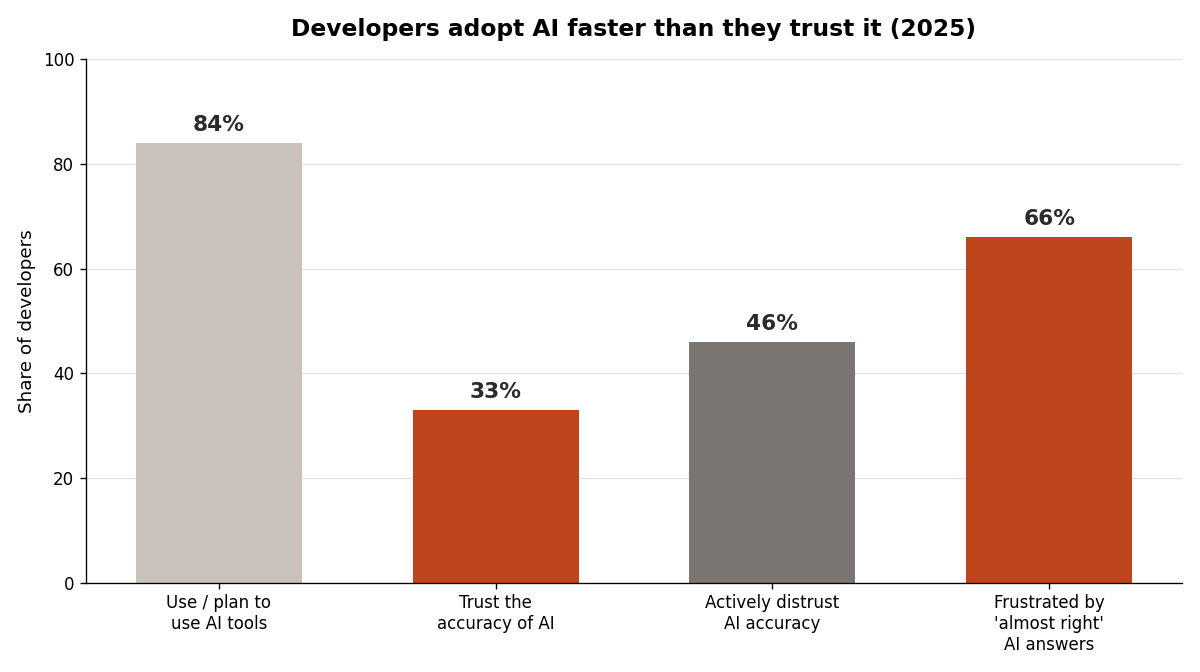
Read that gap carefully, because it's the whole lesson. The people using these tools the most are also trusting them the least. That's not contradiction — it's calibration. Experience taught them that fluency and correctness come from different places, a point I unpack in common AI hallucinations in code. You don't have to relearn it the slow way. You can adopt the calibrated posture from day one.
The two axes that decide how much to trust
Every coding task sits somewhere on two axes, and where it sits tells you how much rope to give the AI.
Axis one: reversibility. How hard is it to undo this if it's wrong? A CSS change is instantly reversible — you see it, you don't like it, you revert. A database migration that drops a column is not. A pricing calculation that's been quietly wrong for three weeks has already done its damage by the time you notice. The less reversible the change, the more verification it earns before you trust it.
Axis two: verifiability. How cheaply can you confirm it's correct? Some outputs verify themselves the instant you look — the button is centered or it isn't. Others hide their wrongness — a tax calculation that's right for the input you happened to test and wrong for the one you didn't. Cheap-to-verify work can be trusted quickly because catching a mistake is fast. Expensive-to-verify work needs a deliberate plan for how you'll check it before you let the AI near it.
Put the two together and you get four quadrants. Reversible and easy to verify: trust freely, move fast, this is where AI earns its keep. Reversible but hard to verify: trust the code, but build a check before you rely on the output. Irreversible but easy to verify: let the AI write it, then verify hard before you run it. Irreversible and hard to verify: this is the slow-down zone — money, auth, data deletion, anything in production — where you generate in small pieces and confirm each one.
Here's how common founder tasks map onto that framework:
| Task | Reversible? | Easy to verify? | Default posture | | --- | --- | --- | --- | | Landing page copy and layout | Yes | Yes | Trust, glance, move on | | A one-off data cleanup script | No | Yes | Verify output before running on real data | | Stripe webhook handling | No | No | Slow down, generate in slices, test each | | Auth and permission checks | No | No | Slow down, verify every condition | | Email template wording | Yes | Yes | Trust, read it once | | A database schema migration | No | No | Slow down, back up first, review every line | | Analytics event names | Partly | No | Verify against your tracking plan |
The point isn't to memorize the table. It's to internalize the question behind it: before I trust this, how bad is it if it's wrong, and how will I know?
The "almost right" problem is the one to fear
When non-developers worry about AI code, they picture it producing obvious garbage — code that won't run, errors splashed across the screen. That's the easy case. Broken code announces itself. You can't ship what won't compile.
The dangerous failure is the opposite: code that runs perfectly and is quietly wrong. In the Stack Overflow survey, the single biggest frustration — cited by 66% of developers — was "AI solutions that are almost right, but not quite." The second, at 45%, was that debugging AI-generated code takes more time than expected. These are the most experienced AI users in the world, and the thing that bites them isn't failure. It's plausibility.
This matters more for a non-developer than for anyone else. A senior engineer reading an "almost right" function has a chance of feeling the wrongness. You and I don't get that signal. The code reads fluently, every name is real, it does something reasonable when we click around — and the bug is in the one path we didn't test. That's why "it ran" can never be your verification step. Running and being correct are unrelated properties, and the gap between them is exactly where almost-right code lives.
There's a discipline gap hiding in the numbers, too. A 2025 industry analysis reported by IT Pro found that nearly half of developers don't review AI-generated code at all, with 38% saying it's because reviewing AI code takes longer than reviewing a colleague's. Researchers have started calling the result "verification debt" — the backlog of unchecked AI output accumulating in codebases. As a founder, you can't afford that debt, because you're the one who eats the support ticket when an invoice comes out wrong.
So the working rule is blunt: the more an output looks effortlessly correct, the more deliberately you verify it when the stakes are high. Fluency is not evidence. It's the absence of evidence dressed up as confidence.
A four-question pre-flight check before you trust
Trust calibration sounds abstract until you turn it into questions you actually ask. Before I accept any non-trivial change from an AI assistant, I run four. They take about a minute and they catch most of what matters.
One: what breaks if this is wrong? If the honest answer is "nothing much, I'll see it and fix it," trust it and move on. If the answer is "a customer gets charged twice" or "someone sees data that isn't theirs," you've just identified a slow-down task. This question alone sorts 80% of your work into the right lane.
Two: how will I know it's wrong? Before generating, decide what correct looks like. For anything that computes a value, write down the right answer for two or three real inputs first. If you can't predict the right answer, that's the signal you don't understand the feature well enough to delegate it yet — and that's useful information, not a failure.
Three: does everything it references actually exist? AI invents packages, methods, API endpoints, and database columns that sound real and aren't. The fix is a lookup, not a code review: confirm the package is on npm with real downloads, find the method in the official docs, check the column against your schema. I go through every pattern in common AI hallucinations in code.
Four: is the change small enough for me to follow? A 40-line diff you can read. A 500-line diff you're rubber-stamping. If the answer to a request is a giant block of code, ask for it one slice at a time — the table, then the query, then the UI — so each step stays inside what you can actually check. This is the single habit that did the most for my confidence, and it's the throughline in the seven mistakes I made learning to code with AI.
If a change passes all four, trust it. If it fails any, you're not blocked — you've just learned exactly where to spend your verification attention.
The smell tests: when to stop and ask why
Beyond the formal check, there are moments that should make you pause regardless of the task. Think of these as smell tests — none of them prove anything is wrong, but each one is a reason to slow down and ask the AI to explain itself before you proceed.
The AI got suspiciously confident about something you know is tricky. If you asked about a genuinely hard problem — timezone math, currency rounding, concurrent updates — and got back a breezy, no-caveats answer, be suspicious. Hard problems usually have edge cases. An answer that ignores them often hasn't considered them.
It rewrote more than you asked for. You asked to change a button color and the diff touches six files. Maybe there's a good reason. Usually there isn't, and the extra changes are where unreviewed behavior sneaks in. Ask why each file changed.
It introduced a package or service you didn't mention. "I added some-helper-lib to handle this" deserves a pause. Does it exist? Is it maintained? Do you actually need a dependency, or did the AI reach for one because its training data did?
The explanation and the code disagree. When the AI says "this checks that the user is an admin" but you ask it to walk you through the actual logic and the walkthrough doesn't match, trust the discrepancy. Either the code or the explanation is wrong, and you need to know which before you ship.
You're about to do something irreversible. Deleting data, running a migration, pushing to production, changing a Stripe setting. The cost of one more verification pass is a few minutes. The cost of skipping it can be your weekend. Always slow down at the irreversible step, even when everything looks fine — especially when everything looks fine.
The meta-skill here is noticing your own urge to just accept and move on. That urge is strongest exactly when you're tired, behind, or the code looks clean — which is to say, when you're most likely to wave through the almost-right answer. Naming the urge is most of beating it. Good prompting reduces how often these smells show up in the first place, which is the case I make in prompt engineering for non-developers.
Building trust over time without getting complacent
Calibrated trust isn't static. As you work with a tool, you learn where it's reliable and where it drifts, and your defaults can loosen in the areas you've validated. That's healthy. The trap is letting a track record in easy work bleed into confidence on hard work.
The AI being right about a hundred layout changes tells you nothing about whether it's right about your webhook signature verification. Those are different kinds of task with different failure modes, and competence on one doesn't transfer to the other. Keep your guard calibrated to the task, not to your accumulated good feeling about the tool.
A practical way to stay honest: keep a short running note of the times the AI was confidently wrong and what the tell was. After a few weeks you'll have a personal field guide to your specific tool's blind spots — the libraries it gets stale on, the kind of logic it fumbles. That note is worth more than any generic advice, because it's calibrated to how you actually work. The Claude Code starter guide covers the day-to-day workflow that makes building this habit natural rather than bolted-on.
Frequently asked questions
Should a non-developer trust AI-generated code at all?
Yes — selectively. Trust it for work that's reversible and easy to verify, which is most of what you'll do day to day. Apply real verification to anything touching money, authentication, data, or production. The goal isn't blanket trust or blanket suspicion; it's matching your scrutiny to what the specific change can cost you.
How do I verify code I can't read?
You verify the things around the code, not the syntax. Confirm that every package, method, and column it references actually exists by looking them up in official docs. Define the correct output for a few real inputs in advance, then check the actual output against them. Both are lookup-and-compare tasks that need no coding fluency.
Why do developers trust AI less even as they use it more?
Because experience teaches that fluent code isn't the same as correct code. The 2025 Stack Overflow survey shows trust falling to 29% even as adoption hit 84%. The more you use these tools, the more "almost right" answers you encounter — and that pattern produces caution, not confidence. Adopting that caution early saves you from learning it the expensive way.
What's the single most important habit?
Deciding what "correct" looks like before you generate the code. For anything that produces a value, write down the right answer for two or three real inputs first. That one move catches subtly-wrong logic, which is otherwise the hardest failure for a non-developer to detect.
When should I absolutely slow down?
Any time a change is hard to undo and hard to verify at the same time: database migrations, auth and permission logic, payment handling, anything that runs in production. Those are the four-alarm tasks. Generate them in small slices, verify each slice, and never let "it looks fine" substitute for actually checking.
Trust is a decision, not a feeling
The non-developers who do well with AI coding tools aren't the ones who trust the most or the least. They're the ones who decide, task by task, how much trust the work in front of them has earned — and who have a routine that makes the decision quick instead of agonizing. Ask what breaks if it's wrong. Ask how you'll know. Keep the changes small. Slow down at the irreversible step. None of that requires reading code fluently; it requires a habit.
If you're building a SaaS with AI coding tools and want a codebase that gives your assistant real architectural context — so there's less for it to guess at and less for you to second-guess — Coding Capybaras is the free boilerplate I built for exactly this workflow.