How to Read AI Code Output When You Don't Code | Coding Capybaras
A non-coder's guide to reading your AI assistant's output: what to skim, what to scrutinize, and the red flags that matter even if you can't write a line.
· Justin Boggs
Photo by Chris Ried on Unsplash
To read your AI assistant's output when you don't speak code, you don't decode every line — you read for intent and risk. You skim the explanation, then focus your attention on a small set of high-stakes questions: does this do what I asked, does it touch money or user data, does it handle the obvious failure cases, and is it doing anything it wasn't told to do? Reading AI code output is closer to reviewing a contract than writing one. You're checking whether the thing in front of you matches what you meant, and whether it's about to cause a problem you'll regret. This is a learnable skill, and you can get useful at it without ever memorizing syntax.
TL;DR
- You don't need to understand every line. Read AI code in two passes: first for intent (what is this supposed to do?), then for risk (what could this break?).
- Trust is a real problem even among professionals — only 29% of developers trust AI output for accuracy, and 66% say it's "almost right but not quite," per the 2025 Stack Overflow Developer Survey.
- Security is the biggest blind spot: Veracode found 45% of AI-generated code introduced known vulnerabilities.
- Watch for action words (install, run, delete, send, connect) and anything touching payments, passwords, or personal data. That's where the real risk lives.
- The goal isn't to become an engineer. It's to become a good reviewer — enough judgment to catch the mistakes that matter.
Why reading AI output is a skill worth building
When you build software with an AI assistant, the AI writes the code and you own it. That's the deal, and it's easy to miss until something breaks. If you can't read the output at all, you're shipping code you've never actually looked at — which is roughly like signing every document someone hands you without reading it. Most of the time it's fine. The one time it isn't can cost you a data leak, a broken payment flow, or a weekend of untangling.
The reassuring part is that professional developers don't fully trust this output either. The 2025 Stack Overflow Developer Survey, which polled tens of thousands of developers, found that while 84% are using or planning to use AI tools, only 29% trust the accuracy of what those tools produce, and 46% actively distrust it. Two-thirds — 66% — reported that AI answers are "almost right but not quite," and 45% said they lose meaningful time debugging AI-generated code. So the wariness you feel as a non-coder isn't naïveté. It's the same wariness experts have earned the hard way.
The difference is that experts can read the code fluently and you can't — yet. But "yet" is doing a lot of work in that sentence. You don't need fluency to be a useful reviewer. You need a small vocabulary, a repeatable process, and a clear sense of where risk concentrates. This post gives you all three. If you're brand new to working with these tools, start with Claude Code for non-developers first, then come back here — this is the reading skill that sits on top of the workflow.
How do you read code you don't understand?
You read it the way you'd read a document in a language you half-know: for meaning, not for grammar. The trick is to make two passes, and to resist the urge to understand everything on the first one.
Pass one is for intent. Before you look at a single line closely, read whatever explanation the AI gave you in plain English. Good AI assistants narrate what they did — "I added a function that saves the form data to the database and sends a confirmation email." That narration is your map. Your only job in pass one is to answer: is this what I asked for? Not "is the code correct" — just "is this the right thing." If you asked for a password reset and the explanation is about exporting a CSV, stop right there. The most expensive bugs aren't broken code; they're perfectly working code that does the wrong thing.
Pass two is for risk. Now you skim the actual code, but you're not reading evenly. You're hunting for a specific short list of things (the next two sections cover exactly what). You're looking for action words, for anything touching sensitive data, and for the failure cases you know from being a human who uses software. You let the routine plumbing blur past. A senior engineer reviewing a change does the same thing — they don't read every line with equal attention, they zero in on what's dangerous.
The mental question that carries most of the weight is: "Does this make business sense?" You know your product better than the AI does. Even without understanding syntax, you can often tell whether the logic matches your requirements — whether the right fields are being saved, whether permissions match who's supposed to have access, whether a calculation produces a number that's even in the right ballpark. That business judgment is something you have and the AI doesn't. Lean on it.
One more habit: read before you run. If the AI suggests a command to paste into your terminal, understand roughly what it does before you hit enter. "Read before you run" is the cheapest safety rule in this entire practice, and it costs you ten seconds.
What are the red flags in AI-generated code?
Some parts of any code change carry far more risk than others. You can't watch everything, so watch these.
Action words. Skim for verbs that do something irreversible or reach outside your app: install, run, execute, delete, drop, remove, send, connect, fetch, request, download. These are where the real consequences live. A line that installs a package or downloads and runs a file is exactly where a bad payload would hide. You don't need to understand the whole line — just notice it and ask the AI "what does this do and why is it needed?"
Anything touching money, passwords, or personal data. Payment logic, authentication, and user data are the three areas where a mistake stops being an inconvenience and starts being a liability. If a change touches Stripe, login, or a database table full of customer information, slow down and read it carefully — even ask the AI to walk you through it line by line. This is where I spend most of my review attention on Coding Capybaras, and it's where I'd tell any non-technical founder to spend theirs.
Security, specifically. This is the biggest and least visible risk. Veracode's 2025 GenAI Code Security Report tested over 100 large language models and found that 45% of the code samples introduced known security vulnerabilities from the OWASP Top 10. The failure rate varied a lot by language — Java was worst at 72%, while Python came in around 38%. And unsettlingly, the report found that newer, larger models weren't meaningfully better at security than older ones. Functionality improved; safety didn't.
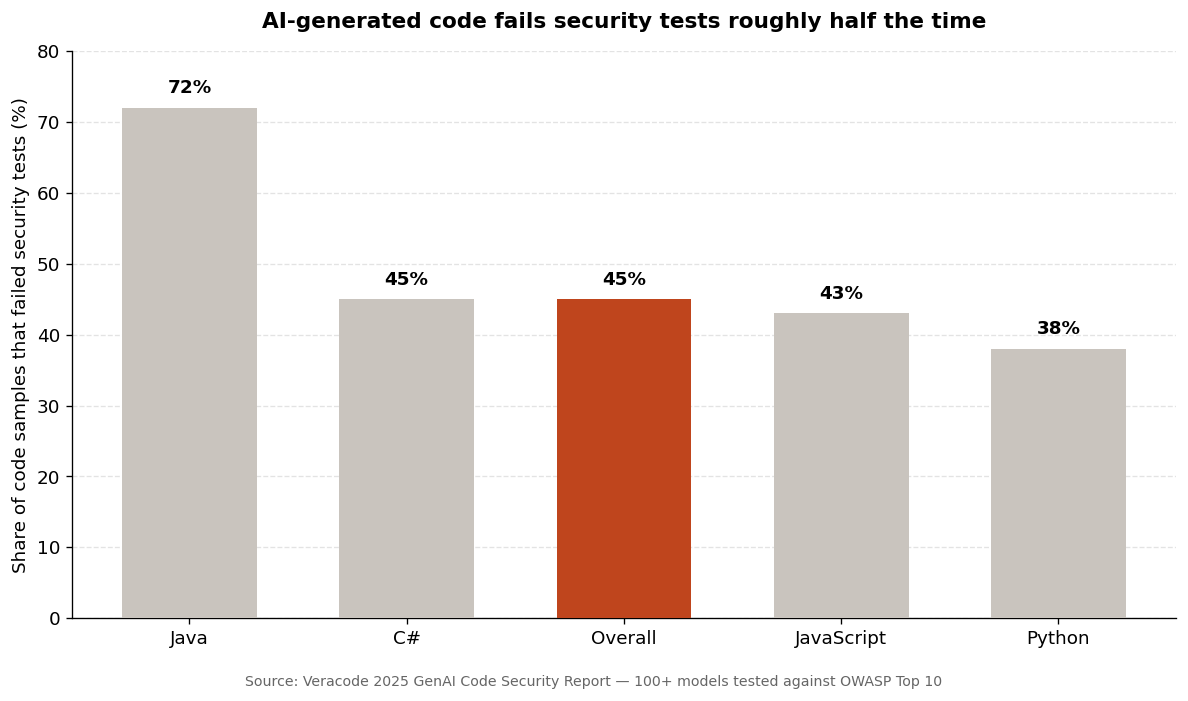
The chart above is the number to internalize: roughly half the time, working AI-generated code has a security hole in it. That doesn't mean don't use AI — professionals ship AI code constantly. It means the code needs review and testing, not blind trust. The most common single flaw Veracode found was cross-site scripting, which the models failed to defend against in 86% of relevant samples. You won't spot XSS by reading, but you can make sure your project runs a security scanner and that you never wave through auth or payment code unreviewed.
Confidence without caveats. AI output always sounds sure of itself, even when it's guessing. Ironically, the more confident the tone, the more worth a second look — because the model has no way to signal its own uncertainty. If something feels too clean for a genuinely tricky problem, poke at it.
What can you safely skim versus scrutinize?
Not everything deserves equal attention. Learning what to ignore is as important as learning what to catch, because if you try to scrutinize everything you'll burn out and review nothing well. Here's the rough triage I use.
| Part of the change | Read for | Attention level | | --- | --- | --- | | Payment / billing logic | Right amounts, right triggers, no double-charging | Scrutinize | | Authentication & permissions | Who can access what, password handling | Scrutinize | | Anything saving user data | Correct fields, nothing sensitive exposed | Scrutinize | | Terminal commands to run | What it installs, deletes, or downloads | Scrutinize | | Core business logic | Does it match your actual requirements | Read closely | | UI text and layout | Does it say and show the right thing | Skim | | Styling / formatting | Cosmetic — low risk | Skim | | Boilerplate & config plumbing | Usually standard; spot-check | Skim |
The pattern is simple: the closer something gets to money, identity, or data, the more it earns your attention. Cosmetic and structural code that can't hurt anyone gets a glance. This isn't laziness — it's how experienced reviewers allocate a finite amount of focus, and it's the only sustainable way to review as a solo founder.
A practical tactic: ask the AI to flag its own risky changes. A prompt like "before I accept this, tell me which parts touch security, payments, or user data, and explain each in plain English" turns the assistant into your first-pass reviewer. It won't catch everything — you're still the backstop — but it surfaces the parts you most need to see. Pairing that with the patterns in prompt engineering for non-devs makes your review dramatically faster.
Building a vocabulary without a CS degree
You need a small glossary, not a degree. A handful of concepts unlock most of what you'll read, and you pick them up by exposure — every time you don't know a word, ask the AI "what does this mean in plain English, and why does it matter here?" Over a few weeks the same twenty or thirty terms recur and stop being opaque.
A function is a named chunk of logic that does one job — the software version of a reusable formula. A variable is a labeled container holding a value. A database query reads or writes stored data; these are the lines to watch when data is involved. An API call reaches out to another service (Stripe, an email provider) over the internet — worth noticing because it means your app is talking to the outside world. A dependency or package is code someone else wrote that your app pulls in; installing one is a trust decision, which is why "install" is on the red-flag list.
You don't memorize these from a list. You learn them the way you learn anything — in context, when you hit them. The goal is recognition, not recall. When you can look at a line and think "that's a database write, so it matters" or "that's just styling, skip it," you're reading well enough to catch what counts. That recognition is exactly the judgment I mean when I write about when to trust your AI assistant: knowing which lines deserve your suspicion is most of the skill.
There's also a defensive habit worth building: watch for the AI inventing things. It will occasionally reference a file, function, or setting that doesn't exist, stated with total confidence. If you ask "where is this defined?" and the answer doesn't hold up, you've caught a hallucination. This failure mode is common enough that I gave it its own piece — common AI hallucinations in code — because catching them early is a big part of not shipping broken software as a non-coder.
Frequently asked questions
Do I need to understand every line of AI-generated code?
No. Even professional developers don't read every line with equal attention. You read in two passes — first for intent (is this the right thing?), then for risk (what could this break?) — and you concentrate your focus on code touching money, authentication, and user data. The rest you can skim.
How do I know if AI code is safe to use?
You can't fully verify safety by reading alone — Veracode found 45% of AI-generated code contains security flaws, and many aren't visible to the eye. The practical answer is to review the high-risk areas (payments, login, data), run an automated security scanner on your project, and never accept auth or payment changes without understanding them. Treat "it runs" as the start of review, not the end.
What should I look for first when reviewing AI output?
Start with intent: read the AI's plain-English explanation and confirm it matches what you asked for. Then scan for action words (install, run, delete, send) and anything touching sensitive data. Those two checks catch a large share of the mistakes that actually matter.
Can I trust my AI assistant's code if it runs without errors?
Not automatically. "It runs" only means the code didn't crash — not that it does the right thing. Two-thirds of developers say AI output is "almost right but not quite," which is exactly the failure mode that runs cleanly while doing something subtly wrong. Verify against what you intended, not against whether it errored.
How long does it take to get good at reading code as a non-coder?
You can be usefully cautious immediately by following the two-pass process. Real fluency in recognizing risky patterns builds over a few weeks of exposure, as the same terms and structures recur. You're aiming for recognition, not the ability to write code from scratch.
Should I ask the AI to explain its own code?
Yes — it's one of the best tools you have. Asking "explain this in plain English" or "which parts of this are risky and why" turns the assistant into a first-pass reviewer. Just remember it's not a neutral judge of its own work, so you remain the final check on anything high-stakes.
You're the reviewer, not the writer
Reading AI code output as a non-coder isn't about becoming an engineer. It's about becoming a good reviewer — someone who reads for intent and risk, knows where the danger concentrates, and has the judgment to slow down when money, identity, or data is on the line. That judgment is something you already have from running a business; you're just applying it to a new medium. The syntax is the AI's job. The "does this make sense and is it safe" question is yours, and it always will be.
If you're building this way, Coding Capybaras is the free boilerplate I built for non-technical founders — the security-sensitive plumbing like auth, billing, and webhooks is already reviewed and solved, so the code you're reviewing is your product logic, not the risky foundations.