AI-Generated Tests: A Safety Net for Non-Coders | Coding Capybaras
How founders who can't read code can use AI-generated tests as a safety net: what tests actually prove, how to ask your AI to write them, and how to read a failing test.
· Justin Boggs

Photo by Andrés Canchón on Unsplash
Automated tests are the safety net that lets a non-technical founder change code without holding their breath. A test is a small program that runs your real code, feeds it a specific input, and checks the result is what you expected — so when your AI assistant edits something next week, a failing test tells you instantly that it broke a thing that used to work. You don't need to read the code to benefit. You need to understand what a test proves, know how to ask your AI to write good ones, and be able to read a failing test well enough to hand it back. This post covers all three.
TL;DR
- A test is code that runs your code and checks the answer. It's a tripwire that catches regressions before your users do.
- Tests prove that specific behavior still works — not that your app is bug-free. Coverage is not correctness.
- AI writes tests well, but it tends to test the happy path. You have to explicitly ask for the edge cases.
- A failing test is a gift: it names what broke, expected what, and got what instead. Paste it straight back to your AI.
- Even at Meta, AI-generated tests are reviewed by humans before they're trusted. Do the same.
What a test actually proves (and what it doesn't)
Strip away the jargon and a test is simple: it's a second little program whose only job is to run your real code with a known input and assert that the output matches what you expected. If your pricing function is supposed to turn a $100 plan with a 20% discount into $80, a test calls that function with those numbers and checks it gets $80 back. When it does, the test passes. When it doesn't, the test fails loudly and tells you so.
The value isn't in today's pass. It's in next month. When you ask your AI assistant to add a feature and it quietly changes how discounts are calculated, that test fails the instant the math breaks. Without it, you'd find out from a customer who got charged wrong. Tests are a tripwire against regressions — things that used to work and silently stopped.
Here's the part founders miss, and it matters: a passing test does not mean your code is correct. It means the specific behavior that test checks still works. This is the difference between coverage and correctness. Coverage measures how much of your code gets run by your tests. You can have a test that executes a line of code without ever checking whether the result was right — high coverage, zero confidence.
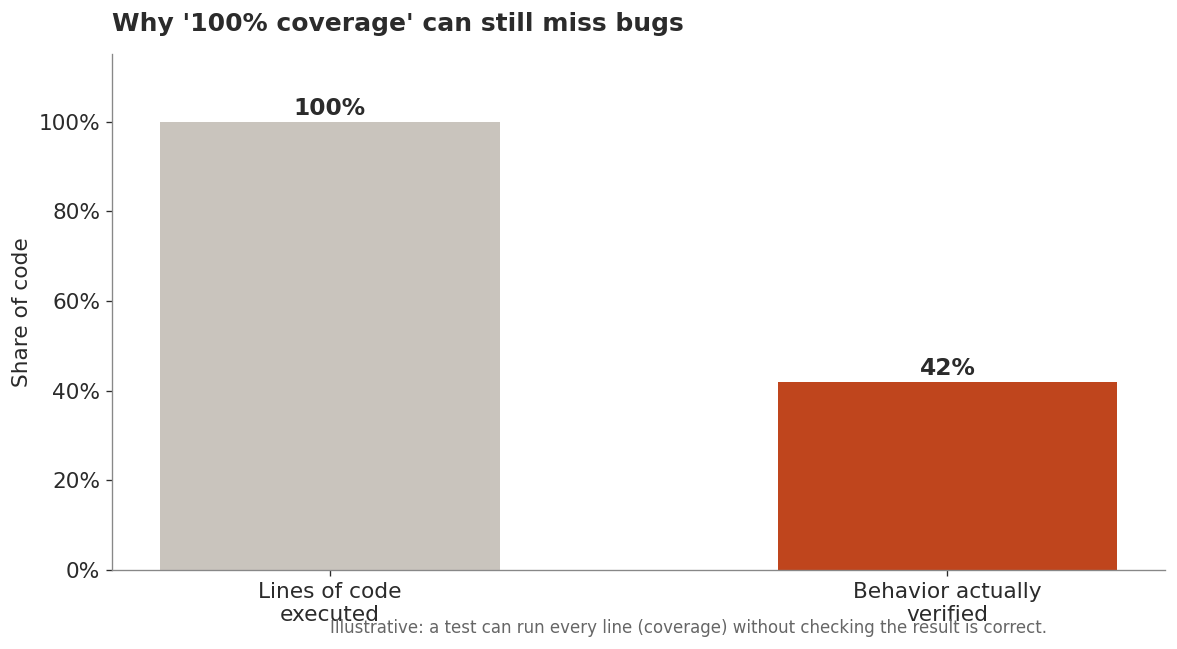
Meta makes this point vivid with something called mutation testing. As their engineering team explained in 2025, traditional coverage "only show[s] if lines of code are run" — a test can run a line and still fail to notice a bug living on it. So Meta deliberately introduces faults into the code and checks whether the tests catch them. If a test still passes after the code was broken on purpose, that test was executing the code without truly checking its behavior. The takeaway for you: don't ask "is it tested?" Ask "would this test fail if the behavior were wrong?"
How to ask your AI to write good tests
The good news for non-coders is that writing tests is one of the things AI assistants are genuinely strong at. The Meta team found that in a real trial, engineers accepted 73% of the tests their AI system generated, and valued being able to focus on evaluating tests rather than writing them by hand. You get the same leverage in Claude Code or Cursor — but only if you ask well.
The default failure is that AI writes the happy path and stops. Ask "write tests for this function" and you'll get a test for the case where everything goes right. That's the case least likely to break. The bugs live at the edges: what happens with an empty input, a negative number, a missing field, a huge value, a user who isn't logged in. Research on AI-written code keeps finding the same weak spot — generated code handles common scenarios but stumbles on corner cases like an empty array or a null value. Those corners are exactly where you want tests.
So make the edges explicit in your prompt. A prompt that works:
Write tests for the discount function. Cover these cases: a normal discount, a 0% discount, a 100% discount, a negative price (should error), a missing price, and a discount over 100%. For each, say in a comment what real-world situation it represents.
That last sentence is the one non-coders should never skip. Asking the AI to comment what each test represents turns a wall of code into something you can actually read and sanity-check. You're not reviewing syntax; you're reviewing whether the list of situations matches reality. If you know a customer once hit a bug with a coupon stacked on a sale, add that case. You understand your users better than the model does — that's the part you bring.
A few more things to ask for by name: test the error cases, not just the successes; test one behavior per test so a failure points at one thing; and use real-ish data, not foo and bar, so the test reads like a scenario. If you want the broader habit that makes all of this land better, write the spec before the code — I covered why in write the spec first.
Reading a failing test without reading code
This is the skill that unlocks everything, and it's more approachable than it looks. When a test fails, it doesn't just say "failed." It tells you a short, structured story. Learn to read three lines and you can act on almost any failure.
A typical failure looks like this:
FAIL  calculatePrice > applies a 20% discount
  Expected: 80
  Received: 100
Three facts, in plain sight. What was being tested ("applies a 20% discount"). What it expected (80). What it actually got (100). You don't need to know how the function works to understand the story: the discount didn't get applied, so the price came back full. That's a real, specific, actionable clue — and you got it without reading a single line of the actual code.
Your move as a non-coder is almost always the same: copy the entire failure message and paste it back to your AI with one sentence of context. Something like: "This test started failing after your last change. It expected the discount to apply but got the full price. What broke, and how do we fix it without breaking the other tests?" The failing test is doing the hard part — localizing the problem — for you.
A short vocabulary helps you stay oriented:
| Term | Plain-English meaning | | --- | --- | | Assertion | The check itself — "expected X, got Y" | | Pass / fail | The behavior matched / didn't match expectation | | Expected vs. received | What should have happened vs. what did | | Regression | Something that used to work and now doesn't | | Suite | A group of related tests run together | | Flaky test | A test that passes and fails randomly — usually a test problem, not a code problem |
One warning worth internalizing: a flaky test — one that passes sometimes and fails sometimes with no code change — is a broken test, not a broken app, and you should ask your AI to fix or remove it. A test you can't trust is worse than no test, because it trains you to ignore red. This connects to the wider discipline of reviewing the code your AI wrote: tests are one input to that review, not a replacement for it.
Where tests fit — and where they don't
Not all tests are the same, and knowing the three rough types keeps your expectations calibrated. As Steve Kinney lays it out, they live on a spectrum of speed versus confidence.
Unit tests check one small piece in isolation — one function, one calculation. They're fast, you can run thousands in seconds, and they pinpoint exactly what broke. Integration tests check that a few pieces work together — does saving a form actually write to the database. End-to-end tests drive the whole app like a user would, clicking through sign-up to checkout. Kinney's own framing is useful: a single integration test "can provide a level of confidence that rivals 60 unit tests," but the heavier tests are slower and harder to keep running. For a solo founder, a healthy mix leans on fast unit tests for your core logic (pricing, permissions, anything involving money) and a few end-to-end tests for the flows that would be catastrophic to break — signup, payment, data export.
And the honest limits. Tests prove the cases you thought to write. They can't catch a bug in a situation nobody imagined — that's the test oracle problem Meta's researchers point to: the hard part is knowing what correct behavior even is. Tests also don't tell you the product is good, only that it does what you specified. And AI-generated tests specifically can be confidently wrong — asserting the behavior the code currently has, bug and all, rather than the behavior you wanted. That's why even Meta, running this at enormous scale, keeps humans in the loop to review generated tests before trusting them. Your version of that review is small but non-negotiable: read the comments, check the scenarios match reality, and never let a test you don't understand guard something that touches money or user data. When the AI seems stuck or a test keeps failing in ways that don't make sense, that's your cue to slow down and ask why rather than accept the next confident fix.
Your first week of tests, concretely
Theory is easy to nod along to and hard to act on, so here's the actual sequence I'd run if you've never written a test and you're staring at a live app you're afraid to touch.
Day one: pick the scary thing. Not the whole app — one function that would ruin your week if it broke. For most SaaS founders that's billing math or an access check. Ask your AI: "What's the single riskiest piece of logic in this codebase for a solo founder to break by accident?" Let it point you, then pick from its answer.
Day two: get one test passing. Ask for a single test on that one piece, covering the normal case, and run it. The goal here is not coverage — it's proving the machinery works: that you can run a test and see green. Once you've seen one test pass, the whole thing stops being abstract.
Day three: add the edges. Go back and ask for the corner cases explicitly — empty inputs, zero, negative numbers, the logged-out user, the expired card. Ask for a comment on each explaining the real situation it represents, and read those comments. This is where you contribute: you know which weird scenarios your actual customers have hit. Add them.
Day four: break it on purpose. This is the most valuable habit, and almost nobody does it. Ask your AI to deliberately introduce a bug into the function you just tested — change the discount from 20% to 25% — and run the tests. If a test goes red, your net works. If everything stays green, your test is executing the code without checking the result, and you should ask for a stronger assertion. This is mutation testing in miniature, and it's the fastest way to earn real trust in a test.
Day five: wire it to run automatically. Ask your AI to set up your tests to run on every change — this is what "continuous integration" means, and it's the difference between a net you remember to check and one that checks itself. From then on, a broken thing turns red before it reaches a customer.
Five short sessions and you've gone from "afraid to touch the code" to "the code tells me when I broke it." That's the whole point. The safety net doesn't make you a better coder — it makes you a founder who can ship changes without holding your breath. If you want the debugging side of this loop, the non-tech founder's debugging playbook picks up where a red test leaves off.
Frequently asked questions
Do I need to know how to code to use tests?
No. You need to understand what a test proves and how to read a failure — expected versus received. Your AI writes the test code; your job is to check that the scenarios it tests match how real users behave, and to hand failing tests back with context.
Can I trust tests my AI wrote?
Mostly, with review. In Meta's trial, engineers accepted 73% of AI-generated tests — a strong hit rate, but not 100%, and every one was reviewed first. The common flaw is that AI asserts the code's current behavior, so if the code has a bug, the test can lock the bug in. Read the test's plain-English intent before trusting it.
What does "code coverage" actually mean?
Coverage is the percentage of your code that gets run by your tests. It's useful but misleading: a line can be covered by a test that never checks whether the result is correct. Treat coverage as a floor, not proof. Ask whether a test would fail if the behavior were wrong, not just whether the line ran.
What's the difference between unit, integration, and end-to-end tests?
Unit tests check one small piece in isolation and run fast. Integration tests check that a few pieces work together. End-to-end tests drive the whole app like a real user. As a solo founder, lean on unit tests for core logic like pricing and permissions, plus a handful of end-to-end tests for critical flows like signup and payment.
What should I test first in my SaaS?
Anything that touches money, permissions, or user data. Test your pricing and discount math, your access checks (can a free user reach a paid feature?), and your core create-read-update-delete flows. These are the failures that cost you customers or trust. Polish and edge features can wait.
Start with one test on the thing that scares you
You don't need a test suite to start getting value — you need one test on the one piece of your app that would hurt most to break. For most founders that's billing or auth. Ask your AI to write it, ask it to cover the edges, read the comments to make sure the scenarios are real, and run it. Now you have a tripwire. The next time your assistant refactors something nearby, that tripwire either stays green and you ship with confidence, or it goes red and hands you a clean, specific clue.
If you're building a SaaS with AI coding tools, Coding Capybaras is the free boilerplate I built for exactly this workflow — it ships with tests next to the code they cover, so you can see what "would this fail if the behavior were wrong?" looks like in a real app.