Common AI Hallucinations in Code (And How to Catch Them)
The eight most common AI code hallucinations — phantom packages, fake API methods, invented columns — why they happen, and how a non-developer catches each one.
· Justin Boggs

Photo by Michael Dziedzic on Unsplash
An AI code hallucination is when your assistant generates code that looks correct and reads fluently but references something that doesn't exist — a package, a function, an API endpoint, a database column — or implements logic that's quietly wrong. The code usually runs. That's what makes it dangerous. As a non-developer, you can't fall back on "I'd recognize a fake function when I see one," so you need a different defense: knowing the specific patterns these hallucinations follow, and a short verification routine that catches them before they ship. This post walks through the eight most common patterns and the exact check for each.
TL;DR
- AI hallucinations in code aren't random — they fall into about eight recognizable patterns, from invented packages to fabricated database columns.
- The dangerous ones don't crash. They run cleanly and produce wrong results, which is why "it ran" is never a verification step.
- Nearly one in five AI-generated code samples references a software package that doesn't exist, per a 2025 USENIX study of 2.23 million samples.
- You don't need to read code fluently to catch these. You need to verify that the things the code references actually exist, and that the outputs match what you expected.
Why AI invents things that don't exist
Your AI assistant doesn't look things up. It predicts the next most-likely token based on patterns in its training data. Most of the time, the most-likely next token is also the correct one — that's why these tools work at all. But when the model hits an ambiguous spot, an unfamiliar library, or a gap in what it knows, it doesn't stop and say "I'm not sure." It fills the gap with whatever is statistically plausible. A function named parseConfig() sounds real, follows the naming conventions of real functions, and fits the surrounding code perfectly. It just doesn't exist in the library you're using.
This is the core thing to internalize: fluency and correctness are produced by completely different mechanisms. The model is extraordinary at fluency. Correctness is a separate question it isn't actually checking. A confident, well-structured, perfectly-formatted answer carries exactly zero additional evidence that the answer is right.
The scale of this is documented. A 2025 USENIX Security study generated 2.23 million code samples across 16 popular code-generating models and found that 19.7% — nearly one in five — referenced at least one software package that doesn't exist. Commercial models did better than open-source ones, but even the best weren't clean.
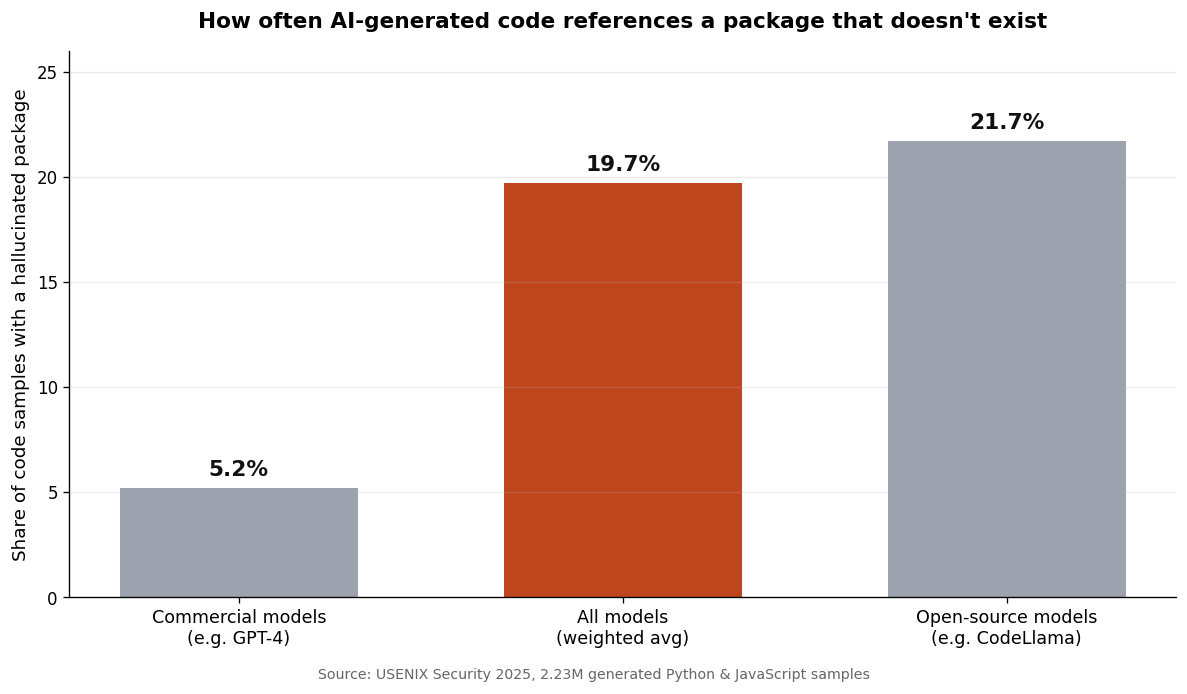
The gap between commercial and open-source models matters less than the headline: this happens often, on every kind of model, and the tool will never warn you it's happening. The defense has to come from you.
The eight most common code hallucinations
Hallucinations cluster into recognizable patterns. Once you know the shapes, you stop being surprised by them and start checking for them by reflex.
1. Phantom packages and dependencies
The model tells you to install a package — npm install react-supabase-helpers — that was never published. You run the install, it fails, and at least you find out immediately. The dangerous version is subtler: the model imports a package that doesn't exist into otherwise-working code, and you don't notice until that file runs. The check: before installing anything, confirm the package exists on its official registry (npm, PyPI) and has real download numbers and a recent publish date.
2. Fabricated function and method names
The model calls supabase.auth.getUserSession() on a real library — except the actual method is getSession(). The library is real, the object is real, the method is invented. These produce runtime errors that are genuinely hard to trace if you can't read a stack trace. The check: cross-reference any unfamiliar method against the library's official documentation. If the AI used it, the docs should list it.
3. Invented API endpoints
For external services, the model fabricates REST or GraphQL endpoints — POST /v2/customers/bulk-update — that the service never exposed. The URL pattern looks exactly like the service's real endpoints, which is precisely why it's convincing. The check: find the endpoint in the provider's API reference. If it isn't documented, it doesn't exist.
4. Made-up configuration options
The model adds a config key, environment variable, or CLI flag that sounds plausible — NEXT_PUBLIC_CACHE_STRATEGY=aggressive — but that the framework doesn't read. The code doesn't error. The setting is simply ignored, and the behavior you wanted never happens. The check: verify the config option exists in the tool's docs, and test that changing it actually changes behavior.
5. Imaginary file paths in your own project
The model references /lib/utils/formatDate.ts because a file like that usually exists in projects like yours — but not in yours. It hasn't read your file tree, so it guesses. This is common enough that it deserves its own write-up, which is on the queue. The check: confirm every referenced file actually exists in your repo before trusting the code around it.
6. Outdated or version-mismatched usage
The model writes code for an old version of a library because its training data is full of that version. It's not technically invented — it was real, two major versions ago. On your current version, it breaks or behaves differently. The check: tell the AI which version you're on, and confirm the syntax matches that version's docs.
7. Fabricated database columns and schema fields
The model queries users.subscription_tier when your column is actually users.plan. It inferred a reasonable schema instead of reading yours. The query fails, or worse, returns nothing and your code treats "nothing" as a valid state. The check: give the AI your actual schema, and verify column names against it.
8. Plausible-but-wrong logic
The hardest one. Every name is real, every function exists, the code runs — and the logic is subtly incorrect. A tax calculation that rounds at the wrong step. A permission check with an inverted condition. This is the "almost right" category, and it's the most common complaint developers report. The check: decide what the correct output should be for two or three real inputs before generating the code, then verify those exact cases by hand.
Here's how the eight break down by how they fail and how hard they are to catch:
| Pattern | How it fails | Catch difficulty | | --- | --- | --- | | Phantom packages | Install fails or import errors | Easy | | Fabricated methods | Runtime error | Easy–medium | | Invented API endpoints | 404 / request error | Medium | | Made-up config options | Silently ignored | Hard | | Imaginary file paths | Import / reference error | Easy | | Outdated usage | Breaks or behaves oddly | Medium | | Fabricated DB columns | Query fails or returns nothing | Medium | | Plausible-but-wrong logic | Runs, produces wrong output | Hardest |
What a hallucination looks like in practice
Abstract patterns are easy to nod along to and hard to recognize in the moment, so here's a concrete walkthrough of the most common medium-difficulty case: a fabricated method on a real library.
Say you ask your assistant to log a user out. It returns code that calls supabase.auth.signOutUser(). Everything about this looks right. supabase is a real object in your project. auth is a real property on it. signOutUser reads exactly like a method that would exist — it's verb-first, it describes precisely what you asked for, and it sits in code that's otherwise correct. If you can't read code fluently, there is nothing on the screen that flags this as wrong.
The actual method is signOut(). The model invented signOutUser() because that name is more descriptive of your request, and "more descriptive" is the kind of thing a next-token predictor drifts toward. When you run it, you get an error like signOutUser is not a function — assuming that line actually runs during your testing. If logout is buried in a flow you didn't click through, the hallucination ships.
The catch takes thirty seconds and zero coding ability: open the library's official documentation, search for signOut, and see that signOutUser isn't listed. The method the AI used should appear in the docs. If it doesn't, the AI made it up. That one move — "show me this in the official docs" — defuses patterns two through seven on its own.
Why hallucinations are more dangerous than normal bugs
A normal bug announces itself. The page crashes, the build fails, an error turns red. Hallucinations of the silent variety — the made-up config option, the wrong-but-runs logic — produce no signal at all. The code executes, returns something plausible, and you ship it. You discover the problem weeks later when a customer's invoice is wrong.
This is the trust gap that experienced developers have already learned the hard way. In the 2025 Stack Overflow Developer Survey, 66% of developers named "AI solutions that are almost right, but not quite" as their top frustration, and only about a third said they trust the accuracy of AI output. The people who use these tools most trust them least — not because the tools are useless, but because experience teaches you that running and being correct are unrelated.
There's a second danger that's easy to miss: hallucinated package names have become an attack vector. Because the same fake names get suggested repeatedly, attackers register them as real malicious packages and wait for someone to install one. Security researchers call it "slopsquatting." BleepingComputer reported on the USENIX research showing that 58% of hallucinated package names reappeared across multiple runs of the same prompt — meaning the fakes are predictable enough to be weaponized. Installing a package your AI suggested, without checking it exists and is legitimate, is now a genuine supply-chain risk, not just a typo.
The throughline: AI failure modes are quieter than the bugs you're used to, and a few of them are now actively adversarial. That changes what "done" means. Done isn't "it ran." Done is "I verified the things it referenced are real, and the output matches what I expected."
How to catch them: a verification workflow for non-developers
You don't need to read code fluently to catch hallucinations. You need a routine that checks the two things that matter: does everything the code references actually exist, and does the code produce the output you expected? Here's the workflow I use.
Define the right answer before you generate. For anything that computes a value — a price, a date, an access decision — write down what the correct result should be for two or three real inputs first. This single habit catches the entire "plausible-but-wrong logic" category, which is otherwise the hardest to spot. If you can't predict the right answer, that's the signal you don't understand the feature well enough to delegate it yet.
Keep diffs small enough to actually read. A 40-line change, you can review. A 500-line change, you're rubber-stamping. Ask for one slice at a time — the database table, then the query, then the UI — so each step is small enough that you can ask about every line you don't follow. I go deeper on this in the seven mistakes I made learning to code with AI.
Make the AI prove its references exist. When the code uses a package, method, endpoint, or column you don't recognize, ask directly: "Does this package exist on npm? Link me the official docs for this method. Is this column in the schema I gave you?" A good prompt also gives the AI the real context up front — your file tree, your schema, your library versions — so it has less reason to guess. That's the core of prompt engineering for non-developers.
Verify outputs against your pre-written cases. After the code runs, check it against the two or three cases you defined at the start. "It didn't crash" is not on this list. The question is whether the numbers are right.
Lower the randomness for code you care about. The USENIX researchers found that lower "temperature" settings — less randomness in the model's output — reduce hallucinations. For production code, you want the boring, deterministic answer, not the creative one.
This is also why I structure the Coding Capybaras boilerplate with rule files in every region: the more real context the AI has about your actual project, the less it invents. A model that can see your file structure doesn't need to guess at file paths. Tooling helps, but the verification habit is what actually protects you. If you want the mental model for when to trust the AI versus slow down, that's its own discipline, and the Claude Code starter guide covers the day-to-day workflow.
Frequently asked questions
What is an AI hallucination in code?
It's when an AI coding assistant generates code that references something nonexistent — a package, function, API endpoint, config option, or database column — or implements logic that's subtly wrong. The defining trait is that it looks correct and often runs without errors, which is what makes hallucinations harder to catch than ordinary bugs.
How often do AI coding tools hallucinate?
Often enough to plan around. A 2025 USENIX Security study of 2.23 million code samples found 19.7% referenced a package that doesn't exist, with commercial models around 5% and open-source models above 20%. Rates vary by model, language, and how unusual your request is, but the practical takeaway is the same: assume it can happen on any generation and verify accordingly.
Can a non-developer catch AI hallucinations without knowing how to code?
Yes, and that's the encouraging part. The two highest-value checks require no fluency: confirm that everything the code references actually exists (look it up in the official docs or registry), and confirm the output matches the answer you defined in advance. Both are lookup-and-compare tasks, not code-reading tasks.
Why does my AI assistant keep inventing package names?
Because it predicts plausible-sounding names rather than retrieving real ones, and the same plausible names recur across prompts. That repeatability is also why fake package names have become a security risk. Always confirm a package exists on its official registry, with real download history, before installing it.
Does a better or newer model fix this?
It reduces the rate, but doesn't eliminate it — and newer models tend to fail more silently, which can make the remaining hallucinations harder to spot. Better models lower the odds; your verification routine is what actually protects the product. Treat the habit as permanent, not as a stopgap until the next release.
The fix is a habit, not a tool
AI hallucinations in code aren't a sign the tools are broken, and they're not a reason for a non-technical founder to avoid AI coding. They're a known, patterned failure mode — eight shapes that recur — and every one of them has a check that doesn't require reading code fluently. Confirm that what the code references exists. Confirm the output matches what you expected. Keep the changes small enough to review. That routine turns the scariest part of building with AI into something procedural.
If you're shipping a SaaS with AI coding tools and want a codebase that gives your assistant real architectural context to work from — so it has less to hallucinate about in the first place — Coding Capybaras is the free boilerplate I built for exactly this workflow.