SaaS Image CDN Comparison for Founders | 2026 Costs
A SaaS image CDN comparison for founders: how Vercel, Cloudflare, Cloudinary, and Supabase actually meter images, and which bill surprises you first.
· Justin Boggs

Photo by Kevin Ache on Unsplash
Any honest SaaS image CDN comparison has to start with an uncomfortable answer: the four main options — Vercel's built-in Image Optimization, Cloudinary, Cloudflare Images, and a plain object bucket behind a CDN — all deliver fast images, and the real decision is about which meter you want to be billed on. Vercel bills transformations, cache reads, and cache writes. Cloudflare bills unique transformations, deduplicated per month. Supabase bills per distinct origin image. Cloudinary bills a single pooled credit. Pick the meter that matches how your app actually uses images, and the bill stays boring.
TL;DR
- The headline per-1,000 rates are not comparable, because every provider counts a different billable unit.
- Vercel is the lowest-friction option and bills three separate meters: transformations (per cache MISS/STALE), cache reads, and cache writes.
- Cloudflare Images deduplicates: the same image at the same size counts once per calendar month, no matter how often it's requested.
- Supabase Storage bills per distinct origin image transformed, in packages of 1,000 — so many sizes of few images is cheap, and few sizes of many images is not.
- Whatever you pick, put a
loaderFilein front of it so switching later is a one-file change.
What are you actually paying for when you host images?
Four things, always, in some combination. Providers bundle them differently and name them differently, which is the entire source of confusion.
Storage is the bytes sitting at rest. This is almost never the expensive part for a SaaS. A thousand user avatars at 2 MB each is 2 GB, and 2 GB of object storage costs pennies on every platform in this comparison.
Transformation is the CPU work of turning one original into a delivered variant — resized, re-encoded to WebP or AVIF, cropped. This is the meter that surprises people, because the number of transformations isn't the number of images you uploaded. It's images × sizes × formats × however often the cache misses.
Delivery is the request count. Every <img> the browser fetches is a request, and some providers bill on request count directly.
Egress is the bytes leaving the network. This is where the genuinely scary bills live, and it's the one founders forget to model because their dev environment never generates any.
The reason a SaaS image CDN comparison is hard is that no two providers meter the same set. Cloudflare Images charges for storage and delivery but folds resizing into a transformation count that resets monthly. Supabase charges for storage and egress separately, then charges again for transformations. Vercel charges for transformations, cache reads, and cache writes, and then charges you for the bandwidth on top. If you compare the headline rates without knowing what a "unit" is at each provider, you'll draw exactly the wrong conclusion:
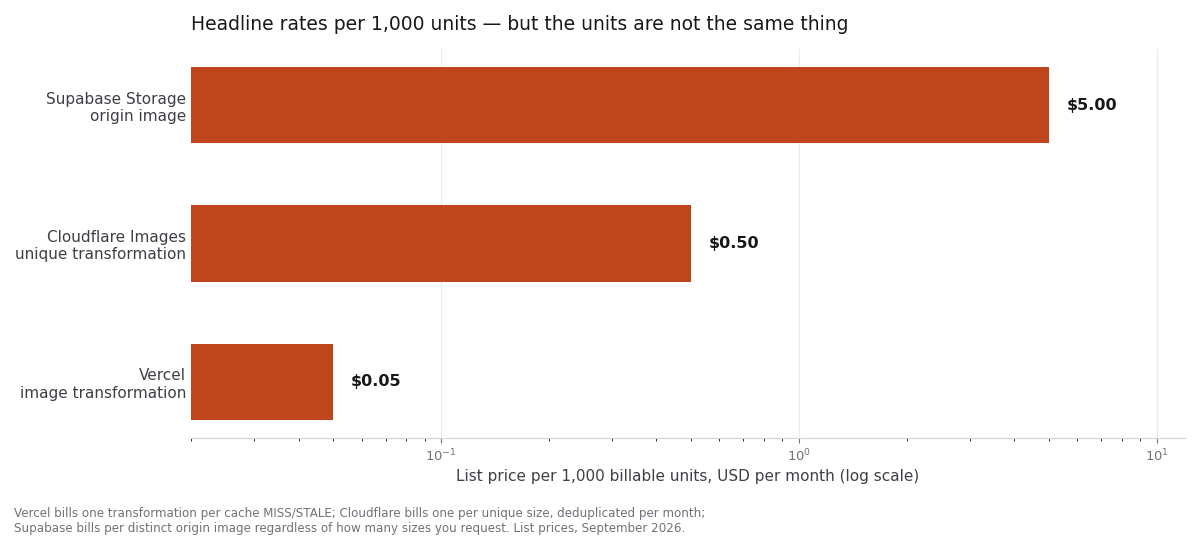
Vercel looks 100x cheaper than Supabase on that chart. It isn't. Those three bars measure three different things, and by the time you finish this post you'll know which of the three most resembles your own traffic. I go into the broader version of this trap in the hidden costs of SaaS infrastructure — image hosting is just the sharpest example of it.
How does Vercel's Image Optimization bill you?
If you're deploying a Next.js app on Vercel and using next/image, you're already using this, whether you chose it or not. It's the default, and for a lot of early-stage SaaS apps it's the right answer for exactly that reason: zero setup.
The billing has three meters. Per Vercel's Image Optimization pricing docs, the Hobby plan includes 5,000 transformations, 300,000 cache reads, and 100,000 cache writes per month; beyond that, on-demand rates run $0.05–$0.0812 per 1,000 transformations, $0.40–$0.64 per million cache reads, and $4.00–$6.40 per million cache writes.
The important mechanic is when a transformation gets billed. Vercel's docs are explicit: "Image transformations are billed for every cache MISS and STALE." That means your bill tracks cache behavior, not image count. A marketing page with ten images that gets a million visits generates almost no transformations, because the cache is warm. A user-generated avatar wall where every image is unique and rarely re-requested generates a transformation for nearly every view.
Cache reads work similarly. They're measured in 8 KB units, and Vercel notes they're not billed on every cache hit — only when an image has to come from the shared global cache rather than the in-region cache. Recently-accessed images in the same region are free to read.
Two things to know before you lean on this:
The Hobby plan is non-commercial only, per Vercel's fair use policy. If you're charging money, you're on Pro. That's not a gotcha, it's just worth saying out loud because a lot of "Vercel images are free" advice on the internet is quietly describing the Hobby tier.
And when you blow past Hobby limits, new images return a 402 and next/image shows your alt text instead of the picture. Previously-cached images keep working. So the failure mode is "some images vanish," which is a miserable thing to debug at 11pm if you don't know to look for it.
Vercel also charges Fast Data Transfer and Edge Requests on top of the three image meters, since the optimized image still has to travel through the CDN. That's the egress line I mentioned above, and it's easy to miss because it shows up in a different section of the invoice.
How do Cloudflare, Cloudinary, and Supabase meter images?
The other three options in this comparison each pick a different billable unit, and each one rewards a different shape of app.
Cloudflare Images: transformations that deduplicate
Cloudflare's model is the one I find easiest to reason about, and the reason is a single sentence in the Cloudflare Images pricing docs: "Repeat requests for the same transformation within the same month are counted only once for that month."
That changes the math completely. A unique transformation is one original plus one set of parameters. thumbnail.jpg at 100×100 is one. The same file at 200×200 is a second. But thumbnail.jpg at 100×100 requested four million times is still one billable transformation for that calendar month.
The rates: the Free plan includes 5,000 unique transformations per month against images you store anywhere — including R2 or your own bucket. The Paid plan includes the same 5,000 and then charges $0.50 per 1,000 unique transformations. If you also store images in Cloudflare Images, storage runs $5 per 100,000 images per month and delivery runs $1 per 100,000 images delivered.
There's a detail in the format parameter worth flagging, because it's the kind of thing you only discover on a bill. Cloudflare counts format=auto as one transformation even when it serves AVIF to some browsers and WebP to others. Most providers would count that as two encodes. Cloudflare doesn't.
The worked example in their docs is useful for calibration: 2,000 remote images served in five sizes each is 10,000 unique transformations, which after the 5,000 included comes to $2.50 for the month. Add R2 storage for 5,000 images averaging 5 MB and the total lands at $2.72. That is a genuinely small number for a real workload, and it's the reason Cloudflare keeps winning this comparison for founders whose image set is bounded — product photos, marketing assets, a few variants each.
The flip side: no overage happens on Free. Past 5,000 unique transformations you get a 9422 error on new transformations while cached ones keep serving. Same vanishing-images failure mode as Vercel, different error code.
Cloudinary and Supabase: pooled credits vs origin images
These two sit at opposite ends of the pricing-philosophy spectrum, and they're the two most likely to already be in your stack.
Cloudinary pools everything into one unit. Its credit system lets you spend the same credit on transformations, storage, or bandwidth depending on your use case — one credit is 1,000 transformations, or 1 GB of managed storage, or 1 GB of viewing bandwidth. The free plan is 25 credits a month. I wrote up the full integration path in the Cloudinary Next.js upload guide, including signed uploads and the widget.
The pooled model is a real advantage when your usage is lopsided in an unpredictable way. If this month is storage-heavy and next month is bandwidth-heavy, you don't blow through one meter while sitting on unused headroom in another. The disadvantage is that a single number makes it harder to see which activity is eating your plan, and you have to go look at the usage breakdown to find out.
Supabase Storage bills the most differently of anything here, and if you're already on Supabase it's worth understanding before you turn transformations on. Per Supabase's usage docs, you're charged "for the number of distinct images transformed during the billing period, regardless of how many transformations each image undergoes" — what they call origin images. Requesting four different sizes of two files counts as two origin images, not four transformations.
It's billed in packages of 1,000 at $5 each, rounded up. 1,001 origin images is two packages, so $10. Pro and Team include a quota of 100 origin images.
Storage itself is separate and cheap: $0.0213 per GB per month, with 100 GB included on Pro. Egress is its own line at $0.09 per GB uncached and $0.03 per GB cached.
So Supabase's meter rewards exactly the opposite shape of usage from Cloudflare's. Many variants of a small library of originals is cheap on Supabase (each original counts once, no matter how many sizes). A large library where each original gets one thumbnail is expensive (every original is a fresh package increment). If your app is closer to "10,000 user-uploaded receipts, one thumbnail each," that's 10 packages, $50/month, and you should price the alternatives. If you're already storing files there and haven't read the Supabase Storage upload guide, start there.
The four options, side by side
| | Vercel Image Optimization | Cloudflare Images | Cloudinary | Supabase Storage | | --- | --- | --- | --- | --- | | Billable unit | Transformation (per cache MISS/STALE) + cache reads + cache writes | Unique transformation, deduped per month | Pooled credit | Distinct origin image, per 1,000 | | Free allowance | 5K transformations, 300K reads, 100K writes (Hobby, non-commercial) | 5,000 unique transformations | 25 credits | 100 origin images (Pro quota) | | Paid rate | $0.05–$0.0812 / 1K transformations | $0.50 / 1K unique transformations | Credit-based | $5 / 1,000 origin images | | Storage priced separately | No (source is your own) | $5 / 100K images stored | Shares credit pool | $0.0213 / GB / month | | Egress priced separately | Yes (Fast Data Transfer) | Included in delivery | Shares credit pool | Yes ($0.09 / GB uncached) | | Setup effort | None on Vercel | Low | Medium (SDK + signing) | Low if already on Supabase | | Rewards | Warm caches, few unique images | Bounded image set, heavy repeat traffic | Lopsided/unpredictable usage | Few originals, many variants | | Punishes | Unique images with cold caches | Huge variant matrices | Nothing specifically, but opaque | Many originals, one variant each |
Rates are the published list prices as of September 2026 and will drift. The shapes of the meters change far more slowly than the numbers do, so that's what I'd optimize the decision around.
Here's the decision the way I'd actually walk it:
flowchart TD
    A[Where do your images come from?] --> B[Mostly marketing and product assets<br/>a bounded set you control]
    A --> C[User uploads<br/>unbounded and growing]
    B --> D{Already deployed on Vercel?}
    D -- Yes --> E[Use next/image as-is<br/>caches stay warm, cost stays near zero]
    D -- No --> F[Cloudflare Images<br/>dedupe is a perfect fit]
    C --> G{How many variants per original?}
    G -- One or two --> H[Cloudflare Images or a bucket + CDN<br/>avoid per-origin-image pricing]
    G -- Four or more --> I{Already on Supabase?}
    I -- Yes --> J[Supabase transformations<br/>variants are free per origin]
    I -- No --> K[Cloudinary<br/>pooled credits absorb the variance]
The fifth option, which the boxes above quietly assume you've rejected, is the plain one: dump originals in an S3-compatible bucket, put a CDN in front, and pre-generate the two or three sizes you need at upload time. No transformation meter at all, because you're not transforming on demand. You pay storage and egress and nothing else. It's more code and more thinking, and it's still the cheapest thing at scale. The marketplace has the wiring prompts for the bucket-and-CDN variants if you want to go that way.
The meter nobody models: egress
Every founder I've talked to about this models transformations and forgets bandwidth. Then a single page gets traction, and the bill arrives.
The arithmetic is simple enough to do in your head, which is why it's worth doing before you launch. Take your average delivered image size, multiply by images-per-page, multiply by monthly pageviews. Ten images at 200 KB is 2 MB per page. Fifty thousand pageviews is 100 GB. At Supabase's uncached egress rate of $0.09/GB that's $9 — fine. At a hundred times that traffic it's $900, and now the shape of your image pipeline is a business decision.
Three mitigations, in order of how much they buy you:
Serve smaller images. This is the whole game. A 200 KB hero is a 60 KB hero in AVIF at a quality setting nobody will notice. That's not a 3x cost saving on one line item — it's a 3x saving on egress and faster pages and better Core Web Vitals. Every provider in this comparison will do the format negotiation for you if you let it.
Cache harder. Long Cache-Control max-age values on immutable images means the browser stops asking. Supabase's own optimization guidance leads with pre-generating common variants and leaning on CDN caching rather than transforming on the fly. The same advice applies everywhere. If you want the general version of this, the caching strategy post covers the layers.
Watch the meter. Vercel Pro has spend management that can notify you or pause projects at a threshold. Supabase has a spend cap. Cloudflare Free simply stops transforming. Turn on whichever one your provider gives you, today, before you need it.
The point isn't that any of these providers is expensive. At founder scale, all four are cheap. The point is that image bills are non-linear in traffic, and traffic is the thing you're actively trying to make go up.
How do you switch providers without rewriting your app?
Put an abstraction in at the start, because the cost of doing it on day one is about fifteen minutes and the cost of doing it after you've shipped is a weekend.
If you're in Next.js, this is a solved problem. The image config supports a loaderFile option that points at a single file exporting a default function. That function receives src, width, and quality and returns a URL string. Swap providers by editing that one function.
// image-loader.js
'use client'

export default function imageLoader({ src, width, quality }) {
  const params = ['format=auto', `width=${width}`, `quality=${quality || 75}`]
  return `https://cdn.example.com/cdn-cgi/image/${params.join(',')}/${src}`
}
// next.config.ts
const nextConfig = {
  images: {
    loader: 'custom',
    loaderFile: './image-loader.js',
  },
}
Two adjacent details that cost people time:
Use remotePatterns, not domains, for external image hosts. The Next.js documentation is direct about why: domains doesn't support wildcards and can't restrict protocol, port, or pathname, and since most remote image hosts are multi-tenant, remotePatterns is what actually limits you to the images you intended to optimize.
And if an image needs authentication to fetch, unoptimized is the escape hatch. The optimizer can't present your credentials, so you either serve the original or you put a signed-URL step in front of it.
In the Coding Capybaras boilerplate, this abstraction is the reason swapping image hosts doesn't touch any component code. One loader file, one config value, and every next/image in the app follows.
Frequently asked questions
Is a dedicated image CDN worth it over a plain bucket?
For most early SaaS apps, yes — but only for the format negotiation and on-the-fly resizing, not for delivery speed. A bucket behind any modern CDN is already fast. What you're buying is not writing a resize pipeline yourself.
Why did my Vercel image bill spike without a traffic spike?
Almost always cache misses. Vercel bills transformations per cache MISS and STALE, so a deploy that changes image URLs, a new set of unique user-uploaded images, or a widened set of sizes breakpoints all generate fresh transformations against the same pageview count.
Does Cloudflare Images really only charge once per image size per month?
That's what their pricing docs state: repeat requests for the same transformation within the same calendar month count once. Delivery is metered separately at $1 per 100,000 images delivered, but only for images stored in Cloudflare Images.
Should I pre-generate image sizes or transform on demand?
Pre-generate if you know your sizes and your originals are numerous. Transform on demand if your sizes are unpredictable or your original set is small. Supabase's own guidance recommends pre-generating common variants specifically to keep the transformation meter down.
Can I mix providers?
Yes, and plenty of apps should. Marketing assets through next/image on Vercel, user uploads through a bucket with pre-generated thumbnails. The loader abstraction above is per-app, but nothing stops you from routing different image sources differently.
What about AVIF versus WebP?
Serve AVIF where the browser supports it and WebP as the fallback, and let the provider negotiate. Every option in this comparison does this automatically. The file-size win is the single highest-leverage change you can make to an image bill.
The decision, compressed
If you're on Vercel and your images are marketing assets, do nothing — next/image is already the right call and your caches will stay warm. If your image set is bounded and traffic is heavy, Cloudflare Images and its monthly dedupe is the cheapest honest answer in this SaaS image CDN comparison. If you're already on Supabase and you serve many sizes of few originals, turn on Storage transformations. If your usage is lumpy and you'd rather not think about which meter you're hitting, Cloudinary's pooled credits buy you that. And if you're at the scale where any of these numbers matters, a bucket with pre-generated variants behind a CDN beats all four.
Whatever you pick, spend the fifteen minutes on the loader file. That's the decision you can't easily make later.
If you're wiring image hosting into a Next.js SaaS right now, the Cloudflare R2 integration guide on Coding Capybaras has the exact prompt to paste into Claude Code — bucket, CDN, signed uploads, and the loader.