The Hidden Costs of SaaS Infrastructure (and How to Plan)
The SaaS infrastructure costs that don't show up on pricing pages: egress, image transformations, per-project minimums, and the compliance add-on tax.
· Justin Boggs

Photo by Annie Spratt on Unsplash
The hidden costs of SaaS infrastructure are almost never the monthly plan fees you compared on pricing pages. They're the metered line items underneath — egress, image transformations, function invocations, per-project minimums — plus a category of add-ons that only appear once a customer asks you a question you can't answer yet. A stack that looks like $50 a month on the pricing pages routinely bills $180 in month six, and the increase usually traces to one or two meters running well past their included allowance. This post lists the specific line items, with the published rates, and shows how to cap each one before it surprises you.
TL;DR
- Plan fees are the small, predictable part of an infrastructure bill. Metered usage is the part that moves.
- Egress is the single most common surprise. Supabase charges $0.09 per GB uncached and $0.03 per GB cached beyond the 250 GB each that paid plans include.
- Image optimization is Vercel's equivalent trap: transformations, cache reads, and cache writes are three separate meters, and cache writes are the expensive one.
- Non-usage costs sneak in too — per-project minimums across dev/staging/prod, seat fees, and compliance add-ons priced in the hundreds per month.
- Turn on spend caps and usage alerts on day one, not the month you get the bill. Both Vercel and Supabase support this and neither enables it for you.
Why the sticker price is never the bill
Modern infrastructure pricing is a small subscription fee wrapped around a large number of independent meters, and the meters are what actually determine your bill. When you compare Vercel Pro against a Supabase Pro project against a Railway plan, you're comparing the smallest and least variable component of each.
This isn't a trick. It's the same usage-based model you'd use if you were billing your own customers for consumption — costs scale with what gets used, which is genuinely fairer than charging everyone the same. But it moves the forecasting burden onto you, and if you've come from a world of fixed software subscriptions, the mental model is different in a way that costs money to learn.
Three properties make these bills hard to predict.
Meters are independent. Your database plan and your bandwidth are separate line items. Doubling traffic doesn't double your bill; it might multiply one line item by ten while leaving the rest flat. That's why bills tend to jump rather than drift.
Usage is a consequence of code, not of customers. One deploy that swaps a compressed thumbnail for a full-resolution source image changes your transfer and transformation costs by an order of magnitude, with no change in signups. The bill goes up because of something you shipped, which makes it harder to attribute.
Charges accrue and can't be undone. Supabase's egress documentation says this directly: usage that has already been served cannot be reduced retroactively, so optimizations only lower future egress. By the time you notice the number, the month is already partly spent.
None of which means the free-tier-first approach is wrong — launching on free tiers is still the right call for most first-time founders. It means you should know which meter graduates first, and roughly when.
The egress trap: what data transfer actually costs
Egress is the number one surprise in this category, and it's worth understanding precisely because the word doesn't describe what most founders think it describes.
Egress is any data leaving the platform toward a client. On Supabase, the egress documentation is explicit that it's incurred by all services, not just file storage: Database, Auth, Storage, Edge Functions, Realtime, and Log Drains. Every sign-in that returns a session, every realtime inventory update pushed to a subscribed client, every row your ORM returns because it was configured to return the whole record after an update — all egress.
The rates: $0.09 per GB per month for uncached egress and $0.03 per GB per month for cached egress. Paid plans include 250 GB of each; the Free plan includes 5 GB of each. You're only charged for usage past the quota, and the two quotas are independent.
Here's how a single Supabase Pro project with a Small compute instance actually scales as uncached egress grows past that 250 GB line.
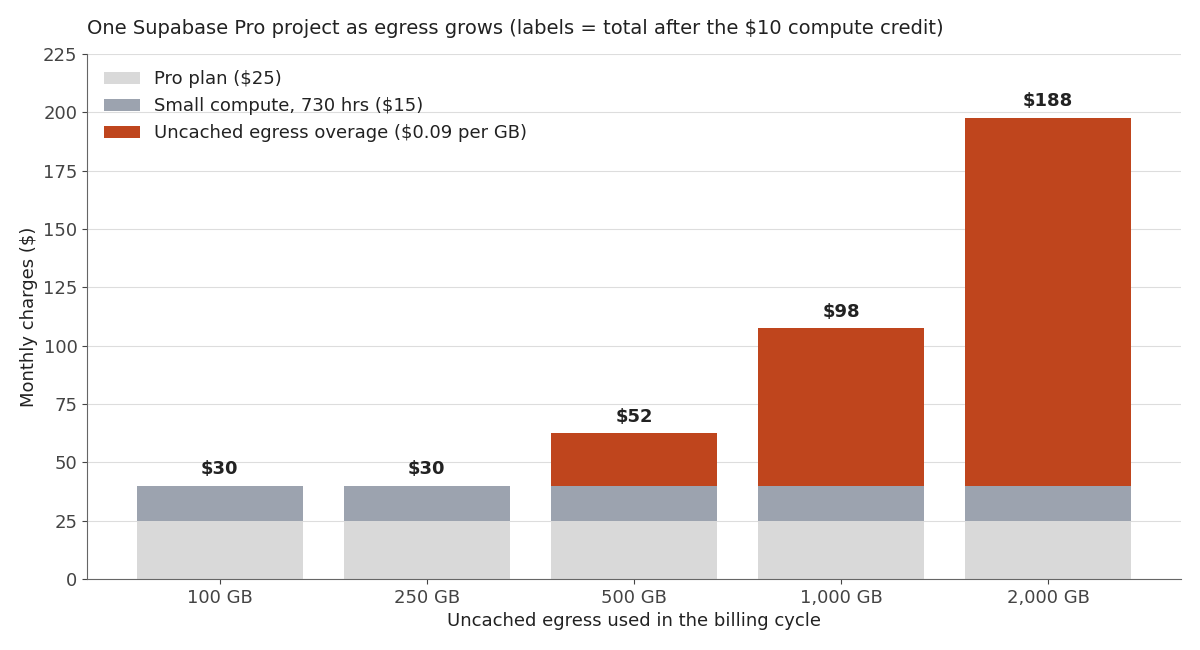
Two things stand out. Below the quota, the bill is boringly flat — $30 a month after the $10 compute credit, and the marginal cost of a new user is effectively zero. Past the quota, egress becomes the dominant line item and grows linearly forever. There's no second plateau.
The practical defenses are unglamorous and they work. Select fewer columns and fewer rows. Configure your ORM not to return the entire row on inserts and updates when you don't need it. Cache aggressively, because cached egress costs a third of uncached. Move large media to a CDN-backed store rather than serving it out of your application database. Supabase's own optimization list says the same things, and the reason it's a list of small habits rather than one big fix is that egress accumulates from thousands of ordinary requests.
If you're evaluating hosts on this dimension specifically, the transfer pricing differences are one of the sharper distinctions between them — worth reading alongside the broader Vercel, Netlify, and Railway comparison rather than in isolation.
Vercel's meters: images, functions, builds, and transfer
Vercel's bill decomposes into more meters than most founders expect. Vercel's pricing documentation enumerates them, and the ones that generate surprise bills are consistently the image optimization group.
Image optimization is not one meter. It's three, and they price very differently:
| Image meter | Hobby included | On-demand rate | Billed when | | --- | --- | --- | --- | | Image transformations | 5K / month | $0.05 – $0.0812 per 1K | Every cache MISS or STALE | | Image cache reads | 300K / month | $0.40 – $0.64 per 1M | Retrieved from the shared global cache | | Image cache writes | 100K / month | $4.00 – $6.40 per 1M | Every cache MISS or STALE |
Look at the relative rates. Cache writes cost roughly eighty times what cache reads cost per unit, and they're billed on the same trigger as transformations. Which means anything that causes cache misses — deploying frequently, serving images at many distinct sizes, using query-string variants — hits two expensive meters simultaneously.
Vercel's image optimization docs give the two highest-leverage fixes: constrain images.imageSizes and images.deviceSizes to the widths your audience actually uses, and lower the quality setting. A narrower size allowlist directly reduces the number of distinct cache keys, which reduces transformations and writes together. Lower quality reduces the bytes on every read and every transfer. Neither requires an architecture change.
The other Vercel meters worth knowing before they appear:
- Builds at $0.0035 per CPU minute, rounded up to the minute and multiplied by the machine's CPU count. Vercel's own example: a 2-minute-34-second build on an 8-CPU Enhanced machine bills as 3 minutes × 8 CPUs × $0.0035 = $0.084. Small per build, and then you notice how many preview deploys a chatty repo generates in a week.
- Functions, metered on Active CPU, Provisioned Memory, and Invocations. Hobby includes 4 hours of Active CPU, 360 GB-hours of Provisioned Memory, and 1 million invocations; Pro bills these on demand against a monthly credit.
- Web Analytics at $0.03 per 1,000 events beyond the plan allowance, and Observability Plus at $1.20 per million events. Both are cheap per unit and both scale with traffic, so they show up right when everything else does.
Vercel does send emails as you approach limits and surfaces alerts in the dashboard. Pro teams can also configure spend management to notify, fire a webhook, or pause projects at a set amount. Configure that on day one. It's the difference between a bad afternoon and a bad invoice.
The costs that aren't usage at all
The metered line items get the attention. These other three categories are more predictable and, in my experience, more often forgotten entirely.
Per-project and per-environment minimums. Infrastructure costs are frequently priced per project, not per company. A separate Supabase project for development, staging, and production means paying the plan fee three times unless you deliberately keep the non-production ones on a free tier. Most founders set up staging in month four, forget it exists, and pay for it for a year. Audit your project list quarterly.
Seats. Vercel Pro charges $20 per month per additional paid seat. That's fine at one person and it's a real line when you add a contractor, a designer, and an agency. Seat-based pricing is the cost category that scales with your team, which means it grows exactly when revenue hasn't yet.
The compliance and enterprise-feature tax. This one catches people completely off guard, because it's invisible until a customer asks a question. From Vercel's published add-on pricing: SAML Single Sign-On is $300 per month, a HIPAA BAA is $350 per month, Advanced Deployment Protection is $150 per month, Static IPs are $100 per month per project, and a Preview Deployment Suffix is $100 per month. None of that is unreasonable for what it is. But if your pricing model assumes a $99/month customer is profitable and closing them requires SSO, the math changed and you didn't notice. This is the strongest argument I know for thinking about your pricing floor early: your first enterprise-shaped customer can arrive with a $300/month infrastructure requirement attached.
There's a fourth category that isn't a line item at all: the time cost of running the stack. Debugging a bill, tracing an egress spike, migrating off a service that got expensive — that's founder hours, and for a solo founder those are the scarcest resource in the business. A stack that costs $40 more per month but requires zero attention is usually the cheaper stack.
How to actually plan for this
Here's the routine I'd give a founder starting today. It takes about an hour to set up and it's the highest-ROI hour in your infrastructure setup.
1. Enumerate your meters, once, in writing. For each service, list every billable dimension and its included allowance. You'll find dimensions you didn't know existed. Keep it in the repo next to your environment docs.
2. Turn on spend caps and alerts before you need them. Supabase's Spend Cap puts you into a grace period and notification flow instead of billing overages. Vercel's spend management can notify, call a webhook, or pause projects at a threshold. Both default to off.
3. Identify which meter graduates first. For a content-heavy or media-heavy product it's almost always egress or image optimization. For an API product it's function invocations. For an AI product it's model inference, which isn't even on this list but dwarfs everything on it. Knowing the answer tells you what to instrument.
4. Put the number on your dashboard. Infrastructure cost per active customer belongs alongside your other early metrics — it's the denominator of every margin question you'll be asked. If you're building out a first-month metrics dashboard, add one row for total infrastructure spend and one for spend divided by active users. Watch the second one.
5. Re-check after every deploy that touches media, caching, or a background job. Those are the three change types that move meters. A weekly glance at the usage page during the first few months teaches you your own cost shape faster than any article can.
| Line item | What triggers it | How to cap it |
| --- | --- | --- |
| Database / API egress | Wide SELECTs, returning full rows on write | Select fewer columns, don't return rows on update |
| Storage egress | Serving media from the app database | CDN in front, cache aggressively |
| Image transformations & cache writes | Many distinct sizes, frequent cache misses | Narrow the size allowlist, lower quality |
| Function invocations | Chatty client polling, per-request middleware | Batch, cache, move work to background jobs |
| Build minutes | Frequent preview deploys, large repos | Fewer preview branches, cache dependencies |
| Per-project fees | Staging/dev environments left on paid plans | Quarterly project audit |
| Seats | Contractors and collaborators added ad hoc | Remove seats when engagements end |
| Compliance add-ons | One enterprise prospect's security review | Price it into enterprise tiers, not your standard plan |
The point of the table isn't to memorize it. It's that every one of these has a cheap, boring mitigation available before the bill arrives and none available after.
Frequently asked questions
What's the most common surprise on an indie SaaS infrastructure bill?
Egress, by a wide margin. It's charged across every service rather than just file storage, it accumulates invisibly from ordinary requests, and it can't be reduced retroactively once served. Image optimization on Vercel is a close second because cache writes are priced far higher than cache reads.
Should I start on free tiers or pay from day one?
Free tiers, in almost every case. The relevant question isn't whether to start free, it's which meter you'll graduate on and roughly when — knowing that lets you optimize the right thing before it's expensive rather than reacting after.
How much should I budget for infrastructure in year one?
There's no honest universal number, because it depends entirely on what your product does with data. The useful exercise is to project your single dominant meter at 10× your current usage and see what that alone costs. If that number frightens you, you've found the thing to optimize.
Do spend caps risk taking my site down?
They can, which is the tradeoff. Supabase's Spend Cap puts you in a grace period with notifications rather than immediately cutting service; Vercel's spend management lets you choose between notification, webhook, and pausing. Start with notification-only, then decide whether a hard stop is right once you know your normal range.
Does a different host solve this?
Not fundamentally. Every serverless and managed platform prices usage in some form, and the ones with flat pricing are usually charging you a fixed premium for the same variability. What differs is which meters exist and how the included allowances are drawn, which is worth comparing against your specific workload rather than in the abstract.
The bottom line
The hidden costs of SaaS infrastructure aren't hidden in any dishonest sense. They're published, they're documented, and every rate in this post came from the provider's own pricing page. They're hidden because pricing pages lead with the plan fee, comparison articles compare plan fees, and the meters that actually determine your bill live two clicks deeper — in exactly the documentation nobody reads until the invoice does something unexpected.
The fix is an hour of work: list your meters, turn on spend caps, learn which one graduates first, and put cost per active customer on the dashboard you already look at. Do that at the start and infrastructure cost becomes a number you manage rather than a number that happens to you.
If you're picking a stack now and want the Next.js, Supabase, Stripe, and Resend combination already wired together with the cost-sensitive defaults in place, Coding Capybaras is the free boilerplate I built for exactly that starting point.