Supabase Storage File Uploads: Signed URLs, Limits, Cleanup
A practical guide to Supabase Storage file uploads for non-tech founders — bucket policies, signed URLs, file size limits, and cleaning up orphaned files.
· Justin Boggs

Adding file uploads to a Supabase-backed SaaS comes down to four decisions: where the file lives (a bucket), who's allowed to put it there (a policy), how people read it back (a signed or public URL), and what happens to it when the record it belongs to gets deleted (cleanup). Supabase Storage is an S3-compatible object store wired directly into your Postgres database, so the same Row Level Security rules that protect your tables also protect your files. Get those four decisions right and uploads are a solved problem. Get them wrong and you'll ship either a wide-open bucket anyone can read or a pile of orphaned files quietly running up your storage bill. This guide walks through all four, with the AI prompt at the end.
TL;DR
- A bucket is public or private. Public buckets serve permanent URLs; private buckets require a signed, time-limited URL to read a file.
- Storage blocks every upload until you write an RLS policy on
storage.objects. Scope uploads to a per-user folder so people can't overwrite each other.- Standard uploads are ideal for files up to 6 MB; use resumable (TUS) uploads above that. Free projects cap files at 50 MB; Pro and up go to 500 GB.
- Store the file's path in a database column. That column is your source of truth — deleting the row should delete the file, or you'll accumulate orphans.
- Test upload and read policies from a logged-in client, not the dashboard. The service key bypasses RLS and will hide your mistakes.
What Supabase Storage actually is
Supabase Storage is an object store — think a folder system for files that lives next to your database instead of on your web server. Every Supabase project gets it for free, and the reason it's worth using over rolling your own is that it shares one thing with the rest of your stack: Postgres Row Level Security. The permission rules you write for your tables are the same kind of rules you write for your files.
Files live in buckets. A bucket is a top-level container, and the first decision you make about any bucket is whether it's public or private. This choice changes everything downstream, so it's worth being deliberate. A public bucket serves files at a permanent, guessable URL with no authentication — correct for things that are meant to be seen by everyone, like a blog post's cover image. A private bucket serves nothing by default; every read requires a short-lived signed URL that you generate on the server. That's what you want for anything user-specific: uploaded documents, private avatars, exports, receipts.
The mental model that keeps founders out of trouble: public means "anyone with the link, forever"; private means "this person, for the next few minutes." If you're not sure, choose private. You can always generate a public-feeling experience from a private bucket with signed URLs, but you can't un-leak a file that was sitting in a public bucket while you figured out your access rules.
Supabase's own guidance is that Storage is designed to work with Row Level Security, and it enforces this by default: a private bucket with no policies rejects every operation. That's a feature, not a bug. It means the failure mode is "nothing works until I write the rule," which is far safer than "everything works until I remember to lock it down." If you've read the Supabase vs Firebase comparison, this is one of the places the Postgres foundation pays off — you're not learning a second, separate permission system for files.
Writing the upload policy (or nothing uploads)
Here's the fact that trips up every first-time builder: by default, Storage does not allow any uploads to a bucket without an RLS policy. As the Supabase access control docs put it, you selectively allow operations by creating policies on the storage.objects table. No policy, no upload. When your first upload attempt returns a permissions error, this is almost always why.
The minimum policy to allow uploads is one that grants INSERT on storage.objects. The simplest useful version restricts uploads to authenticated users and a specific bucket:
create policy "Authenticated users can upload"
on storage.objects for insert to authenticated
with check ( bucket_id = 'user-files' );
That works, but it lets any logged-in user write anywhere in the bucket, including over another user's files. The pattern you actually want scopes each user to their own folder, named after their user ID. Supabase exposes a helper, storage.foldername(name), that splits a file's path into segments:
create policy "Users upload to their own folder"
on storage.objects for insert to authenticated
with check (
  bucket_id = 'user-files'
  and (storage.foldername(name))[1] = (select auth.jwt()->>'sub')
);
Now a user can only insert files whose path starts with their own ID — a1b2.../invoice.pdf is allowed, but writing to someone-else/invoice.pdf is rejected by the database. This is the same per-user isolation you'd write for a table, applied to files. If you want users to be able to overwrite their own files (via the upsert option), the docs note you'll need to grant SELECT and UPDATE in addition to INSERT. Reading files back gets its own SELECT policy, and deleting gets a DELETE policy — you write each operation you want to permit.
One warning that matters more for AI-assisted builders than anyone: the service role key bypasses RLS entirely. If you upload from a server route using the service key, none of these policies apply — you have unrestricted access to every file. That's fine and intended for trusted server code, but it means you must never ship the service key to the browser, and you should test your policies using a logged-in client, not a server script. This is the storage version of the footgun I covered in the Row Level Security tutorial: the tool you test with can quietly have more power than your real users, so it tells you everything works when it doesn't.
Uploading: standard, resumable, and signed upload URLs
Once policies are in place, the upload itself is a few lines. Supabase's standard upload method uses the SDK and ordinary multipart/form-data:
const { data, error } = await supabase
  .storage
  .from('user-files')
  .upload(`${userId}/${crypto.randomUUID()}-${file.name}`, file)
Notice the path: it starts with the user's ID (to satisfy the folder policy) and includes a random prefix so two files with the same name don't collide. That collision matters. By default, uploading to a path that already exists returns a 400 Asset Already Exists error — Supabase won't silently overwrite. You can force an overwrite with the upsert: true option, but the docs explicitly advise against it when avoidable, because the CDN takes time to propagate changes and users can see stale content. Uploading to a fresh path every time sidesteps the whole problem.
Which upload method you use depends on file size, and the threshold is worth memorizing.
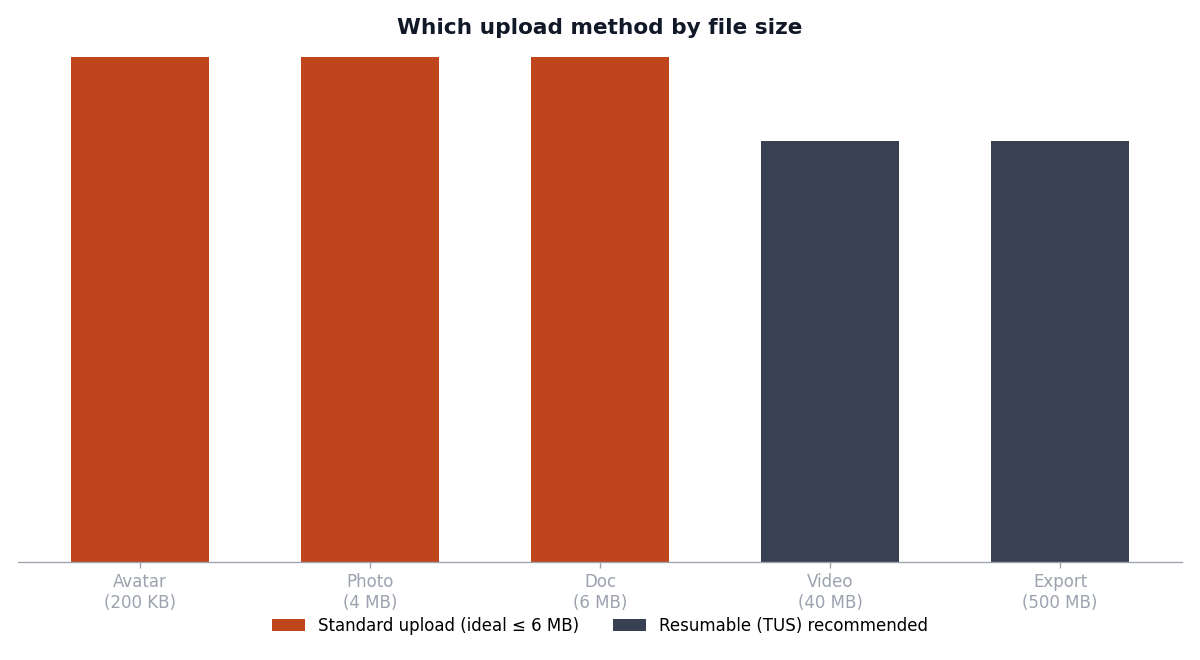
The standard method is ideal for files up to 6 MB. You can push up to 5 GB through it, but Supabase recommends switching to resumable (TUS) uploads above 6 MB for reliability — resumable uploads survive a dropped connection and pick up where they left off, which matters on flaky mobile networks. For most SaaS apps handling avatars, documents, and CSVs, standard uploads cover everything and you never touch TUS.
There's a third pattern that's the right answer more often than people realize: the signed upload URL. Instead of streaming the file through your server, you generate a one-time, time-limited URL on the server (after running your own security checks — plan limits, quotas, virus policy) and hand it to the browser, which uploads directly to Storage. Your server never touches the file bytes, which keeps your serverless functions fast and cheap. It's the storage equivalent of the webhook and background-job patterns where you keep heavy work off the request path.
Reading files back: public URLs vs signed URLs
How you read a file back depends entirely on the bucket type, and this is where the public/private decision from earlier comes home to roost.
For a public bucket, you call getPublicUrl(). It's a pure client-side string builder — it doesn't even hit the network, it just constructs the permanent URL where the file lives. Anyone with that URL can load the file forever. Correct for public assets, catastrophic for private ones.
For a private bucket, you call createSignedUrl() with an expiry. Supabase returns a URL with a signed token baked in that grants read access for exactly the window you specify, then stops working. Here's the comparison a founder needs when deciding which method to reach for:
| Method | Bucket type | Who can access | Lifetime | Where it runs |
| --- | --- | --- | --- | --- |
| getPublicUrl() | Public | Anyone with the link | Permanent | Client (no network call) |
| createSignedUrl() | Private | Anyone with the link, until it expires | Minutes to hours (you set it) | Server |
| createSignedUploadUrl() | Either | One-time upload to a set path | Short (you set it) | Server |
A signed read URL looks like this:
const { data } = await supabase
  .storage
  .from('user-files')
  .createSignedUrl(`${userId}/report.pdf`, 60 * 60) // valid for 1 hour
The expiry is a real security control, not a formality. A 60-second signed URL for a "download now" button behaves very differently from a 7-day URL you paste into an email. Match the lifetime to the use: short for interactive downloads, longer only when the link genuinely needs to survive being shared. And remember — a signed URL, once generated, works for anyone who has it until it expires. It's time-limited, not identity-bound. Don't treat it as a per-person secret.
Cleanup: the orphaned-file problem nobody warns you about
Uploads are the part everyone builds. Cleanup is the part everyone forgets, and it's the one that shows up as a mystery line on your bill six months in — the kind of quiet cost I flagged in the hidden costs of SaaS infrastructure.
The problem is that a file in Storage and the database row that references it are two separate things, and they fall out of sync in two directions. A user uploads an avatar, but the profile save fails — now there's a file with no row pointing to it. Or a user deletes their account and you delete their profiles row, but the avatar sits in Storage forever because nothing told it to leave. Files don't clean themselves up. Deleting a row does not delete the file.
The fix starts with treating the database as the source of truth. Every uploaded file gets a row (or a column on an existing row) storing its bucket path. That path column is what your app reads from, and it's what your cleanup logic keys on. This is also a place where a sloppy schema will bite you later; the database schema mistakes post covers why a nullable, un-indexed path column becomes a problem at scale.
Then you close both gaps. When a user replaces a file, delete the old path with supabase.storage.from('user-files').remove([oldPath]) in the same operation that updates the row. When a user or record is deleted, delete the associated files as part of that flow — ideally in a database trigger or a server action, so it can't be skipped. For the orphans that slip through anyway (failed uploads, half-finished flows), run a periodic reconciliation job: list what's in the bucket, compare against your path columns, and remove anything with no matching row. A weekly scheduled job is plenty for a small SaaS. The point isn't perfection — it's that "delete the file when its row dies" is a decision you make on purpose, not a thing that happens automatically.
Frequently asked questions
What's the maximum file size Supabase Storage allows?
It depends on your plan. Per the Supabase limits documentation, Free projects cap files at 50 MB, while Pro, Team, and Enterprise plans go up to 500 GB. You can also set a lower per-bucket limit and restrict allowed file types, but a bucket limit can only be equal to or lower than the global limit — more specific limits restrict, they never expand.
Should my bucket be public or private?
Default to private. Public buckets serve permanent URLs to anyone, which is correct only for assets meant to be universally visible, like marketing images. Anything tied to a specific user — documents, private photos, exports — belongs in a private bucket read through short-lived signed URLs. You can't retroactively secure a file that was public.
Why is my upload failing with a permissions error?
Almost always because there's no RLS policy allowing the insert. Storage blocks all uploads to a bucket until you create an INSERT policy on storage.objects. Check that the policy exists, that it targets the right bucket_id, and that the file path matches any folder restriction in the policy (for example, that it starts with the user's ID).
How do I stop two users from overwriting each other's files?
Scope each user to a folder named after their user ID using the storage.foldername(name) helper in your upload policy, and give every file a unique path (a random UUID prefix works). Uploading to an existing path returns a 400 Asset Already Exists error by default rather than silently overwriting, which is a second layer of protection.
Do I need Cloudinary if I have Supabase Storage?
Not for basic uploads. Supabase Storage handles storing and serving files, and includes on-the-fly image transformations. You'd reach for a dedicated service like Cloudinary when you need heavy image processing or a mature transformation pipeline — the Cloudinary image uploads guide covers when that tradeoff makes sense versus keeping everything in Supabase.
How do I clean up files when a user deletes their account?
Deleting a database row does not delete the associated file. Store each file's path in a database column, then delete the file with storage.remove([path]) as part of your account-deletion flow — ideally in a trigger or server action so it can't be skipped. Run a periodic job to catch orphaned files that slip through from failed uploads.
Getting it wired in
File uploads are one of those features that feel intimidating and turn out to be four clear decisions once you name them: bucket visibility, upload policy, read method, and cleanup. The order matters — start with private buckets and per-user policies, add signed URLs for reads, and build the delete path before you have a thousand orphaned files to reconcile. If you're directing an AI assistant through this, be explicit that Supabase Storage file uploads need an RLS policy on storage.objects first, because that's the step it's most likely to skip.
If you're building on the Coding Capybaras stack, the Supabase Storage marketplace guide has the copy-paste prompt that wires all four decisions — bucket, policy, signed URLs, and cleanup job — into a Next.js and Supabase app in one pass. The complete boilerplate is free if you want to see how the pieces fit together.