Mobile App vs Web App for SaaS | Coding Capybaras
Mobile app vs web app for your SaaS first version: app store friction, PWA capabilities, real costs, and how to decide correctly without wasting three months.
· Justin Boggs

Photo by freestocks on Unsplash
For the first version of a SaaS product, build a responsive web app. Not a native mobile app, and not both. A responsive web app ships in days instead of weeks, needs no app store approval, updates the instant you deploy, and — since iOS 16.4 — can be installed to a phone's home screen and send push notifications without you joining a single developer program. Native apps earn their cost later, once you know what people actually use and you have a specific reason the browser can't serve. The mobile app vs web app decision is mostly a question of timing, and almost every non-technical founder gets the timing wrong in the same direction.
TL;DR
- Ship responsive web first. It is one codebase, no review queue, and instant updates.
- A progressive web app (PWA) closes most of the gap. Home screen install, offline handling, and push notifications all work on iOS 16.4+ and Android.
- Apple rejects repackaged websites under Guideline 4.2, so "just wrap my site in an app" is not the shortcut it sounds like.
- The real cost of native isn't the $99 developer fee — it is store commission, release cycles, and a second codebase you maintain forever.
- Go native when you need a capability the browser lacks, when store distribution is genuinely a channel for you, or when paying customers ask by name.
What is the actual difference between a mobile app and a web app?
A web app is software that runs in the browser and is delivered over a URL. A native mobile app is software compiled for iOS or Android, distributed through an app store, and installed on the device. Everything else in this debate is downstream of that one distinction: where the code runs, and who stands between you and your user.
A responsive web app is a web app whose layout adapts to screen size. That's it. It is not a lesser thing — Notion, Linear, Figma, and Stripe's own dashboard all started as web apps and still do most of their work there. When someone opens your site on a phone, they get a full-screen, touch-friendly product with zero install step.
A progressive web app is a responsive web app plus three additions: a manifest file that tells the OS how to install it, a service worker that handles caching and background events, and HTTPS. Add those and your site can be saved to a home screen, open without browser chrome, and receive push notifications. It looks and behaves like an app because, to the operating system, it now mostly is one.
Which web framework you pick barely changes this calculus — Next.js, Remix, and Astro all render responsive pages fine, and I compare them in Next.js vs Remix vs Astro. The runtime question is the one that matters here.
Native apps get you the things the browser genuinely cannot do: deep hardware access, background location, Bluetooth peripherals, widgets, and the store listing itself as a discovery surface. They cost you a compiled build for each platform, a review queue between you and every bug fix, and a commission on every dollar you collect in-app.
The mistake I see most often — and the one I nearly made — is treating "mobile app" as a feature to add rather than a distribution channel to enter. Adding a native app is not like adding dark mode. It's like opening a second store in a different city that has its own landlord, its own inspection schedule, and a cut of your revenue.
Why "just wrap my website in an app" gets rejected
The tempting middle path is a webview wrapper: a thin native shell that loads your website inside it. Ship your web app once, submit the wrapper to both stores, and collect the store presence for free. Founders reach for this constantly, and Apple has a guideline written specifically about it.
From Apple's App Review Guidelines, section 4.2 Minimum Functionality, the text is blunt:
Your app should include features, content, and UI that elevate it beyond a repackaged website. If your app is not particularly useful, unique, or "app-like," it doesn't belong on the App Store.
Section 4.2.2 goes further: apps "shouldn't primarily be marketing materials, advertisements, web clippings, content aggregators, or a collection of links." A webview pointed at your marketing site plus a login screen lands squarely in that description.
This does not mean every webview app gets rejected. Plenty of shipped apps use webviews for parts of their interface. The bar is whether the app does something meaningfully native — offline behavior, real push integration, hardware use, OS-level features — rather than rendering the same pages Safari already renders. Bolting on a push notification SDK purely to have a native API in the binary is the kind of thing reviewers have seen ten thousand times.
The practical read for a solo founder: a wrapper is not a cheap way to get an App Store listing. It is a way to spend two weeks building, one week waiting, and then get a rejection notice that asks you to add native functionality you didn't want to build. If you're going to enter the store, enter it deliberately.
There is a second-order problem too. Once you have a wrapper in the store, Apple's in-app purchase rules can apply to what happens inside it. A subscription sold through a webview inside your own app is not obviously exempt from store commission. That's a conversation worth having with the guidelines open before you build, not after.
What a PWA can actually do in 2026
This is the part that has changed most, and the part non-technical founders are most often working from stale information about. The advice "PWAs don't work on iPhone" was accurate in 2019. It isn't now.
In iOS and iPadOS 16.4, Apple added Web Push to home screen web apps. The WebKit team's announcement spells out what that means in practice:
Web Push on iOS and iPadOS uses the same Apple Push Notification service that powers native push on all Apple devices. You do not need to be a member of the Apple Developer Program to use it.
Read that last sentence twice. Push notifications to iPhones, using Apple's own push infrastructure, with no developer program membership, no binary, and no review. The same release added the Badging API (the red count bubble on the icon), Manifest ID, Screen Wake Lock, and Screen Orientation.
The constraints are real but narrow. On iOS, Web Push only works for a web app the user has added to their home screen — not for your site in a Safari tab. The permission prompt has to come from a direct user action, like tapping a "turn on notifications" button. And you have to actually ship a manifest file with display set to standalone or fullscreen, or the OS saves a bookmark instead of a web app.
Here is the honest ceiling. A PWA still can't do background location tracking, Bluetooth on iOS, home screen widgets, Apple Watch companion apps, or App Store search placement. If your product needs any of those, the browser is the wrong runtime and you should know that on day one rather than discovering it in month four.
For the overwhelming majority of B2B SaaS — dashboards, CRMs, project tools, analytics, internal apps, anything a person uses at a desk and occasionally checks on a phone — none of those ceilings matter.
The real costs, including the ones that don't show up as invoices
The sticker prices are small. The Apple Developer Program is $99 per membership year. A Google Play developer account is a $25 one-time registration fee. Neither of those will decide anything for you.
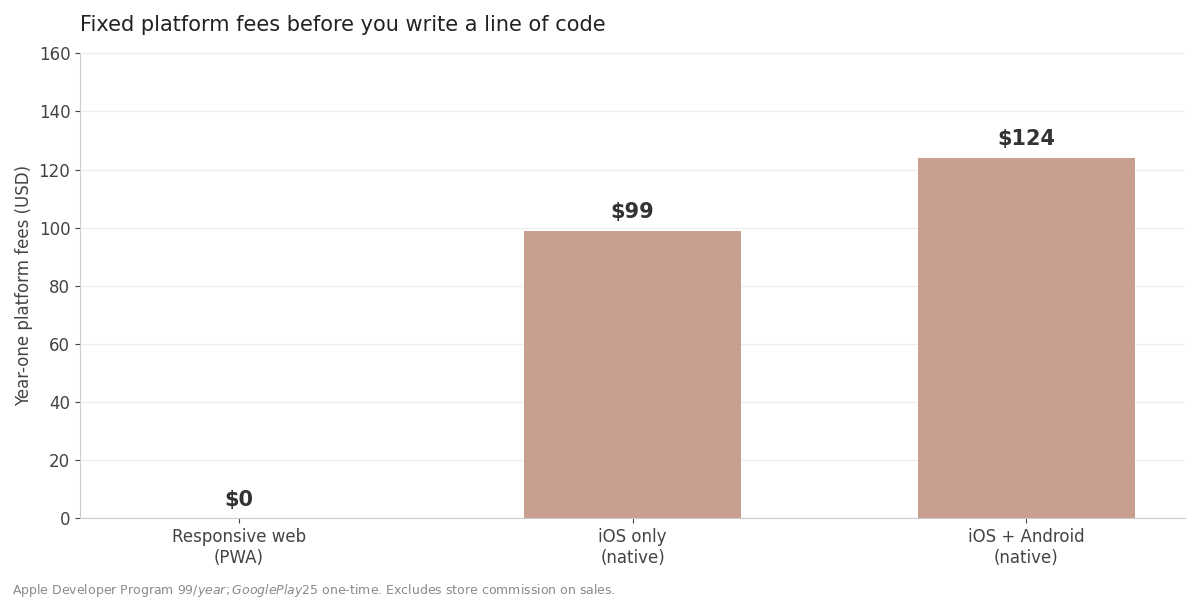
The costs that matter are the ones with no line item.
Store commission. Apple's standard commission is 30%, reduced to 15% under the App Store Small Business Program for developers with up to $1 million in annual proceeds. Fifteen percent is not catastrophic, but it is roughly five times what Stripe takes. On a $29/month plan, that's $4.35 a month per subscriber you don't keep. Model it before you assume the store pays for itself.
Release latency. A web deploy is live in ninety seconds. A native release goes through a build, an upload, a review queue, and then a user who has to actually update the app. Your worst bug and your best fix both move at store speed. For a product still finding its shape, that latency is the expensive part — not the commission.
A second codebase. Even with React Native or Flutter, you now have platform-specific build config, signing certificates that expire, OS version deprecations, and a device matrix. Every feature ships twice. For a solo founder, that's the cost that quietly doubles your maintenance load while your revenue stays flat.
Support surface. "It works on web but not in the app" becomes a category of support ticket that only exists because you shipped both. I write about the compounding cost of extra surface area in the hidden costs of SaaS infrastructure, and a second client is one of the biggest ones.
Mobile app vs web app: a side-by-side comparison
| Factor | Responsive web app | PWA (installable web) | Native mobile app | | --- | --- | --- | --- | | Time to first version | Days | Days + a manifest and service worker | Weeks to months | | Codebases to maintain | 1 | 1 | 2 (or 1 cross-platform + 2 build targets) | | Ship a fix | Instant deploy | Instant deploy | Build, submit, review, user updates | | Platform fees | $0 | $0 | $99/yr Apple, $25 once Google | | Commission on in-app sales | None | None | 15–30% via store IAP | | Push notifications | No | Yes (iOS 16.4+ home screen, Android) | Yes | | Offline support | Limited | Yes, via service worker | Yes | | Home screen icon | No | Yes | Yes | | App store discovery | No | No | Yes | | Hardware access (Bluetooth, background GPS, widgets) | No | Partial, platform-dependent | Yes | | Gatekeeper between you and users | None | None | App review |
The pattern in that table is consistent: web gives you speed and control, native gives you reach and capability. Early on, speed and control are what you're short of. Reach is a problem you earn later.
How to decide, in four questions
Skip the framework. Answer these in order and stop at the first yes.
1. Does your core feature require hardware the browser can't reach? Background location, Bluetooth peripherals, HealthKit, a camera pipeline doing real-time processing, an Apple Watch component. If yes, build native — the decision is made for you and no amount of PWA optimism changes it.
2. Is app store search a real acquisition channel for your category? For consumer fitness, meditation, or games, yes. For B2B SaaS sold to a buyer who found you through Google, a newsletter, or a demo call, almost never. Be honest here. "People will discover us in the App Store" is a hope, not a channel, and it competes with the SEO work that actually drives signups — see SEO for SaaS landing pages for where that effort usually pays off better.
3. Have paying customers asked for it by name, more than twice? Not "would you use a mobile app?" in a survey — everyone says yes to that. Actual unprompted requests from people already paying you. That's signal. Feature requests from non-customers usually aren't, which is the whole argument in saying no to feature requests.
4. Do you have a working, revenue-generating web product already? If no, you are choosing to add a platform before you have a product. Ship the web version, get it in front of people, and revisit this in three months. Shipping before you feel ready is hard enough without doubling the surface area first.
Four noes means build responsive web, add a manifest and a service worker so it installs, and move on to a problem that affects revenue.
Making the web version feel native enough
If you're going the responsive route — and you probably are — the difference between "a website on a phone" and "an app" comes down to a handful of details that take an afternoon each.
Get the manifest right first. A manifest.json with display: "standalone", a proper name and short_name, and real icons is what turns an Add to Home Screen bookmark into a launchable web app. Without it, iOS saves a bookmark that opens in the browser, and you lose the whole illusion plus the ability to push.
Then handle touch properly. Tap targets at least 44 pixels, no hover-only interactions, and forms that use the right inputmode so the phone shows a numeric keypad for numeric fields. These are small and they are exactly what people mean when they say a site "feels like a website."
Then make the first paint fast. On a phone over cellular, perceived speed is most of the app feeling. Server-render what you can — server components versus client components in Next.js is largely a conversation about this — and cache aggressively at the edge.
Then add push, if and only if you have something worth notifying about. If you already run OneSignal or similar, the OneSignal integration guide covers wiring web push into a Next.js app. Notifications with nothing behind them are how you train people to turn them off.
None of this is a native app. All of it is a week of work instead of a quarter, and it's reversible. If you later decide native is right, you've lost nothing — the API layer you built for the web app is the same API layer the native client will call.
Frequently asked questions
Can a PWA send push notifications on iPhone?
Yes, on iOS and iPadOS 16.4 or later, but only for web apps the user has added to their home screen — not for your site open in a Safari tab. The permission prompt must be triggered by a direct user action, and your site must serve a web app manifest. Web Push on iOS runs over Apple's own push service and does not require an Apple Developer Program membership.
Will Apple reject my app if it's a webview wrapper?
It might. Guideline 4.2 requires apps to go beyond a repackaged website, and 4.2.2 explicitly calls out web clippings and collections of links. Wrappers that add genuine native functionality — real offline behavior, meaningful OS integration — do get approved. A shell that renders your existing pages usually doesn't.
Is React Native or Flutter a way to skip this decision?
No. Cross-platform frameworks reduce how much platform-specific code you write, but they don't remove app review, store commission, release latency, signing certificates, or the device matrix. They make the native path cheaper, not free. The decision of whether to be in the stores at all is unchanged.
How much does the App Store actually take?
The standard commission is 30% of in-app purchases. Developers with up to $1 million in annual proceeds can enroll in the App Store Small Business Program for a 15% rate. Both are substantially more than a card processor charges, which is why your pricing model should account for the channel before you commit to it.
What if I need both eventually?
Then build the web app first and design the API as a clean, client-agnostic layer from the start. A native app that talks to the same endpoints your web app uses is a straightforward project. A native app bolted onto a codebase where the UI and data logic are tangled together is a rewrite. That separation costs you nothing today and saves you a quarter later.
Does a responsive web app hurt SEO compared to a native app?
It helps it. Native apps are largely invisible to search engines; a web app's pages get crawled and indexed. If organic search is part of your acquisition plan, the web version is the asset, not the fallback.
The version I'd ship
If I were starting over on a SaaS product tomorrow, I'd ship a responsive web app with a manifest and a service worker, and I would not think about the app stores again until a paying customer gave me a specific reason to. Not because native is bad — because the app store is a distribution channel with a landlord, and you don't sign a lease before you know anyone wants what you sell.
The mobile app vs web app question resolves cleanly once you stop treating it as a product decision and start treating it as a timing one. Web first, native when a capability or a channel demands it, and never a wrapper submitted on the theory that Apple won't notice.
If you're building a SaaS with AI coding tools and want a starting point that already handles auth, billing, and a responsive layout, Coding Capybaras is the free boilerplate I built for exactly this workflow.