SEO for SaaS Landing Pages: A Non-Developer's Guide
A practical SaaS landing page SEO guide for non-developers: keyword intent, on-page structure, Core Web Vitals, and internal linking that ranks.
· Justin Boggs

Photo by Myriam Jessier on Unsplash
SaaS landing page SEO is the practice of structuring a page so search engines understand what it's for, match it to the right query, and rank it above competitors — without sacrificing the conversions the page exists to drive. For a non-developer, it breaks into four things you can actually control: targeting the right keyword intent, structuring the on-page content so the answer is obvious, hitting Google's Core Web Vitals performance thresholds, and linking the page into the rest of your site. You don't need to be an engineer to get all four right. You need to know what each one is and do it deliberately. This guide walks through them in the order that matters.
TL;DR
- Match each landing page to one keyword and one intent — commercial pages target "best X" and "X for Y" queries, not informational ones.
- Structure beats prose: one H1, clear H2s, a direct answer up top, and an FAQ so both Google and AI search engines can extract your content.
- Core Web Vitals are a ranking factor and a conversion factor: aim for LCP under 2.5s, INP under 200ms, CLS under 0.1.
- Internal links from blog posts to landing pages pass authority and intent — this is the highest-leverage SEO move most founders skip.
- SEO compounds. A landing page optimized today keeps earning traffic months later, unlike a launch-day spike.
Start with keyword intent, not keyword volume
The most common SaaS landing page SEO mistake isn't technical. It's targeting the wrong keyword — usually a high-volume term that brings visitors who'll never convert.
Every search has an intent behind it, and there are four broad types: informational ("what is lifecycle email"), commercial ("best lifecycle email tool"), transactional ("buy Resend plan"), and navigational ("Resend login"). Your landing pages — the pages built to convert — should target commercial and transactional intent. Your blog should target informational intent and funnel readers toward those landing pages. Mixing them up is why so many founders rank for terms that produce traffic but no signups.
So before you write a word, decide what one job the page does. A pricing page targets "[product category] pricing." A feature page targets "[product category] for [use case]." Your homepage targets your category term plus your brand. Each page gets one primary keyword and one intent. Trying to rank a single page for five different queries means it ranks well for none — Google can't tell what the page is for.
The practical workflow for a non-developer: list the exact phrases a buyer would type when they're ready to evaluate tools like yours. Not "project management" (too broad, informational, owned by giants) but "project management for freelance designers" (specific, commercial, winnable). Specificity is your advantage as a small player. You will never outrank Asana for "project management," but you can absolutely own a narrow, high-intent niche phrase — and the people typing it are far more likely to convert. This is the same "narrow and specific wins" logic that drives early customer acquisition; I wrote about the channels that work in going from 0 to 100 paying customers.
Worked example: say you sell time-tracking software for law firms. "Time tracking software" is a 50,000-search-a-month term you have no chance at and that brings freelancers, agencies, and accountants who'll never buy a legal tool. "Time tracking for law firms" might do a few hundred searches a month — but every one of those searchers is your exact buyer, with budget and intent. You build a dedicated landing page for that phrase, you put it in the H1 and title tag, and you answer the legal-specific concerns (billable-hour rounding, trust accounting, bar compliance) that the generic tools ignore. That page can rank in weeks, not years, because almost nobody is competing for it. Stack a dozen of these narrow pages and you've built a defensible SEO position one broad keyword could never give you.
Structure the page so the answer is obvious
Once you know the keyword and intent, the on-page work is about structure — making it trivially easy for a search engine to understand what the page says and who it's for.
Start with the elements Google reads first. The title tag (50-60 characters, primary keyword front-loaded) and the meta description (150-160 characters, written as a real sentence, not a pitch) are your page's entry in the search results. They don't directly rank you much anymore, but they decide whether anyone clicks. The H1 should contain the primary keyword and there should be exactly one per page. H2s break the page into scannable sections; each should map to a question or sub-topic a buyer cares about. Never skip heading levels — going from H1 straight to H3 confuses the document outline that both screen readers and crawlers rely on.
The content itself should answer the page's core question in the first paragraph. Modern SEO and Answer Engine Optimization (AEO) both reward this: when the LLM-powered search layer — Google's AI Overviews, ChatGPT, Perplexity — reads your page, it extracts a direct answer. If your first paragraph says "The best invoicing tool for freelance designers is one that..." the AI can lift a clean answer. If your first paragraph is a vague brand mood-piece, you get skipped.
Accessibility and SEO overlap more than people expect. Per WCAG guidelines, body text needs at least a 4.5:1 contrast ratio, every meaningful image needs accurate alt text (describe the image, not your keyword), and keyboard navigation should work with visible focus states. Google's crawlers reward the same things that help real users with screen readers. Good alt text on your product screenshots is free SEO that most founders leave on the table.
One more structural win: add an FAQ section near the bottom with real buyer questions as H3s. It captures long-tail queries, it's exactly the format AI search engines extract, and the structured data that a good site framework emits around it makes the content machine-readable. You're reading this post's FAQ section below — that's the pattern.
Core Web Vitals: speed is a ranking factor and a conversion factor
Here's where non-developers freeze up, but the concepts are simpler than the name suggests. Core Web Vitals are three metrics Google uses to measure real-world page experience, and they affect both your rankings and your conversion rate.
According to web.dev, Google's own performance resource, the three metrics and their "good" thresholds are:
- Largest Contentful Paint (LCP) — how fast your main content (usually the hero image or headline) loads. Target: under 2.5 seconds.
- Interaction to Next Paint (INP) — how quickly the page responds when someone clicks or taps. Target: under 200 milliseconds. INP replaced the older First Input Delay metric in 2024.
- Cumulative Layout Shift (CLS) — how much the page jumps around as it loads. Target: 0.1 or less.
Google assesses these at the 75th percentile of real visits — meaning at least 75% of your page loads need to hit the "good" threshold for the page to count as good. You can check any page's scores in Google Search Central's Core Web Vitals report or PageSpeed Insights.
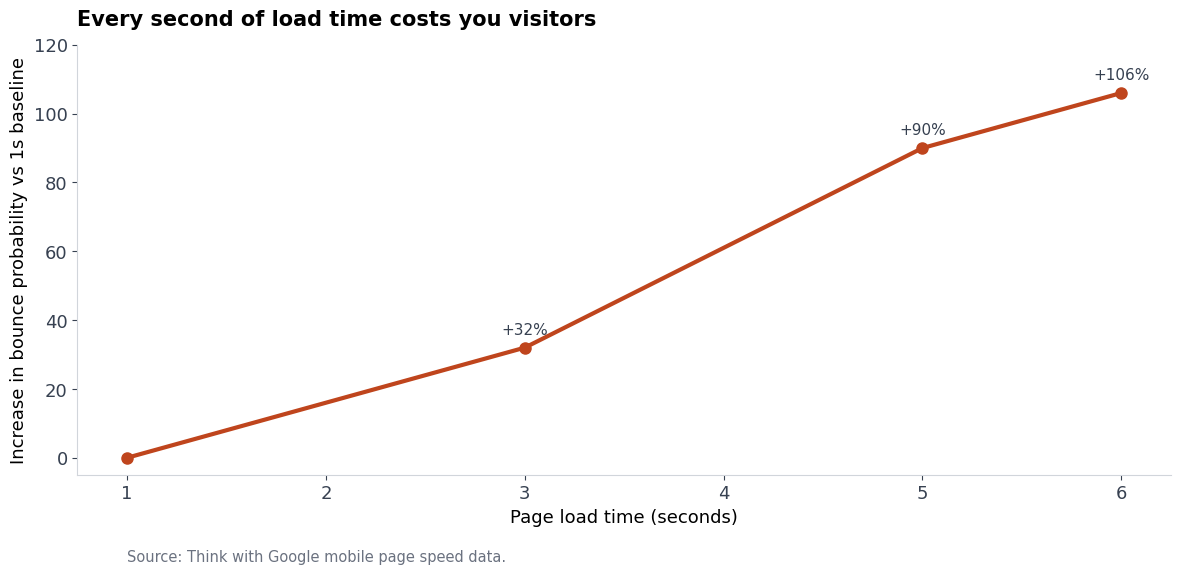
The conversion stakes are real, not theoretical. Google's own mobile speed research found that as page load time goes from one second to three seconds, the probability a visitor bounces rises 32%; at five seconds it's up 90%.
For a non-developer, the good news is that most Core Web Vitals problems come from a short list of fixable causes: oversized hero images (compress and serve them at display size), heavy JavaScript that blocks interaction (ship less of it, defer the rest), and images or ads without reserved dimensions (which cause layout shift). A modern framework on good hosting handles most of this for you — which is part of why the stack you start on matters. I covered the hosting side in Vercel vs Netlify vs Railway; the platform's edge network and image optimization do a lot of Core Web Vitals heavy lifting before you touch anything.
Technical SEO basics you can't skip
Beyond speed, a handful of technical fundamentals decide whether Google can even find and index your pages properly. None of these require writing code — most are settings or a single file your framework generates.
Crawlability. Let search engines crawl your commercial and discovery pages — features, pricing, integrations. Block thin or duplicate pages (internal search results, tag archives) with a noindex directive so they don't dilute your site. Make sure you have an XML sitemap and that it's submitted in Google Search Console.
Mobile-first. Google indexes the mobile version of your site, so your mobile layout is your SEO. If the page is great on desktop and broken on a phone, you rank on the broken version. Test on an actual phone, not just a narrowed browser window.
Server response time. Google recommends a Time to First Byte (TTFB) of 800 milliseconds or less. Anything slower drags down your Core Web Vitals and how efficiently Google can crawl your site. This is mostly a hosting and database concern — another reason a sensible managed stack pays off.
Canonicals. If the same content is reachable at multiple URLs (with and without a trailing slash, with tracking parameters), a canonical tag tells Google which version is the real one so your ranking signals merge instead of splitting.
The reassuring part: a well-built SaaS foundation gives you most of this for free. When I described the anatomy of a 2026 indie SaaS stack, sitemaps, metadata, and image optimization were baked in — you configure them, you don't build them. The same is true of any decent boilerplate; I compared how a few handle this in the SaaS boilerplate comparison.
Internal linking: the move most founders skip
Here's the highest-leverage SEO tactic that costs nothing and almost nobody does deliberately: internal linking from your content to your landing pages.
When a blog post links to a landing page, it passes two things: a slice of the post's accumulated authority, and a signal about what that landing page is about (carried by the anchor text). A landing page with twenty relevant internal links pointing at it, using keyword-rich anchor text, ranks far better than an identical orphan page nobody links to.
The architecture that works is a hub-and-spoke (or "topic cluster") model. Your landing page is the hub. Around it, you publish informational blog posts targeting the questions buyers ask before they're ready to evaluate tools — and each of those posts links back to the landing page with descriptive anchor text. Someone searching "how do I track product usage" finds your blog post, learns something genuinely useful, and follows a contextual link to your analytics landing page. That's the funnel SEO is supposed to build.
A few rules that keep it effective. Use descriptive anchor text — "PostHog analytics setup," not "click here." Link contextually, where the sentence genuinely calls for it, not in a stuffed footer block. Point multiple posts at your most important landing pages to concentrate authority. And don't overdo links to a single page from one post — one or two natural links beat ten forced ones. This post is doing exactly that: it links to related guides where they're relevant, and the PostHog analytics walkthrough is the kind of tactical post that would feed an analytics landing page.
Internal linking is also where SEO and your launch strategy connect. A Product Hunt spike sends a wave of traffic once; a well-linked content cluster sends a trickle every day for years. I'm a fan of doing both — the Product Hunt launch playbook covers the spike, and this guide covers the compounding part.
Frequently asked questions
How long does SaaS SEO take to show results?
Realistically, three to six months before you see meaningful ranking movement on competitive commercial terms, and longer to build a content cluster that compounds. SEO is the opposite of a launch spike — slow to start, durable once it works. If you need traffic this week, SEO isn't the lever; if you want traffic next year without paying for every click, start now.
Do I need to hire an SEO agency as a solo founder?
Not for landing-page SEO. The four fundamentals in this guide — intent-matched keywords, clean on-page structure, good Core Web Vitals, and internal linking — are entirely doable solo, especially with a modern framework handling the technical plumbing. Agencies earn their fee on large sites with hundreds of pages and complex technical debt. A focused early-stage SaaS doesn't have that problem yet.
What's the difference between SEO and AEO for landing pages?
SEO optimizes for ranking in traditional search results; AEO (Answer Engine Optimization) optimizes for being cited by AI search layers like ChatGPT, Perplexity, and Google's AI Overviews. The good news is they overlap heavily: direct answers up top, clean heading structure, FAQ sections, and inline source citations serve both. Structure your page well and you're optimizing for both at once.
Should my landing page or my blog target a given keyword?
Match it to intent. Commercial and transactional keywords ("best X," "X pricing," "X for Y") belong on landing pages built to convert. Informational keywords ("how does X work," "what is X") belong on blog posts that educate and then link to the landing page. Putting a commercial keyword on a blog post wastes the conversion opportunity; putting an informational keyword on a landing page brings visitors who aren't ready to buy.
How do I check my Core Web Vitals without technical tools?
Run your URL through Google's PageSpeed Insights — it's free, web-based, and gives you LCP, INP, and CLS scores plus specific fixes ranked by impact. Google Search Console's Core Web Vitals report shows the same metrics across your whole site using real visitor data. Neither requires code; both tell you exactly what to fix first.
The bottom line
SaaS landing page SEO isn't a developer specialty — it's four deliberate choices a non-technical founder can make: target one keyword with the right intent, structure the page so the answer is obvious, hit Google's Core Web Vitals thresholds, and link the page into a content cluster that feeds it authority. None of those require writing code, and a sensible framework handles most of the technical layer for you. What it requires is doing them on purpose instead of hoping a page ranks because it exists.
If you're building a SaaS and want a foundation where the SEO plumbing — sitemaps, metadata, image optimization, fast hosting — already works out of the box, Coding Capybaras is the free boilerplate I built for non-technical founders shipping with AI coding tools.