Supabase Row Level Security: A 2026 Tutorial
A practical Supabase Row Level Security tutorial for non-tech founders — the policies every SaaS needs, how to test them, and the AI prompt to write them.
· Justin Boggs

Supabase Row Level Security is the single feature that stands between your SaaS and its first data leak — and if you're building with an AI coding assistant, it's the one you're most likely to skip by accident. Row Level Security (RLS) is a Postgres feature that decides, row by row, which data each user is allowed to see or change. Think of it as a WHERE clause the database silently attaches to every query, based on who is asking. Turn it on and write the right policies, and one customer physically cannot read another customer's records — even if your application code has a bug. Leave it off on a table that's exposed to the browser, and anyone with your public key can read the whole thing. This tutorial walks through both.
TL;DR
- RLS is a Postgres rule engine that filters every query by who's asking. Supabase relies on it for safe access straight from the browser.
- You must enable RLS on every table in an exposed schema (usually
public). A table without RLS and a public key is wide open.- Policies use
USINGfor reads and deletes,WITH CHECKfor inserts;UPDATEneeds both.- Test policies from your app or a logged-in client — the SQL Editor bypasses RLS, so it will lie to you.
- Two footguns to avoid: never authorize on
raw_user_meta_data(users can edit it), and never ship the service role key to the browser (it bypasses RLS entirely).
What is Supabase Row Level Security, actually?
Supabase gives every project a real Postgres database and auto-generates an API in front of it, so your frontend can query the database directly with a public "anon" key. That's a huge convenience and, without RLS, a huge liability. RLS is what makes direct-from-browser access safe.
Here's the mechanism. A policy is a rule attached to a table that runs every time the table is accessed. As the Supabase RLS documentation puts it, you can think of a policy as adding a WHERE clause to every query. A policy like this:
create policy "Individuals can view their own todos."
on todos for select
using ( (select auth.uid()) = user_id );
...quietly turns every read of the todos table into select * from todos where auth.uid() = todos.user_id. The user never writes that filter. Postgres enforces it. That enforcement happens in the database itself, which is why RLS provides what security people call "defense in depth" — it protects your data even if a bug in your app forgets to filter, or a request comes in through some third-party tool you didn't write.
This matters more for AI-assisted builders than almost anyone. When you're directing Claude Code or Cursor to build features, the AI writes queries fast, and it's easy to end up with a .select() call that has no filter on it. If RLS is on and your policies are correct, that unfiltered query still only returns the current user's rows. RLS is the safety net under the code you didn't personally write — which is the whole reason it belongs early in your build, not after launch. If you're new to reading what your assistant produces, the Claude Code for non-developers guide covers the mindset; RLS is the database-level version of the same caution.
One clarification that trips people up: RLS is a Postgres primitive, not a Supabase invention. Supabase exposes it cleanly and adds helper functions, but the underlying engine is the same Row Level Security that ships with PostgreSQL. Everything you learn here transfers if you ever move off Supabase.
Enabling RLS (and why "enabled but no policies" means locked)
Turning RLS on is one line:
alter table todos enable row level security;
The important detail: once RLS is enabled, no rows are returned through the API until you write a policy. Enabled-with-no-policies means the table is locked, not open. That's the safe default, and it's the opposite of what a lot of first-time founders assume. Many assume a table is safe until they "add security"; in Supabase a table is exposed until you turn RLS on.
If you create tables through the Supabase Table Editor in the dashboard, RLS is enabled automatically. If you create them in raw SQL or the SQL Editor — which is what your AI assistant will usually generate — you have to enable it yourself. This is the number-one way a table ends up publicly readable: the migration created the table, nobody added the enable row level security line, and the app worked fine in testing because the data was flowing. It was flowing to everyone.
Because this gap is so easy to miss, it's worth a belt-and-suspenders move. Supabase documents an event trigger that automatically enables RLS on any new table created in the public schema, so a forgotten migration can't leave a table exposed:
create event trigger ensure_rls
on ddl_command_end
when tag in ('CREATE TABLE', 'CREATE TABLE AS', 'SELECT INTO')
execute function rls_auto_enable();
That trigger only affects tables created after you install it — existing tables still need RLS enabled by hand. But going forward, it removes the most common human error from the equation. If you're the kind of founder who's shipping fast with an AI pair, install it on day one. It's the same instinct behind writing a good CLAUDE.md file: encode the rule once so you don't have to remember it every session.
A related gotcha lives in the schema itself. Bad table design makes RLS harder to write, and RLS you can't write cleanly tends to get written badly. If your user_id columns are inconsistent or missing, your policies get convoluted. It's worth reading up on the database schema mistakes that haunt SaaS founders before you have twelve tables, because RLS is where those mistakes come back to bite.
The four policies every SaaS table needs
Most SaaS tables need the same four rules: users can read their own rows, insert rows they own, update their own rows, and delete their own rows. Here's the full set for a profiles table, straight from the pattern in the Supabase docs.
Read uses using:
create policy "Users can see their own profile."
on profiles for select
to authenticated
using ( (select auth.uid()) = user_id );
Insert uses with check — the expression that new rows must satisfy:
create policy "Users can create their own profile."
on profiles for insert
to authenticated
with check ( (select auth.uid()) = user_id );
Update needs both. using decides which existing rows can be updated; with check decides what the row is allowed to look like afterward. Together they stop a user from editing someone else's row and stop them from reassigning their own row to another user:
create policy "Users can update their own profile."
on profiles for update
to authenticated
using ( (select auth.uid()) = user_id )
with check ( (select auth.uid()) = user_id );
Delete uses using:
create policy "Users can delete their own profile."
on profiles for delete
to authenticated
using ( (select auth.uid()) = user_id );
Two things in that code are doing quiet, important work. The to authenticated clause scopes the policy to logged-in users only, so it never even runs for anonymous visitors. And auth.uid() is a Supabase helper that returns the ID of the user making the request. Note that auth.uid() returns null when there's no authenticated user — so a policy like using (auth.uid() = user_id) silently fails closed for logged-out requests, which is the behavior you want. The docs recommend being explicit about it when clarity matters: using (auth.uid() is not null and auth.uid() = user_id).
One non-obvious rule: to perform an UPDATE, the table also needs a SELECT policy. Without one, the update won't work the way you expect, because Postgres needs to be able to see the row to check it. If your AI assistant writes an update policy and updates mysteriously do nothing, a missing select policy is the first thing to check. This is the kind of setup that pairs naturally with OAuth login through Supabase Auth — auth establishes who the user is, and RLS decides what that user can touch.
The two mistakes that turn RLS into theater
You can have RLS enabled, policies written, everything green — and still be wide open. Two mistakes account for most of it.
Mistake one: authorizing on data the user controls. Supabase's auth.jwt() helper lets you read claims from the user's token, including raw_user_meta_data. It is tempting to write a policy like "allow if the user's metadata says they're an admin." Don't. As the Supabase docs warn explicitly, raw_user_meta_data can be updated by the authenticated user through the client SDK — so anyone can promote themselves to admin by editing their own metadata. Authorization data belongs in raw_app_meta_data, which the user cannot modify. The distinction is one word in the column name and the entire security of your app.
Mistake two: leaking the service role key. Supabase provides a service role key that bypasses RLS entirely — it's meant for trusted server-side administrative work, like a background job that needs to see every row. If that key ever reaches the browser, RLS is meaningless, because the key holder can read and write everything. The rule is absolute: the service role key lives only in server-side environment variables, never in client code, never in a public env var, never committed to git. This is the same discipline behind keeping secrets out of your repo generally — the boilerplate keeps every secret in .env.local for exactly this reason.
There's a subtler third trap worth naming: column-level exposure. A policy that lets a team member update their team's accounts row lets them update every column on that row, including ones you never meant to be user-writable, like plan or is_admin. RLS controls which rows, not which columns. For the columns that must never be client-writable, reach for Postgres Column Level Security to revoke the default table-wide write access and grant back only the columns clients actually need. Row policies and column privileges are two different locks, and sensitive tables want both.
Testing RLS without fooling yourself
Here's the trap that catches nearly everyone: the Supabase SQL Editor bypasses RLS. It runs queries as a privileged role, so your policies don't apply there. If you write a policy, then test it by running a select in the SQL Editor and seeing the right rows, you've proven nothing — you'd see those rows with no policy at all.
Test the way your users hit the database: through the client SDK, as an actual logged-in user. The honest test is a negative one. Log in as User A, create a row. Log in as User B, and try to read, update, and delete User A's row by its ID. Every one of those attempts should return nothing or fail. If User B can touch User A's data, your policy is broken, no matter how correct it looked in SQL. This is the same "prove it's actually locked" instinct that good code review of AI-generated work depends on — you verify the behavior, not the intention.
Once you're confident the policies are right, the second thing to check is speed. RLS adds a filter to every query, and on tables you scan often, a careless policy can be catastrophically slow. Supabase's own benchmarks — from a public RLS performance test suite — show how large the difference is once you apply a few standard optimizations.
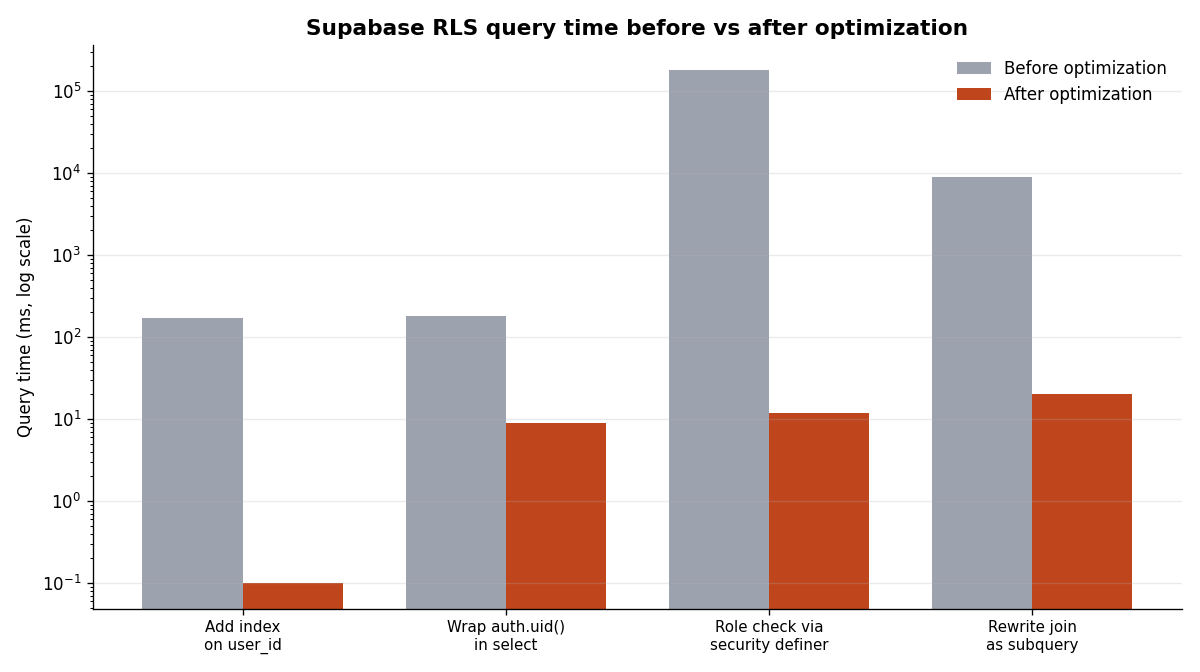
Three optimizations do most of the work, and they're worth committing to memory because your AI assistant won't always apply them by default:
| Optimization | What it does | Reported improvement |
| --- | --- | --- |
| Index the policy column | Add a btree index on user_id (or whatever the policy filters on) | ~171 ms to under 0.1 ms |
| Wrap auth.uid() in a select | (select auth.uid()) lets Postgres cache the result once per statement instead of per row | ~179 ms to ~9 ms |
| Scope with to authenticated | Stops the policy from even running for anonymous users | ~170 ms to under 0.1 ms |
The (select auth.uid()) trick is the one people miss most. Writing the function call bare — auth.uid() = user_id — makes Postgres re-run it for every single row. Wrapping it in a subselect lets the query planner run it once and reuse the answer. On a table with tens of thousands of rows, that's the difference between a snappy query and a timeout. It's a good example of why understanding a little about how the database thinks pays off, even when the AI writes the SQL — a theme that runs through most of the Supabase vs Firebase decision for non-technical founders.
The AI prompt for writing your policies
You don't have to write RLS from scratch. The trick is giving your assistant enough context that it produces the safe version, not the naive one. Here's the prompt structure that works:
Tell it the table and its columns, name the ownership column, specify that you want all four operations, and — critically — tell it to apply the performance optimizations and to avoid the two footguns above. A prompt like: "Write Supabase RLS policies for my projects table (columns: id, user_id, name, created_at). Users should only access their own rows, for select/insert/update/delete. Use (select auth.uid()) for performance, scope every policy to authenticated, and add the index on user_id. Do not reference raw_user_meta_data."
That last sentence matters. Without it, an assistant will sometimes reach for JWT metadata to implement roles, and you'll have shipped the self-promotion bug. Naming the anti-pattern in the prompt is how you keep it out of the output. This is the same discipline that makes a well-written spec double your hit rate with AI in general: the constraints you state up front are the ones you don't have to catch in review. The Coding Capybaras marketplace has copy-paste prompts like this for the integrations most SaaS apps need, RLS included.
Frequently asked questions
Does enabling RLS block my server-side admin code?
No, as long as that code uses the service role key. The service role bypasses RLS by design, so your background jobs, webhooks, and admin tools can still see every row. RLS only constrains requests made with the anon or authenticated keys — which is exactly your browser-facing traffic.
What's the difference between USING and WITH CHECK?
USING filters which existing rows a policy applies to — it's evaluated for reads, updates, and deletes. WITH CHECK validates new or modified row data — it's evaluated for inserts and updates. Read and delete policies only need USING; insert policies only need WITH CHECK; update policies need both.
Why do my queries return nothing after enabling RLS?
Because enabling RLS with no policies locks the table completely. That's the safe default. Add the appropriate select policy (and insert/update/delete as needed) and the rows come back. Also confirm the user is actually authenticated — auth.uid() returns null for logged-out requests, and null = user_id is always false.
Can I use RLS for team or multi-tenant access, not just per-user?
Yes. Instead of auth.uid() = user_id, your policy checks membership: the row's team_id is in the set of teams the current user belongs to. Store authorization data like team membership in raw_app_meta_data or a dedicated table, never in user-editable metadata, and index the columns your policy filters on.
Does RLS protect Supabase Storage too?
Yes. Supabase Storage is backed by Postgres tables, so the same RLS policy model applies to file access. You write policies against the storage schema to control who can read and write which objects — one access-control language across your database and your files.
Wrapping up
Supabase Row Level Security is not an advanced topic you graduate to — it's the foundation you build on, and the earlier you get it right, the less you have to unwind later. Enable it on every exposed table, write the four ownership policies, keep authorization data out of user-editable metadata, keep the service role key server-side, and test as a real logged-in user rather than in the SQL Editor. Do that and a whole category of "customer saw another customer's data" incidents simply can't happen to you.
If you're building a SaaS with AI coding tools and want the RLS policies, auth wiring, and secret handling already done correctly, Coding Capybaras is the free boilerplate I built for exactly this workflow — the complete codebase ships free, and the marketplace has the copy-paste prompts for every piece mentioned above.