Supabase vs Firebase for SaaS Founders (2026 Guide)
Supabase vs Firebase compared for first-time SaaS founders in 2026 — pricing models, database differences, auth, AI-coding fit, and when each one wins.
· Justin Boggs

Photo by Taylor Vick on Unsplash
For most first-time SaaS founders in 2026, Supabase is the better choice in the Supabase vs Firebase decision — and the reason is less about features than about predictability. Supabase charges for resources (a flat plan plus compute), so your bill looks like rent. Firebase charges per operation (every document read, write, and delete), so your bill looks like a taxi meter. Both will get a SaaS to production. But if you're a non-technical founder building with AI coding tools, Supabase's SQL foundation, flat-rate pricing, and default spend caps remove two of the scariest unknowns in your first year: surprise bills and a data model you can't query your way out of.
TL;DR
- Supabase is Postgres with auth, storage, and realtime built in. Pricing is resource-based: free tier, then $25/month Pro. Spend caps are on by default.
- Firebase is Google's managed backend built around Firestore, a NoSQL document database. Pricing is per-operation, with no hard spend cap.
- At prototype scale both are effectively free. At growth scale, per-operation billing tends to overtake flat-rate billing.
- SQL beats NoSQL for typical SaaS data (users, subscriptions, invoices) — and AI coding tools write better SQL than Firestore security rules.
- Pick Firebase if you're building a mobile-first app that needs best-in-class offline sync.
What are Supabase and Firebase, actually?
Supabase is an open-source backend platform built on Postgres — every project gets a real, dedicated Postgres database with an auto-generated API, plus authentication, file storage, realtime subscriptions, and edge functions layered on top. It launched in 2020 as an open-source alternative to Firebase — that positioning is in their own marketing, and to their credit, their comparison material is honest about where Firebase still wins. You can self-host the whole thing with Docker if you ever need to leave.
Firebase is Google's fully managed app-development platform, anchored by Cloud Firestore — a schemaless NoSQL document database — along with Firebase Auth, Cloud Storage, and Cloud Functions. It's proprietary, deeply integrated with Google Cloud, and famous for two things: a phenomenal mobile developer experience and offline data sync that just works. There is no self-hosting option; your app lives on Google's infrastructure or it doesn't live.
The two platforms cover the same checklist — database, auth, storage, serverless functions, realtime — which is exactly why the choice is confusing. The differences that matter live one level down: how data is modeled, how access control works, and how the bill is calculated.
I went through this decision myself when building Coding Capybaras. The boilerplate runs on the Next.js + Supabase + Stripe + Resend stack, and the database choice was the one I sweated the most. A year in, it's also the one I'd change last.
How is the data model different (SQL vs NoSQL)?
This is the most consequential difference, and it's not close for SaaS workloads.
Firestore stores data as JSON-like documents grouped into collections. There's no schema, no foreign keys, and no native joins. That's liberating for a weekend prototype — you just write objects and they persist. It gets expensive (in effort and money) the moment your data becomes relational. And SaaS data is always relational: users have subscriptions, subscriptions have invoices, invoices have line items. In Firestore, you either denormalize (copy the same data into multiple documents and keep the copies in sync yourself) or you make multiple round-trip queries in application code.
Supabase gives you Postgres: structured tables, foreign keys, indexes, and full ACID transactions. The query "show me every Pro customer who signed up in March and hasn't logged in since" is one SQL statement with two joins. In Firestore, that query is an architecture discussion.
There's a second-order effect here for founders building with AI tools. Claude Code, Cursor, and Cowork have been trained on decades of SQL. When I ask Claude to write a Postgres migration or a query with a window function, the output is usually right on the first pass. Firestore's data modeling, by contrast, is full of judgment calls about denormalization that the AI can't make for you because they depend on your read patterns. The Claude Code for non-developers guide goes deeper on why "well-trodden technology" is a superpower when an AI writes most of your code.
Access control follows the same split. Firebase uses Security Rules, a domain-specific language that differs across Firestore, Storage, and Functions. Supabase uses Row-Level Security — policies written in plain SQL, enforced by Postgres itself, applied uniformly across your database and storage. One language to learn instead of three.
Where Firestore genuinely wins: offline support. The Firestore SDKs cache documents on the device, let users read and write while offline, and sync automatically on reconnect. Supabase has no built-in equivalent — you'd wire up your own caching strategy. If you're building a field-service app, a note-taking tool, or anything mobile-first where users work without connectivity, this single feature can outweigh everything above.
How do the pricing models compare?
Here's where the philosophical difference becomes a number on your credit card statement.
Supabase prices by resources. Per Supabase's pricing page, the free tier includes a dedicated Postgres database (500 MB), 50,000 monthly active auth users, 1 GB file storage, 5 GB egress, and unlimited API requests. The Pro plan is $25/month and bumps you to 100,000 MAUs, 8 GB disk, 250 GB egress, and 100 GB storage, with metered overage prices published for everything beyond that. Two details matter for first-time founders: free projects pause after one week of inactivity, and spend caps are on by default on Pro — you have to deliberately toggle them off before Supabase will bill you past your plan limits.
Firebase prices by operations. The free Spark plan, per Firebase's pricing page, includes 50,000 Firestore document reads, 20,000 writes, and 20,000 deletes per day, plus 1 GiB stored and 50,000 auth MAUs. Beyond that you're on the pay-as-you-go Blaze plan, where Google Cloud's Firestore pricing charges $0.03 per 100,000 document reads, $0.09 per 100,000 writes, and $0.01 per 100,000 deletes in us-central1 (multi-region locations cost more). Critically, Google's own documentation notes that requests succeed even after you exceed your monthly budget — budgets trigger email alerts, not shut-offs. There is no hard spend cap.
Those per-operation prices look tiny. The catch is that Firestore charges for reads you didn't know you were making: a query that returns zero results still bills one read, offsets bill a read per skipped document, security rules that look up other documents bill reads for each lookup, and realtime listeners bill a read every time a document in the result set changes. Individually trivial; multiplied by a buggy useEffect that re-subscribes on every render, the meter spins.
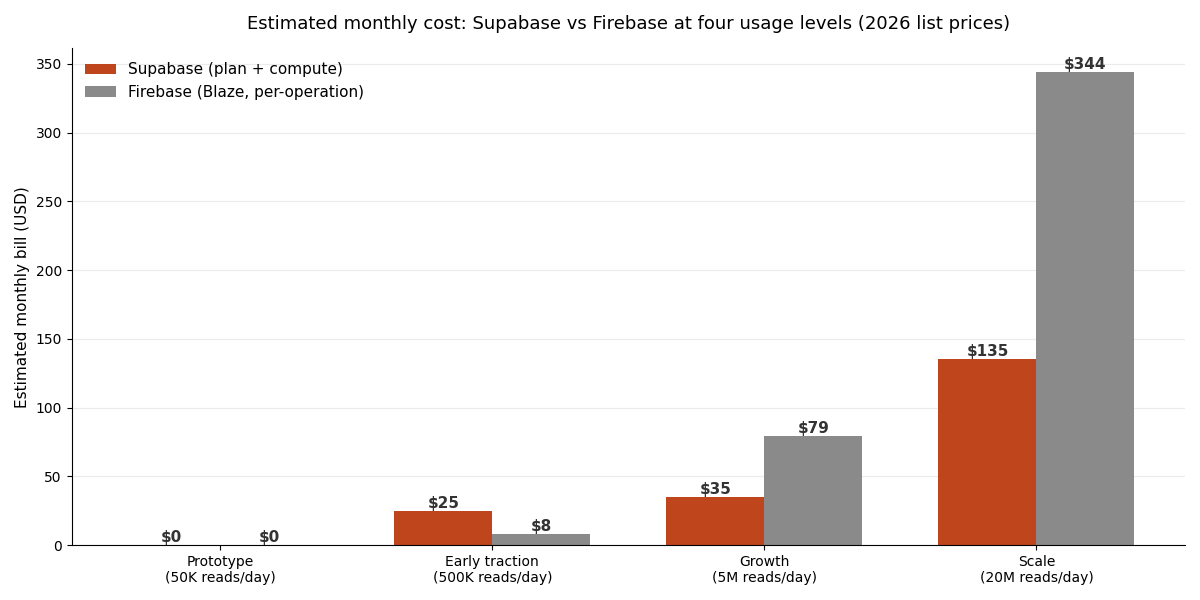
The chart above is my own estimate built from each platform's published 2026 list prices, assuming a typical read-heavy SaaS (roughly 4 reads per write, storage and egress growing proportionally; Supabase figures include the plan fee plus the compute add-on tier the workload would need). The honest summary: Firebase is cheaper at low scale, Supabase is cheaper and far more predictable at growth scale. At prototype volume, both are $0. In the awkward middle, Firebase's metered billing can actually undercut Supabase's $25 floor. Once you have real traffic, per-operation billing compounds and flat-rate billing doesn't.
If you're optimizing for $0 while validating an idea, the free-tier SaaS stack math matters more than any of this — both platforms' free tiers will carry you to your first paying customers.
Auth, storage, and the rest of the platform
Auth. Both platforms include email/password, social OAuth, and phone auth. Supabase's free tier includes 50,000 MAUs; Pro includes 100,000, then $0.00325 per MAU. Firebase Auth is similarly generous at 50,000 MAUs free — but enterprise features (SAML/OIDC, multi-factor enforcement) require upgrading to Identity Platform, a separate Google Cloud product with its own pricing. On Supabase, SSO is an add-on within the same product. Practically, for an indie SaaS, both auth systems are good; Supabase's advantage is that user records live in your Postgres database, so "join users against subscriptions" is a query, not an export job.
Storage. Firebase's Cloud Storage is rock solid and built on Google Cloud Storage; access control uses a separate Security Rules language. Supabase Storage is S3-compatible, and its file metadata lives in Postgres — protected by the same Row-Level Security policies as everything else. Supabase also ships built-in image transformations on Pro plans; Firebase needs an extension for that.
Functions. Firebase Cloud Functions support JavaScript, TypeScript, and Python, with a free allowance of 2 million invocations per month on Blaze, then $0.40 per million. Supabase Edge Functions run TypeScript on Deno at the edge, with 500,000 invocations free and 2 million on Pro. Firebase's trigger ecosystem (Firestore events, auth events, pub/sub) is broader; Supabase's functions talk directly to your Postgres database, which is usually what an indie SaaS actually needs.
Realtime. Firebase's realtime sync remains best-in-class, especially with offline support. Supabase Realtime, built on Postgres logical replication, handles the standard SaaS cases — live dashboards, notifications, presence — comfortably: the free tier includes 200 concurrent connections and 2 million messages per month.
Lock-in. Supabase is open source, and your data is in Postgres — the most portable database format in existence. pg_dump works. Firebase is proprietary with no self-host option; leaving means an export-and-rewrite project. Supabase publishes official migration tools for moving off Firebase — auth users, Firestore collections, and Storage files — which tells you something about which direction the traffic flows.
Migration considerations, if you're already on Firebase. The standard playbook is a two-phase move: run both services side by side, importing Firestore collections into Supabase as JSONB columns while your app still reads from Firebase, then swap SDK calls incrementally. Phase two is normalizing that JSON into proper tables with foreign keys and Row-Level Security policies — which is when the SQL benefits actually kick in. Auth is the trickiest piece because password hashes have to transfer; Supabase's Firebase Auth migration utility handles the export-and-recreate flow. Budget a real week for a small app, not an afternoon, and don't attempt the cutover during a launch window. If your app is still pre-launch, the cheaper migration is the one you skip by picking your long-term database now.
Which one should a non-tech founder actually pick?
A SaaS boilerplate decision rule: pick the database that matches your data shape, then check the pricing model against your growth plan. Here's the comparison in one table:
| Factor | Supabase | Firebase | | --- | --- | --- | | Database | Postgres (SQL, relational) | Firestore (NoSQL, documents) | | Pricing model | Resource-based, flat plan + compute | Per-operation, pay-as-you-go | | Free tier | 500 MB DB, 50K MAUs, unlimited API requests | 50K reads/20K writes per day, 50K MAUs | | Paid entry point | $25/month Pro | $0 + usage (Blaze) | | Spend protection | Spend caps on by default | Budget alerts only, no hard cap | | Offline sync | Build it yourself | Built-in, excellent | | Access control | Row-Level Security (SQL) | Security Rules (custom DSL) | | Self-hosting | Yes (open source) | No | | AI-coding fit | Strong (SQL is everywhere in training data) | Weaker (denormalization judgment calls) | | Best for | Web SaaS, relational data, predictable bills | Mobile-first apps, offline-heavy use cases |
Choose Supabase if you're building a web-first SaaS with the standard relational shape — accounts, subscriptions, billing, content. That's most of you. The SQL foundation pays compounding dividends: better AI-generated code, real queries for analytics, portable data, and a pricing model you can budget for. It's what I built Coding Capybaras on, and after a year of operating it — including a Product Hunt launch spike — the database bill has been the most boring line item I have.
Choose Firebase if you're building mobile-first and offline sync is core to the product, or if your team already lives in the Google Cloud ecosystem. Firestore's client SDKs and offline persistence are genuinely better than anything Supabase offers there, and at small scale the metered billing is cheap.
The trap to avoid is choosing Firebase for a relational SaaS because the prototype felt fast. Schemaless feels fast for exactly as long as your data has no relationships. By month six you'll be hand-maintaining denormalized copies of user data across collections and paying for the reads to keep them in sync.
Frequently asked questions
Is Supabase cheaper than Firebase?
It depends on scale. At prototype volume both are free. At low traffic, Firebase's per-operation billing can come in under Supabase's $25/month Pro plan. At growth scale, per-operation costs compound — independent 2026 comparisons and my own estimates from list prices both put Firebase at roughly 2–3x Supabase's cost for read-heavy SaaS workloads. Supabase is also the only one of the two with spend caps on by default.
Can Firebase run out of free tier and surprise-bill me?
Yes — that's the most-cited Firebase horror story. The Blaze plan has no hard spend cap; Google Cloud budgets send email alerts but explicitly don't stop requests. A runaway query loop or a viral day can produce a large bill before you read the alert email. On Supabase Pro, spend caps are on by default and you must opt in to overage billing.
Is Firestore or Postgres better for a SaaS app?
Postgres, in most cases. SaaS data is relational — users, plans, subscriptions, invoices — and SQL handles relationships natively with joins, constraints, and transactions. Firestore can model the same data, but you take on denormalization and consistency work the database would otherwise do for you. Firestore's edge is offline-first mobile sync, not relational workloads.
Can I migrate from Firebase to Supabase later?
Yes. Supabase maintains official migration guides and open-source tools for moving Firebase Auth users, Firestore data, and Storage files into Postgres. It's a real project — you'll normalize JSON documents into tables — but it's well-trodden. Migrating the other direction has no equivalent official tooling.
Does Supabase work well with AI coding tools like Claude Code and Cursor?
Very well, and this matters more than most comparisons admit. SQL and Postgres are massively represented in AI training data, so generated migrations, queries, and Row-Level Security policies tend to be correct. Supabase also ships an MCP server that lets AI agents inspect your database schema directly. Firestore work leans on data-modeling judgment that AI assistants are noticeably worse at.
What stack should I pair with Supabase?
Next.js for the framework, Stripe for payments, Resend for email is the combination I use and recommend — the full reasoning is in the anatomy of a 2026 indie SaaS stack post, and the boilerplate comparison covers the prebuilt options that wire it together.
Conclusion
The Supabase vs Firebase question in 2026 comes down to data shape and billing shape. If your product is a web SaaS with relational data — and statistically, it is — Supabase's Postgres core, default spend caps, and AI-coding friendliness make it the lower-risk choice for a first-time founder. Firebase remains the right call for mobile-first, offline-heavy apps, and its engineering is excellent; it's just solving a different problem than the one most SaaS founders have. Whichever you pick, the free tiers mean the decision costs you nothing to start — the cost shows up in year two, which is exactly why it's worth deciding deliberately in year one. If you want the Supabase path pre-wired — auth, billing, email, and database already integrated — Coding Capybaras is the free boilerplate I built on exactly this stack.