SaaS Outbound Webhooks Tutorial: Ship Them Right
A practical SaaS outbound webhooks tutorial: signing payloads, retry schedules, delivery logs, SSRF protection, and the customer docs that make it usable.
· Justin Boggs

Photo by Stephen Harlan on Unsplash
Shipping outbound webhooks means letting your customers register a URL that your app POSTs to whenever something happens in their account. The hard part isn't sending the request — that's twenty lines. The hard part is everything around it: signing the payload so they can verify it came from you, retrying on a schedule that survives their server being down, giving them a delivery log they can debug against, and stopping an attacker from pointing a webhook URL at your own internal network. This tutorial walks the whole thing, with the specific decisions I'd make and the ones I'd copy from the Standard Webhooks spec.
TL;DR
- Follow the Standard Webhooks spec instead of inventing your own signature scheme. Three headers:
webhook-id,webhook-timestamp,webhook-signature.- Sign
id.timestamp.payloadwith HMAC-SHA256. Sign the exact bytes you send — re-serializing the JSON breaks verification.- Retry on an exponential schedule spanning ~3 days. Treat only
2xxas success; disable the endpoint on410 Gone.- Proxy every outbound request to block internal IPs. Customer-supplied URLs are an SSRF vector by definition.
- Ship a delivery log with manual replay. Without it, every failure becomes a support ticket you can't answer.
Why build outbound webhooks at all?
There's a point in a SaaS's life where customers stop asking "can I export this?" and start asking "can this show up in our Slack automatically?" Outbound webhooks are the answer to the second question, and they're the cheapest integration surface you can build.
The economics are good. One webhook system lets every customer wire your product into Zapier, n8n, Make, their own internal tooling, or a Slack channel — without you building any of those integrations. You ship the plumbing once, and integration requests turn from roadmap items into documentation links.
They also change what your product is. An app that only has a UI is a destination. An app that emits events is a component of someone's workflow, which is a much harder thing to churn out of. If you've already shipped API keys for customers, outbound webhooks are the natural other half — the API lets them pull, the webhooks let you push.
The thing to be clear-eyed about: this is an ongoing operational commitment, not a feature you ship and forget. You are now running a delivery system. Customers' endpoints will go down, their certificates will expire, their firewalls will block you, and every one of those becomes a conversation with your support inbox. Build the delivery log first and most of those conversations resolve themselves.
What should the payload look like?
Start with structure, because changing it later is painful. The Standard Webhooks spec recommends a payload with three fields:
{
  "type": "invoice.paid",
  "timestamp": "2026-09-01T14:22:10.344522Z",
  "data": {
    "id": "inv_1f81eb52",
    "amount": 9700,
    "currency": "usd"
  }
}
type is a full-stop-delimited event name that also identifies the schema of data. timestamp is when the event happened, in ISO 8601 — note that this is not the same as when the delivery was attempted. data is the event payload.
The spec is direct about naming: event types should be hierarchical and restricted to [a-zA-Z0-9_] within each segment. invoice.paid, user.created, subscription.canceled. Think of an event type the way you'd think of a REST path — the same type should always carry the same schema, forever.
Thin payloads or full payloads?
This is the one structural decision worth thinking about for more than a minute.
A full payload includes everything about the affected object. A thin payload includes only the identifier, and the customer calls your API to get the rest.
| | Full payload | Thin payload | | --- | --- | --- | | Customer needs a second API call | No | Yes | | Payload size | Larger, grows with your schema | Small and stable | | Access auditing | Data goes to every listening endpoint | Customer must request it — auditable | | Adding fields later | Easy | Easy | | Removing fields later | Breaking change | Not applicable | | Easiest to generate from arbitrary code paths | No — you need the full object loaded | Yes — you need an ID |
The spec's own framing is the useful one: you can always turn a thin payload into a full one, but you can't go the other direction without breaking customers. It also raises a point I hadn't considered until I read it — with full payloads, data gets pushed to every registered endpoint whether or not anyone looks at it, while thin payloads force an explicit API call you can log and restrict.
I'd start thin with a couple of convenience fields, and let customer demand pull you toward fuller payloads. On size: the spec recommends staying under about 20kb, on the reasoning that you're imposing load on a consumer who may not even care about this event. If you need to send something large, upload it and send a URL.
How do I sign the payload so customers can verify it?
Do not invent this. Use the Standard Webhooks scheme, which ships reference implementations in Python, JavaScript, Go, Ruby, Java, Rust, and C# — meaning your customers can verify your webhooks with a library instead of reading your docs and getting it subtly wrong.
Three headers go on every request:
webhook-id: msg_2KWPBgLlAfxdpx2AI54pPJ85f4W
webhook-timestamp: 1674087231
webhook-signature: v1,K5oZfzN95Z9UVu1EsfQmfVNQhnkZ2pj9o9NDN/H/pI4=
The signed content is the message ID, the timestamp, and the body, concatenated with full stops:
msg_2KWPBgLlAfxdpx2AI54pPJ85f4W.1674087231.{"type":"invoice.paid",...}
That gets HMAC-SHA256'd with the endpoint's secret, base64-encoded, and prefixed with v1,. The spec calls for secrets that are base64-encoded with a whsec_ prefix, carrying between 24 and 64 bytes of randomness.
Four details that are easy to get wrong:
Sign the exact bytes you transmit. The spec calls this out as a very common failure mode, usually on the receiving side — a consumer parses the JSON, re-serializes it, and verification fails over a stray space. Make sure your own sending code doesn't do the same thing between signing and sending. Serialize once, sign that string, send that string.
The message ID and timestamp must not be user-controlled. Because they're joined with ., anything a user can influence that contains a . opens the door to signature confusion.
The signature header is a space-delimited list. This is what makes zero-downtime secret rotation possible: during a rotation window you sign with both the old and the new secret and send both signatures, and the customer's verification passes on either. Stripe does the same thing, keeping the previous secret active for up to 24 hours when you roll an endpoint secret.
Use a unique secret per endpoint. The spec is blunt that reusing keys across customers leads to security issues. One customer's leaked secret should never let them forge webhooks for another.
Symmetric HMAC is the pragmatic default — fast, ubiquitous, easy for customers. The spec does note that asymmetric signing with ed25519 (v1a prefix, whsk_/whpk_ keys) is preferable on security grounds, since only you ever hold the private key and the customer verifies with a public one. If you're handling something genuinely sensitive, it's worth the extra CPU.
The timestamp is not decoration
The webhook-timestamp header exists to stop replay attacks. Without it, someone who captures one valid subscription.upgraded delivery can re-send it forever, and the signature will still be valid.
Tell your customers to reject deliveries whose timestamp is outside a tolerance window. Stripe's official libraries default to a five-minute tolerance, and Stripe's docs specifically warn against setting it to 0, because that disables the recency check entirely. Put a number in your docs so nobody has to guess.
Retries, status codes, and the delivery log
Sending once and hoping is not a webhook system. Here's the delivery behavior worth implementing.
The retry schedule
The Standard Webhooks reference schedule is ten attempts spread over roughly three days, with the gap growing each time.
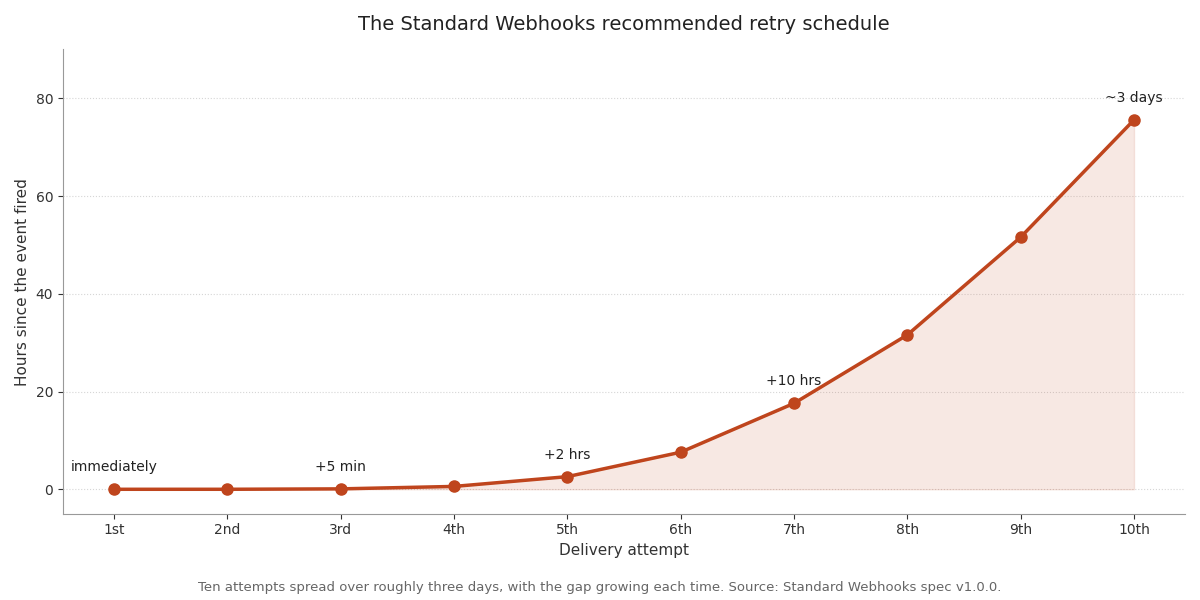
The exact numbers: immediately, then +5 seconds, +5 minutes, +30 minutes, +2 hours, +5 hours, +10 hours, +14 hours, +20 hours, +24 hours. Stripe's live-mode policy lands in the same neighborhood — up to three days with exponential backoff.
Add jitter. If a hundred deliveries to a hundred customers all fail during the same outage on your side, an un-jittered schedule retries all hundred at the identical moment and knocks the recovering server straight back over.
Status code handling
Only 2xx is success. Everything else is a failure — but not all failures mean the same thing, and the spec's recommended handling is worth copying verbatim:
| Response | What it means | What you should do |
| --- | --- | --- |
| 2xx | Delivered | Mark success |
| 3xx | Redirect | Treat as failure; don't follow. Ask the customer to update the URL |
| 410 Gone | They're done receiving | Disable the endpoint and stop sending |
| 429 Too Many Requests | Rate limited | Throttle, honor retry-after if present |
| 502 / 504 | Server under load | Throttle and back off |
| Timeout / connection reset | Unreachable | Normal retry path |
Give consumers a real timeout. The spec recommends 15 to 30 seconds, which is more generous than GitHub's inbound policy of 10 seconds before it terminates the connection. Err toward the generous end — your customers may be non-technical founders whose handler does real work inline, and a timeout that's too tight turns into a support ticket.
When an endpoint fails consistently for a long stretch, disable it and email the customer. Silently retrying into a black hole for weeks wastes your workers and, worse, hides the problem from the one person who can fix it.
The delivery log is not optional
Every failed delivery is a support ticket unless the customer can debug it themselves. Ship a page in your dashboard that shows, per endpoint: the event type, the timestamp, the HTTP status you got back, the response body (truncated), the number of attempts, and when the next retry is scheduled.
Then add a Replay button. Two of them, really — replay one delivery, and replay everything in a time range. That second one is what lets a customer recover from a four-hour outage on their side without emailing you. It's a couple of days of work and it will pay for itself the first month.
Security: the part that can actually hurt you
Outbound webhooks have a security problem inbound webhooks don't: your customers get to tell your server what URL to call.
That is the textbook setup for server-side request forgery. A customer registers http://169.254.169.254/latest/meta-data/ as their webhook URL, your worker dutifully POSTs to it, and now your cloud instance metadata is being echoed back into a delivery log they can read. Or they point it at an internal service that has no authentication because it was never supposed to be reachable. The Standard Webhooks spec names this explicitly, noting that webhook implementations are especially vulnerable because they let customers add any URL they want.
The defense is two layers, and you want both:
Route outbound requests through a filtering proxy. Stripe open-sourced Smokescreen for exactly this — an HTTP proxy that blocks connections to internal IP ranges. Don't build the IP filter yourself; the edge cases (DNS rebinding, IPv6-mapped IPv4, redirect chains) are more numerous than they look.
Put the webhook workers on their own private subnet that can't reach your internal services in the first place. Defense in depth, so a bug in layer one isn't fatal.
Beyond SSRF:
- Require HTTPS for customer endpoints. Signatures prove authenticity but don't encrypt anything — over plain HTTP, the payload is readable in transit.
- Refuse to follow redirects. A
3xxis a failure, not a route. Following them is both wasted load and an SSRF bypass. - Publish your source IPs if you can. Enterprise customers with firewalls will ask, and having a documented static IP list turns a multi-week procurement conversation into a config change.
- Never put anything sensitive in the payload URL. GitHub's docs warn about this specifically for inbound webhooks, and it cuts the same way outbound: URLs end up in logs, error trackers, and proxy access records.
If you're wiring the sending side into a Next.js app, the worker belongs in a background job rather than in a request handler — an outbound HTTP call with retries has no business blocking a user's page load. I covered that setup in background jobs for indie SaaS. And if you've read Stripe webhook hell, you already know what the receiving end of a badly-built webhook system feels like; this is your chance to not be that.
Frequently asked questions
Should I use Standard Webhooks or invent my own signature scheme?
Use Standard Webhooks. The practical argument beats the theoretical one: your customers can verify your webhooks with an existing library in seven languages instead of hand-rolling HMAC from your docs. The spec came out of Svix and has since been picked up by OpenAI, Anthropic, Supabase, and Kong, so a growing share of developers already recognize the headers.
How long should I retry a failed delivery?
About three days, across roughly ten attempts with exponential backoff and jitter. That matches both the Standard Webhooks reference schedule and Stripe's live-mode behavior. Shorter than that and a customer's weekend outage costs them data; much longer and you're spending worker time on an endpoint that's probably never coming back.
Do I need a queue, or can I send webhooks inline?
You need a queue. An inline send means a customer's slow endpoint holds your request open for up to 30 seconds, and a retry schedule spanning days is impossible to express inside a web request anyway. The queue is the feature, not an optimization.
Should webhook payloads contain the full object or just an ID?
Start thin — the event type and the object's ID — and expand toward fuller payloads only when customers ask. You can always add fields without breaking anyone, but removing one is a breaking change. Thin payloads also mean data access goes through your API, where you can log and restrict it.
How do I let customers test their endpoint before going live?
Give them a "send test event" button that dispatches a real, correctly-signed payload of a type they choose. It exercises the exact code path a live event would, including the signature, so they can debug verification against something they triggered on purpose.
What's the difference between the event timestamp and the delivery timestamp?
The event timestamp is when the thing happened in your system; it stays fixed forever. The delivery timestamp is when this particular attempt was made, and it changes on every retry. The signature covers the delivery timestamp, which is what makes the replay-attack tolerance window work.
Conclusion
A good outbound webhooks implementation is mostly unglamorous defensive work. The fetch call that sends the payload is the easy twenty lines. Everything that makes it trustworthy — the HMAC over id.timestamp.payload, the ten-attempt retry curve, the honest handling of 410 and 429, the SSRF proxy, the delivery log with a replay button — is the actual product.
The good news is that you don't have to design any of it. The Standard Webhooks spec is a short read and encodes what Stripe, GitHub, and Svix learned the expensive way. Follow it, ship a delivery log on day one, and put your webhook workers behind a filtering proxy before a single customer registers a URL.
If you're building this into a Next.js SaaS with AI coding tools, Coding Capybaras is the free boilerplate I built for that workflow — the Stripe webhook receiver in it is a working reference for the signing and idempotency patterns above, running in reverse.