Stripe Webhook Hell: Every Gotcha (and How to Avoid It)
Stripe webhook gotchas explained for indie SaaS founders — signature verification, idempotency, retries, and the dev-vs-prod traps that cause silent revenue bugs.
· Justin Boggs

Stripe webhooks are where most indie SaaS founders meet their first truly nasty bug, and it's almost always one of four things: a signature that won't verify because a framework mangled the request body, a missing idempotency check that double-charges or double-fulfills, a handler that runs too slow and gets retried into a storm, or a dev-vs-prod config mismatch where events silently vanish. None of these throw a loud error. They fail quietly, in production, on the code that touches your customers' money — which is exactly why they're so painful. The good news: every one of them has a known fix, and once you understand why each gotcha happens, they stop being mysterious. Here's the full tour.
TL;DR
- Verify the signature, and use the raw body to do it. Stripe signs every event; if your framework parses the body to JSON before you verify, verification fails. This is the #1 cause of "my webhook won't work."
- Make your handler idempotent. Stripe guarantees at-least-once delivery and retries for up to 72 hours, so the same event can arrive more than once. Store each
event.idwith a unique constraint and skip duplicates.- Return a 2xx fast, then do the work. Stripe expects a quick success response and retries anything else. Verify, enqueue the event, return 200 — don't send email or sync an ERP inline.
- Dev and prod are different worlds. Separate signing secrets, separate endpoints, and the Stripe CLI for local testing. Mixing them up is how events disappear silently.
- This is the highest-stakes code you own. Treat the webhook handler as core infrastructure, not a glue script.
Why are webhooks so error-prone in the first place?
A webhook is just Stripe making an HTTP request to your server when something happens — a payment succeeds, a subscription renews, a card gets declined. Conceptually it's simple. The reason it turns into "hell" is that a webhook is an event you don't control the timing, ordering, or delivery count of. Everything else in your app, you trigger. A webhook arrives whenever Stripe decides, possibly more than once, possibly out of order, possibly while your server is mid-deploy.
That inversion breaks the assumptions most founders code with. You write a handler imagining it runs once, cleanly, right after the customer pays. In reality it might run three times, the third arriving eleven hours later, after a retry, while a different event for the same customer is also in flight. Code that's correct for the happy path is quietly wrong for the real one.
And the failures are silent. A bug in your checkout page throws an error the customer sees. A bug in your webhook handler just means a customer paid and never got access — and you find out days later from a support email. That's what makes this the part of a Stripe integration worth slowing down on. In the boilerplate, all of this lives in one file (/platform/lib/payments/webhook-handler.ts) on purpose: the money-touching logic is concentrated in one place you can reason about, not scattered across routes.
The four sections below are the four gotchas, in the order you'll typically hit them.
Gotcha 1: Signature verification and the raw body trap
Stripe signs every webhook so you can prove the request actually came from Stripe and wasn't forged. Per Stripe's webhook documentation, each event arrives with a Stripe-Signature header, and you verify it with the Stripe library before trusting a single byte of the payload. Skip this and an attacker can POST a fake payment_intent.succeeded to your endpoint and unlock paid features for free. Verification is not optional — it's the security boundary of your whole billing system.
Here's the trap that gets nearly everyone: signature verification needs the raw request body, exactly as Stripe sent it. Most web frameworks — including Next.js by default — automatically parse incoming request bodies into JSON for you. That convenience destroys the signature. Stripe computed its signature over the original bytes; the moment your framework re-serializes the parsed object, even a whitespace difference makes the computed signature not match, and verification fails with a cryptic error that has nothing to do with the real cause.
The fix is to tell your framework not to parse the body for the webhook route, and to hand Stripe the raw buffer. In a Next.js App Router route handler you read await request.text() and pass that string straight to stripe.webhooks.constructEvent() along with the signature header and your signing secret. Get those three inputs right — raw body, signature header, correct secret — and verification just works.
The other half of signature verification is replay protection. Stripe includes a timestamp in the signed payload, and the official libraries reject anything older than a 5-minute default tolerance (per Stripe). That stops an attacker from capturing a valid old event and replaying it later. You rarely need to touch the tolerance — just know it's why a webhook replayed from a log hours later will fail verification, which is by design, not a bug.
If verification is failing, the debugging order is almost always: (1) am I using the raw body, (2) is the signing secret the right one for this endpoint, (3) is the signature header being passed through unmodified. Ninety percent of the time it's number one.
Gotcha 2: Idempotency, or why the same event arrives twice
Stripe guarantees at-least-once delivery. Read that carefully — at least once, not exactly once. The same event can, and eventually will, be delivered to your endpoint more than one time. This happens because of retries (more on those next), network hiccups, and Stripe's own redundancy. If your handler isn't built for it, the duplicate is a real bug with real money attached.
Picture a checkout.session.completed handler that grants a license and emails a download link. It runs once, all good. Then the same event arrives again. Now you've granted two licenses and sent two emails — or worse, if the handler creates a record, you have a duplicate. For a refund or a credit, a double-processed event is money straight out the door.
The fix is idempotency: process each event exactly once, no matter how many times it's delivered. The standard pattern, recommended across Stripe integration guides, is to store every processed event.id in a database table with a UNIQUE constraint. At the top of your handler, try to record the event ID; if it's already there, you've seen this event — return 200 and stop. If it's new, do the work.
The subtle part most tutorials skip: the idempotency record and the actual business logic must commit in the same database transaction. If you mark the event as processed before doing the work and your server crashes in between, the retry sees the ID, thinks it's done, and skips it — so the customer paid and never got access. If you do the work first and crash before recording the ID, the retry runs the work again — double-fulfillment. Wrapping both in one transaction is what makes "exactly once" actually hold. This is also why the database you pick matters here: you want real transactional guarantees under your billing logic, not eventual consistency.
Gotcha 3: Retries, timeouts, and the storm you cause yourself
Stripe decides whether a delivery succeeded based purely on your HTTP status code. Any 2xx response is success; anything else — a 400, a 500, a redirect, or a timeout — is a failure that triggers a retry. And Stripe doesn't retry gently. In live mode it retries with exponential backoff for up to three days, across roughly 16 attempts (per Stripe's documentation): the first retry within an hour, then spacing out to twice a day, then daily until it gives up.
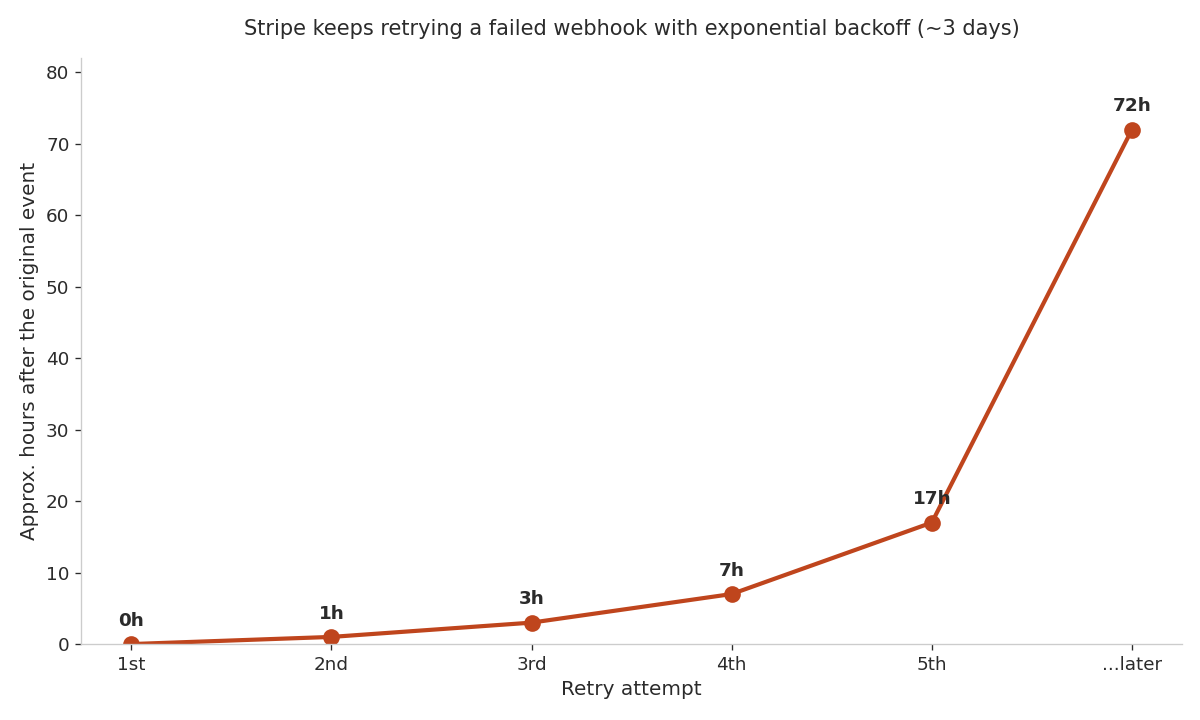
The chart shows why a slow or flaky handler is so dangerous: every failure schedules another delivery, and those stack up. If your handler is slow enough to time out — Stripe waits only about 10 seconds for a response — every single event "fails" from Stripe's view and gets retried, even though your code eventually finished. Now you've got the original event plus a retry running the same expensive work, racing each other, multiplying load exactly when your server is already struggling. That's the self-inflicted storm.
The fix flips the order of operations. Verify the signature, immediately persist or enqueue the event, return 200 — and only then do the slow work. Sending email, syncing to another system, generating a PDF: none of that belongs inline in the webhook response. Acknowledge fast so Stripe is satisfied, then process the event from a background job or a queue. This is exactly the kind of long-running work that pushed me toward a backend platform that can run workers — serverless functions are fine for the fast acknowledgment, but the heavy processing wants somewhere it can take its time.
If you do hit failures, don't panic-rebuild — Stripe's dashboard shows every delivery attempt and its response, and you can manually re-send any event. That visibility, plus good logging in your error tracker, turns webhook debugging from guesswork into reading a clear record of what arrived and what your code did with it.
Gotcha 4: The dev-vs-prod traps that swallow events
The last category isn't a coding bug — it's a configuration bug, and it's the one that makes people think Stripe itself is broken. Dev and prod are completely separate worlds in Stripe, and mixing them up makes events silently vanish.
The biggest offender is the signing secret. Every webhook endpoint has its own secret, and your local testing setup has a different secret again. Deploy with the test-mode secret in your production environment, or paste your local secret into prod, and every real event fails signature verification. No crash, no alert — just verification failures piling up while customers pay and get nothing. Each environment needs its own endpoint and its own secret, loaded from that environment's config, never hardcoded. (In the boilerplate, like every secret, this lives only in .env.local and the deploy platform's env vars — never in the code.)
For local development, the right tool is the Stripe CLI. Running stripe listen --forward-to localhost:3000/api/webhooks opens a secure tunnel from Stripe to your machine and prints a dedicated webhook signing secret for that session. You can then stripe trigger checkout.session.completed to fire real test events at your local handler. This is how you test webhooks without deploying — and without it, people resort to clicking through real checkouts on a deployed test build, which is slow and miserable.
A few more environment traps worth knowing. Test-mode events and live-mode events are entirely separate streams; a test purchase never hits your live endpoint and vice versa, so "it worked in test but not in prod" is usually a secret or endpoint mismatch. And if your webhook route sits behind authentication middleware, Stripe's request — which carries no login session — gets blocked before your handler runs, so the webhook path must be explicitly public. The reliability of these events is the backbone of everything downstream, from access control to receipts to your lifecycle email sequences — a dropped subscription.updated is a customer who keeps access after canceling, or loses it after paying.
Frequently asked questions
Why does my Stripe webhook signature verification keep failing?
The most common cause is that your framework parsed the request body before you verified it. Signature verification requires the raw, unmodified body exactly as Stripe sent it. In Next.js, read the raw body with await request.text() and disable automatic body parsing for the webhook route. The second most common cause is using the wrong signing secret for that endpoint or environment.
What does idempotency mean for Stripe webhooks?
It means processing each event exactly once even though Stripe may deliver it multiple times (at-least-once delivery). Store every event.id in a database table with a unique constraint, and skip events you've already recorded. Critically, commit the idempotency record and the business logic in the same transaction so a crash between them can't cause double-fulfillment or a missed event.
How long does Stripe retry a failed webhook?
In live mode, Stripe retries with exponential backoff for up to three days, across roughly 16 attempts — the first within an hour, then spreading out to daily. It treats any non-2xx response, or a timeout (it waits about 10 seconds), as a failure. You can also manually re-send any event from the Stripe dashboard.
Should I do work inside the webhook handler or return 200 first?
Return a 2xx response as fast as possible, then do the slow work. Verify the signature, persist or enqueue the event, and respond 200 immediately. Running email sends, external API calls, or heavy processing inline risks a timeout, which Stripe reads as a failure and retries — creating duplicate work and load right when you can least afford it.
How do I test Stripe webhooks locally?
Use the Stripe CLI. Run stripe listen --forward-to localhost:3000/api/webhooks to tunnel events to your local server; it prints a dedicated signing secret for the session. Then use stripe trigger <event> to fire test events at your handler. This lets you develop and debug without deploying or clicking through real checkouts.
Why are my production webhooks failing when local ones work?
Almost always a configuration mismatch. Each endpoint and environment has its own signing secret, and test-mode and live-mode events are separate streams. Confirm production is loading its own live signing secret, that the live endpoint URL is registered in Stripe, and that the webhook route isn't blocked by authentication middleware.
The bottom line
Stripe webhook hell isn't really about Stripe — it's about the fact that webhooks invert the assumptions you code with. You don't control when an event arrives, how many times it arrives, or what else is happening when it does. Once you internalize that, the four gotchas become a checklist: verify with the raw body, make the handler idempotent within a transaction, acknowledge fast and process in the background, and keep dev and prod cleanly separated. Get those right and the "hell" mostly evaporates.
This is the code you least want to get wrong, so treat it like the core infrastructure it is. If you're building a SaaS with AI coding tools, Coding Capybaras is the free boilerplate I built for exactly this workflow — the Stripe webhook handler ships with signature verification and idempotency already wired in, so you start from the safe version instead of debugging your way to it.