SaaS API Keys Tutorial: Scopes, Hashing, and Rotation
A founder's guide to shipping customer-facing API keys: key format, hashing before storage, scoping permissions, rate limits, rotation, and the AI prompt.
· Justin Boggs

Photo by Filip Szalbot on Unsplash
A SaaS API keys tutorial usually skips the part that actually bites you. Generating a random string is the easy 5%. The other 95% is: what does the key look like so a scanner can recognize it, do you store the key or a hash of it, what happens when a customer pastes it into a public GitHub repo, how do you let them give a key read-only access, and how do you rotate it without breaking their production integration at 2am. This post walks through all of it — the schema, the verification path, the scoping model, the rotation flow, and the prompt you can paste into your AI assistant to build it.
TL;DR
- Give keys a visible prefix and a secret half:
cc_live_+ 32 random bytes. The prefix makes them greppable by GitHub secret scanning; the random half makes them unguessable.- Hash the secret half before storing it. Store SHA-256, never the raw key. Show the full key exactly once, at creation.
- Store a short lookup prefix alongside the hash so verification is one indexed query, not a table scan.
- Scope keys by resource and verb (read / write / none), the way Stripe's restricted keys work.
- Rotation needs an overlap window. Two valid keys for 7 days beats a hard cutover every time.
Why customers ask for an API before you're ready
The request arrives in support before it arrives on your roadmap. Someone wants to pull their data into a spreadsheet on a schedule. Someone else wants to push records in from a form tool. A third wants to wire you into Zapier or n8n. All three are asking for the same thing: a credential they can paste into a machine.
That's what an API key is. An API key is a long-lived bearer credential that identifies a caller and carries a fixed set of permissions, with no user session and no interactive login step. Anyone holding the string is the caller. That's the whole security model, which is why the design details matter more than they do for a normal login.
The good news for a solo founder: this is a genuinely small feature. One table, one middleware function, one settings page. I shipped the version described here over a weekend. The bad news is that every shortcut you take shows up later as a support incident — usually the day after a customer commits their key to a public repo.
Two design decisions determine how bad that day is. First, whether the key is recognizable on sight, so automated scanners can find it and tell you before an attacker does. Second, whether you stored the key or a hash of it, which decides whether a database leak hands an attacker working credentials or useless noise.
Everything below follows from those two.
What should an API key actually look like?
Structure your key in two halves: a human-readable prefix and a cryptographically random secret.
cc_live_7fK2mQx9vB4nR8sL1tW6yZ3jH5dP0aCe
└──┬──┘ └──────────────┬────────────────┘
  prefix           random secret
The prefix does three jobs. It tells a human what the string is when they find it in a log. It tells you which environment it belongs to (cc_live_ vs cc_test_), so a customer can't accidentally hit production with a sandbox key. And it makes the key findable by automated secret scanners.
That third one is the underrated part. GitHub's secret scanning partner program lets you register your key pattern so GitHub notifies you when one of your customers' keys shows up in a public commit. You get a webhook; you revoke the key; the customer gets an email. That loop only exists if your keys have a distinctive shape.
GitHub wrote up their own reasoning when they moved to prefixed tokens. Their post Behind GitHub's new authentication token formats is the best short read on this. Three details worth stealing:
- They use a three-letter prefix plus an underscore —
ghp_for personal access tokens,gho_for OAuth tokens,ghs_for server-to-server. GitHub credits Slack and Stripe for the pattern. - The separator is an underscore specifically because it isn't a Base64 character, so a random encoded string can't accidentally look like a token. Bonus: double-clicking an underscore-separated string selects the whole thing, where a hyphen stops the selection.
- With the prefix alone, GitHub expected the false-positive rate for secret scanning to drop to 0.5%.
They also append a 32-bit CRC32 checksum in the last six characters, Base62-encoded. That lets a scanner reject a malformed token offline without querying a database. If you're feeling thorough, do the same; if you're shipping this weekend, the prefix alone gets you most of the value.
How long should the random half be?
Long enough that guessing is off the table forever, which is a lower bar than people think.
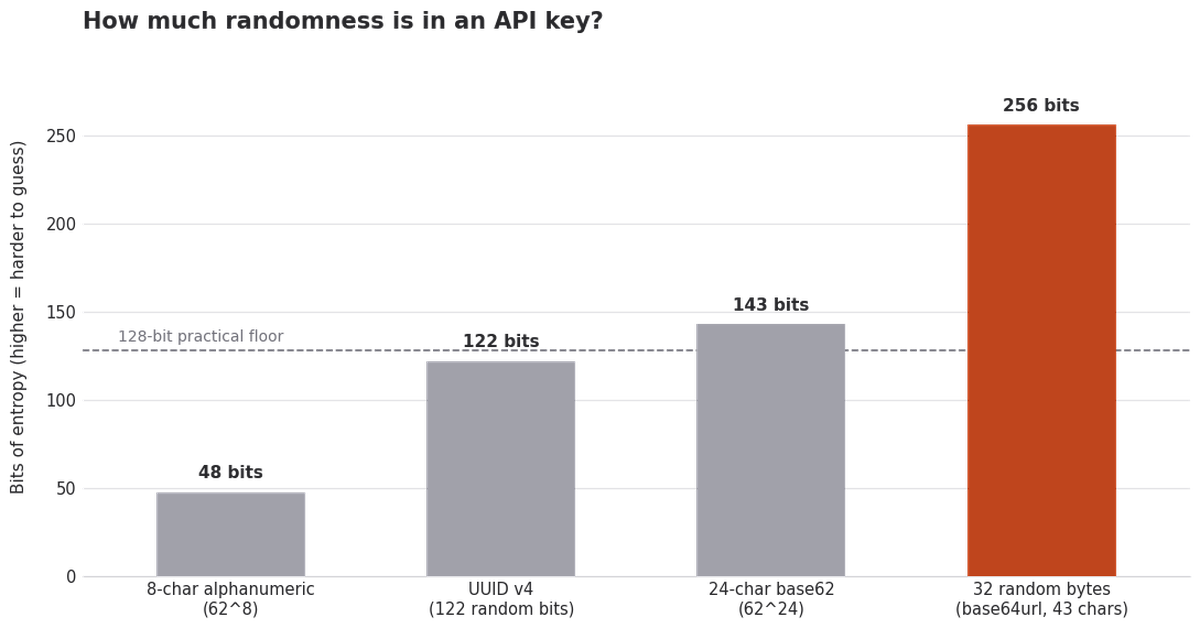
32 bytes from a cryptographically secure random source gives you 256 bits. In Node that's one line:
import { randomBytes } from "node:crypto";

const secret = randomBytes(32).toString("base64url"); // 43 chars
const key = `cc_live_${secret}`;
Use node:crypto, not Math.random(). This is the single most common mistake I see in AI-generated key code — the model reaches for the familiar random function because it appears in ten thousand tutorials, and the result is predictable output. Ask your assistant explicitly for a CSPRNG. It's the same class of review habit I cover in reviewing AI-written code for security problems.
How do you store an API key safely?
You don't store the key. You store a hash of it.
When a customer creates a key, you generate it, show it to them once, hash it, and write the hash to the database. The plaintext key never touches your storage layer. If your database leaks, the attacker gets hashes — and a SHA-256 hash of 256 bits of true randomness is not reversible by any dictionary, rainbow table, or GPU farm.
| Storage approach | Attacker with a DB dump gets… | Can you re-display the key? | Verdict | | --- | --- | --- | --- | | Plaintext in a column | Working keys for every customer | Yes | Never do this | | Reversibly encrypted | Working keys if they also get the encryption key | Yes | Only if you truly need re-display | | SHA-256 hash | Useless hashes | No — show once at creation | Default choice | | bcrypt / argon2 hash | Useless hashes | No | Overkill and too slow here |
That last row surprises people, so it's worth being precise. You use bcrypt or argon2 for passwords because passwords are low-entropy and human-chosen — the slow hash is what makes brute-forcing "hunter2" expensive. An API key you generated is 256 bits of machine randomness. There's nothing to brute-force. And unlike a password, a key gets verified on every single API request, so a deliberately slow hash turns into a latency tax on your whole API. Plain SHA-256 is the right tool.
The lookup problem, and the fix
Here's the part most tutorials miss. If you only store a hash, how do you find the row? You can't query WHERE key = $1 because you don't have the key stored. Hashing the incoming key and querying WHERE key_hash = $1 works, but only if you're hashing with a deterministic, unsalted algorithm — which is exactly why SHA-256 (not bcrypt) is the choice.
Store a short, non-secret lookup prefix as a separate indexed column: the first 8-12 characters after the environment marker. It's not enough to reconstruct the key, but it narrows the search to one row instantly, and it gives you something safe to display in the UI (cc_live_7fK2mQx9…) so customers can tell their keys apart.
Here's the schema. In the Coding Capybaras layout this is product code, so it goes in /product/db/schema/app.ts with the app_ prefix — platform tables are reserved for auth, billing, and config:
export const apiKeys = pgTable("app_api_keys", {
  id: uuid("id").primaryKey().defaultRandom(),
  userId: uuid("user_id").notNull(),
  name: text("name").notNull(),              // "Zapier prod"
  keyPrefix: text("key_prefix").notNull(),   // "cc_live_7fK2mQx9" — displayable
  keyHash: text("key_hash").notNull(),       // sha256(full key)
  scopes: text("scopes").array().notNull(),  // ["records:read"]
  lastUsedAt: timestamp("last_used_at"),
  expiresAt: timestamp("expires_at"),
  revokedAt: timestamp("revoked_at"),
  createdAt: timestamp("created_at").defaultNow().notNull(),
});
Index keyPrefix and userId. If you're on Supabase, add a row-level security policy so a customer can only ever see their own keys — the pattern is the same one in the Supabase Row Level Security tutorial, and it's cheap insurance against a query that forgets its WHERE clause. If you're multi-tenant with organizations rather than individual users, key ownership belongs to the org, not the person who clicked the button — otherwise every offboarding turns into a scavenger hunt.
Two columns earn their keep later. lastUsedAt is what lets you tell a customer "that key hasn't been called in 40 days, safe to delete" — and it's what makes rotation survivable. revokedAt gives you soft deletes, so a revoked key still shows in an audit trail instead of vanishing.
The lifecycle: create, verify, rotate, revoke
flowchart TD
    A[Customer clicks Create key] --> B[Generate 32 random bytes]
    B --> C[Build cc_live_ + secret]
    C --> D[Show full key ONCE in the UI]
    C --> E[Store prefix + SHA-256 hash + scopes]
    D --> F[Customer pastes key into their tool]
    F --> G[Request arrives with Authorization header]
    G --> H[Look up row by prefix]
    H --> I{Hash matches?<br/>Not revoked?<br/>Not expired?<br/>Scope allows verb?}
    I -->|No| J[401 or 403 + log the attempt]
    I -->|Yes| K[Update last_used_at, serve request]
    E --> L[Rotate: issue new key,<br/>keep old valid 7 days]
    L --> M[Old key expires,<br/>revoked_at set]
The verification step runs on every request, so it needs to be boring and fast:
export async function verifyApiKey(header: string | null) {
  if (!header?.startsWith("Bearer ")) return null;
  const key = header.slice(7);
  if (!key.startsWith("cc_live_")) return null;

  const prefix = key.slice(0, 16);
  const hash = createHash("sha256").update(key).digest("hex");

  const [row] = await db.select().from(apiKeys)
    .where(and(eq(apiKeys.keyPrefix, prefix), isNull(apiKeys.revokedAt)))
    .limit(1);

  if (!row) return null;
  if (!timingSafeEqual(Buffer.from(row.keyHash), Buffer.from(hash))) return null;
  if (row.expiresAt && row.expiresAt < new Date()) return null;

  return row;
}
Use timingSafeEqual rather than ===. String comparison short-circuits on the first differing character, which in theory leaks information about the hash through response timing. It's a marginal risk and a one-word fix, so take it.
Don't write lastUsedAt synchronously on every call — that's a database write per request, and it'll be the first thing to fall over under load. Batch it, or write it at most once a minute per key. If you already have Redis in the stack for other reasons, this is a natural fit; the Upstash Redis marketplace guide has the wiring.
Scopes: what should this key be allowed to do?
The default failure mode is the all-powerful key. One credential, full account access, no restrictions. It's fine right up until it leaks, at which point the blast radius is your entire customer account.
Stripe's answer is the model worth copying. A restricted API key starts with rk_, and when you create one you pick each resource it touches and set the permission to Read, Write, or None. Stripe's own guidance in best practices for managing secret API keys is to use restricted keys for most use cases, precisely so a compromised key is limited to what it was granted.
Scale that down to your app. A resource:verb string list is enough:
| Scope | Grants | Typical consumer |
| --- | --- | --- |
| records:read | List and fetch records | A reporting dashboard, a spreadsheet sync |
| records:write | Create and update records | A form tool pushing submissions in |
| records:delete | Hard-delete records | Rare — make customers opt in explicitly |
| webhooks:manage | Register and remove endpoints | An integration partner |
| billing:read | Read plan and usage | An internal finance script |
Two rules make this work in practice. Default every new key to read-only — make write a deliberate checkbox, not the path of least resistance. And check the scope in the route handler, not just the middleware, because middleware that only authenticates without authorizing is one careless copy-paste away from a records:read key deleting data.
Keep the scope list short at launch. Five scopes you can explain in a sentence each beat twenty that nobody understands, and adding a scope later is trivial while removing one is a breaking change for every customer.
Rate limits, rotation, and the revoke button
Rate limits. Apply them per key and per source IP. Per-key limits stop one customer's runaway script from starving everyone else. Per-IP limits catch an attacker spraying guessed keys from a single host — traffic that never matches a valid key and so never hits a per-key counter. Start generous (say 100 requests/minute per key), return 429 with a Retry-After header, and always include X-RateLimit-Remaining so a well-behaved client can back off before it gets throttled.
Rotation. The naïve version is a footgun: customer clicks "rotate," you invalidate the old key immediately, and their production integration starts throwing 401s before they've finished pasting the new one.
Stripe's key rotation flow solves this with an overlap window — when you roll a secret key in the Dashboard, both the old and new keys work for up to 7 days, so you can migrate gradually with no downtime. Stripe's advice is to watch the old key's request logs and expire it only once its volume has sat at zero for a few hours. That's exactly what your lastUsedAt column is for. Copy the whole pattern:
- Customer clicks Rotate. You issue a new key and show it once.
- The old key keeps working, with
expiresAtset 7 days out. - Your dashboard shows "old key last used 4 minutes ago" so they know whether the cutover landed.
- At zero usage, they click Expire now — or the window closes on its own.
Revoke. Separate from rotation, and it should be instant and unambiguous. One button, one confirmation, revokedAt set, done. Then send an email: which key, when, from where. If your key was revoked because a scanner found it in a public repo, say so plainly — customers would much rather hear it from you than from an attacker, and the first hour of a security incident goes much better when the revoke path already exists.
One more thing to build before you launch: an audit trail. Every create, rotate, and revoke, with actor, timestamp, and IP. It's three extra lines at write time, and the first time a customer asks "who deleted our production key," it's the difference between an answer and a shrug.
The prompt
Here's what I'd paste into Claude Code or Cursor to build this. Notice how much of it is constraints rather than instructions — that ratio is the whole trick, and it's the same approach I described in spec-driven development with AI.
Add customer-facing API keys to this Next.js + Supabase app.

Schema (product region, /product/db/schema/app.ts, table app_api_keys):
id, user_id, name, key_prefix, key_hash, scopes (text[]),
last_used_at, expires_at, revoked_at, created_at.
Index key_prefix and user_id. Add an RLS policy: users read only their own rows.

Key format: cc_live_ or cc_test_ + randomBytes(32).toString("base64url").
Use node:crypto — NOT Math.random().
Store sha256 of the full key in key_hash. Store the first 16 chars in key_prefix.
Never store the plaintext key. Return it once from the create action, never again.

Verification helper in /product/lib/api-keys/verify.ts:
parse Bearer header, look up by key_prefix, compare hashes with
crypto.timingSafeEqual, reject revoked and expired keys, return the row.
Do not write last_used_at on every request — throttle it to once per minute per key.

Scopes: records:read, records:write, records:delete, webhooks:manage, billing:read.
New keys default to records:read only. Enforce the scope check inside each route
handler, not only in middleware.

UI at /product/pages/settings/api-keys: list keys showing name, key_prefix,
scopes, last used, created. Create dialog shows the full key exactly once with a
copy button and an explicit "you will not see this again" warning.
Rotate issues a new key and sets expires_at on the old one to now + 7 days.
Revoke sets revoked_at immediately.

Validate every server action input with Zod before touching the database.
Write a test for verify.ts covering: valid key, revoked key, expired key,
wrong prefix, malformed header, and a key with insufficient scope.
Read what comes back before you run it. The two things to check first: that it used randomBytes and not Math.random(), and that the plaintext key genuinely never reaches a database write. Those are the failures that matter; everything else is a fixable bug. If reading generated code still feels opaque, reading AI output as a non-coder is the piece I'd start with.
Frequently asked questions
Should I use API keys or OAuth for my customers?
API keys when your customer is calling your API as themselves — their own script, their own Zapier account, their own data. OAuth when a third-party app needs to act on behalf of your users, because that requires a consent screen and per-user tokens. Most indie SaaS needs keys first and may never need OAuth.
Can I show a customer their API key again later?
Not if you hashed it, which is the point. Show the key once at creation with a clear warning, display only the prefix afterward, and make rotation a one-click flow so "I lost it" has a fast, safe answer. Customers are used to this — it's how GitHub, Stripe, and OpenAI all behave.
Do API keys need to expire?
They don't have to, and forcing short expiry on every key mostly generates support tickets. Offer optional expiry as a checkbox for customers who want it, and pair it with an email warning 7 days out. Reserve mandatory expiry for high-privilege scopes like records:delete.
What happens if a customer commits their key to GitHub?
If your key has a distinctive prefix and you've joined GitHub's secret scanning partner program, GitHub sends you a webhook when it spots one in a public repo. Auto-revoke the key, email the customer with the commit URL, and let them create a replacement. Without a recognizable prefix, you find out when the bill arrives.
Should the key go in a header or a query parameter?
Header, always — Authorization: Bearer <key>. Query parameters end up in server logs, browser history, proxy logs, and Referer headers, which is how keys leak without anyone doing anything wrong. Reject query-parameter auth outright rather than supporting it "for convenience."
How do I bill for API usage?
Meter it at the verification layer, where you already have the key row and the customer ID. Record one usage event per authenticated request, aggregate nightly, and report totals to Stripe. Usage-based billing with Stripe metered pricing walks through the meter events and the reconciliation job.
Wrapping up
A SaaS API keys feature is a weekend of work and a decade of consequences, so spend the extra hour on the parts that are hard to change later. Give the key a recognizable prefix so scanners can find it. Hash the secret half so a database leak is a non-event. Default new keys to read-only and check scopes at the route, not just the door. Build rotation with an overlap window before your first customer needs it, because the day they need it is the day their integration is already down.
Everything above is the boring version on purpose. There's no clever cryptography here — just a prefix, a SHA-256 hash, an indexed column, and a 7-day window. That's the whole feature.
If you're building this into a Next.js SaaS, Coding Capybaras is the free boilerplate I built for exactly this kind of work — the region layout, Zod-validated server actions, and audit log referenced above ship with it, and the marketplace has copy-paste prompts for the rate-limiting and email pieces.