Postgres Full Text Search Tutorial | Coding Capybaras
A postgres full text search tutorial for founders: tsvector, tsquery, GIN indexes, ranking, and the exact point where you should reach for Algolia instead.
· Justin Boggs

Photo by Ilya Semenov on Unsplash
Postgres full text search is a built-in search engine inside your database: you convert text into a tsvector, convert the user's query into a tsquery, match them with the @@ operator, and put a GIN index underneath so the whole thing stays fast. For most early SaaS apps that is the entire answer — no Algolia account, no sync job, no second system to keep in step with your database. This tutorial walks the full setup, the ranking and highlighting most guides skip, and the specific failure modes that eventually push you toward a dedicated search service. Because there are real ones, and knowing them ahead of time is the difference between shipping search and rebuilding it.
TL;DR
- Postgres full text search has three moving parts:
to_tsvector()turns your rows into searchable tokens,websearch_to_tsquery()turns user input into a query, and@@matches them.- Store the tsvector in a generated column and index it with GIN. That's the version that stays fast as your table grows.
- Use
setweight()to make title matches outrank body matches, then sort byts_rank().- Postgres does not correct typos. A search for "suprman" returns zero rows, and no amount of tuning changes that — you add
pg_trgmor you move to a search service.- Reach for Algolia or Typesense when typo tolerance, faceting, or instant as-you-type results become product requirements. Not before.
What is Postgres full text search, and how does it actually work?
Postgres full text search is a set of built-in data types and functions that let the database tokenize text, normalize it into searchable lexemes, and match it against a parsed query — the same job a search engine does, running inside the database you already have.
The core idea is normalization. When you run to_tsvector() on a sentence, Postgres doesn't store the sentence. It breaks the text into tokens, throws away the ones that don't matter, and reduces the rest to a root form. The Postgres documentation shows this cleanly:
SELECT to_tsvector('english', 'a fat  cat sat on a mat - it ate a fat rats');
--  'ate':9 'cat':3 'fat':2,11 'mat':7 'rat':12 'sat':4
Three things happened there and all three matter. The words a, on, and it disappeared — those are stop words, too common to be useful. The word rats became rat, because the English dictionary recognized it as a plural. And the punctuation vanished entirely. What's left is a list of lexemes with their positions in the document.
The query side gets the same treatment. to_tsquery('english', 'The & Fat & Rats') normalizes to 'fat' & 'rat'. Both sides of the comparison have been reduced to the same canonical form, which is why searching for "rats" finds a row containing "rat," and searching for "friend" finds "friends" and "friendly."
The @@ operator does the matching:
SELECT title
FROM posts
WHERE to_tsvector('english', body) @@ to_tsquery('english', 'friend');
That query works today, on your existing table, with no schema change. Which is the first honest thing to say about Postgres full text search: the barrier to trying it is roughly zero. You can paste that query into the Supabase SQL editor right now and see whether the results are good enough for your product.
The Postgres docs are blunt about what happens next, though: "most applications will find this approach too slow, except perhaps for occasional ad-hoc searches." Every row gets re-tokenized on every query. On a few hundred rows nobody notices. On fifty thousand, somebody does.
How do you index a tsvector column with GIN?
The fix is to compute the tsvector once, store it, and index it. There are two ways to do this and the difference matters more than most tutorials admit.
The quick way is an expression index:
CREATE INDEX posts_fts_idx ON posts USING GIN (to_tsvector('english', body));
This works, and it takes one line. The catch is precision: because the index was built with the two-argument form of to_tsvector, only queries written the same way will use it. WHERE to_tsvector('english', body) @@ ... hits the index. WHERE to_tsvector(body) @@ ... silently doesn't, and you get a sequential scan with no error telling you why. That's an easy bug for an AI assistant to introduce while "simplifying" a query — dropping the 'english' argument looks like tidying and is actually a full table scan. If you're building with Claude Code or Cursor, this is one to watch for; it's the same class of silent regression I wrote about in reading AI output as a non-coder.
The version I'd ship is a stored generated column instead. (Drop the expression index above if you created it — you only want one.)
ALTER TABLE posts
  ADD COLUMN fts tsvector
  GENERATED ALWAYS AS (
    to_tsvector('english', coalesce(title, '') || ' ' || coalesce(body, ''))
  ) STORED;

CREATE INDEX posts_fts_gin ON posts USING GIN (fts);
The 'english' argument isn't optional here for a second reason: a generated column requires an immutable expression, and only the two-argument to_tsvector qualifies. The one-argument form depends on a runtime setting, so Postgres rejects it.
Note the coalesce calls. to_tsvector(NULL) returns NULL, and concatenating anything with NULL gives you NULL — so a single missing title silently wipes out the entire searchable document for that row. This is the most common bug in hand-rolled Postgres search and it fails quietly, which is the worst way to fail.
The generated column has three advantages over the expression index. Queries don't need to repeat the configuration name, so the "silently dropped the config" bug can't happen. Postgres doesn't have to recompute to_tsvector to verify index matches, so searches are faster. And the column stays current automatically when title or body changes — no trigger to write, no cron job to forget.
Now the search:
SELECT id, title
FROM posts
WHERE fts @@ websearch_to_tsquery('english', $1);
Why GIN and not GiST? The Postgres docs are unambiguous: "GIN indexes are the preferred text search index type." GIN is a true inverted index — one entry per lexeme, pointing at a compressed list of matching rows. GiST is lossy: it hashes each document into a fixed-length signature (124 bytes by default), so it produces false matches that Postgres has to check against the actual table row. For search, GIN. The only knob worth knowing is maintenance_work_mem, which speeds up GIN index builds on large tables.
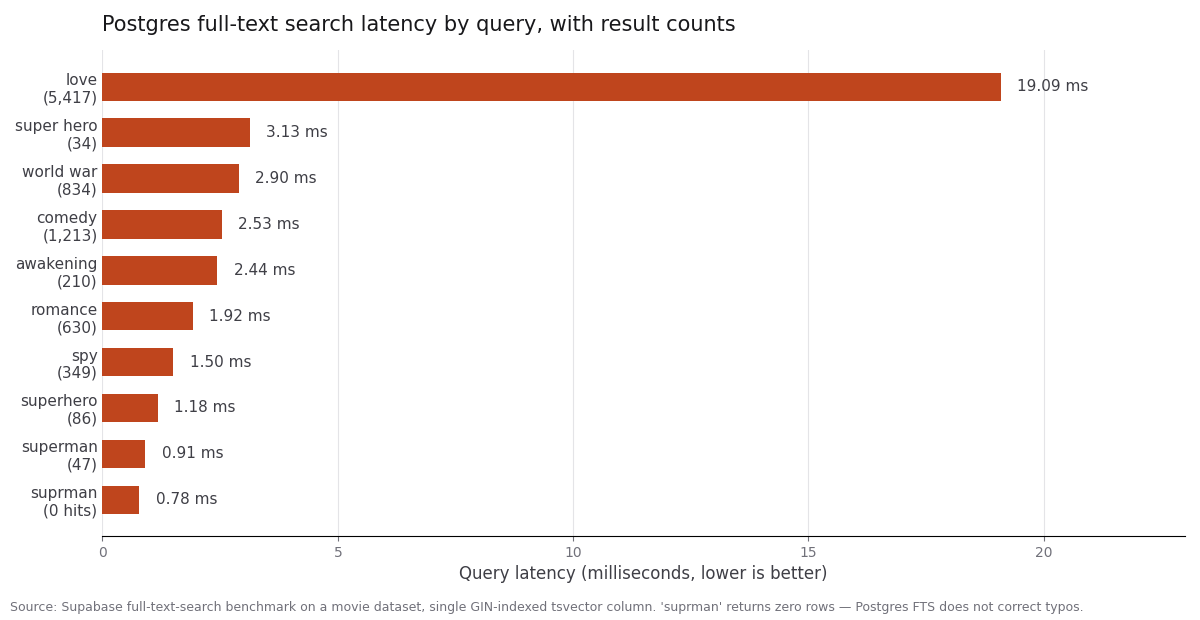
The chart above is from Supabase's full-text-search benchmark, which ran a set of queries against a movie dataset with a single GIN-indexed tsvector column. Nine of the ten queries came back in under 3.2 milliseconds. The outlier — "love", which matched 5,417 rows — took 19 ms. That's the shape you should expect: GIN lookup time tracks the number of matching rows, not the total row count, so broad queries cost more than narrow ones and your table can grow a lot before anything hurts.
Look at the fastest bar, though. "suprman" returned in 0.78 ms with zero results. We'll come back to that.
Which tsquery function should you use for user input?
This is the decision that separates a search box that feels right from one that throws 500 errors at your users, and Postgres gives you four options.
to_tsquery() is the most powerful and the most dangerous. It expects properly formatted input — tokens joined by &, |, !, or <->. Feed it a raw search box value like harry potter and it raises a syntax error. Every founder who wires to_tsquery() straight to a form input discovers this the first time a user types two words.
plainto_tsquery() takes unformatted text and ANDs the words together. plainto_tsquery('english', 'The Fat Rats') becomes 'fat' & 'rat'. Safe, but it ignores everything the user might have meant by quotes or minus signs.
phraseto_tsquery() does the same thing with the <-> (followed-by) operator instead, so word order matters. Useful for exact-phrase lookups, too strict as a general default.
websearch_to_tsquery() is the one you want. It accepts the syntax people already know from Google, and — this is the important part — the docs note it "will never raise syntax errors, which makes it possible to use raw user-supplied input for search." No sanitizing layer, no try/catch around your query.
| Function | Handles raw user input | Quoted phrases | OR / negation | Good default? |
| --- | --- | --- | --- | --- |
| to_tsquery() | No — raises syntax errors | Via <-> | Via \| and ! | No |
| plainto_tsquery() | Yes | No | No | Only for single-word search |
| phraseto_tsquery() | Yes | Implicit (all words) | No | No |
| websearch_to_tsquery() | Yes | Yes, with " | Yes, or and - | Yes |
Here's what users get for free with websearch_to_tsquery:
SELECT websearch_to_tsquery('english', 'signal -"segmentation fault"');
--  'signal' & !( 'segment' <-> 'fault' )
A user typed a minus sign and a quoted phrase, and Postgres turned it into a correct boolean query with a phrase exclusion. That's a genuinely good search experience from one function call.
One more piece: prefix matching, for as-you-type search. Append :* to a lexeme and it matches any word starting with that string. to_tsquery('lit:*') finds "little", "literature", "litigation". Supabase's guide wraps this in a database function so it's callable from the client SDK, which is the right shape — you don't want string concatenation against to_tsquery happening in your front end.
How do you rank and highlight search results?
Matching is the easy half. Ordering is what makes search feel intelligent, and this is where most DIY implementations stop too early.
Postgres ships two ranking functions. ts_rank() scores by how often query terms appear. ts_rank_cd() computes cover density, which also accounts for how close the matching terms are to each other — it implements the approach from Clarke, Cormack, and Tudhope's 1999 paper on relevance ranking for short queries. For a search box where people type two or three words, ts_rank_cd() usually orders things better.
Both take an optional weights array, and weights are the feature worth your time. Use setweight() to label lexemes A through D by which field they came from. This is a replacement for the fts column defined earlier, not an addition — write it this way the first time:
-- The weighted version of the generated column from earlier.
ALTER TABLE posts
  ADD COLUMN fts tsvector
  GENERATED ALWAYS AS (
    setweight(to_tsvector('english', coalesce(title, '')), 'A') ||
    setweight(to_tsvector('english', coalesce(body,  '')), 'B')
  ) STORED;
The default weights are {0.1, 0.2, 0.4, 1.0} for D, C, B, A. So a title match scores 1.0 and a body match scores 0.4 — a post with the search term in its title outranks one that merely mentions it. That single change does more for perceived search quality than any other tuning step.
Then rank:
SELECT id, title, ts_rank_cd(fts, query) AS rank
FROM posts, websearch_to_tsquery('english', $1) query
WHERE fts @@ query
ORDER BY rank DESC
LIMIT 20;
Two caveats the docs are honest about. Ranking is expensive — it has to read the tsvector of every matching row, which can be I/O bound. And ranks are not comparable across queries: there's no global information involved, so you can't present a "87% match" score. Normalization flag 32 squeezes ranks into a 0–1 range, but that's cosmetic and doesn't change the ordering.
For highlighting, ts_headline() returns an excerpt with matched terms wrapped in tags:
SELECT ts_headline('english', body, websearch_to_tsquery('english', $1),
                   'MaxWords=30, MinWords=10, StartSel=<mark>, StopSel=</mark>')
FROM posts WHERE fts @@ websearch_to_tsquery('english', $1);
Two warnings here, and the first is a security one. The Postgres docs state plainly that ts_headline() output "is not guaranteed to be safe for direct inclusion in web pages." It strips some XML tags but not all HTML, so rendering it with dangerouslySetInnerHTML on untrusted content is an XSS hole. Sanitize the output, or strip HTML from the input before it's ever stored. If you're letting an AI assistant write this code, read the rendering line carefully — this is exactly the kind of thing that looks fine and isn't, which I covered in more depth in the AI coding security review.
The second warning is performance: ts_headline() reads the original document, not the tsvector. Run it on your twenty result rows after the LIMIT, never across the whole match set.
When does Postgres full text search stop being enough?
Here's the part that gets left out of most tutorials, and it's the part that actually determines whether you build this or skip it.
Postgres full text search has no typo tolerance. Go back to the chart: "suprman" returned zero rows in 0.78 milliseconds. The query was fast and the answer was empty. Stemming reduces "rats" to "rat", but no dictionary in the default English configuration knows that "suprman" was meant to be "superman." In Supabase's benchmark, only Typesense and MeiliSearch handled the misspelling correctly — Postgres returned zero rows, and Supabase notes OpenSearch's default configuration doesn't index misspellings either.
For a public-facing search box where people type fast on phones, that's a product problem, not a technical detail. You have two outs. The lighter one is pg_trgm, the trigram extension, which does fuzzy similarity matching and can be layered alongside your FTS query as a fallback when the tsvector match returns nothing. The heavier one is a dedicated search service.
The other limits, in the order you'll hit them:
- Faceting. Filter-by-category sidebars with live result counts are a search-engine feature. You can approximate it with
GROUP BYin Postgres, but it gets slow and awkward fast. - Instant search. Sub-50 ms responses on every keystroke, from the browser, means an edge-cached search API. Your Postgres connection pool was not designed for that traffic shape.
- Synonyms and multi-language. Postgres supports thesaurus dictionaries and per-language configurations, but configuring them is real database administration work — not something you want on a solo founder's plate.
- Relevance tuning by business rules. "Boost items from customers on the Pro plan" is a config toggle in a search service and a custom ranking function in Postgres.
| | Postgres FTS | pg_trgm alongside FTS | Dedicated search service |
| --- | --- | --- | --- |
| Extra infrastructure | None | None | Yes — plus a sync job |
| Typo tolerance | No | Yes, fuzzy | Yes, tuned |
| Relevance ranking | ts_rank / ts_rank_cd | Similarity score | Built-in, configurable |
| Faceting | Manual GROUP BY | Manual | Built-in |
| Cost | Already paid for | Already paid for | Free tier, then usage-based |
| Good fit for | Most apps, until a feature gap bites | Apps needing fuzzy match only | Search-is-the-product apps |
Supabase's own conclusion after benchmarking Postgres against SQLite FTS, Typesense, MeiliSearch, and OpenSearch was that Postgres "held its own" and is "'complexity neutral' — no new systems needed." That matches what I'd tell a founder: build it in Postgres, ship it, and let real user behavior tell you whether you need more. If you do hit the wall, the Algolia setup guide walks the migration, and the broader database comparison covers why Postgres earns its place as the default anyway.
What does this look like in a Next.js app?
Concretely, in a Next.js + Supabase stack, the whole feature is four pieces.
The migration adds the generated column and the GIN index. Keep it in a real migration file — pnpm db:generate if you're on Drizzle — rather than clicking through a dashboard, so it's reproducible across environments.
A Postgres function wraps the search, so ranking happens server-side and the client never builds a tsquery string:
CREATE OR REPLACE FUNCTION search_posts(q text)
RETURNS TABLE (id bigint, title text, rank real)
LANGUAGE sql STABLE AS $$
  SELECT p.id, p.title, ts_rank_cd(p.fts, websearch_to_tsquery('english', q))
  FROM posts p
  WHERE p.fts @@ websearch_to_tsquery('english', q)
  ORDER BY 3 DESC
  LIMIT 20;
$$;
A server action or route handler calls it, validating the input with Zod first — a search string is user input like any other, and it should be length-capped before it reaches the database.
The UI debounces keystrokes (250 ms is a reasonable starting point) and renders the results. If your table has row-level security, remember the RLS policies still apply to the function's results when it's not SECURITY DEFINER — which is what you want, but it's worth verifying rather than assuming. The Supabase RLS tutorial covers the policy patterns.
Total: one migration, one function, one route, one component. That's a realistic afternoon, and it's the version I'd build before paying for anything.
Frequently asked questions
Do I need an index to use Postgres full text search?
No — to_tsvector(body) @@ to_tsquery('word') works on any text column without schema changes, which makes it easy to prototype. But without an index Postgres re-tokenizes every row on every query, so it gets slow as your table grows. Add a GIN-indexed generated column before you ship it to users.
What's the difference between GIN and GiST for full text search?
GIN is an inverted index storing one entry per lexeme with a list of matching rows; it's the preferred type for text search. GiST hashes each document into a fixed-length signature, which makes it lossy — it can produce false matches that Postgres must verify against the table, and those random row fetches are slow. Use GIN unless you have a specific reason not to.
Can Postgres full text search handle typos?
Not on its own. Stemming reduces word variants to a common root, but a misspelling like "suprman" produces a lexeme that matches nothing. Add the pg_trgm extension for fuzzy trigram matching as a fallback, or move to a search service with built-in typo tolerance if it's a core requirement.
Should I use to_tsquery or websearch_to_tsquery?
Use websearch_to_tsquery() for anything fed by a user-facing search box. It accepts Google-style syntax — quoted phrases, or, and - for negation — and it never raises syntax errors on malformed input. to_tsquery() is for queries you construct yourself in code.
Is ts_headline() safe to render in React?
Not directly. The Postgres documentation warns its output isn't guaranteed safe for direct inclusion in web pages, because it doesn't strip all HTML markup. Sanitize the output with a library like DOMPurify before rendering, or strip HTML from the source text before storing it.
How many rows can Postgres full text search handle?
More than most early SaaS apps will ever have. GIN lookup cost scales with the number of matching rows rather than total rows, so a well-indexed table handles hundreds of thousands of rows comfortably. The thing that pushes you off Postgres is usually a feature gap — typo tolerance, faceting, instant search — rather than raw row count.
Wrapping up
The reason I keep recommending Postgres full text search to non-technical founders isn't that it's the best search engine. It obviously isn't. It's that it's the search engine with zero marginal complexity: no second service to provision, no sync job to debug at 11pm, no free-tier limit to trip over during a launch. You write one migration and one function, and your app has search.
And the ceiling is higher than people assume. Generated columns, GIN indexes, weighted ranking, websearch_to_tsquery, and ts_headline together get you a search experience that most users won't be able to distinguish from a dedicated service — right up until they typo a word. When that becomes the thing your users complain about, you'll know it's time to graduate, and you'll be migrating a feature that already works instead of building one from scratch.
If you're wiring this into a Next.js + Supabase + Stripe app, Coding Capybaras is the free boilerplate I built for exactly that stack — the Postgres schema conventions, migrations, and server-action validation patterns above are how the codebase is already set up.