AI-Generated Code Security Review Checklist | Coding Capybaras
A practical security review for AI-written code when you're not a security engineer: 7 checks, the prompts that surface issues, and what still needs a human.
· Justin Boggs

Photo by FlyD on Unsplash
You can review AI-generated code for security without being a security engineer. You do it with a fixed checklist, a handful of prompts that make the AI audit its own work, and a clear line between what you can verify yourself and what genuinely needs an expert. The goal isn't to turn you into a penetration tester. It's to catch the specific, repeatable mistakes AI coding tools make most often — hardcoded secrets, missing access checks, unsanitized inputs — before they ship. Those few categories cover most of what actually goes wrong in a small SaaS, and every one of them is checkable by a non-technical founder who knows where to look.
TL;DR
- AI-generated code fails a security check roughly 45% of the time, per Veracode's 2025 research — speed goes up, and so does risk.
- You don't need deep expertise to catch the common failures: secrets in code, missing authorization, unsanitized input, and made-up dependencies.
- Run a fixed 7-check review on every meaningful feature, and use the AI itself to audit its output with targeted prompts.
- Some things (payment flows, auth internals, anything touching money or personal data) deserve a real human security review before launch.
Why AI-generated code needs its own review
The productivity is real, and so is the risk. Veracode's 2025 GenAI Code Security Report tested code from over 100 large language models across 80 coding tasks, and found that only 55% of AI-generated code was secure — meaning 45% introduced a known security flaw. More uncomfortable still: that number hasn't improved much as the models have gotten better at writing code that runs. Syntactic quality went up; security did not follow.
This isn't a reason to stop using AI to build. Nearly everyone is: GitHub's 2024 developer survey found 97% of developers have used AI coding tools. It's a reason to treat the output the way you'd treat a first draft from a fast but junior contractor — useful, mostly right, and never shipped unread.
There's a specific trap for founders here. Veracode's researchers describe a "comprehension gap": people integrate AI code they don't fully understand, and vulnerabilities slip through precisely because nobody looked. If you're non-technical, that gap feels wider, so the instinct is to trust the AI more. That's backwards. The less you can eyeball the code, the more you need a repeatable process that doesn't depend on you spotting a subtle bug by intuition.
The good news is that AI tools fail in patterns. They don't invent new categories of vulnerability every day — they reach for the same insecure shortcuts over and over. Cross-site scripting, log injection, missing input validation. Veracode found models generated insecure code for cross-site scripting 86% of the time and log injection 88% of the time, largely because the model can't see the whole application and doesn't know which data came from a user. Once you know the patterns, you know where to look. That's what makes a checklist possible.
The failure rate isn't the same everywhere
Where your code fails depends partly on what it's written in. The same Veracode research broke the security pass rate down by language, and the spread is wide.
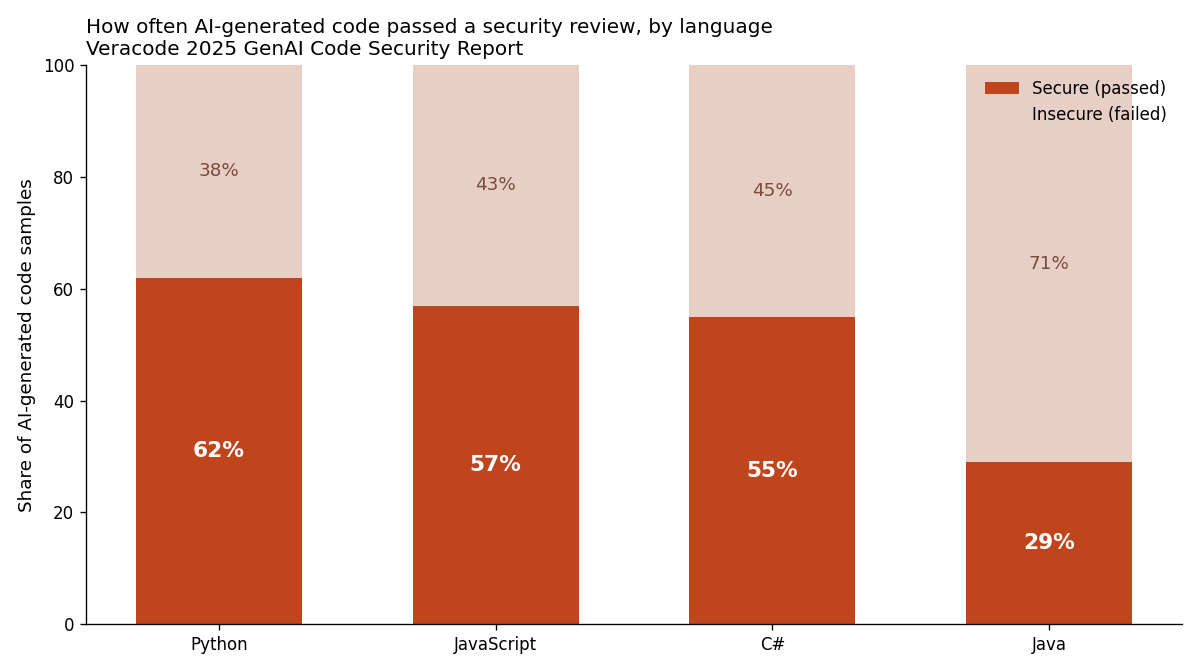
For the modern SaaS stack most non-technical founders use — TypeScript, JavaScript, and Python on the edges — you're in the 55–62% range. Better than Java's 29%, but still: roughly four in ten samples had a problem. The lesson isn't "pick Python." It's that no language gets you a free pass, and the safest stacks still hand you insecure code often enough that review has to be a habit, not an exception.
It also matters that these failures cluster around a small set of root causes. The OWASP Top 10 for 2025 — the industry's reference list of web application risks, drawn from data on over 2.8 million applications — puts Broken Access Control at #1, followed by Security Misconfiguration, Software Supply Chain Failures, Cryptographic Failures, and Injection. Notice how many of those an AI assistant can quietly get wrong: it'll happily write an API route with no permission check (access control), leave a debug setting on (misconfiguration), or npm install a package that doesn't exist (supply chain). Your checklist maps directly onto this list.
The 7-check review, in plain language
Here is the review I run on every feature that touches data, auth, money, or user input. None of it requires you to read code fluently. Most of it is knowing what question to ask and where the answer lives.
1. Are there any secrets in the code? API keys, database passwords, and signing secrets belong in environment variables, never in a source file. Search the changed files for anything that looks like a long random string or a key prefix (sk_, pk_, AKIA, -----BEGIN). If it's in the code, it's in your git history forever. This is the single most common and most damaging mistake, and it's the easiest to catch. I wrote a full walkthrough on environment variables and secrets management that covers the fix.
2. Does every protected action check who's asking? For each new API route or server action, ask: "does this verify the user is logged in, and that they're allowed to touch this specific record?" AI loves to write an endpoint that fetches a record by ID without checking whether the record belongs to the person asking. That's Broken Access Control — the #1 risk on OWASP's list — and it's how one customer ends up reading another customer's data.
3. Is user input treated as dangerous? Anywhere a user can type something — a form, a URL parameter, a search box — that input has to be validated before it's used in a database query or rendered back onto a page. Unvalidated input is how injection and cross-site scripting happen. In practice this means: are queries parameterized (not string-concatenated), and is user-supplied text escaped when displayed?
4. Are the dependencies real and current? AI models sometimes hallucinate package names — recommending a library that doesn't exist, which an attacker can then register with malware. Before you install anything the AI suggested, confirm the package exists on npm, has real download numbers, and isn't a lookalike of a popular one. This is the same instinct that keeps AI from inventing file paths — don't trust a name just because it sounds plausible.
5. Do errors fail closed, not open? When something goes wrong — a token is invalid, a check fails — does the code deny access, or does it accidentally let the request through? "Mishandling of Exceptional Conditions" is new to the 2025 OWASP list for a reason. Ask the AI to walk you through what happens on the unhappy path.
6. Is sensitive data actually protected at rest? Passwords should be hashed, not stored in plain text. Personal data should live behind access controls. If you're on Supabase, that means Row Level Security is switched on — a step AI frequently skips. My Supabase Row Level Security tutorial has the exact policies.
7. Is anything logged that shouldn't be? Check that the code isn't writing passwords, full credit card numbers, or session tokens into logs. Logs get shared, exported, and stored in places you don't control.
You don't run all seven at equal depth every time. A CSS change doesn't need an access-control review. But a new billing endpoint needs all seven, and knowing which is which is most of the skill.
Here's how the seven checks line up against the OWASP 2025 risks and who can realistically do each one:
| Check | Maps to OWASP 2025 | Can a non-tech founder do it? | | --- | --- | --- | | Secrets in code | A02 Security Misconfiguration | Yes — search for key-like strings | | Access checks on every action | A01 Broken Access Control | Yes — ask "who is allowed?" per route | | User input treated as dangerous | A05 Injection | Partly — AI-assisted, verify the flags | | Dependencies real and current | A03 Software Supply Chain | Yes — confirm the package exists | | Errors fail closed | A10 Mishandling Exceptional Conditions | Partly — walk the unhappy path with AI | | Data protected at rest | A04 Cryptographic Failures | Yes — confirm hashing and RLS are on | | Nothing sensitive logged | A09 Logging & Alerting Failures | Yes — search logs for secrets |
Four of the seven you can clear on your own with a search and a question. The other three are AI-assisted: you lean on the model to trace the data flow, then verify the specific flags it raises. Notice that this simple checklist touches seven of the ten OWASP categories — you're covering most of the industry's actual risk surface without a security background.
A worked example of how this goes wrong in practice: I once had an AI assistant build a "download my invoice" endpoint. It worked perfectly in testing — I clicked the button, I got my invoice. What the checklist caught was that the endpoint accepted an invoice ID and returned that invoice without checking it belonged to the logged-in user. Change the ID in the URL, and you'd get someone else's invoice. The code ran flawlessly; it was also a data breach waiting to happen. Check #2 — "does this check who's asking?" — is the only thing that surfaced it, and it took one question, not a security degree.
Making the AI review its own work
The most useful move for a non-technical founder is to turn the AI into your first reviewer. It won't catch everything — it wrote the bug, after all — but a fresh, security-framed prompt catches a surprising amount, because you're asking it to reason about security explicitly instead of just "make it work."
Prompts I use, more or less verbatim:
"Review this code as a security engineer. Check specifically for: hardcoded secrets, missing authentication or authorization, unvalidated user input, SQL injection, and cross-site scripting. For each issue, tell me the file, the line, why it's a risk, and the fix."
"List every place in this feature where data comes from the user. For each one, confirm whether it's validated and escaped before use. Flag any that aren't."
"Does this API route check that the logged-in user is allowed to access the specific record being requested? Show me exactly where that check happens, or tell me it's missing."
The trick is specificity. "Is this secure?" gets you a reassuring, useless "yes." Naming the exact vulnerability classes forces the model to actually look. This is the same principle behind good AI code review when you're not technical: you get better output when your questions are concrete.
One caution: don't let the AI's confidence substitute for the check. It will sometimes declare code secure that isn't, which is exactly the "false sense of security" the research warns about. Treat its review as a second opinion that raises flags, not a certificate. Knowing when to trust your AI assistant — and when to verify — is the whole game.
What still needs a human
Here's the honest boundary. The checklist and the prompts will catch the common, mechanical failures — and those are the majority. But some surfaces carry enough risk that a real security review is worth paying for before you take real money or store real personal data.
Anything in the authentication core — how sessions are issued, how passwords reset, how tokens expire — deserves expert eyes, because a subtle flaw there compromises everything else. Payment flows are the same: getting Stripe webhook verification wrong (I've written about Stripe webhook hell) can mean processing forged events. And if you handle health, financial, or children's data, or you're subject to something like GDPR, the compliance stakes justify a professional audit regardless of how clean the code looks.
The way I think about it: the checklist is your smoke detector, catching the everyday risks continuously and cheaply. A human security review is your fire inspection — occasional, targeted at the highest-stakes rooms, and done before you open the doors. You need both, but you run them at very different frequencies. Most features get the checklist. A handful of critical ones, once, get the human.
This is also why architecture matters. In the boilerplate this site runs on, the security-critical plumbing — auth, billing, webhook verification — lives in a locked /platform region that non-technical founders aren't meant to rewrite, precisely so AI edits happen in the safer /product and /website layers. Structure narrows where a dangerous mistake can even occur.
Frequently asked questions
How often does AI-generated code actually have security problems?
About 45% of the time, according to Veracode's 2025 testing across more than 100 large language models. The rate varies by language — from roughly 38% for Python to over 70% for Java — but no language is safe enough to skip review. Assume any AI-generated feature that touches data or auth may contain a flaw until you've checked it.
Do I need to learn to code to review AI code for security?
No, but you need to learn what to look for. The seven checks in this post are mostly about asking the right question — "does this check permissions?", "are there secrets in here?" — and knowing where the answer should be. You can run the checks by reading the AI's explanation and searching the changed files, without writing code yourself.
Can I just ask the AI if its code is secure?
You can, and you should — but with specific prompts, not a vague "is this safe?" Name the exact vulnerability types you want checked. And never treat the answer as final: the model wrote the code, and research shows AI assistants often rate insecure code as secure. Use its review to surface flags, then verify the important ones.
What's the single most common AI security mistake?
Hardcoded secrets and missing access-control checks are the two I see most. Secrets in source code are the easiest to catch (search for key-like strings) and among the most damaging, since they persist in git history. Missing authorization — an endpoint that returns a record without checking who's asking — is #1 on the OWASP 2025 list and easy for AI to write.
When should I pay for a professional security review?
Before you take real payments or store sensitive personal data, and specifically for your authentication and billing code. Those surfaces have outsized blast radius, and a subtle flaw is hard to catch with a checklist. For everything else, a disciplined self-review plus AI-assisted auditing covers the common cases.
The takeaway
Reviewing AI generated code for security isn't a specialist skill reserved for engineers — it's a habit built on a fixed checklist, a few sharp prompts, and an honest sense of which risks you can clear yourself and which need a professional. Run the seven checks on anything that touches data, auth, money, or user input. Make the AI audit its own output before you do. And spend your expert-review budget where the blast radius is largest.
If you're shipping a SaaS with AI coding tools, Coding Capybaras is the free boilerplate I built for exactly this workflow — the security-critical plumbing is already wired and walled off, so your AI edits happen where a mistake is survivable. The complete codebase ships free.