Add Team Accounts to a Single-User SaaS | Coding Capybaras
A non-tech founder's guide to adding team accounts and invites to a single-user SaaS: the data model, invite flow, roles, and seat billing with Stripe.
· Justin Boggs

Photo by Annie Spratt on Unsplash
To add team accounts to a single-user SaaS, you introduce three things in this order: an organization that owns the data (instead of a user owning it), a membership table that connects users to organizations with a role, and an email invite flow that creates a pending membership a new user claims when they sign up. Seat billing comes last, and Stripe handles the hard part by changing the quantity on an existing subscription. The work is real but bounded, and most of it is a data-model change you make once. This guide walks through each piece in plain English, with the exact prompt to hand your AI assistant at the end.
TL;DR
- The core shift: data stops belonging to a user and starts belonging to an organization. A
tenant_id(ororg_id) goes on every row you want a team to share.- Model the user-to-org link as a separate membership table (
user_id,org_id,role,invited_by,joined_at) — never as a column on the user.- The invite flow is a pending membership plus a tokenized email link that expires. Auto-attach it on sign-up by matching the email.
- Start roles simple:
owner,admin,member. Store roles as data, not hardcodedifstatements.- Seat billing is a Stripe subscription quantity change. Adding or removing a seat triggers a proration automatically.
What "team accounts" actually changes
The hard part of team accounts is not the invite emails or the billing. It's a single conceptual shift: in a single-user app, data belongs to a user; in a team app, data belongs to an organization, and users are granted access to it. Everything else follows from that.
In a single-user SaaS, your tables probably have a user_id column. A project belongs to a user. A document belongs to a user. That's clean and it works right up until two people need to see the same project. The moment a customer says "can my co-founder log in too," a user_id column can't answer the question, because the data was never designed to be shared.
The fix is to introduce an organization — sometimes called a workspace, an account, or a tenant — as the thing that owns shared data. This is the same decision at the heart of multi-tenancy architecture: every shared row belongs to exactly one organization, and every user reaches that data through a membership. WorkOS, whose whole business is B2B user management, puts it plainly in its guide to user management for B2B SaaS: "All business logic — billing, permissions, usage limits — tends to be scoped at the org level."
Here's the mental model that made it click for me. In a single-user app, the user is the front door and the house. In a team app, the organization is the house, and each membership is a key. A user can hold keys to several houses. Losing a key doesn't destroy the house. That separation — identity on one side, access on the other — is the whole design.
Getting this wrong early is one of the database schema mistakes that haunt founders a year in. Retrofitting an org boundary onto a table that assumed single ownership means backfilling every existing row, rewriting every query, and praying you didn't miss one. Do the model change deliberately, once, and the rest of this is wiring.
The data model: users, organizations, memberships
Three tables carry team accounts. Two you may already have in some form; the third is the one that makes everything flexible.
Users are globally unique individuals, identified by email or a UUID. A user is a person, not a seat and not a role. Critically, do not store which organization a user belongs to on the user record itself. That assumption — one user, one org — is the thing you'll rip out later when someone belongs to two teams.
Organizations are the unit that owns shared data and carries billing. An organization row holds an id, a display name, and settings (plan tier, feature flags, and eventually SSO config). Every shared table in your app gets an org_id column pointing here.
Memberships are the join table, and they do the real work. A membership connects one user to one organization and records the relationship. WorkOS recommends exactly this shape:
| Column | Purpose |
| --- | --- |
| id | Unique membership identifier |
| user_id | Which person |
| org_id | Which organization |
| role | Their permission level in this org |
| invited_by | Who added them (useful for support and audit) |
| joined_at | When they accepted |
| status | pending, active, deactivated |
Modeling the relationship as its own table — instead of a role column on the user — buys you three things you will want: a user can belong to multiple organizations, a user can hold a different role in each, and you can represent an invited-but-not-yet-joined person as a pending membership row with no active user attached yet. That last one is what makes the invite flow clean.
If you're on Supabase, this is also where Row Level Security earns its keep. An RLS policy that checks "does the current user have an active membership in this row's org_id?" turns tenant isolation from something you remember to do in every query into something the database enforces whether you remember or not. For a solo founder who can't code-review every data path, that's not a nice-to-have — it's the thing standing between you and serving one customer's data to another.
How the team invite flow works, step by step
An invite is a promise of access that hasn't been claimed yet. The flow has four moves: an admin sends it, you store a pending record with a token, the invitee clicks a link, and you attach them on sign-up.
sequenceDiagram
    participant A as Org admin
    participant App as Your app
    participant Email as Email (Resend)
    participant I as Invitee
    A->>App: Enter invitee email + role
    App->>App: Create pending membership + token
    App->>Email: Send invite link (token in URL)
    Email->>I: "You've been invited to Acme"
    I->>App: Click link, sign up / sign in
    App->>App: Match token, activate membership
    App->>I: Access to the org granted
The details that matter are the ones people skip. WorkOS's invitations best practices are a good checklist, and they line up with what burned me when I got lazy about it:
Store a pending membership with a token. When an admin invites someone, write a membership row with status = pending and a random, unguessable token. The token — not the email address — is what the invite link carries. Never build the link so that changing the email in the URL grants access to a different account.
Expire invites. Set them to lapse after a fixed window; seven days is a common default. An invite link is a credential. A credential that lives forever in someone's inbox is a slow-motion security incident. Let admins re-send an expired one rather than keeping them valid indefinitely.
Auto-attach on sign-up by matching email. When the invitee clicks through and creates an account (or signs in with an existing one), match the invite token, confirm the email lines up, flip the membership to active, and set joined_at. Now they're in — no manual provisioning on your end.
Let admins cancel and re-invite. People fat-finger email addresses. An admin needs to revoke a pending invite and issue a fresh one without emailing you for help. This is a small piece of UI that saves a disproportionate amount of support time.
One more thing worth building early: decide what happens when the invited email already has an account. The clean behavior is to attach a new membership to the existing user rather than forcing a second account. That's the payoff of separating identity from access — the same person can join a second org without duplicating themselves.
Roles and permissions without over-engineering
You need roles the day you have two people in an organization, because "can this person delete the whole workspace" now has more than one answer. You do not need a permissions engine. Those are different problems, and conflating them is how a weekend feature becomes a month.
Start with three roles: owner, admin, and member. The owner can do anything including billing and deleting the org. Admins can manage members and content. Members can use the product. That covers the overwhelming majority of B2B SaaS for a long time. This mirrors the authentication and access choices most indie SaaS settle into.
The one principle worth internalizing comes straight from WorkOS: implement roles as data, not code. Don't scatter if (user.role === 'admin') across your codebase. Define a permission matrix — a small table or config that says which role can do which action — and check against it. When a customer inevitably asks for a "billing manager who isn't a full admin," you add a row, not a refactor.
Here's a matrix small enough to start with and honest enough to grow:
| Action | Owner | Admin | Member | | --- | --- | --- | --- | | Use the product | Yes | Yes | Yes | | Invite / remove members | Yes | Yes | No | | Change roles | Yes | Yes | No | | Manage billing & seats | Yes | No | No | | Delete the organization | Yes | No | No | | Transfer ownership | Yes | No | No |
Resist the pull toward fine-grained, per-resource permissions on day one. WorkOS notes that resource-level access control (this user is an editor on this project but a viewer on that one) is real and eventually necessary for some products — but it "adds complexity" and only becomes essential "when multiple teams collaborate within a single tenant." That's a later problem. Ship the three-role version, watch what customers actually ask for, and add granularity where the requests cluster. Adding roles to a clean matrix is easy; removing a speculative permissions system you never needed is not.
Seat billing with Stripe (the part you dread, mostly automated)
Seat billing sounds like the scary part and turns out to be the most solved part, because Stripe models it directly. A per-seat plan is a subscription with a quantity. Ten seats is quantity ten. Add a seat, and you increment the quantity by one.
The mechanics are covered in Stripe's modify subscriptions documentation. Changing the quantity is a billing-related update, which means Stripe automatically calculates a proration — the mid-cycle math that charges a new teammate for the partial month they're joining, and credits you when someone leaves. You don't compute any of that. You change one number and Stripe issues the right adjustment.
You do get to decide how the proration lands, via the proration_behavior setting Stripe documents on its prorations page. create_prorations rolls the adjustment into the next invoice. always_invoice bills the difference immediately. none skips proration entirely and the change takes full effect next cycle. For most indie SaaS, prorating onto the next invoice is the least surprising choice for customers.
The chart below is pure arithmetic — not data, just the shape of the decision — but it's the shape every founder should picture before pricing seats:
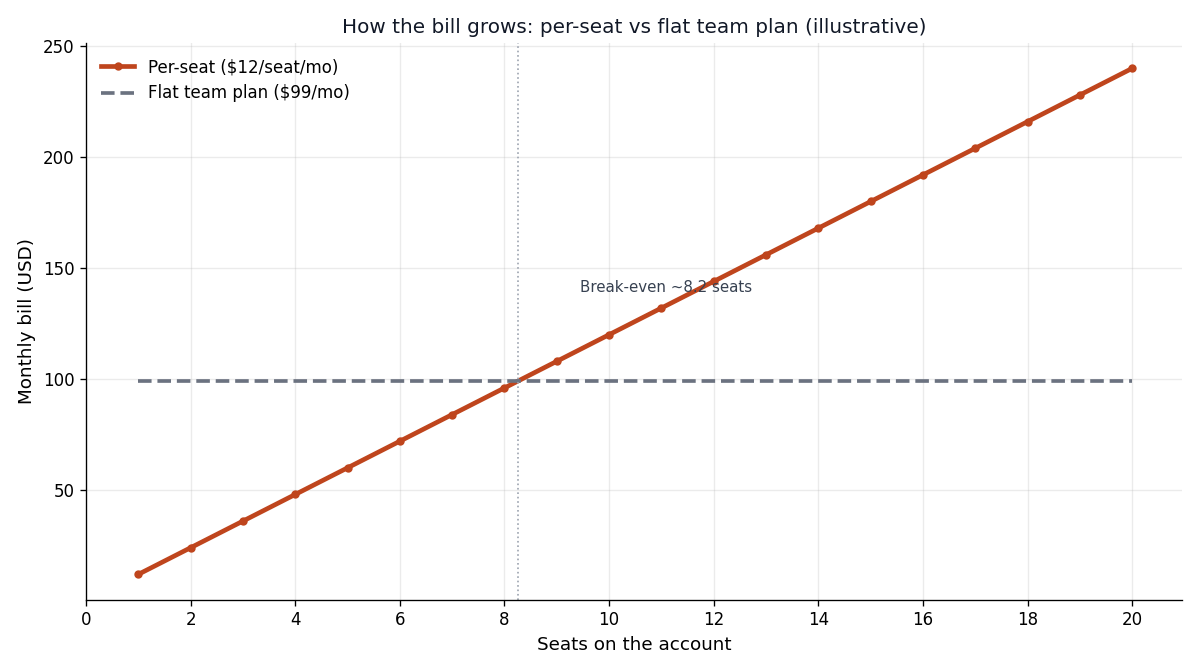
Per-seat pricing scales revenue with team size but caps small teams' cost; a flat team plan is simpler but leaves money on the table with big teams and overcharges tiny ones. Where those lines cross is a pricing decision, and it's worth reading subscription billing math and how to price a SaaS before you commit. If your value scales with usage rather than headcount, metered billing may fit better than seats at all — Stripe's own guidance in 2026 is that pure per-seat pricing is worth pressure-testing against how your product actually delivers value.
Two edge cases to handle so billing doesn't drift from reality. First, keep the Stripe quantity in sync with your actual active membership count — reconcile them, don't trust that they'll never diverge. Second, decide the rule for pending invites: do they consume a paid seat immediately, or only when accepted? Billing on acceptance is friendlier; billing on invite is simpler. Pick one and make it visible in the UI so customers can see exactly what they're paying for.
The AI prompt to wire it in
Team accounts is a multi-file change, which makes it a good fit for a spec-first prompt rather than incremental back-and-forth. Give your AI assistant the whole shape at once:
Add team accounts to my Next.js + Supabase + Stripe app. Create
organizations,memberships(user_id, org_id, role, invited_by, joined_at, status), and addorg_idto my shared tables. Roles are owner/admin/member enforced by a permission matrix, not inline conditionals. Build an email invite flow using a pending membership plus an expiring token, sent via my existingsendEmail()helper, that auto-attaches on sign-up by matching email. Add Supabase RLS policies scoping every shared table to the caller's active membership. Wire seat count to a Stripe subscription quantity withproration_behavior: create_prorations. Show me the migration and the schema before writing route handlers.
That last sentence matters. Asking to see the data model first means you review the foundation before any code depends on it. If the schema is wrong, you catch it in ten seconds of reading instead of after twenty files reference it.
Frequently asked questions
Do I need team accounts at launch?
Almost never. If you're pre-launch or serving individuals, ship single-user and add teams when customers ask. The one exception is if you know your buyer is a team (classic B2B), in which case the org-owns-data model belongs in your first schema — retrofitting it later is the expensive path.
Should an invited user consume a paid seat before they accept?
Your call, but bill on acceptance if you can. Charging for an unaccepted invite feels like a gotcha to customers and creates awkward refund conversations when an invite is never claimed. Billing when the membership goes active keeps the invoice matched to reality.
How do I handle someone belonging to multiple organizations?
This is exactly why membership lives in its own table. A user can hold several membership rows, one per org, each with its own role. Your UI needs an org switcher, and every query needs to filter by the currently active org. The data model supports it for free once membership is separate from the user.
What happens when the only owner leaves or is removed?
Block it. An organization with no owner is orphaned — nobody can manage billing or add members. Require ownership transfer before an owner can leave, and never let an admin remove the last owner. WorkOS flags this "sole admin" case specifically as a lifecycle edge case worth handling deliberately rather than discovering in production.
Can I use OAuth logins with team accounts?
Yes, and they compose cleanly. OAuth (Google, GitHub) handles authentication — proving who someone is — while membership handles authorization — what org they can access. Use OAuth for login, then attach memberships on top. The two layers stay independent by design, which is why you can add either one without disturbing the other.
Do I need SSO and SCIM for teams?
Not until enterprise deals demand them. SSO and SCIM provisioning are table-stakes for large customers but real engineering projects on their own. Ship email invites first; they cover self-service teams and small businesses completely. Add enterprise provisioning when a deal is on the table that pays for the effort.
Wrapping up
Team accounts feels like a big feature and is really one deliberate decision — data belongs to an organization, not a user — followed by a bounded amount of wiring. Model users, organizations, and memberships as three tables. Build the invite flow as a pending membership with an expiring token. Keep roles to owner/admin/member, stored as data. Let Stripe handle seat proration by changing a quantity. Do the schema change once, carefully, and everything downstream falls into place.
If you're building this with an AI assistant, Coding Capybaras is the free boilerplate I built for exactly this workflow — the marketplace has copy-paste prompts for the Supabase, Stripe, and Resend pieces this feature touches, so you can wire each one in without leaving your editor.