Authentication for SaaS in 2026: NextAuth, Clerk, Supabase
A non-tech founder's guide to SaaS authentication in 2026: how NextAuth (Auth.js), Clerk, and Supabase Auth compare on price, DX, lock-in, and scale.
· Justin Boggs

Photo by Muhammad Zaqy Al Fattah on Unsplash
For a new Next.js SaaS in 2026, the authentication decision comes down to three realistic paths: Supabase Auth if your database already lives in Supabase, Clerk if you'll pay for the fastest polished sign-in experience, and Auth.js (formerly NextAuth) if you want free and fully self-hosted with no vendor. There's no universally correct pick — it depends on your stack, your budget at scale, and how much of the auth UI you want handed to you. This guide walks through what each one actually is, what it costs as you grow, and the trade-offs that bite founders six months in, so you can choose once and not rip it out later.
TL;DR
- Supabase Auth: free up to 50,000 monthly active users, integrated with your Postgres database and Row Level Security. Best if you're already on Supabase.
- Clerk: the most polished drop-in UI and B2B/organization features, free up to 50,000 monthly retained users, then it gets expensive fast at scale.
- Auth.js (NextAuth): free, self-hosted, no dashboard — but now in maintenance mode as of early 2026, so treat it as a stable legacy option, not a growth bet.
- Pricing models differ in a way that matters: Clerk and Supabase both give 50K free, but Clerk's per-user overage is ~6x Supabase's.
- Ripping out auth later is one of the most painful migrations in a SaaS. Choose for where you'll be in 18 months, not week one.
What "SaaS authentication" actually covers
Before comparing tools, it helps to be clear about what you're buying. Authentication is the system that verifies who a user is (login), and it usually bundles the adjacent jobs of managing accounts, sessions, and permissions. For a real SaaS, "auth" isn't just a login form. It's password handling and reset flows, social logins (Google, GitHub), email verification, session management, multi-factor authentication, and — for B2B products — organizations, roles, and invitations.
You can build all of this yourself. You almost certainly shouldn't. Auth is the canonical build-vs-buy decision where "buy" wins for nearly everyone: it's security-critical, the edge cases are endless, and a mistake leaks user data. The three options below are all "buy" (or at least "adopt a battle-tested library") rather than "roll your own."
The reason auth deserves its own careful decision — rather than defaulting to whatever your AI assistant suggests first — is that it's expensive to change. Your users, their credentials, their sessions, and often your permission model all live inside whatever you pick. Swapping providers means migrating password hashes (sometimes impossible), re-authenticating everyone, and rewriting every protected route. Choose deliberately.
The three real options in 2026
Auth.js (formerly NextAuth)
Auth.js is a free, open-source authentication library that runs entirely on your own infrastructure. There's no hosted service, no dashboard, and no monthly bill — you install it, wire it to your database, and own the whole thing. For years it was the default answer for Next.js auth.
The important 2026 update: the project is now part of Better Auth and in maintenance mode — security patches only, no new features. Version 5 is technically still beta but widely deployed in production. That doesn't make it a bad choice for an existing app; it's stable and free. But for a brand-new project it's harder to recommend as a growth bet, since the ecosystem energy has moved elsewhere. If you value zero cost and zero vendor lock-in above developer experience, it's still viable.
Clerk
Clerk is a hosted authentication service that hands you production-quality sign-in screens and user management out of the box. You install the SDK, drop in pre-built React components, and get sign-up, sign-in, user profiles, MFA, organization management, and sessions without writing an auth function. It's the fastest path to a working, polished login — and its B2B/organization features are genuinely strong if you're building for teams.
The catch is cost at scale, which I'll get to. Clerk's free Hobby tier now covers 50,000 monthly retained users (up from 10,000 earlier), and Pro is $20/month billed annually. One nuance worth knowing: Clerk bills on monthly retained users — a user only counts once they return 24+ hours after signing up — which is founder-friendly for apps with lots of drive-by signups.
Supabase Auth
Supabase Auth is the built-in authentication layer of the Supabase platform, built on the open-source GoTrue service. Its defining feature is integration: it lives right next to your Postgres database and plugs directly into Row Level Security, so your authorization rules can reference the logged-in user at the database level. If your app already uses Supabase for data, auth is essentially already there.
It's free up to 50,000 monthly active users, and on the $25/month Pro plan you get 100,000 MAUs included. Because it's part of a platform you're likely already paying for, the marginal cost of auth is close to zero for most indie SaaS. This is what Coding Capybaras uses, and it's why — I'll be honest about the bias.
What each one costs as you grow
Price is where the abstract "it depends" turns concrete. All three start free at reasonable volumes, so the free tier isn't the deciding factor. What matters is the slope of the line after you cross it.
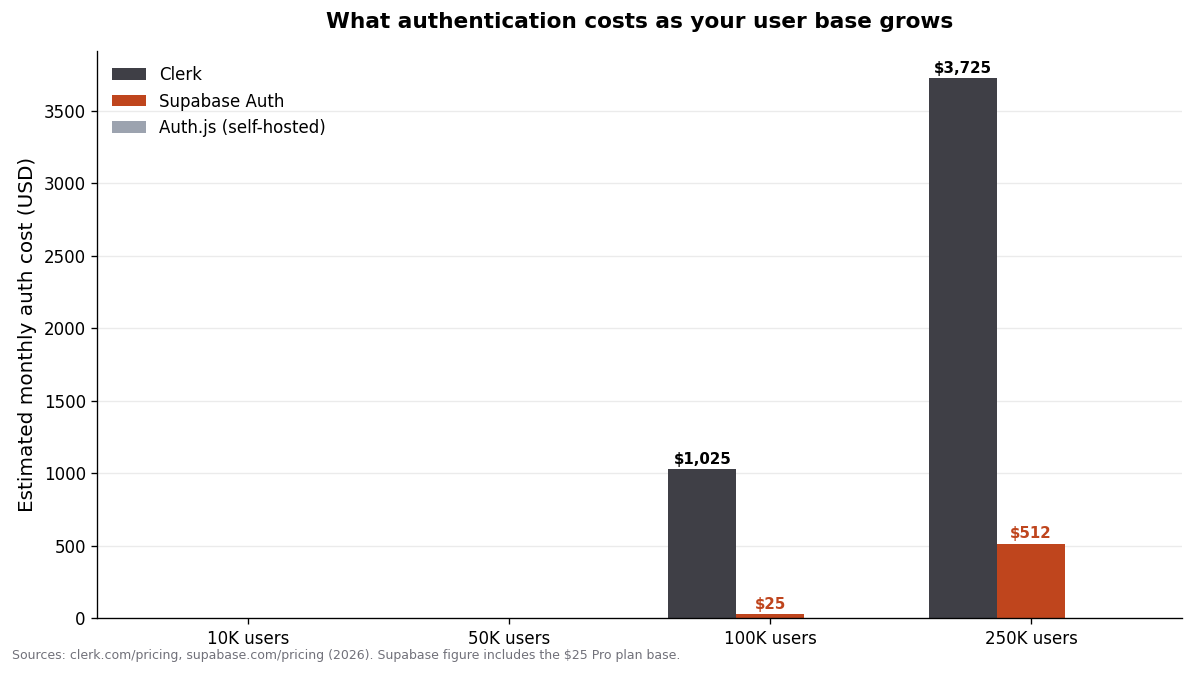
The gap is dramatic and it's worth understanding why. Both Clerk and Supabase give you 50,000 free users. Above that, Clerk's overage starts at $0.02 per user per month, while Supabase's is $0.00325 — roughly a 6x difference per user. At 100,000 users, Clerk works out to around $1,025/month while Supabase Auth (including the $25 Pro plan that also covers your database) is about $25/month. At 250,000 users the gap is thousands of dollars a month.
This is not a reason to never choose Clerk. If you're a B2B product charging real money per seat, $1,000/month for best-in-class auth and org management at 100K users may be trivial against your revenue, and the DX might save you weeks. But if you're a B2C or prosumer app with a large, lower-value user base, that same bill can quietly become one of your biggest line items. Map the pricing model to your business, not to a generic "which is cheapest."
Auth.js is $0 forever in licensing — but "self-hosted and free" isn't truly free. You're absorbing the cost in your own infrastructure, your own maintenance, and your own time when something breaks and there's no support team. For a solo founder, that time is often the most expensive resource you have.
The comparison, side by side
Here's the whole decision in one view. Prices reflect the published 2026 plans; always check the live pricing pages before committing, since these change.
| Factor | Auth.js (NextAuth) | Clerk | Supabase Auth | | --- | --- | --- | --- | | Type | Self-hosted library | Hosted service | Platform-bundled service | | Free tier | Free forever | 50,000 monthly retained users | 50,000 monthly active users | | Paid entry | $0 | $20/mo (annual) | $25/mo Pro (100K MAU incl.) | | Overage per user | N/A | ~$0.02/user/mo | ~$0.00325/user/mo | | Pre-built UI | No | Yes (best-in-class) | Basic components | | Database integration | You wire it | Via webhooks/API | Native (Postgres RLS) | | B2B / organizations | DIY | Excellent | Basic | | Vendor lock-in | None | High | Medium (open-source core) | | Active development | Maintenance mode | Active | Active | | Best for | Zero-cost, no-vendor apps | B2B, teams, premium DX | Anyone already on Supabase |
If you take one thing from this table, let it be the interaction between the "database integration" row and the "overage" row. The tools that are cheapest at scale (Supabase, Auth.js) ask you to do a little more wiring; the tool that does the most for you (Clerk) charges for it later. That's the fundamental trade, and it's a fair one — you're just choosing which currency to pay in.
How I'd choose (and what Coding Capybaras uses)
My honest decision framework, in order:
If you're already using Supabase for your database, use Supabase Auth. The RLS integration alone justifies it — your authorization logic lives next to your data, the marginal cost is near zero, and you avoid syncing user records between two systems. This is the case for most first-time founders on a modern stack, and it's why the Coding Capybaras stack is built on it. If you want to see it wired up end to end, I walked through adding OAuth login with Supabase Auth step by step.
If you're building B2B and organizations are central, seriously consider Clerk. When your product is "teams invite teammates and manage roles," Clerk's org features and polished UI can save you weeks of work, and B2B pricing usually absorbs the cost. Just model the bill at your target scale first.
If you want zero vendor dependency and don't mind the maintenance, Auth.js still works — but I'd weigh the maintenance-mode status carefully for a new build. Stable is not the same as thriving.
The deeper question sitting under all of this is your database choice, because it heavily constrains your auth choice. If you haven't locked that in yet, my Supabase vs Firebase comparison is the better place to start — pick the data layer, and the auth decision gets a lot simpler. And if you're weighing whether to assemble any of this yourself versus starting from something pre-built, the honest answer for most non-technical founders is that auth is the last thing you want to hand-assemble.
The security questions that actually matter
Choosing a provider handles most of the hard security work for you — that's the entire point of not rolling your own. But "I picked Clerk" or "I picked Supabase Auth" doesn't mean you're done thinking about security. A few questions matter regardless of which one you land on.
Where do your secrets live? Every one of these tools uses API keys or signing secrets, and the single most common auth mistake I see from first-time founders is committing those to a public repository. They belong in environment variables, never in code, never in the Git history. If you're using an AI assistant to wire up auth, be especially watchful here — generated code sometimes hardcodes a placeholder key that you then forget to move.
Are your protected routes actually protected? It's surprisingly easy to add a login page and still leave the underlying pages reachable by anyone who types the URL directly. Auth is only real if the server checks the session on every protected route, not just the UI hiding a link. This is a place to read the code carefully rather than assume.
Do you verify webhooks? If you sync user data from your auth provider (Clerk does this heavily), those webhooks must have their signatures verified before you trust the payload — the same discipline you'd apply to Stripe's webhooks. An unverified webhook endpoint is an open door.
Have you turned on the free protections? Clerk and Supabase both ship features like bot protection, brute-force lockout, and leaked-password detection. These are often a toggle away and frequently left off. Turn them on before launch, not after your first incident.
None of this is exotic, and none of it requires you to become a security engineer. It's a short checklist you run once. The reason it's worth calling out is that the auth provider protects the front door beautifully and can't do anything about a window you left open. Your job shrinks to a handful of checks — but it doesn't disappear.
Frequently asked questions
What is the best authentication for a Next.js SaaS in 2026?
For most new projects, Supabase Auth is the best default because it's free up to 50,000 users and integrates natively with your Postgres database and Row Level Security. Choose Clerk instead if you need best-in-class B2B and organization features and can absorb higher costs at scale, and Auth.js if you want a free, fully self-hosted option with no vendor.
Is NextAuth still maintained?
Auth.js, formerly NextAuth, became part of Better Auth in early 2026 and is now in maintenance mode — it receives security patches but no new features. It remains stable and safe for existing apps, but for a brand-new project the lack of active development is a reason to consider Supabase Auth or Clerk instead.
Is Clerk or Supabase Auth cheaper?
Both are free up to 50,000 users, but Supabase Auth is dramatically cheaper above that: its per-user overage is about $0.00325 versus roughly $0.02 for Clerk. At 100,000 users, Supabase Auth runs about $25/month while Clerk is around $1,025/month. Clerk's premium can still be worth it for B2B products with high revenue per user.
Can I switch authentication providers later?
You can, but it's one of the most painful migrations in a SaaS because it touches user records, password hashes, sessions, and every protected route. Some password hashes can't be migrated at all, forcing users to reset. This is why choosing deliberately up front, based on where you'll be in 12–18 months, matters so much.
What's the difference between authentication and authorization?
Authentication verifies who a user is (logging in); authorization decides what they're allowed to do (permissions and roles). Supabase Auth is notable because it ties authentication directly into authorization at the database level through Postgres Row Level Security, so both live in one place.
Do I need multi-factor authentication for my SaaS?
For most SaaS products, offering MFA is strongly recommended and increasingly expected by business customers. All three options support it — Auth.js via configuration, and Clerk and Supabase Auth as built-in features (note MFA sits on Clerk's paid Pro tier). If you handle sensitive data, treat MFA as a launch requirement, not a later add-on.
Choose once, build on it
Authentication is the kind of decision that's invisible when you get it right and agonizing when you get it wrong. All three of these options are legitimate — the mistake isn't picking the "wrong" one, it's picking without thinking through your database, your scale, and your budget, and then having to migrate under pressure. Match the tool to your stack: Supabase Auth if you're on Supabase, Clerk if B2B polish is worth the premium, Auth.js if free and self-hosted is non-negotiable.
If you'd rather not wire any of this from scratch, Coding Capybaras ships with Supabase Auth already built and tested — OAuth, sessions, and protected routes included — so you can spend your energy on the product instead of the plumbing.