Building a Feedback Loop With Your AI Assistant
How to build a feedback loop with your AI coding assistant so you spot wrong output fast — predictions, cheap tests, and a written record of how it fails.
· Justin Boggs

Photo by Shane Aldendorff on Unsplash
You build a feedback loop with your AI assistant by deciding what correct looks like before it writes anything, checking the result against that prediction immediately, and writing down every miss so the same failure doesn't get past you twice. It isn't about learning to read code. It's about arranging the work so wrongness becomes visible on its own — fast, cheaply, and without you having to spot a bad line by eye. That's the whole discipline. Predict, generate, check against the prediction, record the miss, tighten the instructions. This post is how I run that loop as a non-technical founder.
TL;DR
- A feedback loop is a routine where you predict the correct outcome first, then compare the AI's output to your prediction — not to your gut feeling about whether the code looks right.
- The industry has an enormous verification gap: 96% of developers don't fully trust AI-generated code, but only 48% always check it before committing, per Sonar's 2026 survey.
- Your assistant fails in a small number of repeating patterns. Once you've logged three or four, you can predict them, and the loop mostly runs itself.
- Cheap checks beat careful reading. Run the thing, look at the output, compare it to what you wrote down. That's available to non-coders today.
- The loop's real output isn't caught bugs. It's a growing set of standing orders — usually a
CLAUDE.mdfile — that stops the same class of mistake at the source.
What a feedback loop actually is (and why "just review it" isn't one)
A feedback loop is a repeatable routine where you define the correct outcome in advance, compare the AI's actual output against that definition, and feed what you learn back into how you instruct it next time. Three parts: a prediction, a comparison, and a change to the instructions. Drop any one of them and you don't have a loop — you have a vibe.
Most advice for non-technical founders stops at "review the AI's work." That's not actionable if you can't read the code. Worse, it isn't actually what experienced engineers do either. They don't read every line of generated output and pronounce it good. They run it, watch what happens, and compare that to what they expected to happen. The reading is a fallback for when the comparison fails.
That distinction matters enormously for you. Comparison is a skill you already have. If I ask you what a signup form should do when someone submits an email that's already registered, you can answer that. Writing down the answer before the AI builds it converts a code-reading problem into a checking problem — and checking is the part you can do.
Here's the shape of the loop I run:
flowchart LR
  A[Write down what correct<br/>looks like] --> B[Ask the AI to build<br/>one small slice]
  B --> C[Run it and observe<br/>the actual result]
  C --> D{Matches the<br/>prediction?}
  D -- Yes --> E[Commit the slice]
  D -- No --> F[Log the failure pattern]
  F --> G[Update standing orders<br/>in CLAUDE.md]
  G --> A
  E --> A
Notice what's not in that diagram: any step where you squint at a function and decide whether it seems correct. That step is where non-technical founders get stuck and where technical founders get overconfident. The loop routes around it.
Notice also that the loop's exit isn't "ship it." The exit is back to the top, with slightly better instructions than you had last time. That compounding is the point. The first week you catch mistakes one at a time. By the third week, a whole category of mistakes has stopped happening because your standing orders now prevent it.
The verification gap is the whole problem in one statistic
If you want a single reason this matters right now, it's this. AI now writes a large share of production code, and almost nobody is checking it properly.
Sonar's 2026 State of Code Developer Survey, which surveyed over 1,100 developers, found that AI accounts for 42% of all committed code today, and developers expect that to reach 65% by 2027. Meanwhile 96% of those developers say they do not fully trust that AI-generated code is functionally correct — and only 48% say they always check it before committing.
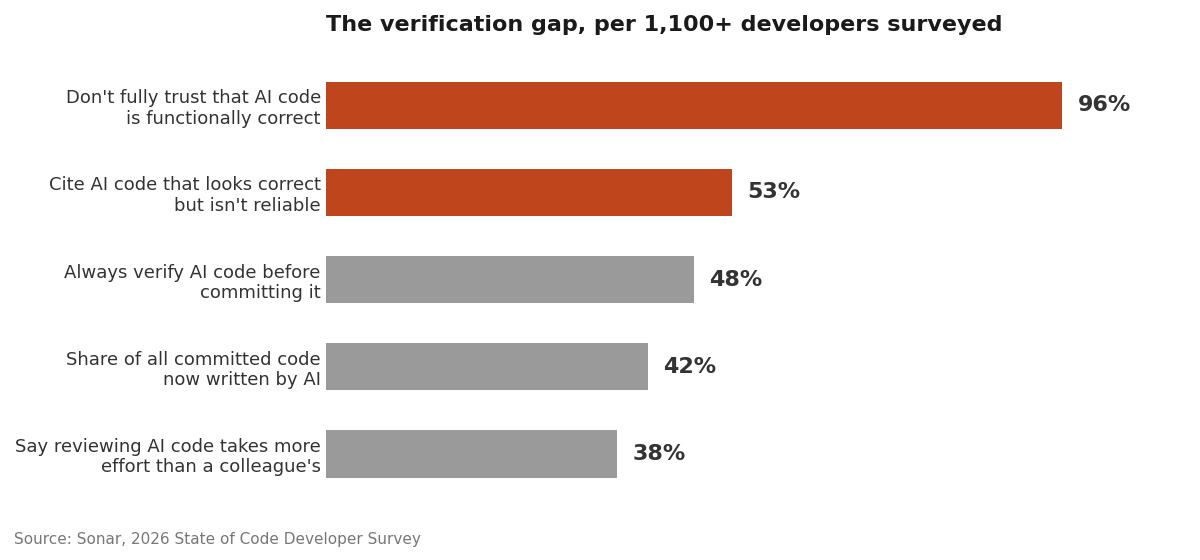
Sit with that gap for a second. Ninety-six percent don't trust it. Forty-eight percent verify it. That's roughly half the industry shipping code they've told a surveyor they don't believe in. AWS CTO Werner Vogels calls the accumulating result "verification debt," and Sonar's report borrows the term.
Two more numbers from the same survey explain why the gap exists rather than just measuring it. First, 38% of developers say reviewing AI-generated code takes more effort than reviewing a human colleague's work. Second, 53% cite AI producing code that "looks correct but isn't reliable." Those two findings are the same finding. Code that looks correct is expensive to review precisely because looking doesn't settle it.
Here's the uncomfortable good news for a non-technical founder: you were never going to review by looking anyway. The professionals' shortcut — glance at it, feel that it's fine — is exactly the shortcut that fails on this class of output. You don't have that shortcut available, so you're forced into the method that actually works. I wrote more about this inversion in when to trust your AI assistant.
The rest of this post is the method.
Step one: write the prediction before you write the prompt
This is the step everyone skips and the step that does most of the work.
Before you ask for anything that produces a result — a calculation, a filter, a permission check, an email trigger — write down what the right answer is for two or three specific inputs. Not "it should calculate the discount correctly." Instead: "A $97 order with code LAUNCH20 charges $77.60. The same code on a $0 order charges $0 and doesn't error. An expired code charges $97 and shows 'This code has expired.'"
That takes ninety seconds. It also does four things at once.
It forces you to actually decide the behavior, which is founder work the AI can't do for you. It gives you a concrete pass/fail test that requires zero code fluency. It gives the assistant a far better prompt, because you've handed it the edge cases instead of hoping it guesses them. And it protects you against the specific failure mode where you look at output, see a plausible number, and accept it — a subtly-wrong result is only obvious when you already know the right one.
I keep predictions in the same plain-language format every time:
Feature: apply discount code at checkout
Given a $97 order and code LAUNCH20 (20% off, valid) -> charge $77.60
Given a $97 order and code EXPIRED2025 -> charge $97, show "This code has expired."
Given a $97 order and no code -> charge $97, no error
Given a $97 order and code launch20 (lowercase) -> charge $77.60
That last line is deliberate. Half of my caught bugs live in cases like it — the ones I only thought of because writing the list made me think about variations. Case sensitivity, empty values, zero, negative numbers, someone hitting the button twice.
Then I paste the whole block into the prompt. The assistant now has both the task and the acceptance criteria, which is closer to how Anthropic's own engineering teams describe working with Claude Code: most of the effort goes into designing the environment around the model — the tests, the context, the feedback — rather than into the prompt wording itself. Their guidance is blunt about the reason. If the verifier isn't nearly perfect, the model will confidently solve the wrong problem.
For more on how to structure the request itself, prompt engineering for non-developers covers the prompt anatomy that pairs with this.
Step two: make the check cheap enough that you always do it
The reason 48% of developers skip verification isn't laziness. It's cost. If checking takes twenty minutes, you'll skip it under deadline pressure every time. The fix is to make checking take two minutes.
Three techniques, in increasing order of setup effort:
Run it and look. The lowest-tech option and still the most underrated. Open the page. Enter the input from your prediction. Read the number on the screen. If your prediction said $77.60 and the screen says $77.60, that slice passes. Founders skip this because it feels too simple to count as verification. It counts.
Ask the AI to prove it, not to promise it. There's a large difference between "did you handle the expired case?" (it will say yes) and "show me the exact lines that handle an expired code, and walk me through what happens with code EXPIRED2025 on a $97 order." The second forces it to trace real behavior against a real input. When the trace doesn't match the code, you'll usually see the seam. I go deeper on this in how to read your AI assistant's output when you don't speak code.
Have it write the test, then read the test. Tests are just your predictions written in a form the computer can run. You don't need to write them — say "write tests covering these four cases" and paste your prediction block. Then read the test file, which is far more readable than implementation code because it's literally input-and-expected-output pairs. If a test says the expired code should charge $97 and your prediction said $97, the test encodes the right thing. Now you can rerun it forever, for free.
The third option is where the loop starts paying compound interest. Anthropic's engineering write-up describes the same pattern from the other direction: their teams ask for pseudocode, guide the model through test-driven development, and check in periodically, which produces more reliable and more testable code than one-shot generation.
One caution worth stating plainly. Speed and correctness aren't the same axis, and it's easy to conflate them. In a randomized controlled trial, METR found experienced open-source developers were 19% slower on real tasks when allowed to use AI tools — while those same developers estimated afterward that AI had made them 20% faster. METR itself now labels that result historical, noting it doesn't necessarily reflect current tools or workflows, and it studied experienced engineers on codebases they knew deeply rather than founders building something new. But the perception gap is the durable lesson: your sense of how well this is going is not a measurement. The loop is the measurement.
Step three: log the failure patterns, because there aren't many of them
Here's the finding that made this whole practice feel manageable to me: your assistant does not fail in infinite ways. It fails in a handful of ways, repeatedly, and once you've named them you start seeing them coming.
Keep a running list. Mine lives in a plain text file. Every time a check fails, I write one line: what I asked for, what I got, and what category of wrong it was. After a few weeks the categories stabilized into something like this:
| Failure pattern | What it looks like | Cheapest way to catch it | | --- | --- | --- | | Invented API or method | Calls a function that doesn't exist in that library version | Ask for the doc link; the page 404s or lacks the method | | Invented file path | References a file or folder that isn't in your project | Search your project for the path before running anything | | Right logic, wrong edge case | Works on the happy path, breaks on empty, zero, or duplicate | Your prediction list — that's what the edge cases are for | | Silent scope creep | Fixes your bug and also "improves" three unrelated files | Read the list of changed files, not the code | | Confident wrong explanation | Explains behavior that the code doesn't actually implement | Ask it to trace one concrete input end to end | | Stale-context drift | Contradicts a decision made earlier in the same session | Start a fresh session; restate the constraint | | Plausible-but-unverified number | Produces a value you can't independently confirm | Compute one case by hand and compare |
Nothing on that list requires code fluency to catch. Every row is a lookup, a search, or a comparison. That's the entire point — the loop converts "can you spot bad code?" into "can you check whether this thing exists and whether this number matches?" Yes, you can.
The patterns themselves are worth studying in more depth; I catalogued them in common AI hallucinations in code generation. But the log is the part that's specific to you, because your assistant's failure profile depends on your stack, your project's conventions, and the way you phrase things. Mine drifts toward scope creep. Yours might drift toward stale context. You only find out by writing it down.
Step four: turn the log into standing orders
Catching the same mistake ten times is not a feedback loop. It's a treadmill. The loop closes when a caught mistake changes the instructions so it stops happening.
The mechanism for that is a CLAUDE.md file at the root of your project — a file Claude Code treats specially, keeping it in context and referring back to it for the overall plan. Cursor has .cursorrules; the concept is the same. It's a place to write standing orders once instead of repeating them every session.
Every entry in mine traces back to something that went wrong. A few real ones:
- "Never edit files in
/app/directly. Create routes viapnpm new:route <path>." That exists because an assistant helpfully hand-edited a routing file and broke the build. - "All transactional email goes through
sendEmail()from@/platform/lib/email." That exists because generated code once called the Resend SDK directly and skipped the logging layer, so a failed send left no trace. - "Server actions and route handlers always validate input with a Zod schema before doing anything else." That's a rule I would never have thought to write on day one. It came from a specific miss.
Notice the pattern. Each is a specific, checkable instruction derived from an actual failure — not general encouragement like "write good code." "Be careful with payments" changes nothing. "Every webhook handler verifies the provider's signature before processing the payload — no exceptions, even in dev" changes the output.
The other half of standing orders is architectural. An assistant guesses most when your codebase gives it nothing to pattern-match against. If your project already has one clear place email is sent from, one clear place payments are handled, and one clear naming convention for database tables, then the model has real structure to follow instead of inventing its own. Less guessing means fewer misses to catch, which means the loop gets cheaper to run over time. This is a big part of why I organize the Coding Capybaras boilerplate into strict regions with documented interfaces — the structure is as much for the AI as for the human.
If your assistant keeps drifting mid-session regardless of your standing orders, that's usually a context problem rather than an instruction problem, and the fix is different — the non-tech founder's debugging playbook covers what to do when it starts fighting you.
Frequently asked questions
How do I build a feedback loop if I can't read code at all?
You build it out of predictions and comparisons, not reading. Write down the correct output for two or three specific inputs before you prompt, then run the result and compare. Every check in this post — does this file exist, does this method appear in the docs, does this number match what I wrote down — is a lookup or a comparison, not a code review.
How long does this add to each task?
About two to five minutes per slice: ninety seconds to write predictions, a couple of minutes to run and compare. That's real, and it's less than it sounds because the predictions double as a better prompt, so the AI's first attempt is usually closer. The alternative isn't zero minutes — it's finding the bug in production, which costs hours.
What's the single highest-value habit if I only adopt one?
Writing down what correct looks like before you generate. It catches subtly-wrong logic, which is the exact failure a non-developer cannot see by inspection, and it's the failure 53% of surveyed developers say they run into. Everything else in the loop is an optimization on top of that one move.
Should I trust tests the AI writes for its own code?
Trust them to catch regressions, not to prove correctness. A test written from the same misunderstanding that produced the bug will pass happily. That's why you supply the expected values from your prediction list rather than asking the AI to decide what correct means. Read the test file — it's the most readable thing in your repo — and confirm the expectations match yours.
How do I know when a failure is worth a standing order?
When it's happened twice, or when the consequence of it happening once is severe. Second occurrence means it's a pattern, not an accident. Severe-once covers anything touching money, auth, or data deletion — for those, write the rule after the first near-miss.
Does this loop still make sense with agentic modes running unattended?
More so, not less. Sonar's survey found 64% of developers have started using autonomous agents, and unattended runs remove the moment-to-moment glance that used to catch obvious problems. That makes the pre-written prediction and the automated test the only checks that survive. Start from a clean git state and commit checkpoints so you can revert cleanly when a run goes sideways.
The loop is the skill
Nobody gets good at AI-assisted building by getting better at spotting bad code. They get good at it by arranging the work so bad code announces itself. Predict first. Check cheaply. Log the pattern. Write the rule. Then do it again, on a slightly smaller pile of possible mistakes than yesterday.
The verification gap in Sonar's data isn't a story about developers being careless. It's a story about verification being expensive and nobody having built the habit that makes it cheap. As a non-technical founder you don't get to skip verification and lean on intuition, which sounds like a disadvantage and turns out to be the reason the habit sticks.
If you want a codebase where the structure does some of this work for you — clear regions, documented interfaces, and a CLAUDE.md full of standing orders already written from real failures — Coding Capybaras is the free boilerplate I built for exactly this workflow.