Lifecycle Email for Indie SaaS: The Sequences That Convert
A full lifecycle email playbook for indie SaaS: welcome, activation, nurture, post-purchase, and re-engagement sequences — with the triggers and timing that work.
· Justin Boggs
Photo by Mariia Shalabaieva on Unsplash
Lifecycle email for an indie SaaS is the set of automated sequences that move a stranger from sign-up to activation to purchase to retention — and back from the brink when they go quiet. The minimum viable version for a solo founder is five sequences: a welcome, an activation nudge, a feature tip, a post-purchase confirmation, and a re-engagement drip. Behavior-triggered emails outperform time-based drips every time because they fire on what the user actually did, not on a calendar a marketer guessed at. This post walks through each sequence — the goal, the trigger, the timing, the subject line pattern, and the gotcha that always shows up at scale. Everything here is what I wired into Coding Capybaras running on Resend, but it works on Postmark, Mailgun, or Loops just as well.
TL;DR
- Start with five sequences: welcome, activation, feature tip, post-purchase, re-engagement. Don't build a sixth until those five are working.
- Welcome emails should hit 50–70% open rates. If yours is under 40%, your subject line or from-name is the problem.
- Behavior-triggered beats time-based. "User created their first project" beats "Day 3 after signup."
- Send from a real person at a real reply-to address. Replies are the highest-signal feedback you can collect;
noreply@throws that signal away.- Log every send. Without a delivery log, you can't debug deliverability when things break. Build the log on day one.
What "lifecycle email" actually means for a solo founder
Most marketing posts on lifecycle email assume you have a marketing team, a customer-success team, and a separate growth team. That framing doesn't help if you're a solo founder shipping nights and weekends. For an indie SaaS, lifecycle email is just: the emails the system sends on its own, without you clicking anything, in response to user actions.
That's it. No campaigns, no broadcasts, no segments-of-segments. The sequences below run on triggers from your app database — a row got inserted, a column flipped — and the email gets sent through your transactional provider. The whole thing should fit in a single file you can read in one sitting. In Coding Capybaras the file is /platform/lib/email/lifecycle.ts — a couple hundred lines that wire user-state changes to email sends.
The point of all this isn't to feel sophisticated. The point is that the first 14 days after signup are the highest-leverage moment in the entire customer lifecycle, and if you don't have any automation there, you're losing the people who would have converted. ProductLed's research on SaaS onboarding emails consistently shows that activation rates double when there's a meaningful welcome sequence vs. nothing.
There is one thing you must NOT do: send marketing broadcasts from the same sender domain as your transactional email until you understand deliverability. Mixing them tanks your inbox placement. We'll come back to this in the gotchas section.
The five sequences every indie SaaS needs
Here are the five sequences, in priority order. Build them top-to-bottom. If you only ever build three, build the first three.
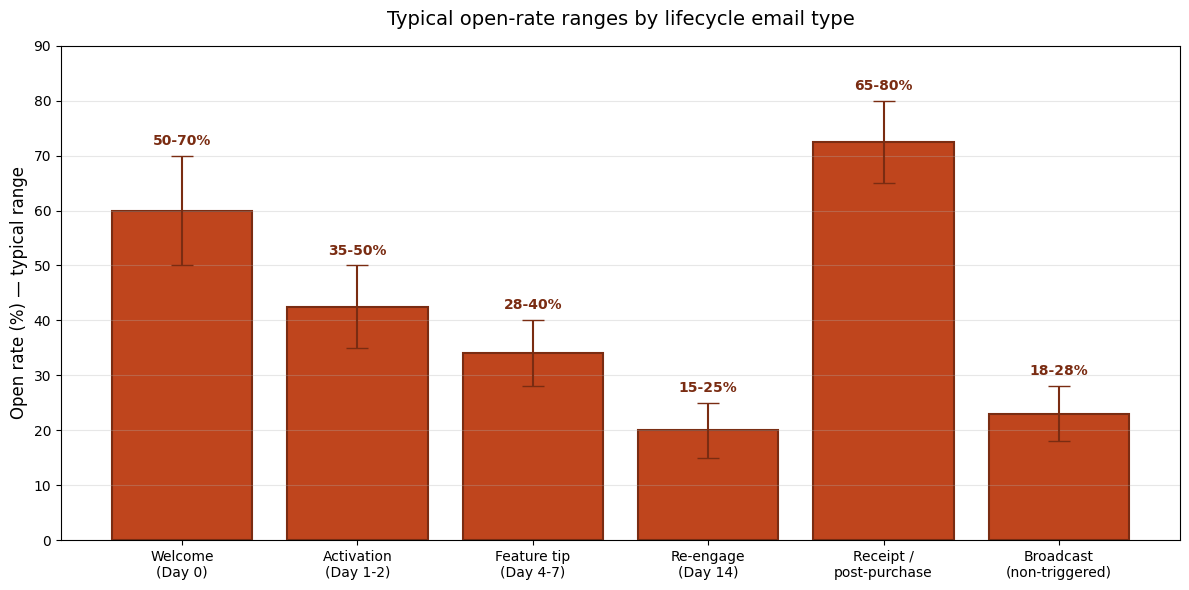
The chart shows roughly what to expect from each sequence in terms of open rate. Post-purchase receipts hit the highest open rates because the user is actively expecting them. Re-engagement drips have the lowest because by definition you're emailing someone who's gone quiet. Knowing the range matters — if your welcome email is at 28%, something is broken (probably the subject line or sender). If it's at 72%, leave it alone and ship the next sequence.
Sequence 1: Welcome (Day 0)
Trigger: User confirms email address.
Goal: Get them back into the product for first activation.
Timing: Send instantly. Not in five minutes — instantly.
Subject line pattern: [First name], your first step or You're in — here's what to do first.
Day zero is the highest-intent moment in the entire customer lifecycle. The user just signed up. They are motivated, curious, and they will not be this receptive again. Don't over-explain. Don't list every feature. Don't ask them to follow you on five social platforms. Get them into the product with one clear next step.
A working welcome email is three short paragraphs and one button. The button takes them to the action that earns them their first win. For a Coding Capybaras user that's "open your Stripe configuration" — the journey-engine step that proves the product works for their stack. For your SaaS it might be "create your first project" or "import your first contact." Whatever your "aha" moment is, the welcome email's only job is to point at it.
The single biggest mistake: sending the welcome from noreply@yourdomain.com. You're throwing away replies, and replies are the highest-signal qualitative feedback you can collect early. Send it from you@yourdomain.com with a reply-to that goes to your actual inbox.
Sequence 2: Activation nudge (Day 1–2)
Trigger: User signed up but hasn't hit the activation event 24–48 hours in.
Goal: Get them back to finish the action they started.
Timing: 24 hours after signup if they haven't activated. If they activated, skip this entire sequence.
Subject line pattern: Stuck on [specific step]? or Need help with [the thing they didn't finish]?
This is the sequence that pays the rent. Of the users who never activate, a significant fraction will activate after a single well-targeted nudge — not because the email is magic, but because they got distracted and forgot. A reminder that's specific to where they stopped converts. A generic "come back!" doesn't.
The trick is making the email specific without making it creepy. "I noticed you signed up and haven't created a project yet — here's the step-by-step" is fine. "I watched you click around for 4 minutes and then leave" is not. The line is whether the user expected you to know something. Sign-up state — yes. Mouse movement — no.
If you're running this on Resend, the trigger logic lives in a background job that queries your users table for created_at < now() - 24 hours AND activated_at IS NULL once an hour. If you've never written a background job before, Inngest or Trigger.dev are the indie-friendly options.
Sequence 3: Feature tip drip (Day 4–14)
Trigger: User has activated. Send one feature tip every 3 days for two weeks.
Goal: Surface the features they don't know exist so they get more value, which raises retention.
Timing: Day 4, Day 7, Day 10, Day 14.
Subject line pattern: One thing about [feature] most users miss or Did you know [feature] could [outcome]?
These are the emails most SaaS founders skip because they feel like noise. They're not noise if each one teaches something the user actually didn't know. The bar is: would a user who already knows this feature get annoyed by the email? If yes, you're padding. Cut the email or rewrite it for users who don't know.
The Encharge team has documented their 40%+ open rate sequence and the pattern they use is: each feature email opens with a concrete user problem, then shows the feature as the solution. Not "here's our roadmap" — "if you've ever needed to do X, here's how."
If a user clicks the link in a feature tip email and uses that feature within 24 hours, you can mark them more engaged in your CRM and skip the next two tips. They're a power user now.
Sequence 4: Post-purchase confirmation (transactional)
Trigger: Stripe webhook event checkout.session.completed or invoice.paid.
Goal: Confirm the purchase, deliver any access details, set expectations for next 7 days.
Timing: Within 30 seconds of payment.
Subject line pattern: Your [product] order is confirmed — keep it boring and predictable. People search for it.
This one is technically a transactional email, not a marketing email, but it's the highest-open-rate email you'll ever send and you'd be wasting an opportunity not to think about it carefully. Put the receipt details up top. Put the "what happens next" mid-email. Put a single CTA to the most important post-purchase action at the bottom.
The gotcha: Stripe webhooks are eventually consistent and can deliver out of order. If you send the receipt before your database has marked the user as Pro, your "view your purchase" button will go to a 404. The right pattern is to use the webhook to mark the user as Pro first, then send the receipt — not the other way around. Verify the webhook signature before anything else. We cover this in detail in the adding Sentry to Next.js SaaS post; instrumenting your webhook handler is how you catch the failed sends.
Sequence 5: Re-engagement drip (Day 14–30 of inactivity)
Trigger: User has been inactive for 14 days.
Goal: Either get them back or get them to officially unsubscribe.
Timing: Day 14, Day 21, Day 30.
Subject line pattern: [First name], should we keep your account? or Still want [product]? Quick check.
This sequence is where most indie SaaS founders are too timid. You want quiet users to either come back or churn cleanly, because quiet users who don't open emails for months are deliverability poison. Email providers see "low engagement on your domain" and start routing your messages to spam — for everyone, including the active users.
Be willing to ask the direct question: "Do you still want this account?" The user who replies "yes, just busy" stays. The user who replies "no, please remove me" gets removed, which is good — they were dragging your sender reputation. The user who doesn't reply at all after three emails goes into a suppressed list and stops getting marketing email until they re-engage on their own.
Comparing transactional email providers
For an indie SaaS in 2026, the realistic choice is between Resend, Postmark, Loops, and Mailgun. Pricing and features are similar enough that any of them work; the differences matter at the margin. Here's a comparison for a solo founder shipping a SaaS at indie volumes.
| Provider | Free tier | Paid starts at | Built for | Standout feature | | --- | --- | --- | --- | --- | | Resend | 3k emails/mo, 100/day | $20/mo for 50k | Developer-first transactional | React Email components, simple API | | Postmark | 100 test emails | $15/mo for 10k | Reliable transactional | Industry-leading inbox placement | | Loops | 1k contacts | $49/mo for 5k contacts | Indie SaaS lifecycle automation | Visual sequence builder out of the box | | Mailgun | Pay-as-you-go | $35/mo for 50k | Volume + flexibility | Strongest API for high-throughput |
I'm running Resend on Coding Capybaras because the React Email components let me write templates in JSX that match my brand without a separate visual editor, and the API is the cleanest. For founders who don't want to write any code for sequences, Loops is the closest thing to "lifecycle email in a box." The full comparison lives in Resend vs Postmark vs Mailgun when that post ships next week.
Whichever you pick, the architecture rule is the same: there is exactly one file that imports the email SDK, and every other part of the codebase goes through a single sendEmail() helper. That helper logs every attempt to a database table — success, failure, suppression. Without that log, debugging deliverability is impossible. With it, you can answer "did the welcome email actually go out?" in seconds.
The five gotchas that always hit indie SaaS at scale
These are the bugs you'll hit between 1,000 and 10,000 users. Each one took me a week to figure out the first time.
Apple Mail Privacy Protection inflates your open rates. Since iOS 15, Apple proxies email opens — every email "opens" whether the user opened it or not. This adds 10–15% to your reported opens with no engagement underneath. Treat open rate as a deliverability proxy, not an engagement metric. Click-through rate and reply rate are what matter.
Marketing broadcasts from the same domain as transactional email tank your placement. If you send marketing from you@yourdomain.com and transactional from noreply@yourdomain.com, the marketing engagement signal drags the transactional placement down. Run marketing from a subdomain like news.yourdomain.com with its own SPF/DKIM. Keep the transactional sending domain clean.
Welcome emails to invalid addresses crater your reputation. Some users sign up with typos, throwaway addresses, or honeypots. Send to them once, get a hard bounce, and don't send again. Build a suppression list on day one. Resend, Postmark, and Mailgun all expose bounce webhooks — handle them.
Sequences run after a user unsubscribes. This is the bug that gets you reported. If a user unsubscribes mid-sequence, the scheduled emails still fire unless you check the unsubscribe state at send time. Always check user.email_unsubscribed_at IS NULL immediately before sending each individual email, not just when enqueuing the sequence.
Trigger doubles when a user repeats an action. If your activation trigger is "user created their first project" and the user creates a second project, the trigger might fire again depending on how you wrote it. Use a welcome_email_sent_at column, check it before sending, and set it as the last action. Idempotency keys are the engineering term for this; a single column does the same thing for indie scale.
There's a longer deep-dive on the webhook side of this in Stripe webhook hell — the same idempotency pattern applies whether the trigger is a Stripe event or a user action.
Frequently asked questions
How many lifecycle emails should an indie SaaS send?
Five sequences is the right starting number: welcome, activation nudge, feature tip drip, post-purchase, re-engagement. Each sequence has 1–4 emails. Total volume to a user over their lifecycle is roughly 10–15 emails in the first 30 days, then it drops to feature-tip-on-event after that. Don't add a sixth sequence until the first five are measurably working.
Should I use a marketing automation tool or build sequences in code?
For under 5,000 active users, building sequences in your codebase is faster and cheaper. Each sequence is one cron job and one trigger function. Above 5,000 users, the operational overhead of debugging email sends starts to add up and a tool like Loops or Customer.io pays for itself. The decision point isn't features — it's whether you can afford the time to debug your own pipeline.
What's a good open rate for a SaaS welcome email?
50–70%. Apple MPP inflates this number, but even adjusting for that, anything below 40% means your subject line, sender name, or send time is broken. Welcome emails are sent to users who literally just signed up — they should open at higher rates than any other email type.
Can I just send all my lifecycle emails through Gmail?
Technically yes, practically no. Gmail's SMTP has rate limits that will trigger as you grow, no bounce handling, no deliverability features, and no API for logging. Use a transactional provider from day one. The Resend free tier covers 3,000 emails per month, which is enough for an indie SaaS up to a few thousand active users.
Should I use AI to write my lifecycle email copy?
AI is fine for drafts and for variations. AI is not fine for the final voice — your founder voice is what makes a sub-3000-user SaaS feel like a real product instead of a churn-out. Write the first version yourself, then use Claude or Cursor to generate variations and a/b test the subject lines. Don't ship raw AI output.
How do I know if my lifecycle emails are actually working?
Three metrics: activation rate from welcome-email recipients vs. non-recipients, paid conversion rate from the activation nudge cohort, and 30-day retention of users who received the feature-tip drip vs. users who didn't. Set these up before you build the sequences; you can't a/b test what you don't measure.
Wrapping up
The five sequences above will run an indie SaaS through its first thousand users. They're not fancy. They're the boring infrastructure that converts curious signups into paying customers without you babysitting the inbox. Build them in this order — welcome, activation, feature tip, post-purchase, re-engagement — and ship each one as soon as it works. Polish later, after you have data on what's worth polishing.
If you're building a SaaS and want the lifecycle email plumbing already wired in, the Coding Capybaras boilerplate ships the five sequences above as a working Resend integration — every email logged to platform_email_log, every send going through a single sendEmail() helper, every trigger idempotent. The free tier is the complete codebase; you fork it and start sending.