Resend vs Postmark vs Mailgun for Solo Founders (2026)
Resend vs Postmark vs Mailgun compared for solo founders in 2026 — real pricing, deliverability, developer experience, and which email API fits your stage.
· Justin Boggs

Photo by Davide Baraldi on Unsplash
For most solo founders in 2026, the Resend vs Postmark vs Mailgun decision comes down to your stage, not a feature checklist. Resend wins on developer experience and has a free tier that covers most pre-revenue apps, so it's the easiest place to start. Postmark wins on transactional deliverability and is the one I'd reach for the moment a delayed password reset would actually cost me a customer. Mailgun wins on flexibility and raw volume economics — it has nearly every feature an email platform can sell, often as paid add-ons. None of them is wrong. The right pick depends on how much email you send, how much that email matters, and how much you want to think about it.
TL;DR
- Resend has a free tier (3,000 emails/month) and the cleanest developer experience of the three, with React Email as a native way to build templates. Best for MVPs and React-first stacks.
- Postmark is the deliverability specialist. It keeps transactional and bulk mail on completely separate infrastructure and publishes its time-to-inbox numbers publicly. Best when a late email costs you a customer.
- Mailgun is the flexible, high-volume workhorse with pay-as-you-go pricing. Best when you're sending a lot and want per-email economics.
- At 10,000 emails/month, the entry prices are close: Resend Pro ~$20, Postmark ~$15, Mailgun Foundation ~$15. Price is rarely the deciding factor at indie scale.
- Start with the one whose tradeoff you actually understand. For a non-technical founder, that's usually Resend for DX or Postmark for peace of mind.
What's the real difference between a transactional email API and an email API?
All three of these are transactional email providers — services built to send the one-to-one application emails your SaaS depends on. Password resets, magic links, receipts, account confirmations, "someone mentioned you" notifications. The kind of email a user is actively waiting for.
That's a different job than marketing email. A newsletter can arrive ten minutes late and nobody notices. A password reset that arrives ten minutes late generates a support ticket and, sometimes, a churned customer. The whole category exists because mixing those two traffic types on the same sending infrastructure hurts the email that matters most.
This is the single most important concept in the comparison, and it's where the three providers diverge philosophically. Postmark treats the separation as sacred — it runs transactional and bulk mail on parallel, never-mixed infrastructure. Resend and Mailgun both handle transactional and marketing/bulk sending, with Mailgun in particular leaning toward being a full platform rather than a transactional purist.
For a first-time founder, the practical takeaway is simple: you are almost certainly shopping for transactional sending first. Your welcome email, your billing receipts, your auth flows. The marketing list can come later, and it doesn't have to live with the same provider. I cover the sequence design itself in lifecycle email for indie SaaS — this post is about the pipe that carries it.
How do Resend, Postmark, and Mailgun compare on pricing?
Here are the 2026 list prices for the entry tiers, then the part the sticker doesn't show.
| Provider | Free tier | Entry paid plan | Pricing model | Best fit | | --- | --- | --- | --- | --- | | Resend | 3,000 emails/mo (100/day) | Pro ~$20/mo (50,000 emails) | Tiered by volume | MVPs, React stacks, best DX | | Postmark | Trial only (100 test emails) | ~$15/mo (10,000 emails) | Tiered by volume | Deliverability-critical apps | | Mailgun | Trial credits | Foundation ~$15/mo (10,000) or Flex $1/1,000 | Tiered or pay-as-you-go | High volume, flexibility |
According to Resend's pricing page, the free plan covers 3,000 emails per month with a 100-per-day cap, and Pro starts at $20/month for 50,000 emails. Postmark's pricing starts around $15/month for 10,000 emails and scales by volume. Mailgun's pricing offers both a tiered Foundation plan and a pay-as-you-go Flex plan at roughly $1 per 1,000 emails with no monthly minimum.
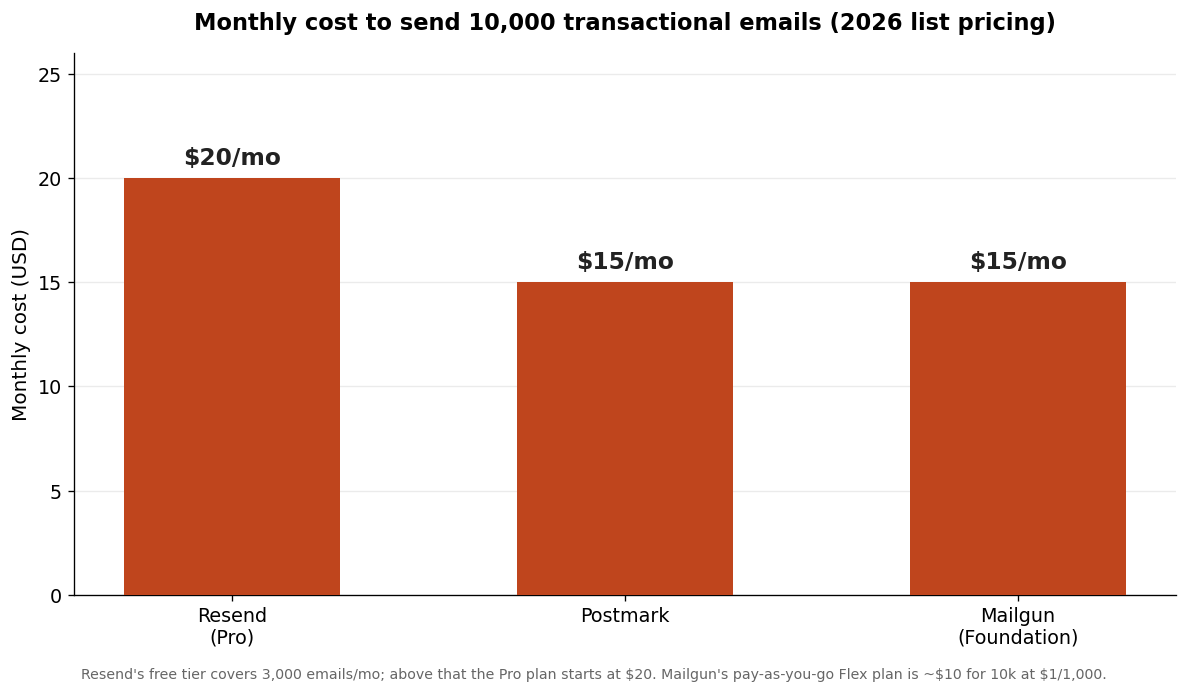
The chart above is built from each provider's published 2026 list prices for one illustrative case: 10,000 transactional emails a month, which is a realistic early-stage volume. The gap is a few dollars. At the scale most indie SaaS apps actually run, pricing is not the deciding factor — the difference between $15 and $20 a month is noise next to the cost of a single churned customer.
Where price starts to matter is at the extremes. At the very bottom, Resend's free tier genuinely is free, which is a real edge for a pre-revenue MVP that sends a few hundred emails a month. At the top, the economics flip toward the volume players: at hundreds of thousands of emails a month, Mailgun's pay-as-you-go model and the high-volume tiers get more competitive per-email than the transactional-specialist pricing. For most readers of this blog, you're in the middle, where the answer is "pick on fit, not on price."
Which one has the best deliverability?
Deliverability is the metric that actually matters and the hardest one to shop for, because you can't see it until your email is already landing in spam.
Postmark is the deliverability specialist, and it's the one that publishes proof. It maintains a public Time to Inbox page showing live transactional delivery times to Gmail, Apple, Outlook, Yahoo, and AOL, and it aims for a median delivery time under ten seconds. The mechanism behind that is Message Streams: Postmark runs transactional and bulk email on completely separate sending infrastructure so your password resets never share a reputation with anyone's newsletter blast. That's the engineering decision that makes the difference, not marketing copy.
Resend's deliverability is solid and improving fast — it's built by people who care about the modern developer stack, and most founders report good inbox placement. Mailgun has strong deliverability tooling too, including detailed analytics, dedicated IPs, and validation features, but more of that lives behind higher tiers and add-ons.
Here's the honest framing I use. Deliverability is partly the provider and largely you. No provider can save you if your SPF, DKIM, and DMARC records aren't set up, if you email people who never opted in, or if your bounce rate climbs because you don't clean your list. All three providers make domain authentication straightforward now. What Postmark sells on top of that is the institutional reputation with inbox providers and the refusal to let bulk mail contaminate transactional streams — and for an app where a late auth email is a real problem, that's worth paying for.
Which one has the best developer experience for a non-technical founder?
If you're shipping with Claude Code or Cursor, developer experience translates directly into how few times you get stuck.
Resend has the cleanest DX of the three, and it's not close. The API is small and obvious, the dashboard is modern, and the docs read like they were written this decade. Its standout feature is React Email — you build your email templates as React components instead of hand-writing the table-soup HTML that email clients require. For a founder whose AI assistant is already writing React, that's a real reduction in friction: the same mental model covers your app and your email.
Postmark's developer experience is excellent in a different way — it's stable, well-documented, and boringly reliable, which is exactly what you want from infrastructure. Its templating system is solid, and the API has been consistent for years. It feels like a tool built by people who send a lot of email and don't want surprises.
Mailgun is the most powerful and the least beginner-friendly. It exposes nearly everything an email platform can do — routing, inbound parsing, validation, detailed logs, suppression management — which is great when you need it and overwhelming when you don't. For a non-technical founder's first SaaS, that surface area is mostly cost, not benefit.
This is why I default new builders toward Resend or Postmark. When you're learning to read your AI assistant's output, you want the provider with the smallest surface area and the clearest errors, not the one with the most knobs. If you eventually need Mailgun's advanced features, switching providers later is a contained, well-understood change — most of these integrations live behind a single sending function in a well-structured codebase. In the Coding Capybaras boilerplate, for example, every send routes through one sendEmail() helper, so swapping the provider underneath is a one-file change rather than a hunt-and-replace across your app.
Which email provider should you actually choose?
Here's the decision the way I'd make it for a solo founder shipping in 2026.
Choose Resend if you're pre-revenue or early, your stack is React/Next.js, and you want the least friction getting your first transactional emails out the door. The free tier covers you while you have no users, the DX is the best in the category, and React Email fits naturally into an AI-assisted React workflow. This is my default recommendation for most readers here.
Choose Postmark if a delayed or missing email would directly cost you money or trust — and for most SaaS apps, password resets and billing receipts qualify. You're paying a small premium for the deliverability specialist that separates transactional from bulk and publishes its delivery times. If I had to bet a customer's first impression on one provider, it's this one.
Choose Mailgun if you're sending at meaningful volume, you want pay-as-you-go economics, or you need its advanced routing, inbound parsing, and validation features. It's the most flexible and scales the most predictably on price at high volume. For a first SaaS, it's usually more than you need.
The meta-point: this is a reversible decision. Picking an email provider is not like picking a database or a framework, where the choice compounds into everything you build. Email is a relatively thin integration. So don't agonize. Pick the one whose tradeoff you understand today, wire it behind a single helper function, and move on to shipping the actual product.
What about automation, templates, and the features beyond sending?
Raw sending is table stakes. The features that separate these three show up once you want to do more than fire a single email from a server action.
Templates. All three support reusable templates so you're not pasting HTML into your code. Resend's angle is React Email: you compose templates as React components, preview them locally, and reuse the same components your app already uses. Postmark ships a mature templating system with a layout/template split and a library of pre-built, deliverability-tested designs. Mailgun has templates too, plus more programmatic control over variables and versions. For a React-first founder, Resend's approach removes the most friction; for someone who wants proven designs out of the box, Postmark's template library is a head start.
Automation and sequences. This is where the line between "transactional provider" and "marketing platform" gets blurry. Resend has been adding broadcast and audience features, so you can run simple campaigns alongside transactional sends. Mailgun leans furthest toward full platform capability, with routing rules, scheduled sends, and inbound email parsing that lets you receive and process replies programmatically. Postmark stays closer to its transactional roots, though it added bulk and broadcast streams. If you want true drip sequences and lifecycle automation, you'll often pair any of these with dedicated logic in your app — I walk through that design in lifecycle email for indie SaaS.
Analytics and webhooks. All three give you delivery, open, bounce, and complaint events via webhooks, so your app can react when an email hard-bounces or a customer marks you as spam. Mailgun's logging and analytics are the most detailed; Postmark's are clean and focused on the metrics that predict deliverability problems; Resend's are modern and improving. For an indie SaaS, the must-have is bounce and complaint handling — wire those webhooks early so you stop emailing dead addresses before your reputation takes the hit.
Inbound email. If your product needs to receive email — reply-by-email support tickets, parsing forwarded receipts, that kind of thing — Mailgun and Postmark both offer inbound parsing that turns incoming messages into structured webhooks. Resend's inbound story is newer. This is a niche need, but if it's your need, it narrows the field fast.
The pattern across all four dimensions is the same one from the deliverability and DX sections: Resend optimizes for the modern developer's first 80%, Postmark optimizes for transactional reliability, and Mailgun optimizes for "we can do that too." Match the optimization to your actual roadmap, not to the longest feature list.
Frequently asked questions
Is Resend's free tier enough to launch a SaaS?
For most pre-revenue MVPs, yes. The free tier covers 3,000 emails a month with a 100-per-day cap, which is plenty for early auth flows, receipts, and a handful of users. You'll outgrow it once you have real traffic, but it's enough to validate the product before you pay anything.
Why is Postmark more expensive per email than the others?
You're paying for transactional deliverability and the infrastructure that protects it. Postmark keeps transactional and bulk email on completely separate sending streams and maintains a strong reputation with inbox providers, which is why it can publish sub-ten-second median delivery times. For apps where a late email is a real cost, that premium is usually worth it.
Can I use one provider for transactional email and another for marketing?
Yes, and it's a common setup. Many founders run transactional email through Postmark or Resend and keep marketing or newsletter sending on a separate platform. Mixing the two traffic types on one provider can hurt the deliverability of your critical transactional mail, so separating them is often the safer choice.
Does the email provider matter for whether mail lands in spam?
Partly. A good provider with strong infrastructure helps, but deliverability is largely determined by your own setup — correct SPF, DKIM, and DMARC records, a clean opt-in list, and a low bounce rate. No provider can rescue mail sent from an unauthenticated domain to people who never subscribed.
How hard is it to switch email providers later?
In a well-structured codebase, not very. If all your sends route through a single helper function, swapping the underlying provider is usually a one-file change plus updating environment variables and re-verifying your sending domain. That's a big reason not to overthink the initial choice.
Do I need a dedicated IP address for sending?
Almost certainly not at indie scale. For small and mid-size senders, a well-managed pool of shared IPs typically delivers better than a cold dedicated IP, because shared pools already have an established reputation. Dedicated IPs make sense at high volume, and providers will help you warm one up when you actually need it.
Conclusion
The Resend vs Postmark vs Mailgun question has a boring, true answer: all three are good, and your stage decides the winner. Resend for the best developer experience and a real free tier, Postmark for deliverability you can bet a customer on, Mailgun for volume and flexibility. The pricing differences at indie scale are small enough to ignore, so choose on fit and wire whichever you pick behind a single sending function so the decision stays reversible.
If you're building a SaaS with AI coding tools, Coding Capybaras is the free boilerplate I built for exactly this workflow — it ships with transactional email already wired behind one sendEmail() helper, so swapping providers is a one-file change instead of a refactor.