Drizzle vs Prisma vs Raw SQL | Coding Capybaras
Drizzle vs Prisma for a first SaaS: what an ORM actually does, migration ergonomics, when to skip the ORM, and which one AI coding assistants handle best.
· Justin Boggs

Photo by Arnold Francisca on Unsplash
For a first SaaS, the honest answer to "Drizzle vs Prisma vs raw SQL" is: pick Drizzle if you want to see the SQL your code runs, Prisma if you want the database hidden behind a friendlier API, and reach for raw SQL only for the handful of queries an ORM makes awkward. All three are correct choices — they trade different things. Drizzle keeps you close to the database with TypeScript-native schemas and SQL-like queries. Prisma abstracts SQL away behind method calls and a visual data browser. Raw SQL gives you total control and zero abstraction. This post explains what an ORM does, how the two leaders differ, and — because this blog is for non-technical founders — which one your AI assistant writes most reliably.
TL;DR
- An ORM (object-relational mapper) is the translation layer between your TypeScript code and your database, so you write
db.select()instead of hand-writing SQL strings.- Drizzle is SQL-first: schema in TypeScript, queries that read like SQL, a tiny footprint. Prisma is abstraction-first: its own schema file, method-chaining queries, a data browser (Prisma Studio).
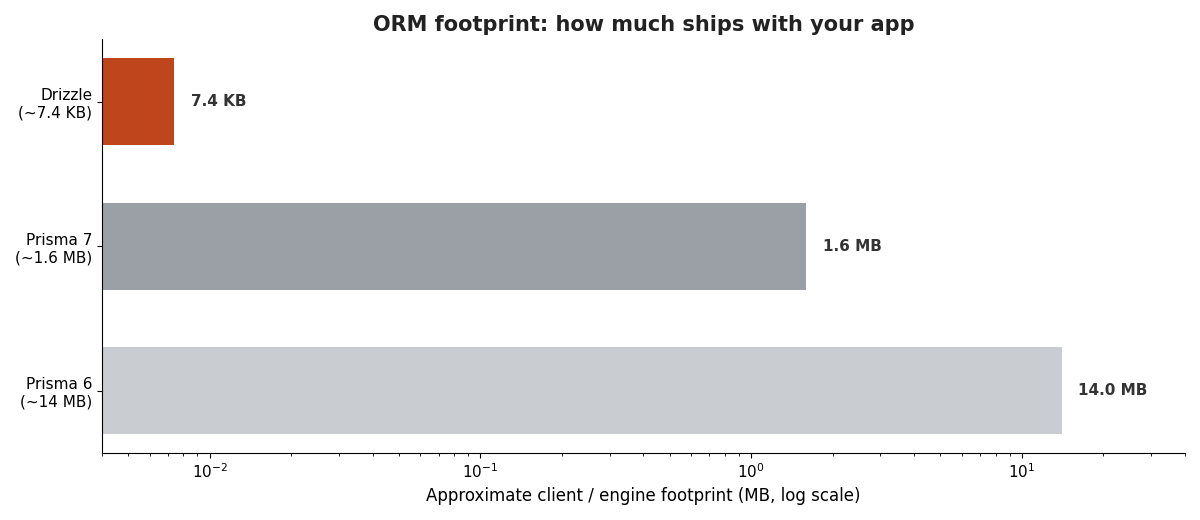
- Prisma 7 (November 2025) dropped its Rust engine, cutting its footprint from ~14MB to ~1.6MB and closing the old performance gap.
- For AI-assisted building, Drizzle's SQL-like output is easier to read and verify line by line — which is why Coding Capybaras ships with it.
- You don't have to choose forever, but switching means rewriting every query, so decide deliberately.
What does an ORM actually do?
An ORM is a translation layer that lets you talk to your database in your programming language instead of in raw SQL. Your database — Postgres, in most modern SaaS stacks — only speaks SQL, a language of SELECT, INSERT, JOIN, and WHERE. Your app is written in TypeScript. The ORM sits between them: you write TypeScript, it generates the SQL, runs it, and hands the results back as typed objects you can use in your code.
Here's the concrete difference. Without an ORM, fetching a user looks like a hand-written string:
SELECT id, email, name FROM users WHERE email = 'jane@example.com';
With an ORM like Drizzle, the same query is TypeScript your editor understands and checks:
const user = await db.select().from(users).where(eq(users.email, "jane@example.com"));
The payoff isn't just cosmetic. Because the ORM knows your schema, it gives you type safety — if you typo a column name or try to read a field that doesn't exist, your editor flags it before the code ever runs. For a founder leaning on an AI assistant, that safety net matters a lot: it's the difference between a mistake caught instantly in the editor and one that surfaces as a 2am production error. I made the broader case for types as a safety net in TypeScript vs JavaScript when you don't write either one yourself, and an ORM is where that safety net does the most work.
ORMs also handle the tedious, error-prone plumbing: escaping user input so you don't get SQL injection attacks, managing database connections, and converting between database rows and JavaScript objects. That's real security and reliability you'd otherwise have to get right by hand.
The tradeoff is a layer of abstraction between you and the database. Most of the time that layer helps. Occasionally it gets in the way of a complex query — which is exactly when raw SQL earns its place, covered below.
Drizzle vs Prisma: how the two leaders differ
Drizzle and Prisma are the two most popular TypeScript ORMs, and they take genuinely different philosophies. The Encore team put it well: use Prisma if you want an ORM that thinks for you, use Drizzle if you want one that thinks with you.
Drizzle is SQL-first. You define your tables in plain TypeScript files, and your queries look like SQL wearing a TypeScript coat — select().from().where(). If you've ever seen a SQL query, you can read a Drizzle query. There's no separate schema language and no code-generation step; the types flow directly from your TypeScript schema. The official Drizzle docs lean into this: "If you know SQL, you know Drizzle."
Prisma is abstraction-first. You define your data model in a dedicated .prisma file using Prisma's own schema language, then run prisma generate to produce a typed client. Your queries are method calls — prisma.user.findMany(), prisma.user.create() — that hide the SQL entirely. Prisma also ships Prisma Studio, a visual browser for your data that a lot of non-technical founders genuinely love: it's a spreadsheet-like view of your database with no SQL required.
Here's the side-by-side:
| Aspect | Drizzle | Prisma |
| --- | --- | --- |
| Schema definition | TypeScript files | Separate .prisma file |
| Query style | SQL-like (select().from().where()) | Method chaining (findMany, create) |
| Code generation | None — types come from the schema | prisma generate step required |
| Footprint | Minimal (~kilobytes) | ~1.6MB since Prisma 7 |
| Raw SQL escape hatch | First-class sql template tag | $queryRaw / $executeRaw |
| Visual data browser | Third-party (Drizzle Studio) | Prisma Studio (built in) |
| Learning curve | Low if you know SQL | Low if you'd rather not |
| Databases | Postgres, MySQL, SQLite | Postgres, MySQL, SQLite, MongoDB, SQL Server |
Neither is "better" in the abstract. Prisma's abstraction is a real gift if SQL intimidates you and you want the database to feel like a set of tidy function calls. Drizzle's transparency is a gift if you want to know exactly what hits your database — which, for reasons I'll get to, is worth more than it sounds when an AI is writing the code.
Migrations: the part that actually bites founders
You'll hear "migration" constantly, and it's worth understanding because it's where database work goes wrong. A migration is a versioned change to your database's structure — adding a table, adding a column, changing a type. You need migrations because your live database has real customer data in it; you can't just delete it and recreate it with the new shape. Migrations are the safe, tracked, reversible way to evolve the structure without losing what's inside.
Both tools handle migrations well, with slightly different ergonomics.
Drizzle uses Drizzle Kit, with two workflows. During early development you run drizzle-kit push, which syncs your TypeScript schema straight to the database with no migration file — fast and frictionless while you're still changing things every hour. Once you have real data, you switch to drizzle-kit generate (which writes a migration file you can read and commit) and drizzle-kit migrate (which applies it). In Coding Capybaras that generate step is wrapped as pnpm db:generate.
# Early development — sync schema directly, no migration file
npx drizzle-kit push

# Production workflow — generate a reviewable migration, then apply it
npx drizzle-kit generate
npx drizzle-kit migrate
Prisma rolls generation and application into one command, prisma migrate dev, and tracks migration state in a dedicated table inside your database. It's more opinionated and more guardrailed — it warns you loudly before a destructive change, and the state tracking makes "which migrations has this database seen?" a solved question.
# Create and apply a migration in development
npx prisma migrate dev --name add_projects_table

# Apply pending migrations in production
npx prisma migrate deploy
The guardrails cut both ways. Prisma's opinionated flow protects you from foot-guns, which is reassuring for a first-timer. Drizzle's push is looser and faster but trusts you not to run it against production. Whichever you pick, the rule that saves you is the same: never let an AI assistant run a migration against your live database without you reading the generated SQL first. Migrations are precisely the class of change I said to slow down and verify in when to trust your AI assistant — a bad one can drop a column full of customer data, and there's no undo button.
Which ORM do AI assistants handle best?
This is the question that matters most for this audience, and it's the one generic comparisons skip. If you're building with Claude Code, Cursor, or Cowork, you are not really choosing an ORM for yourself — you're choosing one for your AI assistant to write, and for you to review.
On that axis, Drizzle has a real edge, for two reasons.
First, Drizzle output is readable. A Drizzle query reads like the SQL it becomes, so when your assistant writes db.select().from(orders).where(eq(orders.userId, id)), you can reason about what it does even if you've never written a line of code. Prisma's prisma.order.findMany({ where: { userId: id } }) is arguably easier to write but harder to verify, because the actual database behavior — which joins run, how many queries fire — is hidden behind the abstraction. When you can't write code yourself, "can I read and sanity-check this?" beats "is this slightly terser?" every time. That's the whole discipline I laid out in how to review code your AI wrote when you can't write it yourself.
Second, Drizzle has no code-generation step to forget. Prisma requires prisma generate after every schema change to regenerate the typed client. It's a small thing, but it's a step an AI assistant sometimes skips, producing a confusing class of error where your code references a field the generated client doesn't know about yet. Drizzle's types come straight from the schema file, so there's one less invisible step for anything to go wrong.
None of this makes Prisma a bad choice — teams ship enormous products on it, and its abstraction is a legitimate advantage if a human who knows the codebase is doing the writing. But Coding Capybaras is built for the AI-assisted, founder-reviews-the-diff workflow specifically, and that's why the boilerplate ships with Drizzle. It fits the "boring, transparent, verifiable" bar I hold the whole stack to, the same reasoning behind the boring tech case for non-tech founders. The chart below shows the footprint difference that used to be Drizzle's headline advantage — worth understanding, even though Prisma 7 mostly closed it.
When raw SQL is the right call
An ORM is the right default, but there's a third option people forget: skipping it. Raw SQL means writing the query as a string yourself and running it directly, no translation layer. Both Drizzle and Prisma keep a first-class door open for this — Drizzle's sql template tag, Prisma's $queryRaw — because every ORM eventually meets a query it makes awkward.
You reach for raw SQL in a few specific situations. Complex reporting queries with several joins, window functions, or aggregations are often clearer written directly than expressed through an ORM's query builder. Performance-critical hot paths sometimes need a hand-tuned query the ORM won't generate. And occasionally you'll use a database feature the ORM doesn't model yet.
The mistake is starting there. Writing raw SQL for everything means giving up the type safety and injection protection that make an ORM worth having — and for a founder who can't easily eyeball a SQL string for a security hole, that protection is not optional. My rule: ORM for ninety-plus percent of queries, raw SQL through the ORM's escape hatch for the handful that genuinely need it. That keeps the safety net under normal code and the flexibility available for edge cases.
There's also a "no ORM at all" path some tools take — Supabase, for instance, gives you a client library that talks to Postgres over an auto-generated API, which many first SaaS apps use without ever adding a separate ORM. That's a legitimate route too, and it interacts with your database choice more than your framework choice. I compared the underlying engines in PostgreSQL vs SQLite vs MongoDB for first-time SaaS builders, and the schema-design foot-guns that outlast any ORM decision are catalogued in 7 SaaS database schema mistakes to avoid — worth reading whichever tool you land on, because the ORM changes how you write queries but not what a good schema looks like.
Has Prisma 7 changed the calculus?
Yes, meaningfully — and if you're reading an older comparison, some of its conclusions are now stale. For years, Prisma's headline weakness was a Rust query engine that shipped as a binary alongside your app: roughly 14MB, awkward on serverless, and unsupported on edge runtimes. That was Drizzle's clearest structural advantage.
Prisma 7, released in November 2025, replaced that Rust engine with a TypeScript/WASM implementation, cutting the footprint from about 14MB to roughly 1.6MB and adding native edge support. The performance and bundle-size gap that used to be the deciding factor is now, for most apps, negligible — as the Encore analysis notes, database query time dominates response latency for both, so the real-world difference between them is small.
What that means practically: don't choose between these two on performance anymore. The gap is gone for the workloads a first SaaS runs. Choose on the thing that doesn't change — the authoring and review experience. Do you want to see the SQL (Drizzle) or have it hidden (Prisma)? That's the real decision, and it's the same one it was before the engine change.
Frequently asked questions
Is Drizzle faster than Prisma?
Marginally, in raw ORM overhead, because Drizzle generates SQL directly in JavaScript with no engine layer. But for a normal SaaS the difference is negligible — your actual database query time dominates response latency for both. Prisma 7 (November 2025) closed most of the historical gap by dropping its Rust engine. Don't pick between them on speed.
Do I need an ORM at all for my first SaaS?
Usually yes. An ORM gives you type safety and automatic protection against SQL injection, both of which matter enormously when an AI assistant is writing your queries and you're reviewing rather than authoring. The exception is if your stack already includes a database client (like Supabase's) that covers your needs — then a separate ORM can be redundant early on.
Can I switch from Prisma to Drizzle later?
You can, but it's real work. The two use different schema formats and query APIs, so switching means rewriting your schema definitions and every query in your app. The underlying database and its data don't need rebuilding — only the code that talks to it. Because switching is costly, decide deliberately up front.
Which ORM does Coding Capybaras use?
Drizzle. The boilerplate ships a single unified Drizzle client that types both platform and product tables, with migrations generated via pnpm db:generate. The choice is deliberate: Drizzle's SQL-like queries are the easiest to read and verify when an AI assistant writes them and a non-technical founder reviews the diff.
What is a database migration, in plain terms?
A migration is a tracked, reversible change to your database's structure — adding a table or column, changing a type — applied without deleting the data already inside. You need them because your live database holds real customer records you can't afford to lose. Both Drizzle and Prisma generate and apply migrations for you; the rule is to read the generated SQL before running one against production.
Is raw SQL dangerous for beginners?
It can be. Writing query strings by hand gives up the injection protection an ORM provides automatically, and a SQL string with a security hole isn't easy to spot if you don't write code. Use raw SQL through your ORM's escape hatch for the few complex queries that need it, and let the ORM handle everything else.
The bottom line
For a first SaaS, choose your database tool on the authoring experience, not the benchmark. Drizzle keeps you close to the SQL — readable, verifiable, no hidden generation step — which is why it fits the AI-assisted workflow and why it's what I ship. Prisma trades that transparency for a friendlier abstraction and a genuinely nice data browser, a fair deal if SQL isn't something you ever want to see. Raw SQL is the specialist tool you keep in reach for the handful of queries an ORM makes awkward, not the default you start from.
If you're building a SaaS with AI coding tools and want a working example of Drizzle wired into Next.js, Supabase, and Stripe, Coding Capybaras is the free boilerplate I built for exactly this workflow — the complete codebase ships free, including the schema and migration setup described above.