TypeScript vs JavaScript When You Don't Write Either
TypeScript vs JavaScript for non-technical founders: why static types are a safety net for AI-generated code, what the stricter option costs, and when to choose it.
· Justin Boggs

Photo by Ben Hershey on Unsplash
If you're a non-technical founder shipping a SaaS with AI coding tools, choose TypeScript over JavaScript. That's the short answer, and it holds even though you won't be writing either language by hand. The reason is counterintuitive: TypeScript's value isn't for the person typing the code, it's for the person reviewing it. When an AI writes most of your app and you can't audit every line, TypeScript acts as a safety net that catches an entire class of mistakes before the code ever runs. JavaScript lets those same mistakes through silently, so you find them when a customer does. This post explains what that tradeoff actually is, what it costs, and the narrow cases where plain JavaScript is still the right call.
TL;DR
- TypeScript is JavaScript plus a type checker that catches mismatched data, missing fields, and wrong arguments before the code runs.
- For AI-generated code you can't fully read, that pre-run check is a safety net — it turns silent runtime crashes into errors caught at build time.
- Adoption backs this up: 40% of surveyed developers now write exclusively in TypeScript, up from 28% in 2022; only 6% use plain JavaScript exclusively.
- The cost is real but small for founders: stricter code, occasional cryptic errors, slightly slower first drafts. Your AI absorbs most of that cost, not you.
- Choose plain JavaScript only for throwaway prototypes or tiny scripts. For anything you'll operate and bill customers for, use TypeScript.
What is the difference between TypeScript and JavaScript?
JavaScript is the language browsers and servers actually run. TypeScript is JavaScript with a type checker layered on top — a tool that verifies your data has the shape you expect before the code ever executes. That's the whole difference, and it's smaller than the debate around it suggests. TypeScript compiles down to ordinary JavaScript; the browser never sees the types. They exist purely to catch mistakes during development.
Here's the difference made concrete. Say a function expects a customer's email as text and their account age as a number. In JavaScript, nothing stops you (or your AI) from accidentally passing those two values in the wrong order, or passing a value that's missing entirely. The code runs anyway — right up until it hits the bad data in production and crashes. In TypeScript, that mismatch is flagged the moment it's written, with a red underline, before anything runs. As the 2025 developer surveys describe it, the compiler catches shape mismatches, missing properties, and wrong argument types before a single line executes.
For an engineer, this is a productivity feature — it saves debugging time. For a non-technical founder, it's something closer to a seatbelt. You're going to be reviewing code you didn't write and can't fully read, a skill I've written about in how to read your AI assistant's output when you don't speak code. TypeScript does part of that review for you, automatically, on every save. It won't catch logic errors or bad decisions. But it eliminates an entire family of "the data wasn't what we thought it was" bugs that are otherwise invisible until they bite.
Why types are a safety net for AI-generated code
The strongest argument for TypeScript as a non-developer has nothing to do with your own typing habits. It's about the specific failure modes of AI-generated code.
AI coding assistants are fluent and confident. They also make a recognizable set of mistakes: inventing a field that doesn't exist, calling a function with the wrong arguments, assuming a value is present when it might be missing, or drifting between two slightly different shapes for the same piece of data across files. I've catalogued the broader pattern in common AI hallucinations in code and how to catch them. The through-line is that these errors are plausible. The code looks right. It reads cleanly. And in plain JavaScript, it often runs — until the exact condition that exposes the flaw shows up in front of a paying customer.
TypeScript closes most of that gap mechanically. When the AI invents a field, the type checker says that field doesn't exist. When it passes the wrong argument, the checker flags the mismatch. When it assumes a value is present that might be missing, the checker forces the question to be answered before the code compiles. None of this requires you to spot the error yourself. The tool spots it and refuses to build until it's resolved.
This changes the review conversation in a way that favors non-technical founders specifically. Instead of you needing to catch a subtle bug in a diff you can barely parse, the build simply fails with a message pointing at the exact line. You can paste that message back to your AI and say "fix this," and it will — because the error is precise and machine-checkable, not a vague "something feels off." That tight feedback loop is the same discipline behind building a reliable feedback loop with your AI assistant: the faster the tool tells you it's wrong, the less it can hurt you.
A concrete version of this saved me an embarrassing bug early on. My AI wrote code that read a customer's subscription status from Stripe and used it to decide what to show on their dashboard. In one file it treated that status as the text "active"; in another, written twenty minutes later, it checked for a boolean isActive that didn't exist anywhere. In plain JavaScript, both files would have run. The second check would have quietly always evaluated to "not active," and paying customers would have seen a locked dashboard. TypeScript refused to build: the field isActive doesn't exist on that data, full stop. I hadn't spotted the inconsistency myself — the checker did, before it could ship. That's the safety net doing precisely the job I can't reliably do by eye.
There's a second-order benefit too. Because the types describe what each piece of data is supposed to look like, they act as documentation the AI reads on its next pass. When you ask for a change three weeks later, the assistant sees the type definitions and works within them, instead of guessing at the shape of your data all over again. The safety net is also a memory.
What TypeScript actually costs you
Honesty matters here, because TypeScript isn't free, and pretending otherwise is how people end up resenting it. The costs are real. They're just smaller for founders than for the engineers who usually debate them.
The first cost is that TypeScript is stricter, which means it sometimes refuses to build over things that feel pedantic. A value that might be missing has to be handled even if you're sure it won't be. Early on, this reads as the tool being difficult. What's actually happening is that it's surfacing a real gap the AI left, and you're choosing to address it now instead of at 2am when a customer hits it.
The second cost is cryptic error messages. TypeScript's errors can be genuinely hard to read, full of nested type descriptions that mean nothing to a non-developer. This is the most legitimate complaint against it. The mitigant, for our workflow specifically, is that you don't have to decode them — you hand them to your AI, which reads them fluently and fixes the cause.
The third cost is a slightly slower first draft. Setting up types and satisfying the checker adds a little friction versus dashing off raw JavaScript. For a genuine throwaway prototype, that friction isn't worth it. For anything you'll operate, it pays for itself the first time it catches a bug that would otherwise have shipped.
Here's the tradeoff laid out directly:
| Consideration | TypeScript | Plain JavaScript | | --- | --- | --- | | Catches data-shape bugs before running | Yes, at build time | No, only when the code runs | | Best for | Products you'll operate and bill for | Throwaway prototypes, tiny scripts | | Error timing | Development (visible, fixable) | Production (in front of users) | | AI-generated code safety | High — mismatches get flagged | Low — plausible bugs run silently | | First-draft speed | Slightly slower | Slightly faster | | Reading cryptic errors | Occasionally needed (hand to AI) | Rare, but bugs are hidden instead |
The key insight for a non-technical founder: almost every cost of TypeScript is paid by the AI, and almost every benefit accrues to you. The AI handles the stricter syntax and decodes the confusing errors. You get code that fails loudly in development instead of silently in production. That's a lopsided trade in your favor, which is exactly why the boring, proven default here is the right one — the same logic behind the "boring tech" case for non-tech founders.
The industry already made this call
You don't have to take my word for the tradeoff, because the developer population has voted with its keyboards, and the trend is one-directional.
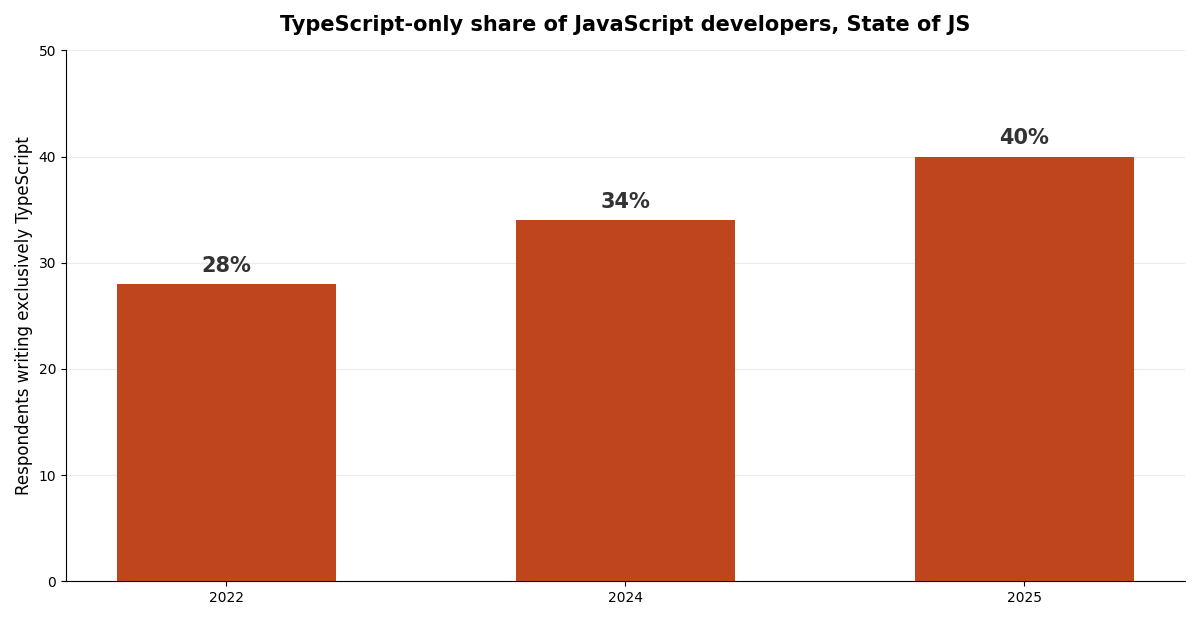
According to the State of JavaScript 2025 survey, 40% of respondents now write exclusively in TypeScript, up from 34% in 2024 and 28% in 2022. In the same survey, only 6% still use plain JavaScript exclusively. The Stack Overflow 2025 Developer Survey puts overall TypeScript usage around 38.5%, up from 34.8% the year before. Every credible source points the same direction: up and to the right.
Why does this matter to a founder who isn't part of that population? Two reasons. First, tooling and ecosystem support follow adoption. The libraries you'll depend on, the boilerplates you'll start from, and the AI models writing your code have all been trained and built in a world where TypeScript is the default for serious work. Picking it means swimming with the current. Second, the AI assistants themselves are demonstrably strong at TypeScript precisely because there's so much high-quality TypeScript in their training data. You benefit from that fluency every time you ask for a feature.
This is also why nearly every modern SaaS boilerplate ships in TypeScript, a point that comes up in any honest SaaS boilerplate comparison. The stack that most first-time founders actually adopt — Next.js, Supabase, Stripe, and Resend — is TypeScript-first end to end. Choosing JavaScript instead means fighting the grain of every tool you'll touch. There are moments to be contrarian about your stack. This isn't one of them.
When plain JavaScript is still the right call
TypeScript is the default, not a law. There are real situations where reaching for it is over-engineering, and recognizing them keeps you honest.
Plain JavaScript wins for genuine throwaway code. A script you'll run once to reformat a spreadsheet, a five-line experiment to see if an idea is even possible, a quick prototype you fully intend to delete — none of these benefit from a type system. The setup cost isn't repaid because the code has no future to protect. If you're testing whether a concept works before committing, raw JavaScript's speed is a genuine advantage, and it fits the "ship the smallest thing first" spirit of a minimum viable launch.
JavaScript is also fine for tiny, isolated automations with no data flowing between parts — a single webhook that fires one notification, a config file, a build helper. When there's no complex data being passed around, there's nothing for the types to protect, so the safety net catches nothing.
The line to watch is the one between "prototype" and "product." The moment a throwaway starts becoming something you'll operate, bill customers for, and extend over months, the calculus flips hard toward TypeScript. The trap is letting a JavaScript prototype quietly graduate into your real product without ever making the switch, because retrofitting types onto a grown codebase is far more painful than starting with them. My rule: if it will ever touch a paying customer's data, it starts in TypeScript. If it's a scratch pad, JavaScript is fine. Almost everything a founder actually ships falls on the TypeScript side of that line.
Frequently asked questions
Do I need to learn TypeScript to use it?
No. As a non-technical founder using AI coding tools, you're directing the work, not typing the types. Your AI writes TypeScript, satisfies the checker, and decodes any errors. Your job is to understand why it's worth choosing — which is the safety net it provides on code you can't fully audit yourself.
Is TypeScript harder for AI to write than JavaScript?
Slightly, in that there's more for the model to get right, but modern AI assistants are very strong at TypeScript because there's so much of it in their training data. In practice the extra strictness helps the AI produce more correct code, because the type checker catches its own mistakes and lets it self-correct before you ever see them.
Can I switch from JavaScript to TypeScript later?
Yes, and TypeScript is designed to allow a gradual migration — the two can coexist in one project. But retrofitting types onto a large existing codebase is meaningfully harder than starting with them. If you have any reason to think a project will become a real product, it's far cheaper to begin in TypeScript than to convert later.
Will TypeScript slow down my app for users?
No. TypeScript's types exist only during development. Before your app runs, the code is compiled down to ordinary JavaScript with the types stripped out, so what your users' browsers execute is identical in performance to hand-written JavaScript. The safety is entirely a development-time feature.
Does TypeScript catch every bug?
No, and it's important to be clear about this. TypeScript catches data-shape errors — wrong types, missing fields, mismatched arguments. It does not catch logic errors, bad business decisions, or security flaws. It's one layer of protection, best paired with review and tests, not a substitute for either.
The bottom line
For a non-technical founder shipping a real SaaS with AI coding tools, TypeScript versus JavaScript isn't a close call: choose TypeScript. The whole point is that the safety net protects you on exactly the code you can't personally vet — the code your AI wrote and you approved without reading every line. You pay almost none of the cost, because your assistant handles the strictness and the cryptic errors, while you collect the benefit of bugs that surface in development instead of in front of customers.
Keep the escape hatch in mind: throwaway prototypes and tiny scripts don't need it. Everything you'll operate does. If you want to see how the pieces fit together in a working codebase, Coding Capybaras is the free, TypeScript-first boilerplate I built for founders in exactly this position — shipping software with AI, and staying in control of it without writing the code by hand.