Stripe Tax for Indie SaaS: When You Need It (and When You Don't)
A non-tech founder's guide to Stripe Tax: how the 0.5% fee works, what it automates, what it leaves to you, and when a solo SaaS actually needs it.
· Justin Boggs

Photo by Kelly Sikkema on Unsplash
You probably don't need Stripe Tax on day one, and you almost certainly will need something like it before you cross your first six figures of revenue. Stripe Tax is an add-on that calculates, collects, and helps you file sales tax, VAT, and GST on the transactions you already process through Stripe. It charges 0.5% per transaction, but only in jurisdictions where you're registered to collect tax. The honest answer to "should I turn it on?" is: not until you have a tax obligation somewhere — and the day you register in your first state, flip it on before your next invoice goes out. This post walks through the math, the mechanics, and the line where it stops being optional.
TL;DR
- Stripe Tax costs 0.5% per transaction, charged only where you have an active tax registration. No registration, no fee.
- It automates rate calculation, collection, threshold monitoring, and filing in supported jurisdictions. It does not register you, handle exemption certificates, or clean up tax you owed before you enabled it.
- You don't have a collection duty until your product is taxable in a state and you cross that state's economic nexus threshold — commonly $100,000 in sales or 200 transactions.
- For a solo SaaS under ~$5M in revenue, Stripe Tax is almost always the right call over dedicated tax software like Avalara or Vertex.
- Turn it on the day you register in your first jurisdiction — not before, not a year after.
What Stripe Tax actually does
Stripe Tax is a compliance layer that sits on top of your existing Stripe payments and handles the "what tax do I charge this customer" question automatically. It's not a separate payment processor and it's not a tax filing service you bolt on from outside — it reads the transactions already flowing through your Stripe account and applies the correct rate based on where your customer is and what you're selling.
According to Stripe's own documentation on how Stripe Tax works, the full tax compliance cycle has four stages: figure out where you owe tax, register in those places, calculate and collect the tax, then file and remit it. Stripe Tax touches all four, but it does not own all four. That distinction is the whole ballgame, so it's worth being precise.
On calculation and collection, Stripe Tax is genuinely hands-off. Once you've told it your business address and added your tax registrations, it uses your customer's location, their business-or-consumer status, and the product tax code to determine the right rate on every charge. Stripe employs tax researchers who monitor rate changes and push them into the system, so you're not maintaining a rate table yourself. For a non-technical founder, this is the part that would otherwise eat weekends — and it's solved.
On monitoring, Stripe Tax watches your transaction volume and warns you when you're approaching a registration threshold in a new jurisdiction. Per Stripe's monitoring docs, it surfaces these as Dashboard notifications and emails to the account owner once you've had at least $10,000 in revenue in the prior year and don't already have an active registration for that location. That early-warning system is the feature most indie founders underrate.
On filing, Stripe can file for you in US locations directly, and outside the US it works with partners like Taxually and Marosa to automate returns. This is optional and priced separately, but the transaction data syncs automatically either way, so even if you file yourself, you have clean itemized reports to hand your accountant.
The 0.5% fee, and what it really costs you
The pricing is simple enough to reason about on a napkin. Stripe charges 0.5% on live transactions in jurisdictions where you're registered to collect tax. No registration in a state means no fee on sales into that state, even if the transaction runs through Stripe. That single rule keeps the cost proportional to your actual obligation.
Here's what that looks like as your taxable volume grows. Remember: this is 0.5% of the transaction volume in places you're registered, not your entire revenue.
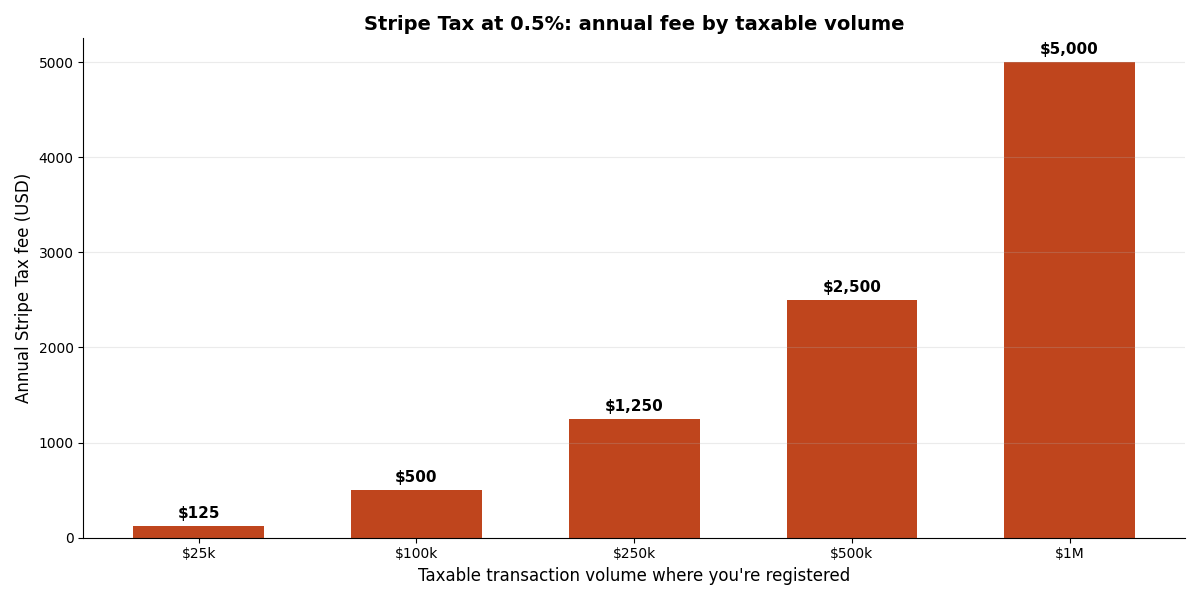
At $25,000 of taxable volume you're paying $125 a year. At $250,000 you're at $1,250. The fee only becomes a real line item once you're a substantial business, and by then you can afford it. Compare that to dedicated enterprise tax engines — Avalara and Vertex are excellent tools built for companies filing in dozens of states, but they carry setup projects and annual contracts that run into five figures. For a solo founder, that math doesn't close.
There's a nuance worth flagging so you don't get surprised. Stripe's docs note the tax calculation fee is distinct from the payment itself and can apply even when the calculated tax is zero, as long as there's an active registration covering that customer. But Stripe explicitly does not charge you to configure settings, to monitor thresholds against your past payments, to calculate tax on abandoned checkouts, or on zero-amount transactions. So the threshold-monitoring safety net — arguably the most valuable part for a small SaaS — is free until you actually register somewhere.
If you want to think about where payment fees, tax fees, and subscription math all intersect, I broke down the underlying revenue metrics in subscription billing math for non-finance founders. Tax sits on top of that stack, not inside it.
When do you actually owe sales tax?
This is the question that trips up every first-time founder, because the answer is "it depends on two independent things, both of which vary by state." You have a duty to collect only when both are true: your product is taxable in that state, and you've crossed that state's economic nexus threshold.
Taxability first. SaaS is not uniformly taxable across the US. As of 2025, SaaS is taxable in roughly 25 US jurisdictions, with states like New York, Pennsylvania, Texas, and Washington clearly treating it as taxable. Meanwhile California generally treats SaaS as a nontaxable service — which means you can cross California's high revenue threshold and still owe nothing there. You cannot assume; you have to check state by state, because the same product can be taxable in one state and exempt in the neighboring one.
Nexus second. Nexus is the legal connection that subjects you to a state's tax rules. Since the 2018 South Dakota v. Wayfair decision, that connection is economic, not just physical — you can trigger it without ever setting foot in a state. Common thresholds, per Avalara's state-by-state economic nexus guide, sit around $100,000 in annual sales or 200 separate transactions, though the specifics differ and a number of states have been dropping the 200-transaction test entirely.
The combination is what matters. If your SaaS is taxable in Texas and you cross Texas's threshold, you have to register and collect. If your SaaS is "taxable" nowhere you've hit a threshold yet, you have no collection duty anywhere — and turning on Stripe Tax's paid collection would just cost you 0.5% for nothing. This is exactly why the sequencing matters: monitor first (free), register when you cross, collect after you register.
One more trap for the road: local taxes exist. Chicago, for instance, imposes a Personal Property Lease Transaction Tax on certain cloud services used within the city, based on the customer's location rather than yours. These are edge cases for a brand-new SaaS, but they're the reason "I'll just handle tax myself in a spreadsheet" stops scaling faster than founders expect.
Turning it on: the actual steps
Enabling Stripe Tax is genuinely a short task, which is a nice change from most compliance work. Here's the sequence I'd follow, assuming you've already determined you have a real obligation somewhere.
First, go to the Tax settings in your Stripe Dashboard and set your origin address (your head office) and your default product tax code. For most SaaS, the software-as-a-service tax code is the right default. This step is free and it's what powers the monitoring engine.
Second, let the monitoring run. As your sales grow, Stripe watches your transaction volume by jurisdiction and notifies you — via the bell icon in the Dashboard and by email to the account owner — when you're nearing a threshold. Per Stripe's threshold-monitoring documentation, you'll get these once you're past $10,000 in prior-year revenue and don't already hold a registration there.
Third, when you cross a threshold, register with that tax authority. Stripe can help you register in US states where you're a remote seller, or hand you off to a partner for physical-presence and international registrations. Registration is the one step Stripe genuinely cannot do silently on your behalf — a government has to issue you a permit.
Fourth, add the registration in the Dashboard under Locations. This is the switch that turns on actual calculation and collection for that jurisdiction — and starts the 0.5% clock for transactions there. If you're running the standard Stripe Checkout or Billing setup that ships with most boilerplates, you enable automatic_tax on your Checkout Sessions and subscriptions, and Stripe handles the rest at renewal time.
If you're wiring this into a Next.js app, the collection side lives right next to your existing payment code. In Coding Capybaras, all Stripe logic is funneled through a single PaymentProvider abstraction in /platform/lib/payments/, so turning on automatic tax is a config change, not a refactor across your codebase. If you've been through Stripe webhook hell, you already know why keeping payment logic in one place matters — tax is one more reason.
Stripe Tax vs. the alternatives
Stripe Tax isn't the only option, and being honest about the tradeoffs builds more trust than pretending it's perfect. Here's how the realistic choices stack up for a solo or small-team SaaS.
| Option | Cost | Best for | Catch | | --- | --- | --- | --- | | Stripe Tax | 0.5% per transaction where registered | Solo/small SaaS already on Stripe | Only tracks Stripe-processed sales | | Do nothing (spreadsheet) | Free | Pre-revenue or clearly-exempt products | Breaks the moment you cross a threshold | | Anrok / Numeral | Monthly SaaS fee | SaaS-focused, multi-channel sellers | Another tool + subscription to manage | | Avalara / Vertex | Five figures/year | Companies filing in many states | Overkill and overpriced for indies | | Merchant of record (Paddle, Lemon Squeezy) | ~5%+ blended | Founders who want tax fully off their plate | Higher take rate; less payment control |
The merchant-of-record route deserves a real mention. Platforms like Paddle and Lemon Squeezy act as the seller of record, which means they own the tax liability entirely — you never register anywhere. That's a legitimately great deal for founders who'd rather pay a higher percentage than ever think about VAT. The tradeoff is cost and control: you're paying a blended rate well above Stripe's, and you're further from your own payment data. I compared these head-to-head in Stripe vs. Lemon Squeezy vs. Paddle — if you're pre-launch and tax anxiety is keeping you up, that's the decision to make deliberately before you write payment code, because switching later is painful.
One place Stripe Tax quietly earns its keep is business-to-business sales into the EU. When you sell to another business there, the transaction is often subject to a reverse charge — the tax liability shifts to the buyer and you don't charge tax at all. Per Stripe's documentation, Stripe Tax uses the customer's tax identification number to detect these B2B cases and applies the reverse charge automatically. It won't validate whether the tax ID is genuine, so you still want basic collection hygiene, but it means you're not manually deciding which European invoices carry VAT and which don't. For a solo founder selling to a mix of consumers and companies across borders, that's a category of mistake you simply stop making.
The key limitation to keep in mind with Stripe Tax specifically: it monitors and calculates on transactions that flow through Stripe. If you also sell through AppSumo, a Shopify store, or direct wire invoices outside Stripe, those channels need separate tracking. For a SaaS whose only revenue path is Stripe Checkout, that's a non-issue. For a multi-channel business, it's a gap you plan around.
Frequently asked questions
Do I need Stripe Tax before I launch?
No. Until your product is taxable somewhere you've crossed a nexus threshold, you have no collection duty and paying 0.5% would buy you nothing. Set up the free tax settings so monitoring runs, and leave collection off until you register.
Does Stripe Tax file my sales tax returns for me?
It can, in supported US states directly and internationally through filing partners, for an additional fee. If you file yourself, Stripe still gives you itemized, jurisdiction-level reports so you or your accountant aren't reconstructing anything by hand.
What does the 0.5% fee apply to?
Only live transactions in jurisdictions where you have an active tax registration. Sales into states where you aren't registered incur no Stripe Tax fee, and threshold monitoring against your past Stripe payments is free.
Is SaaS taxable in every state?
No. SaaS is taxable in roughly 25 US jurisdictions and exempt in others — California generally treats it as a nontaxable service, for example. Taxability is decided state by state, independent of whether you've crossed a revenue threshold there.
Can I use Stripe Tax if I sell outside Stripe too?
You can, but Stripe Tax only sees Stripe-processed transactions. Revenue through other channels — marketplaces, direct invoices, a separate storefront — needs its own tracking, either manually or through a multi-channel tax tool.
What if I already owed tax before turning it on?
Stripe Tax handles transactions going forward from when you enable it. Historical liability from before you registered is not something it retroactively fixes — that's a conversation for a tax professional, and a reason not to wait too long to start monitoring.
The bottom line
Stripe Tax is one of those rare compliance tools where the cheap, easy option is also the right one for your stage. For a non-technical founder running an indie SaaS on Stripe, the play is straightforward: configure the free tax settings today so monitoring runs in the background, let Stripe warn you as you approach thresholds, register when you cross one, and only then turn on paid collection. That sequence keeps you compliant without paying for coverage you don't yet need — and without the five-figure tax software that's built for companies ten times your size.
If you're building a SaaS with AI coding tools and want the payment and tax plumbing already structured so turning this on is a config flip rather than a rewrite, Coding Capybaras is the free boilerplate I built for exactly that workflow — every Stripe call routes through one provider abstraction, so compliance features slot in cleanly.
This post is general information, not tax advice. Sales tax obligations vary by jurisdiction and change over time — consult a tax professional for your specific situation.