Time-Blocking as a Solo Founder: My Actual Calendar
Solo founder time management, with the real calendar. What time-blocking actually fixes, what it can't, and the schedule I landed on after two that failed.
· Justin Boggs

Photo by Cabri Caldwell on Unsplash
Time-blocking works for solo founders, but not for the reason it gets sold. It won't make you faster, and it won't manufacture hours you don't have. What it does is decide in advance who gets to interrupt you, so you're not making that call forty times a day with your defenses down. As a solo founder you are simultaneously the engineer, the support desk, the marketer, and the person who decides what matters — and those four people want the same hours. Time-blocking is how you stop them from negotiating in real time. Below is my actual calendar, including the two versions that failed first.
TL;DR
- Time-blocking's real benefit is fewer switches, not more hours. Observed knowledge workers averaged about 11 minutes in a working sphere before switching, and 57% of those spheres got interrupted.
- Switching isn't free. Attention-residue research shows part of your mind stays stuck on the last task, degrading the next one.
- My first two schedules failed because I blocked by category and by optimism. The one that works blocks by energy and leaves a third of the day empty on purpose.
- The block that mattered most wasn't deep work. It was the one that ends the day.
- If your calendar has no empty space, it isn't a plan. It's a wish.
Why fragmentation is the actual enemy
Before the calendar, the diagnosis. The reason a founder day evaporates isn't laziness and it isn't a bad tool. It's fragmentation, and it has been measured.
In a study out of UC Irvine, Gloria Mark, Victor González, and Justin Harris observed 24 information workers in real offices and tracked what actually happened to their attention. The findings are unkind. People averaged roughly 11 minutes in a "working sphere" before switching to another one. They juggled an average of 11.7 different working spheres. And 57% of those working spheres were interrupted before they finished.
The resumption data is the part that changed how I schedule. Interrupted work did mostly come back the same day — 77.2% of it. But it came back slowly, and rarely directly. On average there were 2.3 intervening activities before someone returned to what they'd been doing. Work that was interrupted from the outside got resumed in about 22 minutes 37 seconds on average; work people interrupted themselves on took about 29 minutes 1 second.
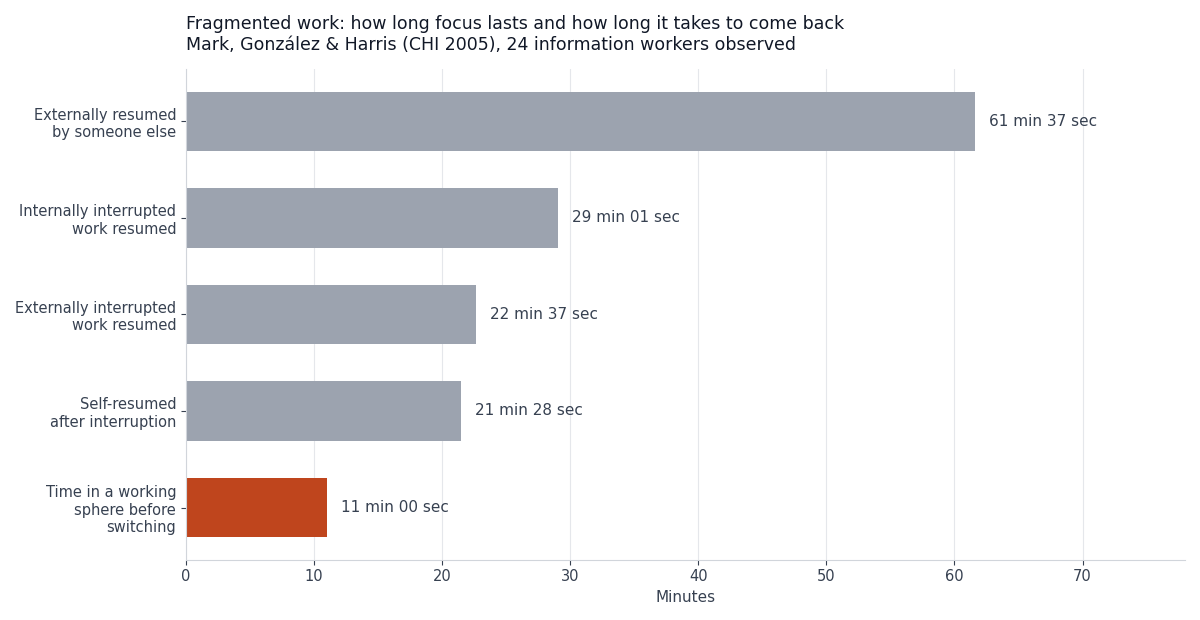
Read those two numbers next to each other. Eleven minutes of work. Twenty-two to twenty-nine minutes to get back to it. The interruption costs more than the thing it interrupted.
I want to flag something here, because this statistic gets mangled constantly. You have probably seen "it takes 23 minutes and 15 seconds to refocus after an interruption" attributed to this research. That specific figure doesn't appear in this paper, and the paper isn't measuring "refocusing" — it's measuring how long until you return to the task at all, which is a different thing. I'm citing the numbers the study actually reports. The real ones are damning enough without the upgrade.
The founder version of this is worse than the office version, because nobody is interrupting you. You're doing it to yourself. Notice that internally interrupted work took longer to resume than externally interrupted work. When you're the whole company, every context is legitimately yours, so every switch feels like work. Checking Stripe is work. Reading the support inbox is work. It all counts, and it all fragments.
The switch you don't feel
Fragmentation would be survivable if switching were free. It isn't, and this is the mechanism that made time-blocking click for me.
Sophie Leroy's research at the University of Minnesota describes a phenomenon she named attention residue. In Why is it so hard to do my work? The challenge of attention residue when switching between work tasks (Organizational Behavior and Human Decision Processes, 2009), she shows that when you stop Task A and start Task B, cognitive activity about Task A persists — and your performance on Task B suffers for it. You don't get a clean handoff. You drag the last thing with you.
Attention residue means the cost of a switch isn't the switch. It's the degraded quality of everything after it. That's why a "quick" five-minute check of your inbox at 10:15 doesn't cost five minutes. It costs five minutes plus a diminished version of you until whatever you read stops rattling around.
Leroy's findings include a wrinkle worth sitting with: it's specifically hard to disengage from unfinished tasks, and having finished — or having been under time pressure that forced closure — helps you transition cleanly. That has a direct scheduling implication. A block that ends with a thing hanging open leaks into the next block. A block that ends with something closed doesn't.
This reframed the whole exercise for me. I'd been treating my calendar as a container for hours. It's actually a container for transitions. The blocks aren't the point. The seams between them are the point. Every seam is a chance to leave residue behind or carry it forward, and the number of seams in your day is something you get to choose.
For non-technical founders working through AI tools, there's a specific tax here. When I hand a task to Claude Code and wait, I have created a perfect residue trap: a 90-second gap, an unfinished task, and a browser one keystroke away. The waiting is what kills you. I've written more about the mechanics of that loop in the vibe coding workflow, but the scheduling fix is blunt — the gap is not a break, and treating it like one is how a two-hour block becomes eleven minutes of work.
The two calendars that failed
I'm including my failures because "here's my perfect system" posts are useless, and because both failures are common.
Failure one: blocking by category. My first calendar was tidy. Monday was code. Tuesday was marketing. Wednesday was support and admin. It looked like a real company's week, which should have been the warning.
It collapsed inside of two weeks for a boring reason: a solo SaaS doesn't respect your taxonomy. A customer emails on Monday with a broken checkout. Do I sit on it until Wednesday because Wednesday is Support Day? Obviously not. So Monday's code block got eaten, and now Monday was a lie, and once one block is a lie the whole calendar is decorative. Category-blocking assumes the work arrives on your schedule. It doesn't.
Failure two: blocking by optimism. The second version fixed the rigidity and broke something worse. I blocked realistically — deep work in the morning, mixed work after — but I filled every hour. 7am to 7pm, fully allocated, no gaps.
This one felt incredible for about ten days. It's the version I would have blogged about if I'd blogged about it in week one, which tells you something about most productivity content. Then a single bad Tuesday — a payment bug, three hours gone — didn't just ruin Tuesday. It ruined the week, because there was no slack anywhere to absorb it. Every displaced block had to shove another block, and by Thursday I was working from a calendar that described a fictional person.
A fully-booked calendar isn't a schedule. It's a prediction, and you're bad at predicting. Everyone is. The moment reality diverges you have no plan at all — you have an accusation, sitting there in fifteen-minute increments, telling you you're behind.
Both failures share a root cause: I built the calendar for the founder I wanted to be. The working version is built for the one who shows up — the one who sleeps badly sometimes, whose customers email whenever they want, and whose energy is not a constant.
The calendar that actually works
Here's the real thing. It has three rules and about a third of it is deliberately empty.
Rule 1: Block by energy, not category. My good thinking happens between roughly 8am and noon. That's not a preference, it's an observation I made after tracking it for a month. So the morning gets whatever is hardest this week — sometimes that's code, sometimes it's positioning, sometimes it's a pricing decision I've been avoiding. The block isn't named "Code." It's named "Hard thing." What goes in it is decided the night before.
Rule 2: Batch the reactive work into two windows. Support, email, X, Stripe dashboard, analytics — all of it lives at 12:30pm and 4:30pm. Not because those are magic times, but because it collapses a dozen daily switches into two. This is the single change that bought back the most usable time, and it maps directly onto the fragmentation data above: I'm not reducing the work, I'm reducing the seams.
Rule 3: Leave the afternoon porous. Roughly a third of my day is unblocked. That's not slack for slack's sake — it's the shock absorber that failure two lacked. When the payment bug shows up, it lands in the porous zone and Tuesday survives.
Here's the shape:
| Time | Block | What it's for | Interruptible? | | --- | --- | --- | --- | | 8:00–10:00 | Hard thing | The single hardest task, chosen last night | No | | 10:00–12:00 | Hard thing (cont.) | Same task. No new context. | No | | 12:30–1:00 | Reactive window 1 | Support, email, Stripe, mentions | Yes — that's the point | | 1:00–3:00 | Build | Shipping work: features, content, integrations | Mostly | | 3:00–4:30 | Porous | Whatever the day threw at me | Yes | | 4:30–5:00 | Reactive window 2 | Second and final inbox pass | Yes | | 5:00–5:20 | Shutdown | Close loops, write tomorrow's "hard thing" | No |
Two things about this table that matter more than the times.
First, the 8am–noon block is one task across two blocks, not two tasks. The break at 10 is a break for me, not a switch for the work. The instant it becomes two different tasks, I've built a seam into my best hours and given away exactly what the morning was for.
Second, the shutdown block at 5:00 is the one I'd defend hardest, and it's the one that looks most skippable. Twenty minutes, at the end, when I'm tired and it feels like the day's already over. I'll explain why it's load-bearing in a second.
I'll be honest about the parts that don't hold. This calendar assumes I control my day, and there are weeks — launch weeks especially, like the one around the Product Hunt launch — where that's simply false and the schedule goes in a drawer. Time-blocking is a default, not a religion. The goal isn't compliance. The goal is that the default day is a good one.
Why the shutdown block is the one that matters
If you take one thing from my calendar, take the last twenty minutes, not the first four hours.
The deep work block is what productivity content sells you. But the block that changed my actual life is the one at 5:00pm, and it exists because of the residue problem. Leroy's work suggests unfinished tasks are the sticky ones — they're what your mind won't release. A solo founder's day ends with everything unfinished, by definition. The company is never done. So without an explicit closing ritual, you don't stop working at 5. You stop typing at 5 and keep working until you fall asleep.
The shutdown block is three things, and it takes twenty minutes:
- Close the open loops. Every half-finished thing gets written down — not solved, just captured. The note is the closure. "Webhook retry logic — stuck on idempotency key, resume at
/platform/lib/payments/webhook-handler.ts." - Pick tomorrow's hard thing. One decision, made now, while I still have context. This is why the 8am block can start at 8am instead of at 8:40 after I've decided what to do.
- Say the day is over. Out loud, which sounds ridiculous and works anyway.
That's it. The mechanism isn't mystical: you can't disengage from an unfinished task, but you can disengage from a task that's been written down with a next step attached. The note does the holding so your brain doesn't have to.
This is also the honest answer to the loneliness problem's less-discussed cousin — the fact that solo founding has no closing bell. Nobody else leaves the office, so the office never closes. You have to build the bell yourself, and then obey it.
The founder-specific trap I want to name plainly: shipping is not a schedule. There's a fantasy in indie SaaS that the right week is the one where you work until you drop and wake up and do it again, and I've had those weeks, and they produce roughly one good decision each. Looking back at the six months it took to ship Coding Capybaras, the heroic weeks aren't the ones that moved the product. The calendar exists to make Wednesday sustainable, not to make Wednesday heroic.
Frequently asked questions
How long are your deep work blocks?
Two hours, twice, on the same task — 8:00 to 10:00 and 10:00 to 12:00 with a real break between. I've tried 4-hour unbroken blocks and the last hour was decorative. Two hours is roughly the limit of my honest attention, and pretending otherwise just moved the fatigue somewhere I couldn't see it.
Does time-blocking work if you have a day job?
Better, actually. Constrained time is easier to block than open time, because the decisions are already mostly made for you. The failure mode for day-job founders isn't finding hours, it's arriving at those hours with residue from the job still stuck to you. The shutdown ritual matters more for you, not less — you need a seam between the two lives.
Isn't this rigid? What about creative work?
The blocks are containers, not scripts. "Hard thing, 8-10" doesn't say how to do the hard thing. In practice, protecting two uninterrupted hours is what makes creative work possible at all — the fragmentation data suggests the average knowledge worker gets about 11 minutes before a switch, which is not enough runway for an idea to get off the ground.
What do you use to time-block?
A calendar. That's it. I've tried a stack of dedicated apps and the tool has never once been the problem — the tool is where you go to feel productive without being productive. Cal Newport, who popularized this practice, does it in a paper notebook and claims time-blockers accomplish roughly twice as much. Treat the "twice as much" as his experience rather than a measured result — it's his claim, not a study — but the underlying method costs nothing to try.
How do you handle customer support without breaking blocks?
Two windows a day, 12:30 and 4:30, and I told customers the truth: I'm one person and I reply within a day. Nobody has ever been angry about it. The anxiety that support needs an instant response is almost entirely self-generated — I wrote about what I learned running founder-led support and the short version is that speed matters far less than actually solving the thing.
What if my energy peak isn't the morning?
Then don't block the morning. Rule 1 is "block by energy," and the whole point is that it's your energy. Track it for two weeks — just note when you did your best thinking — and build around the observation instead of around what productivity blogs told you. Mine is 8am to noon. That's a fact about me, not a prescription.
The point isn't the calendar
Time-blocking as a solo founder isn't about squeezing more into the day. It's about spending your attention deliberately instead of reactively, because attention is the actual scarce resource and it degrades every time you split it. The research is clear that fragmentation is expensive and that switching leaves residue. The calendar is just the mechanism for having that argument with yourself once, in the evening, instead of forty times a day while you're tired.
Start with two things, not the whole system: batch your reactive work into two windows, and add a twenty-minute shutdown. Those two changes cost nothing, break nothing, and will tell you within a week whether the rest is worth building. Leave a third of your day empty. You'll need it.
If you're a non-technical founder building a SaaS with AI coding tools and want the hard thing in your morning block to be product rather than plumbing, Coding Capybaras is the free boilerplate I built for exactly that workflow — auth, billing, and email already wired up, so the two hours go to the part only you can do.