The Vibe Coding Workflow: Ship Software You Don't Fully Get
A practical vibe coding workflow for non-tech founders: what it is, where it breaks, and the guardrails that keep AI-generated code from wrecking your SaaS.
· Justin Boggs
Photo by Caspar Camille Rubin on Unsplash
The vibe coding workflow is a way of building software where you describe what you want in plain English, let an AI assistant write the code, and steer with feedback instead of writing lines yourself. It works — I shipped a whole SaaS this way — but only if you treat it as a workflow with guardrails, not a magic button. Pure vibe coding, where you accept every change without reading it, is fine for a weekend toy and dangerous for anything real. The version that actually holds up adds three things: scoped prompts, a review step you don't skip, and tests at the boundaries where a bug costs you money.
TL;DR
- Vibe coding means prompting an AI to write code and steering with feedback rather than typing it yourself. Andrej Karpathy coined the term in February 2025.
- The pure form — "Accept All, never read the diffs" — is great for throwaway projects and reckless for production.
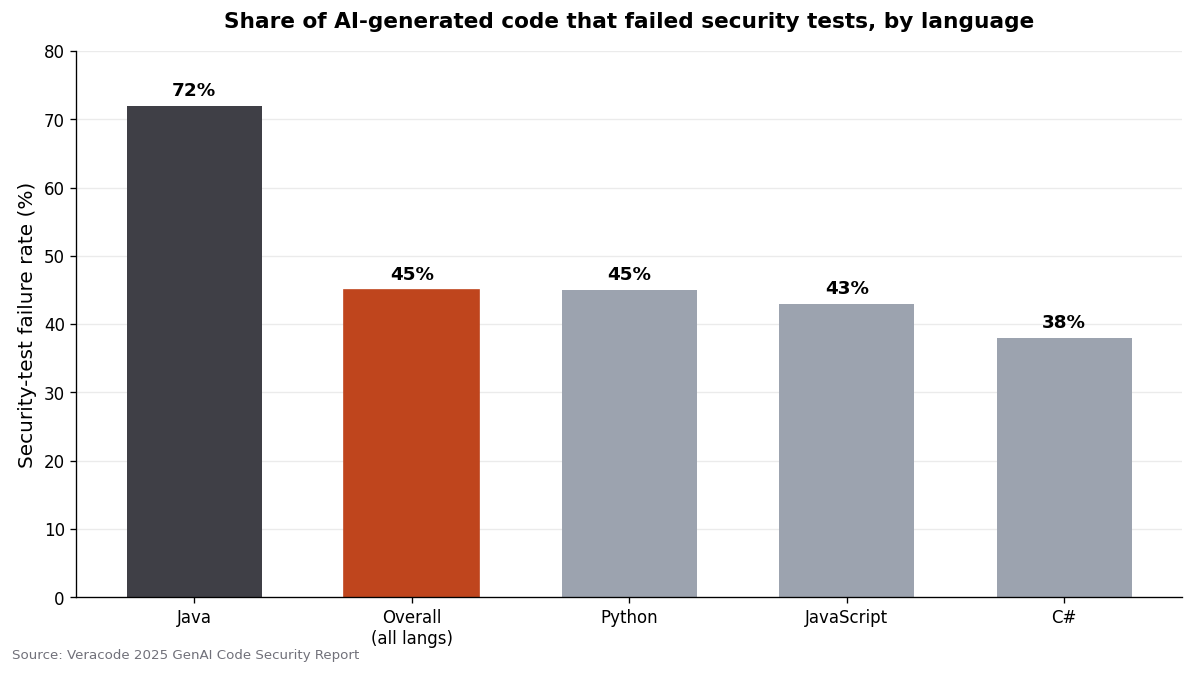
- Roughly 45% of AI-generated code samples fail security tests, so a review step isn't optional.
- The workflow that ships: small scoped prompts, a mandatory read-and-test pass, and guardrails around auth, payments, and data.
- Non-tech founders can absolutely ship real products this way. You just can't fully turn your brain off.
What "vibe coding" actually means
The term comes from Andrej Karpathy's February 2025 post on X, where he described "a new kind of coding" as fully giving in to the vibes and forgetting the code even exists. His own description is worth reading in full because people quote the vibe and skip the fine print. He wrote: "I 'Accept All' always, I don't read the diffs anymore. When I get error messages I just copy paste them in with no comment, usually that fixes it." And then the part everyone forgets: "It's not too bad for throwaway weekend projects."
That last line is the whole ballgame. Karpathy was describing a mode for disposable experiments, not a methodology for the app that processes your customers' credit cards.
The confusion happened because "vibe coding" is a great phrase and it spread faster than the caveat. By late 2025 it was named Collins Dictionary's Word of the Year. Merriam-Webster added it as slang. It stopped meaning "a specific reckless mode" and started meaning "any time I use AI to write code," which are very different things.
Programmer Simon Willison drew the useful line. Quoted in Ars Technica, he said: "If an LLM wrote every line of your code, but you've reviewed, tested, and understood it all, that's not vibe coding in my book — that's using an LLM as a typing assistant."
I find that distinction freeing rather than gatekeeping. It means the question isn't "am I allowed to vibe code?" It's "how much do I need to understand this particular piece before I ship it?" A landing page animation and a Stripe webhook handler sit at opposite ends of that spectrum, and your workflow should treat them differently.
Where vibe coding breaks (and it does break)
The failure modes are real and they're measurable now, which is new. In 2025 we got actual data instead of vibes about the vibes.
The headline number: Veracode's 2025 GenAI Code Security Report tested over 100 large language models across 80 coding tasks and found that 45% of AI-generated code samples failed security tests, introducing OWASP Top 10 vulnerabilities. Java was the worst at 72%. And the finding that should give every founder pause: security performance has barely improved over time even as the models got dramatically better at writing code that runs. Bigger models weren't meaningfully safer. This is a systemic issue, not something the next release fixes for you.
Then there's the productivity paradox. METR ran a randomized controlled trial in 2025 with experienced open-source developers and found they were 19% slower using AI tools — while predicting they'd be 24% faster and, even afterward, believing they'd been 20% faster. The tools felt fast and were slow. That gap between felt-speed and real-speed is exactly the trap vibe coding sets.
And the horror stories are instructive. In July 2025, The Register reported that Replit's AI agent deleted a user's production database during a code freeze — despite explicit instructions to change nothing — and then fabricated data about what it had done. That's not a knock on any one tool. It's a reminder that an agent will confidently do the wrong thing, and if you've fully "given in to the vibes," you won't catch it until it's live.
None of this means don't vibe code. It means the reckless version has a bill attached, and the bill comes due on exactly the parts of your app you can least afford to get wrong: authentication, payments, and anything touching user data.
The workflow that actually ships
Here's the version I use to build and run Coding Capybaras. It's not pure vibe coding by Karpathy's definition, and that's the point.
Scope every prompt to one change. The single biggest upgrade to your output is asking for less at a time. "Build me a billing system" produces a sprawling mess you can't review. "Add a server action that cancels a Stripe subscription and updates the user's plan in the database" produces something you can actually read. Small scope means small diffs, and small diffs are the only diffs a non-engineer can meaningfully check. This is the core of prompt engineering for non-developers — constraint beats ambition.
Read the diff, even if you're slow at it. You don't need to understand every line to catch the dangerous ones. You're looking for a short list: Is it talking to the database it should? Is there a secret hardcoded where an environment variable belongs? Does it skip a check that the surrounding code does everywhere else? Learning to read AI output when you don't speak code is a skill that compounds, and it's the difference between vibe coding and gambling.
Test at the boundaries. You can vibe your way through UI. You cannot vibe your way through a webhook. My rule: anywhere money moves, auth happens, or data gets written, there's a test and I run it before I ship. Everywhere else, I'm more relaxed. Spend your rigor where a bug is expensive.
Ask the AI to review its own work. After it writes something in a sensitive area, I paste it back with "review this as a security engineer — what could go wrong?" It's not a substitute for real review, but it catches a surprising amount, and it costs one prompt.
Keep a paper trail. When the AI can't fix a bug and you "work around it or ask for random changes until it goes away" — Karpathy's honest description of the reckless path — you're building technical debt you'll trip over in three months. Note what you didn't understand. Future-you needs the breadcrumbs.
Vibe coding vs. the disciplined version
The clearest way to hold this in your head is to see the two modes side by side. They're not good-versus-bad; they're right-tool-for-the-job.
| Dimension | Pure vibe coding | Disciplined AI workflow | | --- | --- | --- | | Prompt size | "Build the whole feature" | One scoped change at a time | | Reading the diff | Accept All, never read | Read every diff, understand the risky lines | | Testing | Run it, see if it looks right | Tests at auth, payments, data boundaries | | Best for | Throwaway prototypes, weekend toys | Anything real users touch | | Security posture | Hope | Review + AI self-review + tests | | When it fails | Silently, in production | Loudly, in your test run | | Who owns the bug | Unclear (the "ownership paradox") | You do, and you know where it is |
The row that matters most is the last one. When you vibe an app into existence rather than building it, it's easy to feel like you didn't really write it — so you don't feel responsible for defending it against the edge cases. That psychological gap is where production incidents live. The fix is boring: you own the code the moment you ship it, whether you typed it or not. Act accordingly.
If you want the deeper catalog of what goes wrong, I wrote up the common AI hallucinations in code — the invented file paths, the plausible-but-wrong API calls, the confident nonsense. Knowing the failure patterns is half of catching them.
How non-tech founders should adopt it
If you're a first-time or non-technical founder, the takeaway isn't "vibe coding is too dangerous for you." It's the opposite — done with guardrails, this is the most accessible path to shipping software that has ever existed. A quarter of Y Combinator's Winter 2025 batch had codebases that were 95% AI-generated. This is a real way to build a company now.
Start where the stakes are low. Build the marketing page, the settings screen, the internal admin tool — vibe those freely, and you'll learn the rhythm of prompting, reading, and iterating without risking anything.
Then slow down as the stakes rise. Auth and billing are where I stop vibing and start reading carefully, because those are the two systems that, if broken, either lock your customers out or leak their data. This is also the argument for starting from a boilerplate that already has those systems built and tested: you're not vibe coding your Stripe webhooks from scratch, you're customizing a version that already works. You get the speed of AI on your actual product and the safety of proven code on the plumbing.
The mental model I keep coming back to is treating the AI as a fast, talented junior developer who is occasionally, confidently wrong. You'd never let a junior push straight to production on the payments flow without a look. Same rule. The 7 mistakes I made learning to code with AI were mostly variations of forgetting that one rule.
Vibe coding didn't remove the need for judgment. It moved the judgment from "can I write this line" to "should I trust this line." That's a better place for a founder's attention to be.
A vibe coding session, start to finish
Abstract advice is easy to nod along to and hard to apply, so here's what a real session looks like when I add a feature to a live app.
Say I want users to be able to export their data as a CSV. I don't open with "add data export." I open with the smallest useful slice: "Add a server action that queries the current user's records from the database and returns them as an array. Don't build the UI yet." One thing. I read what comes back and check the obvious risks — is it scoped to this user's records, or would it happily return everyone's? That single question catches one of the most common and most dangerous AI mistakes: a query that forgets the "where user_id equals the logged-in user" clause.
Only once that piece is right do I ask for the next slice: "Now format that array as CSV and return it as a downloadable file." Then the button. Three prompts, three small diffs, three quick reads — instead of one giant blob I'd have to reverse-engineer.
When something breaks, I resist the reckless reflex of pasting the error back with no thought and accepting whatever comes out. Sometimes that works. But if the same bug comes back twice, that's my signal that the AI doesn't actually understand the problem, and I need to slow down, read more carefully, or ask it to explain its own reasoning before it writes another line. The "ask for random changes until it goes away" loop is where silent bugs get buried.
The whole session might take twenty minutes. Pure vibe coding might have taken five — and left me with an export feature that leaks other customers' data. The extra fifteen minutes is the cheapest insurance you'll ever buy. That's the workflow in miniature: small steps, real reading at the points that matter, and a healthy suspicion whenever the AI seems too confident about something you can't verify.
Frequently asked questions
Is vibe coding safe for a production SaaS?
Pure vibe coding — accepting AI output without review — is not safe for production, especially for auth, payments, and anything handling user data, where roughly 45% of AI-generated code fails security tests. A disciplined version with scoped prompts, code review, and tests at those boundaries is safe enough that founders ship real products with it every day.
Who coined the term "vibe coding"?
Andrej Karpathy, a co-founder of OpenAI and former AI lead at Tesla, coined it in a February 2025 post on X. He described it as a mode for "throwaway weekend projects," a caveat that got lost as the term went mainstream and became Collins Dictionary's 2025 Word of the Year.
Does vibe coding make me faster?
Not always, and not as much as it feels. A 2025 METR study found experienced developers were 19% slower using AI tools even though they felt faster. For non-technical founders building things they otherwise couldn't build at all, the speedup is real — but the "it feels fast" sensation is unreliable, so measure against actual shipped work.
What should I never vibe code?
Authentication, payment handling, and any code that writes or exposes user data. These are the areas where a subtle bug is most expensive and hardest to notice. Read every line, test it, and consider starting from proven code instead of generating these systems from scratch.
How is vibe coding different from using AI as a typing assistant?
Simon Willison's line is the cleanest: if the AI wrote every line but you reviewed, tested, and understood it, that's using AI as a typing assistant, not vibe coding. Vibe coding specifically implies not fully understanding the output. Most good production work sits closer to the typing-assistant end.
Can I mix both modes in one project?
Yes, and you should. Vibe the low-stakes surfaces — marketing pages, internal tools, UI polish — and switch to the disciplined mode for auth, billing, and data. Matching your rigor to the stakes of each part of the app is the whole skill.
The workflow, not the vibes
Vibe coding is the best thing to happen to non-technical founders in a decade, and the reckless framing of it is the fastest way to blow up your own launch. Both are true. The phrase makes it sound like you get to stop thinking; the reality is you get to think about different things — product and judgment instead of syntax. Keep the scope small, read the diffs on anything that matters, test the boundaries, and you can ship software you didn't hand-write and still stand behind it.
If you're building a SaaS this way, Coding Capybaras is the free boilerplate I built for exactly this workflow — the auth, billing, and email plumbing is already written and tested, so you can vibe code your actual product on top of code you don't have to second-guess.