When Your AI Assistant Gets Stuck in a Loop: The Fix
When your AI assistant is stuck in a loop, fixing the same bug over and over, here's how to recognize it, reset the context, and ask the questions that unstick it.
· Justin Boggs

Photo by Viktor Danov on Unsplash
When your AI assistant is stuck in a loop — fixing a bug, reintroducing it, then "fixing" it the same way again — the fastest way out is almost always to stop and start a fresh session, not to keep prompting the tired one. The loop happens because the assistant has no memory that it already tried this fix, and because a long, cluttered conversation degrades its judgment with every turn. More words in the chat make it worse, not better. The reliable move is to end the session, write down the current state in a few plain sentences, and hand that clean summary to a brand-new session that hasn't watched itself fail four times. This post covers how to spot the loop early, how to reset cleanly, and the specific questions that break the cycle.
TL;DR
- The loop isn't stubbornness — it's memory loss. Your assistant doesn't remember it already tried a fix. Each turn it sees roughly the same state and reaches for roughly the same answer.
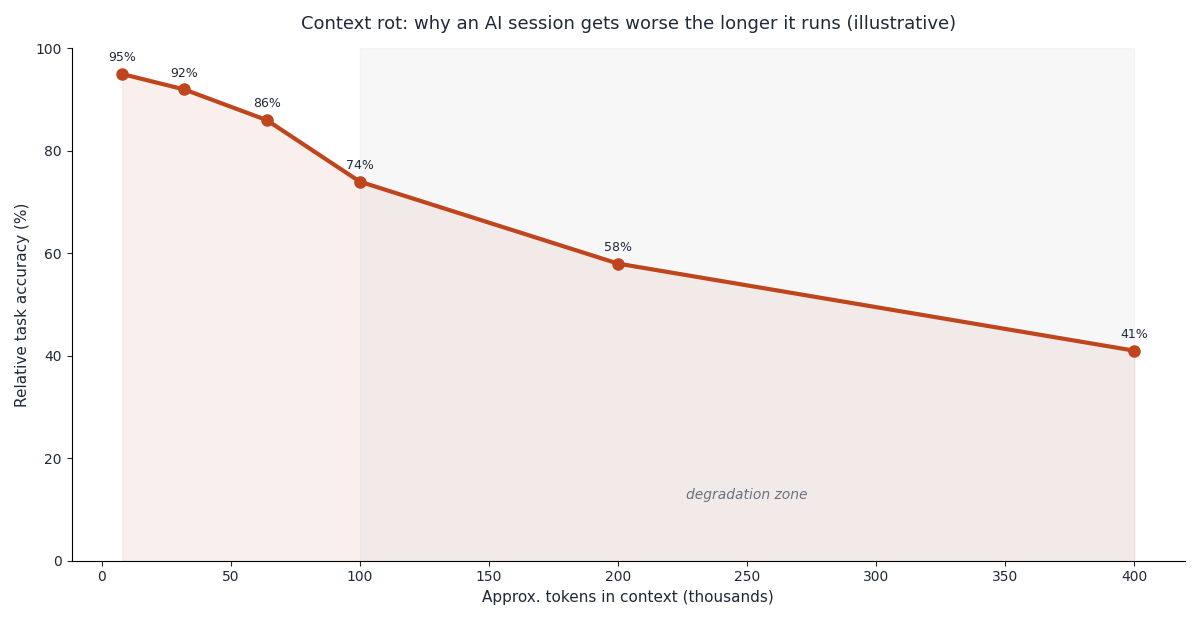
- Long sessions get worse, not better. As the conversation grows, model accuracy degrades — a pattern researchers call "context rot." Piling on more prompts feeds the problem.
- The fix is a reset, not persistence. Stop the session, write a short plain-English summary of the current state, and paste it into a fresh conversation.
- Change the input, not just the ask. Give the new session the error message, what you've already tried, and one specific question — not "it's still broken."
- Prevent it structurally with small commits, a standing instructions file, and shorter working sessions.
Why your AI assistant gets stuck in a loop
The single most useful thing to understand is that your AI assistant does not remember fixing the bug. It isn't being stubborn, and it isn't broken. Each time you ask, it looks at the current state of your code and the current conversation, and it proposes what looks like the best next step. If that step looks the same as it did three turns ago, you get the same suggestion — the same "fix" that already failed.
This gets worse when the real problem is a pattern repeated across several files. The assistant fixes the one instance you showed it, you run the app, the bug reappears from a different file, and the cycle restarts. The assistant never understood that the pattern was the problem, because it only ever saw one symptom at a time. I've watched this exact dynamic play out more times than I'd like — the assistant confidently patching a symptom while the underlying pattern sits untouched.
There's a second, sneakier reason: the longer a session runs, the worse the model's judgment gets. This isn't a hunch. Stanford researchers documented a "lost in the middle" effect in their paper Lost in the Middle: How Language Models Use Long Contexts, showing that models attend well to information at the very start and very end of their context but struggle badly with anything buried in the middle — even models built for long contexts. As your conversation grows, the important details from an hour ago sink into that weak middle zone.
Practitioners call the broader version of this "context rot": accuracy quietly degrading as the conversation fills up with search results, half-finished attempts, and backtracking. Anthropic's own engineering team frames the entire discipline of managing this as context engineering — curating the limited set of tokens the model can actually reason over well. The takeaway for a founder is blunt: a three-hour debugging session isn't three hours of accumulated wisdom. It's three hours of accumulated noise, and the noise is why your assistant keeps circling.
How to recognize the loop before you waste an hour
The trap is that a loop feels like progress. The assistant sounds confident. It says "I see the issue now" and produces a diff. You run it, it fails, and it says "I see the issue now" again. Each turn feels like you're one step away, so you keep going — and an hour disappears.
Here's the shape of the loop, which is worth recognizing on sight:
flowchart TD
    A[Bug appears] --> B[AI proposes a fix]
    B --> C[You apply it and test]
    C --> D{Fixed?}
    D -->|No, same error| E[AI says 'I see the issue now']
    E --> B
    D -->|Yes| F[Done]
    E -.escape.-> G[Stop. Reset context.]
The signals that you're in it, not making progress:
The assistant repeats a fix it already tried, sometimes with tiny cosmetic changes — renaming a variable, reordering two lines — as if the previous attempt never happened. That's the clearest tell. If you've seen this diff before, the loop is real.
The explanations start contradicting each other. Turn two says the problem is in the database call; turn five says it's in the frontend; turn eight is back to the database. The model isn't converging on a diagnosis, it's guessing, and the guesses are drifting because the early context has rotted.
The assistant gets more confident as it gets more wrong. Genuine progress usually sounds more tentative and specific over time. Looping sounds increasingly certain and increasingly vague — "this should definitely fix it now" with no new reasoning behind the "now."
My personal rule: two failed attempts at the same bug is a warning, three is a stop sign. The moment I catch the third round of the same fix, I stop prompting entirely. Continuing past that point has almost never worked for me, and the research on context degradation explains why. This ties into the broader instinct I cover in when to trust your AI assistant — confidence is not the signal to watch. Repetition is.
The reset: how to actually break the loop
Breaking the loop is mechanical, and it's the opposite of what your instinct says. Your instinct is to explain harder to the session you're in. The fix is to leave it.
Step one: stop and end the session. Don't send another prompt. The conversation is polluted; nothing you add to it will help, and everything you add makes the middle worse. Starting a brand-new conversation resets the context to zero — which is exactly what you want.
Step two: write down the state in plain English. This is the step people skip, and it's the one that matters most. In a few sentences, capture: what you're trying to do, what's actually happening, the exact error message, and what's already been tried and failed. You're not writing code — you're writing a handoff note. Anthropic's engineering team found that giving a fresh agent a short written summary of the work-so-far is what lets it pick up effectively across a clean context window; they describe using a simple progress file for exactly this in their write-up on effective harnesses for long-running agents. You're doing the same thing by hand.
Step three: open a fresh session and paste the note. The new session hasn't watched itself fail four times, so it isn't anchored to the failed fix. It reads your clean summary and reasons from the actual problem instead of from a transcript of dead ends. More often than not, it spots something the tired session couldn't see anymore.
The reason this works is that you've changed the input, not just repeated the request. A fresh session with a crisp summary is reasoning over signal. The old session was reasoning over an hour of noise. Same model, completely different quality of context — and context, not raw intelligence, is usually what was failing.
If the fresh session also stalls, that's real information: it means the bug is genuinely hard, not that the assistant was confused. At that point the honest move is to slow down and involve a human view of the code, which is the workflow I lay out in the non-tech founder's debugging playbook. A reset tells you whether you had a context problem or a genuinely difficult problem — and that's worth knowing before you spend another hour.
The questions that unstick it
A reset gives you a clean session; the right question makes that session productive. Vague prompts produce vague loops. Here's the difference between input that keeps you stuck and input that breaks through.
| Keeps you looping | Breaks the loop | | --- | --- | | "It's still broken, try again" | "Here's the exact error and the three fixes that already failed" | | "Fix the bug" | "Explain what's causing this before changing any code" | | "That didn't work" | "Why would that fix not resolve this specific error?" | | Pasting the whole file every time | Pasting only the failing function and the error | | "Make it work" | "What are three different possible root causes here?" |
The highest-leverage question, and the one I lead with every time now, is: "Before writing any code, explain what you think is causing this." Forcing a diagnosis before a diff does two things. It surfaces the assistant's actual reasoning so you can catch a wrong assumption, and it breaks the reflexive pattern of proposing the same edit. If the explanation is vague or contradicts the error message, you've found the confusion before it wastes another cycle.
Two more that reliably help. Asking for three possible root causes instead of one forces the model off the single answer it's been stuck on and often produces the real one as option two or three. And asking "why would the previous fix not have worked?" makes it reason about the failure directly, which is different from — and much more useful than — asking it to try again.
One practical constraint: feed the new session less, not more. Paste the specific failing function and the error message, not the entire file. Dumping whole files buries the relevant lines in exactly the low-attention middle the Stanford researchers warned about. Tighter input, sharper output — and pairing that with the habit of actively checking the assistant's reasoning, which I cover in building a feedback loop with your AI, is how you keep a fresh session from quietly sliding into a new loop.
Preventing the loop next time
You can't stop loops entirely, but you can make them rare and cheap to escape. Three habits do most of the work.
Commit small and often. When your code is saved in small, working increments, escaping a loop is trivial — you throw away the broken attempt and restart from the last good state, no untangling required. When you've let the assistant make forty changes since the last save, a loop becomes genuinely dangerous, because you can't cleanly get back to working code. The eight commands that make this safe for non-coders are in Git for non-developers; the only one you truly need at first is the habit of committing every time something works.
Keep a standing instructions file. A short file that tells your assistant the important facts about your project — the file structure, the conventions, the things that always break — means a fresh session starts informed instead of blank. It makes the reset cheaper, because you're not re-explaining your whole project every time you start over. I covered what belongs in one in writing a CLAUDE.md file.
Work in shorter sessions on purpose. Since accuracy degrades as context fills, don't treat a marathon session as a virtue. When a task is done, or when a session starts feeling foggy, start a fresh one. Managing where your attention and the model's attention go is a skill in itself, and it's the whole subject of managing context so your AI doesn't get worse three hours in.
None of these require you to write code. They're workflow habits — save often, tell the assistant the ground rules, and don't let any one conversation run so long that it forgets how it started. Do those three things and the loop, when it shows up, costs you five minutes instead of an afternoon.
Frequently asked questions
Why does my AI assistant keep fixing the same bug over and over?
Because it doesn't remember fixing it. Each turn it reads the current code and conversation and proposes the best next step, which often looks identical to the last one. If the real problem is a pattern spread across several files, it fixes the one instance you showed it and the bug returns from elsewhere.
Should I keep prompting or start over when the AI is stuck in a loop?
Start over. Long sessions accumulate noise that degrades the model's accuracy, so more prompts usually make the loop worse. Ending the session and pasting a short state summary into a fresh conversation resets the context and gives you a clean, un-anchored session to reason from.
How many failed attempts before I should reset the context?
A practical rule is two failed attempts on the same bug is a warning and three is a stop sign. Once you see the same fix proposed a third time, continuing rarely works. Reset instead of pushing for a fourth try.
What should I put in the summary when I start a fresh session?
Four things in plain English: what you're trying to do, what's actually happening, the exact error message, and what's already been tried and failed. You're writing a handoff note, not code. That clean summary is what lets a new session reason from the real problem instead of from a transcript of dead ends.
Does a bigger context window solve this?
Not really. Research on long contexts shows models attend poorly to information buried in the middle of the window, and accuracy degrades as context fills regardless of the maximum size. A larger window lets you paste more, but pasting more of the wrong thing makes the problem worse, not better.
How do I stop the loop from happening in the first place?
Commit your code in small working increments, keep a standing instructions file so fresh sessions start informed, and work in shorter sessions. Those habits make loops rarer and make escaping one a five-minute reset rather than an afternoon of untangling.
The five-minute escape
The counterintuitive truth about a stuck AI session is that persistence is the wrong tool. When your assistant is looping — proposing the same fix, sounding more confident as it gets more wrong — the fix isn't a better prompt to the tired session. It's a clean summary handed to a fresh one. Stop at the third repeat, write down the state in a few sentences, and start over. You'll break in five minutes what an hour of "try again" never would.
If you're building your SaaS with AI coding tools and want a codebase that's structured to keep these sessions clean, Coding Capybaras is the free boilerplate I built for exactly this workflow — the file conventions and the standing instructions file are set up so a fresh session always starts informed.