Adding Usage-Based Billing with Stripe Metered Billing
A practical guide to Stripe metered billing: creating meters, sending meter events, picking a pricing shape, and the edge cases that break real invoices.
· Justin Boggs
Photo by Jon Moore on Unsplash
Stripe metered billing works in three pieces: you create a meter that describes how to aggregate a unit of usage, you attach a metered price to a subscription so Stripe knows what that unit costs, and then you send meter events from your app every time a customer consumes something. Stripe adds the events up over the billing period and puts the total on the invoice. The setup takes an afternoon. What takes longer is deciding what to meter and picking a pricing shape your customers can predict — and that's the part this post spends the most time on, because getting it wrong is expensive in a way the code isn't.
TL;DR
- Stripe's usage-based billing has three primitives: a meter (how to aggregate), a metered price (what a unit costs), and meter events (what actually happened).
- Meters aggregate with
sum,count, orlast— pick before you launch, because changing it later means archiving the meter and migrating subscriptions.- Send meter events with a stable
identifieryou can regenerate. Stripe deduplicates on it over a rolling 24-hour window, which is your safety net for retries.- Timestamps must land within the past 35 calendar days and no more than 5 minutes in the future. Backfills older than 35 days are simply rejected.
- Pure pay-as-you-go is the hardest model to sell to a non-technical buyer. A base fee with included units plus overage usually converts better and forecasts better.
What Stripe metered billing actually is
Metered billing is a subscription where at least one line item's quantity is determined by what the customer did during the period, rather than being fixed when they signed up. Everything else about the subscription — the renewal cycle, the payment method, the invoice, the dunning flow — works the way it always has. Only the quantity is late-binding.
Stripe rebuilt this system a couple of years back. The old approach used usage records attached directly to a subscription item, which meant your application had to know the subscription item ID before it could report anything. The current system decouples the two: you report usage against a customer and an event name, and Stripe figures out which subscription item that maps to. That sounds like a small change. It isn't. It means the code path that records usage no longer needs to look up billing state, which removes an entire category of bug from your app.
The three primitives:
Meter. A named definition that says "events called api_requests should be aggregated by summing the value field in the payload, grouped by the customer in stripe_customer_id." You create it once, in the Dashboard or the API.
Metered price. A price object attached to a product, linked to the meter, with a unit rate. This is where "$0.004 per unit" or a graduated tier table lives.
Meter event. The actual usage report. Per Stripe's meter event API reference, the request is small: an event_name, a payload containing the customer ID and a numeric value, an optional identifier, and an optional timestamp.
curl https://api.stripe.com/v1/billing/meter_events \
  -u "$STRIPE_SECRET_KEY:" \
  -d event_name=api_requests \
  -d "payload[value]=25" \
  -d "payload[stripe_customer_id]=cus_NciAYcXfLnqBoz" \
  -d identifier=req_2026_07_20_a1b2c3
That's the whole reporting surface. If you can make an HTTP request from wherever your usage happens, you can meter it.
One thing worth internalizing early: Stripe processes meter events asynchronously. The recording usage docs say plainly that aggregated usage in meter event summaries and on upcoming invoices might not immediately reflect recently received events. If you build a "current usage this month" widget in your product and it lags the customer's own counter by thirty seconds, that's expected behavior, not a bug you need to chase.
How do you set up a meter and a metered price?
Do this in order. Each step depends on the one before it.
1. Decide the unit and the aggregation formula. The unit is the thing a customer intuitively consumes — an API call, a generated image, a transcribed minute, a seat, a gigabyte stored. The aggregation formula is how Stripe rolls the period's events into one number. Stripe supports three: sum adds the value from each event, count counts events regardless of value, and last takes the final value reported in the period. Stripe added the last formula in 2025, and it's the right choice for anything that's a level rather than a flow — storage occupied, active seats, records under management. If you're billing storage and you use sum, you'll bill a customer with a steady 10 GB for 300 GB-months. Get this right before launch.
2. Create the meter. In the Dashboard under Billing → Meters, or via the API. Name the event something you'll still understand in a year: api_requests, not usage_v2. Set the customer mapping key (defaults to stripe_customer_id) and the value key (defaults to value).
3. Create the product and metered price. Attach the price to the meter. This is where you choose the pricing shape — flat per-unit, or per-tier with graduated or volume tiering. Stripe's pricing models reference covers the distinction: with graduated tiering the customer pays each tier's rate for the units that fall in that tier; with volume tiering, crossing a threshold reprices all units at the lower rate. Graduated is more common and easier to explain.
4. Subscribe the customer to that price. No quantity — that's the point. The subscription item exists, and its quantity is whatever the meter says at invoice time.
5. Send a test event and check the meter event summary. Do not skip this. Send one event in a sandbox, wait, and confirm the aggregated value appears where you expect. The most common launch failure is a payload key mismatch that silently produces zero billable usage for a month.
In the Coding Capybaras boilerplate, all of this lives behind the payment provider abstraction — the Stripe SDK is imported in exactly one file (/platform/lib/payments/stripe.ts), and everything else calls through the interface. If you're wiring metered billing into a codebase you didn't write, find that seam first. If there isn't one, adding metering is a good excuse to create it, because the alternative is Stripe calls scattered through your route handlers.
Where should meter events come from in your app?
This is the architectural decision that matters, and it's easy to get backwards.
The instinct is to fire a meter event inline, in the request path, right where the usage happens. Don't. If Stripe is slow or returns a 429, you've now coupled your product's latency and availability to your billing vendor's. Meter your usage into your own database first, then report to Stripe from a background job.
flowchart LR
  A["User action<br/>(API call, generation)"] --> B["Write usage row<br/>to your own DB"]
  B --> C["Return response<br/>to the user"]
  B --> D["Background job<br/>every 1-5 min"]
  D --> E["POST /v1/billing/meter_events<br/>with stable identifier"]
  E --> F["Stripe aggregates<br/>over billing period"]
  F --> G["Invoice line item"]
Three things this buys you.
Your own source of truth. When a customer disputes an invoice — and they will, usage-based billing generates more billing support tickets than flat-rate does — you need to answer "what did I actually charge you for" from your own records, with timestamps. Stripe's meter event summaries are aggregates. Your table has the rows.
Safe retries. The identifier field is your idempotency key for usage. Stripe enforces uniqueness within a rolling period of at least 24 hours, so re-sending the same identifier won't double-bill. Derive it from your own usage row's primary key rather than generating a fresh UUID each attempt — that way a retry after a timeout produces the same identifier and gets deduplicated correctly. A random UUID per attempt gets you double billing on exactly the day your network is flaky.
Headroom on rate limits. The meter event endpoint allows 1,000 calls per second in live mode. That's plenty for most indie SaaS, but if you're metering something high-frequency, pre-aggregate: accumulate in your own table and send one event per customer per minute instead of one event per action. Stripe explicitly recommends this. There's also a v2 meter event stream that handles up to 10,000 events per second in live mode, but if you need that you have bigger architecture questions than this post covers.
Then subscribe to the failure events. Stripe emits v1.billing.meter.error_report_triggered when a meter receives invalid events and v1.billing.meter.no_meter_found when events arrive with an event name that doesn't match any meter. These are thin events, so you configure the destination with the thin payload style. Wire them into whatever alerting you already have — the same discipline as verifying signatures on every other Stripe webhook. A meter that silently rejects a week of events because someone renamed a payload key is a revenue bug that looks like nothing at all until the invoices go out.
Which usage pricing shape should you pick?
The mechanics are the easy half. The shape you charge in decides whether customers buy.
Here's the same unit rate expressed three ways. Flat rate at $99/month, pure pay-as-you-go at $0.004 per unit, and a hybrid: $29 base with 5,000 units included, then $0.004 per unit over that.
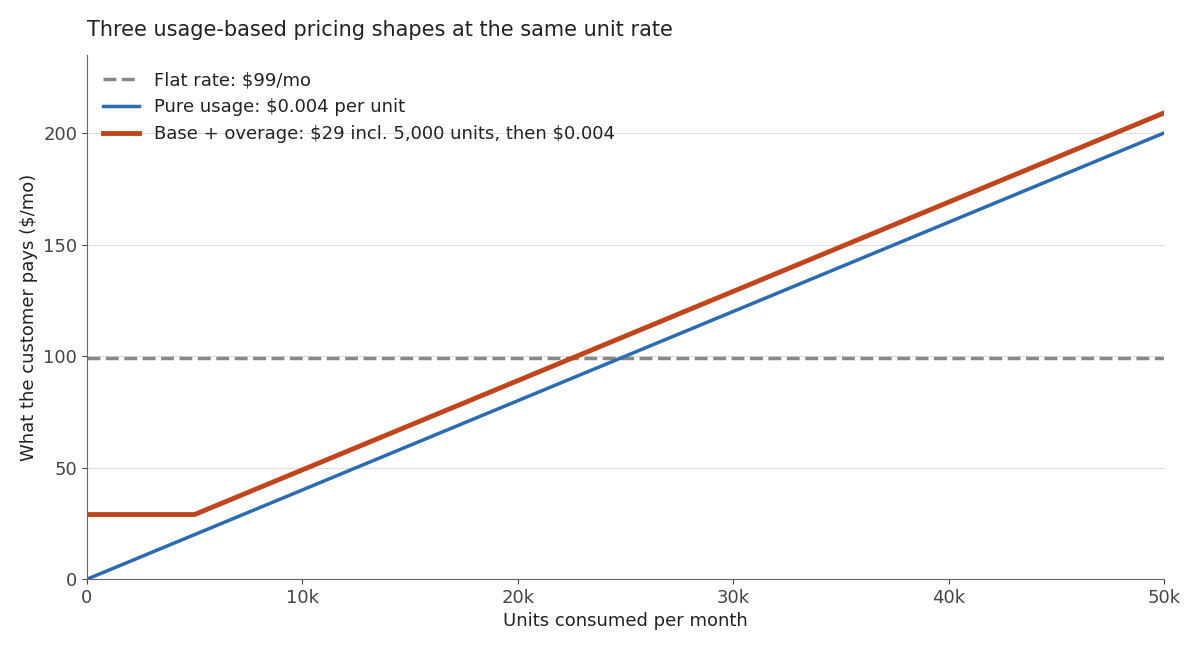
The interesting part isn't where the lines cross. It's the left edge. Under pure pay-as-you-go, a customer who consumes nothing pays nothing — which sounds customer-friendly and is, in fact, how you end up with a large user base and no revenue floor. The hybrid line starts at $29 and stays flat until the included units run out, which means you have predictable baseline revenue and the customer feels like the first 5,000 units are free.
| | Flat rate | Pure usage | Base + overage | Prepaid credits | | --- | --- | --- | --- | --- | | Revenue predictability | High | Low | Medium-high | High | | Customer can forecast cost | Yes | No | Mostly | Yes | | Aligns price with value | Poorly | Tightly | Reasonably | Reasonably | | Billing support burden | Low | High | Medium | Medium | | Good fit for | Fixed-scope tools | Infrastructure APIs | Most indie SaaS | Bursty usage |
For a first-time founder selling to non-technical buyers, base-plus-overage is almost always the right starting point. A pure consumption model puts your customer in the position of not knowing what they'll owe, and buyers who can't forecast a cost either don't buy or churn the first month the number surprises them. That's the same dynamic I wrote about in the pricing framework for non-tech founders: predictability is a feature, and you're allowed to charge for it.
There's also a plumbing consideration. If your unit economics are dominated by a variable cost you don't control — model inference, transcription minutes, egress — you want some usage component or a bad month upstream eats your margin. Founders underestimate how quickly this bites; it's the same class of problem as the infrastructure line items that don't show up until they do. Metering is how you stop absorbing someone else's price increases.
One honest caveat: usage-based billing makes your MRR calculation messier. If you're tracking MRR, ARR, and churn the standard way, you now have a component that varies month to month and isn't really recurring. Most usage-heavy companies report committed recurring revenue separately from consumption. Decide how you'll report it before you have investors asking.
The edge cases that will actually bite you
These are the ones I'd want someone to tell me before launch, not after.
The 35-day timestamp window. Meter events must carry a timestamp within the past 35 calendar days and no more than 5 minutes in the future. The five-minute future allowance exists for clock drift between your server and Stripe. The 35-day backward limit means a backfill after a long outage will be rejected, not late. If your reporting job has been broken for six weeks, that usage is not recoverable through the meter events API and you're issuing manual invoice items instead.
Deduplication is a window, not forever. Uniqueness on identifier is enforced over a rolling period of at least 24 hours. It protects you from retry storms. It does not protect you from a batch job that re-reports last month's usage. Guard that with a reported_at column in your own table.
Async processing means the upcoming invoice lags. Don't build a customer-facing spend cap that reads Stripe's aggregate and expects it to be current. Enforce caps against your own usage table, which is real-time by construction, and treat Stripe as the billing record rather than the rate limiter.
Negative or decimal values. Values accept decimals, and decimals carry through to invoices. If the overall cycle usage nets negative, Stripe reports the line item quantity as 0 — it won't credit the customer. If you need credits, issue them as credits.
Proration doesn't work the way it does for seats. Usage isn't prorated on plan changes, because usage already happened. Mid-cycle upgrades to a plan with a different included allowance need explicit handling. Decide the policy, write it in your terms, and test it in a sandbox before a real customer does it for you.
Sandbox rate limits are different. Sandbox calls to the meter event endpoints count against the basic rate limiter, not the 1,000/second live limit. A load test in sandbox that throttles doesn't mean production will.
When usage-based billing is the wrong call
I'd skip it entirely if any of these are true.
Your costs are essentially fixed per customer. If serving customer #200 costs you roughly what serving customer #20 does, metering adds billing complexity and support load in exchange for nothing. Charge a flat rate.
You can't explain the unit in one sentence. "You pay per API request" works. "You pay per compute-second weighted by model tier and adjusted for cache hits" does not, and every invoice becomes a conversation.
You're pre-product-market-fit. Usage pricing requires you to know what customers value, and you learn that by selling flat plans first and watching which customers strain against the limits. Metering is a second-year decision more often than a launch decision.
You don't have a place to put the usage rows. If there's nowhere in your schema to record what happened, adding Stripe metering means Stripe is your only record, and that's a bad position to defend a disputed invoice from.
If two or three of those are true, ship flat pricing, watch your cost curve for a couple of quarters, and revisit. The infrastructure for metering will still be there. Choosing your payment stack matters more at this stage than choosing your billing model — Stripe, Lemon Squeezy, and Paddle handle metered usage very differently, and switching later is genuinely painful.
Frequently asked questions
Do I need to migrate off Stripe's old usage records API?
If you're building new, use meters and meter events — usage records are the legacy path. If you have an existing integration on usage records, it still functions, but new Stripe billing features target meters. Stripe publishes a migration guide, and the practical work is repointing your reporting job from subscription item IDs to customer IDs plus event names.
How often should my job report usage to Stripe?
Every one to five minutes is a reasonable default for most indie SaaS. More frequent buys you a fresher in-product usage display; less frequent reduces API calls and makes pre-aggregation easier. What matters more than frequency is that the job is idempotent and monitored.
What happens if a customer has no usage in a period?
The metered line item bills zero and the invoice still generates for any fixed components. This is exactly why a base fee matters: with pure pay-as-you-go, a dormant customer produces a $0 invoice and looks identical to a churned one in your reporting.
Can I meter something that isn't a request, like storage?
Yes, and this is where the last aggregation formula belongs. Report the customer's current storage level periodically and let Stripe bill the final reported value for the period. Using sum here is the single most common metering mistake and it overbills by orders of magnitude.
How do I show customers their current usage inside my app?
Read it from your own usage table, not from Stripe. Your table is real-time, has the detail a customer wants to see, and doesn't consume API calls on every page load. Use Stripe's aggregate to reconcile at period close, not to render a dashboard.
The bottom line
Stripe metered billing is a small amount of code wrapped around a large product decision. The code is a meter, a metered price, and a background job posting meter events with a stable identifier — an afternoon's work, and most of that afternoon is spent confirming your payload keys match your meter configuration. The decision is what to meter and what shape to charge in, and that one deserves a week of thinking and a few conversations with actual customers.
If I had to compress it to one rule: record usage in your own database first, report to Stripe from a job, and start with a base fee plus included units rather than pure consumption. That combination gives you a defensible record, a revenue floor, and a number your customer can predict — which is most of what usage-based billing has to get right.
If you're wiring this into a Next.js SaaS with AI coding tools, the Coding Capybaras marketplace has copy-paste prompts for the payment and monitoring integrations mentioned above, and the boilerplate itself routes every Stripe call through one provider file so billing changes stay in one place.