Failed Payments and Dunning: Recovering SaaS Revenue
A non-tech founder's guide to SaaS failed payment dunning — why cards fail, how Stripe Smart Retries work, the recovery email sequence, and when to cut access.
· Justin Boggs

Some of the revenue you'll lose this year was already yours. A customer wanted to keep paying, their card expired or their bank declined a routine charge, and unless something automatically retried that payment and nudged them to fix it, they quietly churned — not because they left, but because a transaction failed and nobody caught it. Dunning is the process of recovering failed subscription payments through automated retries and customer notifications. For a SaaS founder, it's one of the highest-return things you can set up, because you're not finding new customers — you're keeping the ones who never meant to leave. This guide covers why payments fail, how to recover them with Stripe, the email sequence that works, and when to finally cut off access.
TL;DR
- "Involuntary churn" — customers lost to failed payments rather than cancellations — is recoverable revenue you've already earned. Dunning is how you recover it.
- Most failures are temporary (insufficient funds, expired cards, bank fraud filters), so retrying at smart intervals recovers a large share automatically.
- Stripe Smart Retries uses machine learning to time retries; the recommended default is 8 attempts over 2 weeks. Hard declines (stolen card, etc.) are never retried.
- Pair retries with a short email sequence — the two together recover far more than either alone.
- Decide your end state in advance: cancel, mark unpaid, or leave past-due. Don't improvise it while revenue leaks.
Why cards fail (and why most failures are temporary)
The first thing to understand about failed payments is that most of them aren't rejections in any meaningful sense. The customer still wants your product. The charge failed for a boring, temporary reason, and if you try again in two days it often just works.
The common causes break down into a few buckets. Insufficient funds is the big one — the customer's balance was low on the day you charged, and it won't be next week. Expired cards are the second — someone got a new card in the mail and never updated it in your app. Then there are bank-side fraud filters, which sometimes flag a recurring charge as suspicious and decline it even though the customer would happily approve it. And occasionally it's a transient network or processor error that has nothing to do with the customer at all.
The reason this matters is strategic: because most failures are temporary, the correct first response is almost never "cancel the subscription." It's "try again, at a better time." A customer whose card was declined on Tuesday because their paycheck lands on Friday is fully recoverable — if your billing system is patient enough to wait until Friday. Treat every failed payment as a cancellation and you'll throw away customers who were one retry away from paying.
There's a smaller, harder category too: hard declines. These are the cases where the bank is telling you the card is genuinely dead — reported stolen, closed, or flagged as high-risk fraud. Retrying those does nothing, because the answer won't change until the customer gives you a different card. Distinguishing "try again later" from "this card is never going to work" is exactly what a good dunning system does automatically, and it's why you shouldn't try to build the retry logic by hand. Understanding the subscription billing math behind MRR and churn makes the stakes concrete: every recovered payment is retained MRR you didn't have to acquire.
How Stripe Smart Retries works
If you're on Stripe Billing, the recovery engine is mostly built for you, and it's worth understanding what it does before you turn it on. According to Stripe's revenue recovery documentation, the platform provides retries, customer emails, automatic card updates, and no-code automations — none of which require you to write code.
The centerpiece is Smart Retries. Instead of retrying on a fixed schedule, Stripe uses a machine-learning model to choose when to retry, based on dynamic signals — for example, how many devices have recently presented a given card, or the time of day a particular bank tends to approve charges. The idea is that a retry at 12:01 AM local time, or right after payday, is more likely to succeed than one at an arbitrary hour. You configure the envelope, not the individual attempts: Stripe lets you set the retry window to 1 week, 2 weeks, 3 weeks, 1 month, or 2 months, and the recommended default is 8 tries within 2 weeks.
Crucially, Smart Retries knows when to stop. If a bank returns a hard decline code — stolen_card, lost_card, incorrect_number, authentication_required, and a handful of others — Stripe won't keep hammering the card. The retries stay scheduled and the attempt count keeps incrementing, but no charge actually executes until a new payment method appears. That's the automated version of the "try again later vs. give up" judgment from the last section, and it's the part you'd get wrong if you rolled your own.
Under the hood, each failed attempt fires an invoice.payment_failed webhook carrying an attempt_count, and the invoice's next_payment_attempt field tells you when Stripe will try again. If you're wiring this into your own app to trigger custom behavior, that webhook is your hook — and webhooks are their own adventure, which the Stripe webhook hell piece covers in detail (signature verification, idempotency, the dev-vs-prod gotchas).
Here's the whole flow at a glance:
flowchart TD
    A[Subscription payment fails] --> B{Hard decline?}
    B -->|Yes| C[Stop retrying<br/>Request new card]
    B -->|No| D[Smart Retries<br/>~8 attempts over 2 weeks]
    D --> E[Send failed-payment emails<br/>with update-card link]
    E --> F{Payment recovered?}
    F -->|Yes| G[Subscription stays active]
    F -->|No| H[End state: cancel,<br/>mark unpaid, or past-due]
    C --> E
Retries alone aren't enough: the email sequence
Automated retries recover a lot, but they hit a ceiling on their own — because the customer with the expired card will fail every single retry until they do something. That "something" is prompted by email. This is why the highest recovery rates come from combining retries with notifications rather than relying on either alone.
The chart below shows the rough shape of it. Email or SMS reminders on their own recover a meaningful but limited share. Automated retries do better. But the two together — retries running in the background while a short, well-timed email sequence pushes the customer to update their card — clear the bar that neither reaches alone.
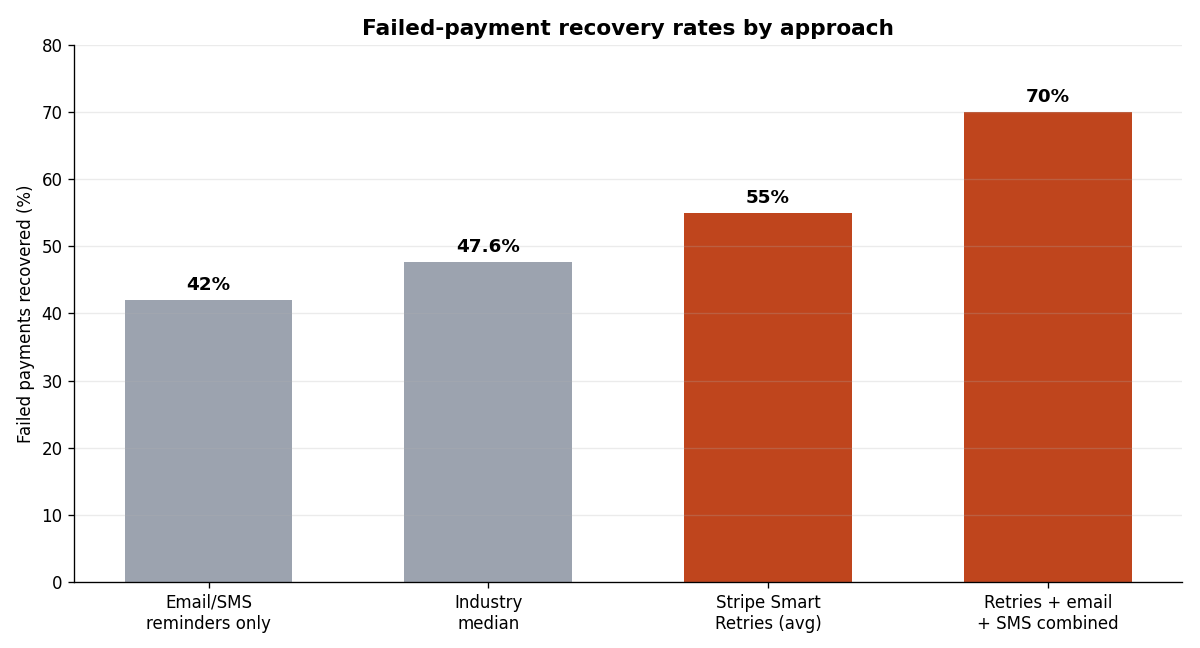
Figures are reported averages that blend many business types; B2B tends to recover higher than B2C. Treat them as directional, not a promise for your specific book.
Stripe can send the failure emails for you — you enable them in the billing settings under the section for managing failed subscription payments, and they include a link for the customer to update their card. That's the zero-effort baseline, and for a solo founder it's often enough. If you want more control over tone and timing, you build the sequence yourself off the invoice.payment_failed webhook.
A sequence that works looks something like this. The first email goes out on the day of the first failure, and it's calm and helpful, not alarming — "your payment didn't go through, here's a one-click link to fix it." The second, a few days in, adds mild urgency and reassures them their account and data are safe for now. The final email, near the end of your retry window, is the honest one: "this is the last attempt before your access pauses." Short, specific, one clear button each. This is the same craft as any lifecycle email sequence — the difference is that these emails have the highest direct dollar value of anything you'll send, because each one is standing between you and revenue you already earned.
Two things make the sequence convert. The card-update link has to be effortless — ideally a direct link into a hosted portal, not a "log in, go to settings, find billing" scavenger hunt. And the tone has to assume good faith. The customer isn't a deadbeat; their card expired. Write like you're doing them a favor by catching it, because you are.
Timing beats volume. Three well-spaced emails across a two-week window outperform six anxious ones crammed into three days — the extra sends don't recover more cards, they just train people to ignore you. Stripe's own failed-payment email settings let you turn on notifications for failed charges, expiring cards, and payment methods that need updating, each independently, so you can start with the failed-charge email and layer the others in later. If your audience skews mobile or high-value, an SMS on the final attempt can lift recovery further — but for most indie SaaS, email plus retries is the 80/20, and adding channels is a later optimization, not a launch requirement. The point is to make fixing the problem take one tap, then get out of the customer's way.
When to actually cut off access
Retries and emails eventually run out. You need to decide — in advance, not in the moment — what happens when a subscription simply won't recover. Stripe gives you three end states, and picking the right one is a product decision, not a billing detail.
| End state | What happens | Best for |
| --- | --- | --- |
| Cancel subscription | Subscription moves to canceled after the retry window; access ends | Simple products where a lapsed payment should just end the relationship |
| Mark as unpaid | Subscription becomes unpaid; invoices keep generating as drafts | When you want to preserve the account and easily reactivate later |
| Leave past-due | Subscription stays past_due; billing keeps attempting per your settings | Higher-touch or annual plans where you'll follow up manually |
The instinct many founders have is to cut access the instant retries stop. Resist it. There's usually a grace period worth granting, especially for annual or higher-value plans, where a personal follow-up recovers accounts that automation couldn't. "Mark as unpaid" is often the kindest and most recoverable default for indie SaaS — the customer's data and settings survive, so if they come back a week later and fix their card, they land exactly where they left off instead of starting over.
Whatever you choose, be honest in the final email about what's coming and when. A customer who's told "access pauses on the 14th if we can't process payment" and then loses access on the 14th feels respected. A customer who's blindsided feels tricked, and tricked customers don't come back and do leave reviews. The cut-off is also where dunning brushes up against your refund policy and your cancellation flow — decide how those three interact before a real customer forces the question. And the whole exercise only makes sense if you're measuring it, which is where a basic grasp of churn analysis earns its keep: involuntary churn is a line item you can actually move.
Setting it up without writing billing code
The good news for non-technical founders is that the highest-leverage version of all this requires no code at all. In the Stripe Dashboard, you turn on Smart Retries, enable the failed-payment emails, and switch on automatic card updates — the last one quietly refreshes card numbers when issuers push updates, so a chunk of "expired card" failures never happen in the first place. That trio, configured in an afternoon, gets most solo founders most of the recovery.
You reach for code only when you want behavior Stripe's defaults don't cover: a custom email tone, in-app banners warning the user their payment failed, or routing a past-due account into a specific product state. All of that hangs off the invoice.payment_failed and related webhooks. If you're using an AI assistant to build it, the pattern is the same as any Stripe integration — give it the webhook event, the exact behavior you want, and your signature-verification setup, and have it write the handler. The Coding Capybaras marketplace has the copy-paste prompt for wiring failed-payment handling into a Next.js app, and pairing it with a Stripe customer portal gives customers the one-click card-update page that makes your recovery emails actually convert.
Frequently asked questions
What's the difference between voluntary and involuntary churn?
Voluntary churn is a customer choosing to cancel — they clicked the button. Involuntary churn is a customer lost to a failed payment they never intended. Dunning targets involuntary churn specifically, which is why it's such high-return: you're recovering customers who wanted to stay.
How many times should I retry a failed payment?
Stripe's recommended default is 8 attempts over 2 weeks, timed by its Smart Retries model. That window balances patience (catching the payday-timing failures) against not annoying a customer whose card is genuinely dead. You can widen it to a month or two for higher-value plans.
Will retrying a payment upset my customers?
Rarely, if you pair it with clear emails. What upsets customers is silent failure followed by sudden loss of access. A calm "we couldn't process your payment, here's how to fix it" reads as a courtesy. Automated retries themselves are invisible to the customer unless they succeed.
Should I cut off access the moment retries fail?
Usually not immediately. A short grace period — and for annual or high-value plans, a personal follow-up — recovers accounts automation can't. "Mark as unpaid" preserves the customer's data so reactivation is painless. Just be transparent in advance about when access actually pauses.
Do I need a third-party dunning tool or is Stripe enough?
For most indie SaaS, Stripe's built-in Smart Retries, failed-payment emails, and automatic card updates are enough, and they're free with Stripe Billing. Dedicated dunning tools add value at scale — more channels, deeper segmentation — but they're an optimization, not a starting point.
Wrapping up
Failed payment dunning is the rare SaaS project with an obvious, measurable payoff: turn it on and you keep revenue you were otherwise going to lose. Enable Smart Retries, switch on the failure emails and automatic card updates, write a short honest recovery sequence, and decide your end state before a real customer forces the decision. None of it requires you to be an engineer, and all of it compounds — every month you run it, it recovers customers who never meant to leave.
If you're building a SaaS with AI coding tools, Coding Capybaras is the free boilerplate I built for this workflow — Stripe billing, webhook handling, and lifecycle email come wired in, and the marketplace has the copy-paste prompt for the failed-payment recovery flow described above.