Multi-Agent Coding Workflow for Founders | Coding Capybaras
How to run multiple AI coding agents at once without creating a mess: what parallelizes, how to isolate the work, and the review discipline that keeps it sane.
· Justin Boggs

Photo by Luna Salome on Unsplash
A multi-agent coding workflow works when the tasks are genuinely independent and each agent has its own copy of the code. It falls apart the moment two agents need to edit the same file, or you have more agents running than you can review. For a solo founder, the practical ceiling is two or three parallel agents on clearly separated work — a bug fix in one, a new page in another, a test suite in a third — with git worktrees keeping them out of each other's way. Beyond that, the bottleneck stops being the AI and becomes you, reading diffs.
TL;DR
- Parallel agents only help when tasks are independent. Two agents on the same feature will overwrite each other and waste your time.
- Isolate every agent in its own git worktree so edits can't collide. Same repo, separate working directories, separate branches.
- Give each agent a check it can run — a test, a build, a lint — or you become the verification loop for all of them at once.
- Multi-agent setups burn roughly 15x the tokens of a chat session, so reserve them for work where the speedup is worth the spend.
- Your review capacity is the real limit. Three agents producing diffs faster than you can read them is slower than one agent you actually supervise.
I started running agents in parallel because I got impatient. I'd kick off a refactor, watch it for ninety seconds, and think: I could be doing something else with this time. So I opened a second terminal. The first few attempts were a mess — two agents editing the same route file, a merge conflict I didn't understand, and a half hour lost untangling it. This post is what I figured out since, plus what the people who build these tools say about where the approach breaks.
What "running multiple agents" actually means
There are three distinct things people mean by this, and they have different costs and different failure modes.
Subagents inside one session. You're in a single Claude Code session and you tell it to use subagents to investigate something. The subagent runs in its own context window, reads a pile of files, and reports back a summary. Anthropic's Claude Code docs frame this as a context-management move: subagents keep research out of your main conversation so the exploration doesn't eat the context you need for implementation. This is the cheapest form of parallelism and the one most founders underuse, and it's the step up from the single-threaded pattern I described in agentic coding versus chat-based coding.
Parallel sessions you drive yourself. Two or three terminal windows, each running its own agent on its own task, each in its own git worktree. You're the orchestrator. This is what most of this post is about, because it's the version a solo founder can actually run and review.
Agent teams working autonomously. Many agents on a shared codebase with no human in the loop, coordinating through locks and a shared repo. This is real — Anthropic's Nicholas Carlini used 16 agents to build a 100,000-line C compiler in Rust across roughly 2,000 sessions — but note what that cost: 2 billion input tokens, 140 million output tokens, and just under $20,000 in API spend over two weeks. It's a research result, not a Tuesday afternoon workflow.
The distinction matters because the advice doesn't transfer. Subagents need almost no setup. Parallel sessions need isolation. Autonomous teams need a test harness good enough to referee the whole thing without you, which is most of the work.
flowchart TD
    A[You: define the tasks] --> B{Are the tasks independent?}
    B -- No --> C[Run them sequentially in one session]
    B -- Yes --> D[Create a git worktree per task]
    D --> E1[Agent 1: bug fix]
    D --> E2[Agent 2: new feature]
    D --> E3[Agent 3: test coverage]
    E1 --> F[Each agent runs its own check: tests, build, lint]
    E2 --> F
    E3 --> F
    F --> G[You review each diff separately]
    G --> H[Merge one at a time, re-run checks after each]
Which work parallelizes, and which doesn't
The test is simple: would two competent contractors working on these tasks need to talk to each other? If yes, don't parallelize. If they'd never touch the same file, go ahead.
Work that parallelizes well:
- A bug fix in the billing layer while a new marketing page gets built. Different regions of the codebase, no shared files.
- Writing tests for existing code while a separate agent builds something new. Tests are additive and rarely collide.
- Three independent integrations — Sentry in one, PostHog in another, a Slack webhook in a third — each touching its own module.
- Content and copy work alongside code work. No overlap at all.
- Investigation. Two agents researching different questions in read-only mode can't conflict by definition.
Work that does not parallelize:
- Any two tasks that modify the same file. This is the big one, and it's not always obvious — a shared types file, a route manifest, or a config module gets touched by more changes than you'd expect.
- A feature and its own refactor. The second agent is working against a moving target.
- Anything that depends on the first task's output. If agent two needs the schema agent one is writing, it isn't parallel work, it's sequential work you've arranged badly.
- Database migrations. Two agents generating migrations against the same schema produces a mess that's genuinely unpleasant to untangle.
Carlini's compiler project ran into exactly this at scale. While there were hundreds of independent failing tests, parallelism was trivial — each agent grabbed a different test. But when the task became "compile the Linux kernel," which is one giant interdependent job, every agent hit the same bug, fixed the same bug, and overwrote each other's fixes. Sixteen agents produced roughly the output of one. The fix was to artificially partition the work so each agent owned a different slice.
That's the lesson in miniature. Parallelism is a property of the work, not a setting you turn on. If the work isn't divisible, adding agents makes it worse, not just no better.
The cost side
Parallel agents are not free, and the multiplier is larger than most people assume.
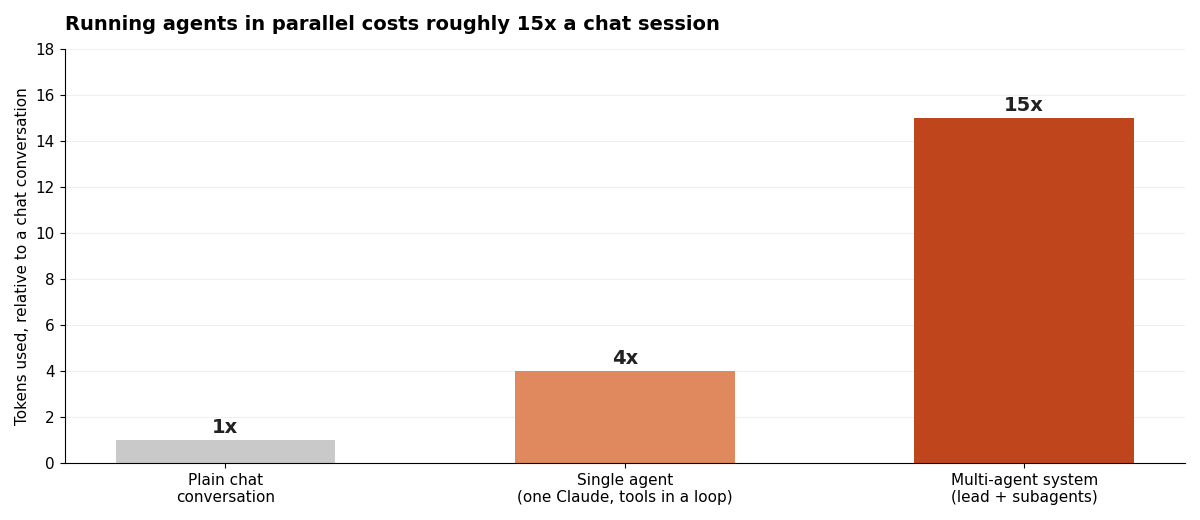
Anthropic's engineering write-up on their multi-agent research system reports that agents typically use about 4x the tokens of a chat interaction, and multi-agent systems about 15x. Their conclusion is blunt: multi-agent architectures need tasks valuable enough to justify the spend. They also note that most coding tasks involve fewer truly parallelizable subtasks than research does — which is worth sitting with, given that coding is what we're using them for.
If you're on a subscription plan this shows up as hitting limits faster rather than a bill. Either way it's a real constraint, and it's a good reason to be deliberate rather than opening a fourth terminal because you can. I wrote more about keeping this in check in managing what AI coding tools actually cost you.
Isolation: give every agent its own copy
The single change that made parallel agents workable for me was git worktrees. Before that, two agents shared one working directory and stepped on each other constantly.
A worktree is a second working directory backed by the same repository. Same git history, same remotes, different files on disk, different branch checked out. Agent one can be mid-edit in feature-billing while agent two rewrites tests in fix-auth, and neither can see or clobber the other's changes.
# from your main repo
git worktree add ../platform-billing -b feature-billing
git worktree add ../platform-tests -b fix-auth

# then start one agent in each directory
cd ../platform-billing && claude
Each agent gets a clean directory, a dedicated branch, and no ability to interfere. When the work is done you merge branches one at a time, running your checks after each merge — not all three at once, which just moves the collision from the filesystem to the merge.
| Isolation level | Setup cost | Collision risk | Good for | | --- | --- | --- | --- | | Same directory, multiple agents | None | Very high | Nothing. Don't. | | Separate git worktrees | One command each | Low | Two or three parallel tasks on one machine | | Separate branches, sequential | None | None | Work that turns out to be dependent after all | | Containers, one repo clone each | High | Low | Autonomous multi-agent runs; overkill for solo work |
Worktrees are the sweet spot for a solo founder. If you're new to git mechanics, worktrees sound more exotic than they are — the mental model is "a second folder that shares the same history," and that's genuinely all it is.
One caveat worth knowing: if your project needs node_modules or a .env.local, each worktree needs its own. A worktree shares git history, not untracked files. Budget a minute per worktree for setup, and don't put secrets anywhere new while you're doing it.
The review discipline that keeps this from becoming a mess
Here's the thing that surprised me: adding agents didn't make me faster in proportion to how many I ran. Two agents made me meaningfully faster. Three made me slightly faster. Four made me slower, because I stopped reading diffs properly and started skimming, and skimmed code is code you will debug later at a worse time.
Three rules keep it honest.
Every agent gets a check it can run. The Claude Code docs put this first among best practices, and the reasoning is that Claude stops when the work looks done — so without a pass/fail signal, you become the verification loop. With three agents running, you become three verification loops at once, which is the whole problem. Give each agent a test command, a build, or a lint it can run and iterate against, and tell it to show you the output rather than asserting success.
Review each diff on its own, before merging anything. Not three diffs at once, and not after merging. Separate context, separate decision. If you can't give a diff your full attention right now, the agent that produced it should wait. There's no prize for merging fast.
Use a fresh reviewer. An agent reviewing its own work is biased toward the code it just wrote — it knows why every choice was made and finds all of them reasonable. A reviewer in a fresh context sees only the diff and the criteria, and catches things the author can't. Ask it for gaps that affect correctness, not style preferences, or you'll get a list of nitpicks and end up over-engineering. I go deeper on this in reviewing AI-written code when you're not an engineer.
The related discipline is task definition. When you delegate vaguely, agents duplicate work or leave gaps — the same write-up notes that vague instructions like "research the semiconductor shortage" caused their subagents to run the identical searches while missing the actual question. A task handed to a parallel agent needs an objective, a scope boundary, and a definition of done. Writing that out is a fair chunk of the work — and it's the part that disappears when you're working side by side with one agent, which is why pair programming with Claude forgives vague prompts in a way parallel work does not.
A good CLAUDE.md also earns its keep here, because every agent reads it at startup. Project conventions, the commands that verify things, the regions of the codebase that are off-limits — write those once and every parallel agent inherits them. My guide to the CLAUDE.md file covers what belongs in it and, more importantly, what doesn't.
Where it falls apart
Five failure modes, in the order I hit them.
The silent overwrite. Two agents touch the same file and the second merge quietly wins. You don't get a conflict marker, you get a feature that stopped working for no visible reason. Worktrees plus one-at-a-time merges prevent this; nothing else reliably does.
Review fatigue. The one that actually limits you. Three well-scoped agents can produce more reviewable change in an hour than you can carefully evaluate in that hour. The tell is when you catch yourself approving a diff because it looks structurally familiar rather than because you followed the logic.
Context blindness between agents. Agent one makes an architectural decision — a new pattern, a shared helper, a naming convention — and agent two, in a separate context, has no idea. You get two solutions to the same problem in one codebase. The mitigation is writing decisions down where both agents read them, which is what CLAUDE.md is for.
The illusion of progress. Three terminals scrolling feels enormously productive. Output volume is not progress. I've had sessions where all three agents were busy and only one produced something I kept. Judge by merged, verified work, not by activity.
Cost surprise. At roughly 15x a chat session, a casually-left-running set of parallel agents adds up quickly. Close terminals you're not actively using.
There's also a subtler risk, and Carlini names it directly at the end of his compiler post: with autonomous systems it's easy to watch tests pass and assume the job is done, when it rarely is. That unease is appropriate. Shipping code you haven't personally verified is a different activity from shipping code you wrote — and at three agents deep, it's very easy to drift into the first while believing you're doing the second. Trust should scale with the strength of your verification, not with how confident the output sounds.
Frequently asked questions
How many AI agents should a solo founder run at once?
Two or three, on clearly independent tasks. The constraint isn't the tooling or your machine, it's how many diffs you can review carefully in the same stretch of time. If you're skimming rather than reading, you're running too many.
Do I need git worktrees to run parallel agents?
If the agents write code, yes — or something equivalent, like separate clones. Two agents editing one working directory will overwrite each other's changes. Read-only investigation agents are the exception; they can share a directory safely because they change nothing.
What's the difference between subagents and parallel sessions?
Subagents run inside one session, in their own context window, and report a summary back to the main conversation. They're mainly a context-management tool. Parallel sessions are separate agents you drive yourself, usually in separate worktrees, each producing its own set of changes to review.
Is a multi-agent coding workflow worth the extra token cost?
Only when the tasks are genuinely independent. Multi-agent systems use roughly 15x the tokens of a chat session, so parallelizing dependent work means paying 15x for output you'll throw away. On independent tasks the speedup is real, which is exactly the case where the spend makes sense.
Can I run agents on tasks that touch the same file?
Not in parallel. Sequence them instead: let the first finish, merge it, then start the second against the updated code. Trying to parallelize this produces merge conflicts at best, and silent overwrites at worst.
What should I do when a parallel agent gets stuck?
Stop it rather than letting it iterate. A stuck agent burns tokens fast and its context fills with failed approaches, which makes it worse at the task over time. Clear the session and restart with a more specific prompt — what to do when an AI assistant gets stuck in a loop goes through the recovery pattern.
What I'd tell myself a month ago
The multi-agent coding workflow that works for a solo founder isn't the impressive one. It's two agents on unrelated work, each in its own worktree, each with a test it runs, merged one at a time after I've actually read the diff. That setup makes me meaningfully faster. Every escalation beyond it has made me slower in ways that took a week to become visible.
The skill that matters here isn't orchestration. It's deciding what's actually independent — and being honest when the answer is "nothing right now, run it sequentially." Most of the mess I made came from wanting the answer to be yes.
If you're shipping a SaaS with AI coding tools, Coding Capybaras is the free boilerplate I built for this workflow, with hard region boundaries between the platform, the marketing site, and the product — which is what makes two agents able to work at once without colliding in the first place.