AI Pair Programming: How to Treat Claude as a Senior Dev
AI pair programming works best when Claude drives and you navigate. Here's the mental model, the workflow, and the review habits that ship good software.
· Justin Boggs

Photo by NEXT Academy on Unsplash
AI pair programming is the practice of building software with an AI model as your coding partner instead of a second human — and the mental model that makes it work is simple: let Claude drive, and you navigate. In classic pair programming, one person types (the driver) while the other holds the plan and reviews every line (the navigator). With an AI assistant, Claude is almost always the driver — it types faster than any human and has read more code than any human — and your job is to be the navigator who supplies intent, judgment, and a careful read of the output. Get that division of labor right and you ship real software. Get it backwards and you rubber-stamp confident mistakes.
TL;DR
- AI pair programming = coding with a model as your partner. The productive setup is Claude as driver, you as navigator.
- The navigator role is where the value lives: you supply intent, constraints, and judgment, and you review every diff.
- The evidence is real — GitHub's controlled study found developers finished a task 55% faster with an AI assistant — but speed shifts the burden to your review, not away from it.
- The workflow is a loop: state intent, let Claude draft, review the diff, correct course, approve, commit, repeat.
- Take back the keyboard when Claude loops on a bug, invents file paths, or proposes a change bigger than you can review.
What "pair programming" actually means
Before you can treat Claude as a senior dev, it helps to know what pair programming was before AI showed up. Pair programming is an Agile technique where two developers share one workstation — one screen, one keyboard — and build a feature together in real time. It was one of the original twelve practices of Extreme Programming, and per the Agile Alliance's definition, the two people split into two distinct roles that they swap between throughout a session.
The driver operates the keyboard. They write the actual code, focused on the syntax and the line in front of them. The navigator does everything else: holds the bigger picture, watches for bugs, thinks about the design, looks up documentation, and questions the driver's choices. The navigator is not a passenger — they are the one asking "wait, what happens if that value is null?" while the driver is heads-down typing.
The reason this works, when it works, is that the two roles use different parts of your attention. The driver is in the weeds; the navigator is above them. One person can technically do both, but not at the same time and not as well — the moment you are typing, you stop seeing the whole board.
Now map that onto working with an AI assistant. Claude types. Claude knows the syntax, remembers the API signatures, and produces the boilerplate in seconds. That is the driver's job, and Claude is extraordinarily good at it. What Claude does not have — until you give it — is the plan, the constraints, the taste, and the "wait, that's not what I meant." That is the navigator's job, and it is now yours.
This is why "treat your AI like a senior dev" is only half the advice. Claude has the recall and range of a senior engineer, but it has zero context on your product and no stake in your decisions until you provide both. You are not the junior watching a senior work. You are the navigator directing a very fast, very well-read driver who will cheerfully build the wrong thing at high speed if you let it.
The role swap: Claude drives, you navigate
Here is the shift that trips up most first-time founders. In human pair programming, the senior engineer is usually the navigator — they hold the plan while the junior drives to learn. People assume AI pairing works the same way, with them as the "junior" learning from the AI. It is the opposite. You are the navigator, and you stay the navigator.
The productive pattern is: supply intent and judgment, let the AI draft, and review every change rather than accepting it blindly. You are the one who knows what "done" looks like for your product. Claude is the one who can get there fastest once you have described the destination clearly. If you flip that — if you let Claude decide what to build and you just approve whatever appears — you have given the keyboard and the map to the driver, and there is no one navigating.
Here is how the two versions of pairing actually compare:
| | Human pair programming | AI pair programming (Claude) | | --- | --- | --- | | Who drives (types the code) | One dev; roles rotate | Claude, almost always | | Who navigates (holds the plan) | The other dev | You, almost always | | Speed of the driver | Human typing speed | Near-instant | | Knowledge breadth | One person's experience | Broad recall across APIs and libraries | | Context on your codebase | Deep, shared team memory | Only what you provide it | | Cost | Two salaries | One subscription | | Main failure mode | Fatigue, groupthink | Confident, fluent mistakes |
The two columns that matter most for a non-tech founder are the last two. Claude costs a fraction of a second engineer, which is the entire reason a solo founder can now ship software that used to require a team. But its failure mode is different and more dangerous for someone who cannot read code fluently: a tired human driver writes obviously sloppy code, while Claude writes code that looks correct and professional even when it is subtly wrong. Fluent wrongness is harder to catch than sloppy wrongness. That is the tax you pay for the speed, and the navigator role is how you pay it.
If you have never worked in a terminal-based agent before, my Claude Code for non-developers guide walks through the setup and the first session. And if you are still deciding which tool to pair with, the Cursor vs Claude Code vs Cowork comparison breaks down how the driver/navigator dynamic feels different in each one.
What the evidence actually says
The productivity claims around AI coding are loud, so it is worth grounding the mental model in real data. The cleanest study is GitHub's controlled experiment on Copilot: 95 professional developers were split into two groups and timed writing an HTTP server in JavaScript. Per GitHub's published research, the group with the AI assistant finished in an average of 71 minutes versus 161 minutes without — 55% faster, a result that was statistically significant.
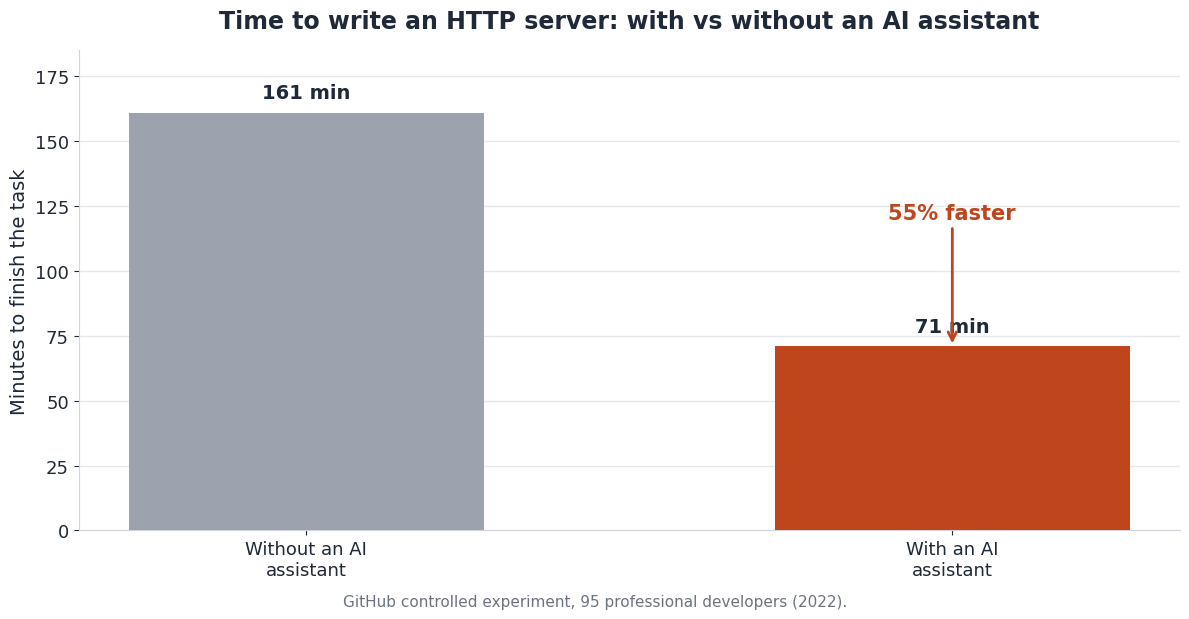
Two things about that number matter for how you pair. First, it is real and large — this is not marketing, it is a controlled experiment, and the effect size holds up. The speed is why AI pair programming is worth building a workflow around. Second, and less discussed: the task was a well-defined, self-contained programming problem. Writing an HTTP server has a known shape. That is exactly the kind of work where the driver's speed dominates and the navigator's job is light.
Your work as a founder is often not that shape. When the task is ambiguous, when it touches your specific product logic, or when "correct" depends on business rules Claude cannot infer, the navigator's job gets heavier and the raw speed gain shrinks. Broader research on AI coding assistants keeps finding the same tension: they reliably speed up how fast code gets produced, but the review and quality burden does not disappear — it moves onto the human. The faster the driver, the more navigating there is to do per hour.
This is the honest version of the pitch. AI pair programming makes you dramatically faster at producing code and modestly faster at shipping correct code, and the gap between those two is filled entirely by how good a navigator you are. A founder who treats the speed as license to stop reading will ship faster and break more. A founder who treats the speed as a way to spend more of their attention on judgment instead of typing will pull ahead and stay there.
The navigator's workflow with Claude Code
So what does good navigating actually look like, moment to moment? It is a loop, and it is the same loop whether the task is a one-line copy change or a new billing flow.
flowchart LR
  A[You: state intent<br/>and constraints] --> B[Claude: drafts<br/>the change]
  B --> C{You: review<br/>the diff}
  C -->|Looks right| D[Approve and test]
  C -->|Something is off| E[You: correct course]
  E --> B
  D --> F[Commit]
  F --> A
State intent and constraints. Before Claude writes anything, you say what you want and what the guardrails are. Not "add authentication" but "add email-and-password sign-in using the existing Supabase auth setup; do not touch the billing code; keep the styling consistent with the current login page." The quality of your intent is the single biggest lever you have. The patterns that make a prompt land are their own topic — my prompt engineering guide for non-developers covers the anatomy of a request that ships.
Let Claude draft — in plan mode first. With Claude Code, pressing Shift+Tab turns on plan mode, where Claude tells you what it intends to do before it does it. This is the navigator's dream feature: you get to review the plan before any code changes, catch a wrong turn while it is still cheap, and approve the approach. Per Anthropic's Claude Code documentation, the agent reads your repository and works against the real files, so a good plan is one that names the actual files it will touch.
Review the diff. When Claude proposes a change, it shows you a diff — the specific lines added and removed. You read it. You do not need to understand every character, but you need to be able to spot when Claude invented a file that does not exist, left a // TODO: implement where real logic should be, or quietly changed something you did not ask about. Reading diffs is the one trainable skill that separates founders who ship with AI from founders who blow up their codebase with it. If the vocabulary is the barrier, how to read your AI assistant's output is a primer on the signals that matter.
Correct course or approve. If something is off, you say so specifically — "you added a new users table, but we already store users in Supabase auth; use that instead" — and Claude redrafts. If it looks right, you approve, run it, and confirm the behavior with your own eyes. Then you commit, so you have a clean point to roll back to. Then the loop starts again on the next slice.
The discipline that makes this loop work is keeping each turn small. A senior engineer pairing with you would not disappear for a day and return with three thousand lines; they would show you their thinking in reviewable chunks. Hold Claude to the same standard. Vertical slices — one working piece at a time — keep every diff inside what you can actually review.
When to stop being polite and take the keyboard
Treating Claude as a senior dev does not mean deferring to it. A good navigator overrides the driver when the driver is heading for a wall. Here are the moments to step in.
When Claude loops on the same bug. If you have gone three or four rounds and the error keeps coming back in a slightly different form, Claude is guessing, not diagnosing. Stop. Change the approach: ask it to explain what it thinks is happening before it writes another fix, or paste the exact error and ask for the three most likely causes. Endless "try this" cycles are the clearest signal that the driver has lost the plot.
When it invents things that are not there. Claude will sometimes reference a file, function, or package that does not exist, stated with total confidence. This category — AI hallucination — never fully goes away, it just gets rarer with better models. The defense is procedural, not technical: verify that the things Claude names actually exist before you build on them. My post on common AI hallucinations in code catalogs the specific patterns so you know them on sight.
When the change is bigger than you can review. If Claude proposes a diff so large you cannot honestly say you understand what it does, the answer is not to approve it and hope. The answer is to break the task down until each piece is reviewable. A change you cannot review is a change you cannot navigate, and an unnavigated change is exactly how a solo founder ends up with a codebase they are afraid to touch.
When your gut says something is off. You do not need to know why. "This feels like more than I asked for" or "why is it changing that file?" is enough of a reason to slow down and ask. Calibrating that instinct — knowing when to trust the output and when to push back — is a skill you build over months, and when to trust your AI assistant is about exactly that calibration.
The through-line is that authority stays with the navigator. Claude is the fastest, best-read driver you will ever pair with, and it will still confidently drive off a cliff if you stop watching the road. Your job is not to write the code. Your job is to make sure the right code gets written — and to take the keyboard back the moment that stops happening.
Frequently asked questions
Is AI pair programming the same as vibe coding?
They overlap but are not identical. Vibe coding usually describes moving fast and accepting AI output with light review, leaning on the model to carry the details. AI pair programming as I have described it here is more deliberate: you stay the active navigator, reviewing each change. Vibe coding is one style of AI pairing — a looser one — and it works better for throwaway prototypes than for the paid product you intend to maintain.
Do I need to know how to code to pair with Claude?
No, but you need to be willing to learn to read code, which is a much lower bar than writing it. The navigator's core skill is reviewing diffs and spotting when something is wrong, not authoring the solution yourself. Non-technical founders do this successfully every day. The ones who struggle are the ones who approve changes they never looked at.
Which AI tool is best for pair programming?
It depends on how you like to work. Claude Code is a terminal agent — you describe outcomes and it executes, which suits the driver/navigator split cleanly. Editor-based tools like Cursor keep you closer to the code with a visual diff loop. Most founders end up using more than one; the Cursor vs Claude Code vs Cowork post compares them for exactly this decision.
How is treating the AI as a senior dev different from treating it as a junior?
A senior dev has broad knowledge and strong instincts but needs your context; a junior needs both context and direction on the basics. Claude has senior-level recall and range, so you do not need to teach it how to write a React component — but it has zero stake in your product and no memory of your decisions, so you must supply the intent and the constraints every time. Treat the knowledge as senior and the context as brand new.
What is the single biggest mistake beginners make?
Handing over navigation. They let Claude decide what to build, accept whatever it produces, and only notice something is wrong when the product breaks. The fix is to never approve a change you have not reviewed, and to keep changes small enough that reviewing them is actually possible.
The bottom line
AI pair programming is not a magic "build my app" button and it is not you humbly learning at the feet of a machine. It is a division of labor: Claude drives because it types faster and knows more APIs than you ever will, and you navigate because you are the only one who knows what your product needs and whether the code in front of you actually does it. The speed is real — GitHub measured it — but the speed is only worth having if you are a good enough navigator to keep it pointed at the right target.
If you are a non-technical founder building a SaaS this way, Coding Capybaras is the free boilerplate I built for exactly this workflow — Next.js, Supabase, Stripe, and Resend, with AI rule files in every region so Claude arrives already knowing the map. The complete codebase ships free, and the integration marketplace has copy-paste prompts you can hand your AI driver to wire up the rest.