SaaS Trial Extension Policy: When to Grant One
A founder's guide to SaaS trial extensions: what an extension request actually signals, a policy that scales without you, and the reply template to send.
· Justin Boggs

Photo by Daniele Franchi on Unsplash
Grant a trial extension when the person has clearly tried to evaluate your product and ran out of runway for a reason that has nothing to do with interest — a work trip, a delayed data import, a stakeholder who was on vacation. Decline, or convert to a soft ask, when the request is a reflex from someone who never logged in. The extension itself is almost never the real decision. An extension request is a signal: it tells you this person wants to keep evaluating, which means your job is to remove whatever blocked them, not to police the calendar. Here is how to think about it, and a policy you can run without agonizing over every email.
TL;DR
- A trial extension request is a buying signal, not a problem. Someone who never touched the product does not ask for more time with it.
- Grant extensions freely when the user activated but hit a real-world blocker. Say the reason back to them so they feel understood.
- Almost nobody abuses this. The volume of extension requests is tiny, and the goodwill from a fast yes outweighs the rare freeloader.
- Build a one-click, self-serve extension for the common case so it does not eat your support time as you grow.
- The reply matters more than the policy. A warm, specific yes that also asks what blocked them turns an extension into a conversation.
What an extension request actually tells you
Start with the base rates, because they reframe the whole question. The median B2B SaaS trial-to-paid conversion rate in 2025 is 18.5%, according to 1Capture's analysis of more than 10,000 SaaS companies. Top-quartile products hit 35-45%. That means even good products watch the majority of trials expire without a purchase, and most of those people simply vanish — they never write in at all.
So when someone does write in to ask for more time, they have separated themselves from the silent majority. They spent effort. They noticed the trial ending. They cared enough to compose an email instead of clicking away. Every one of those is a signal of intent, and intent is the scarcest thing in a trial funnel.
Contrast the two people who send that email. The first activated — imported their data, invited a teammate, ran the core workflow — and then a client emergency ate their last four days. The second signed up, never logged in, and got an automated "your trial ends tomorrow" nudge that prompted a reflexive "can I have more time?" These are completely different situations wearing the same subject line.
The first person is telling you the product works for them and reality got in the way. The second is telling you something failed earlier — your onboarding never got them to value, or the timing was wrong, or they forgot they signed up. The extension is almost beside the point in both cases. What you actually want to know is what happened during the trial, and the request is your opening to ask.
This is why "do I grant it?" is the wrong first question. The right one is "what does this person need to make a decision, and can I give it to them?" Sometimes that is more days. Often it is a fifteen-minute call, a fixed import, or an answer to a question they were too polite to send. The framework in free trial vs freemium vs paid-only covers how the trial model itself shapes these requests — but whatever model you run, the extension email is a gift of information.
Read the activation signal first
Before you reply, look at what the person did in the product. Activation — whether they reached the core value — is the single best predictor of whether an extension is worth granting, and 1Capture's data backs this hard: products with activation rates above 60% convert trials at three to seven times the rate of those below 40%. An extension for an activated user is an investment. An extension for a never-activated user is usually just delaying the same non-decision.
You do not need a fancy system to read this. Three questions answer it: Did they complete the key action your product is built around? Did they come back more than once? Did they invite anyone or connect any data? If the answer to those is yes, you have someone with real intent who ran out of clock. If the answer is no across the board, more days will not fix what one day already failed to.
Here is the practical split:
| Signal during trial | What the extension request means | Best response | | --- | --- | --- | | Activated, returned, real-world blocker | High intent, timing problem | Grant immediately, name the blocker | | Activated but stalled mid-evaluation | Interested, hit friction | Grant + offer to unblock the specific thing | | Signed up, never activated | Onboarding or timing failed | Short extension + a "want a hand getting started?" | | Serial extension requester | Testing your boundaries or genuinely stuck | One more yes, then a direct conversion ask |
Notice that "decline" does not appear in that table. For a new SaaS, a flat no is almost never the right move, because the cost of the rare freeloader is trivial next to the cost of turning away a real buyer over a few days of access. As Maxio notes in its free-trial best practices, a good trial gives the customer enough time to properly evaluate the product in their own environment — and sometimes their environment did not cooperate on schedule.
The one case that needs a firmer hand is the serial requester, the person on their third extension who still has not activated. That is not a scheduling problem; it is a decision they keep avoiding. The kindest response there is not a fourth yes — it is a direct, warm question about whether the product is actually a fit, which I will get to in the reply templates.
Why "just say yes" scales further than you'd think
Founders worry that a generous extension policy will get gamed. In practice the numbers make that fear almost irrational. Extension requests are a tiny fraction of trials — most expiring trials produce silence, not a request — so even if you granted every single one, you would be handing free days to a rounding error of users, and a meaningful slice of those are real buyers.
The math runs the other way. Timing is a huge lever in trials: 1Capture found that most B2B conversions cluster right at trial expiry, and shorter trials with genuine urgency outperform 30-day trials by 71%. That urgency is exactly why a real evaluator who misses the window is so valuable to recover — they were converging on a decision precisely when the clock ran out.
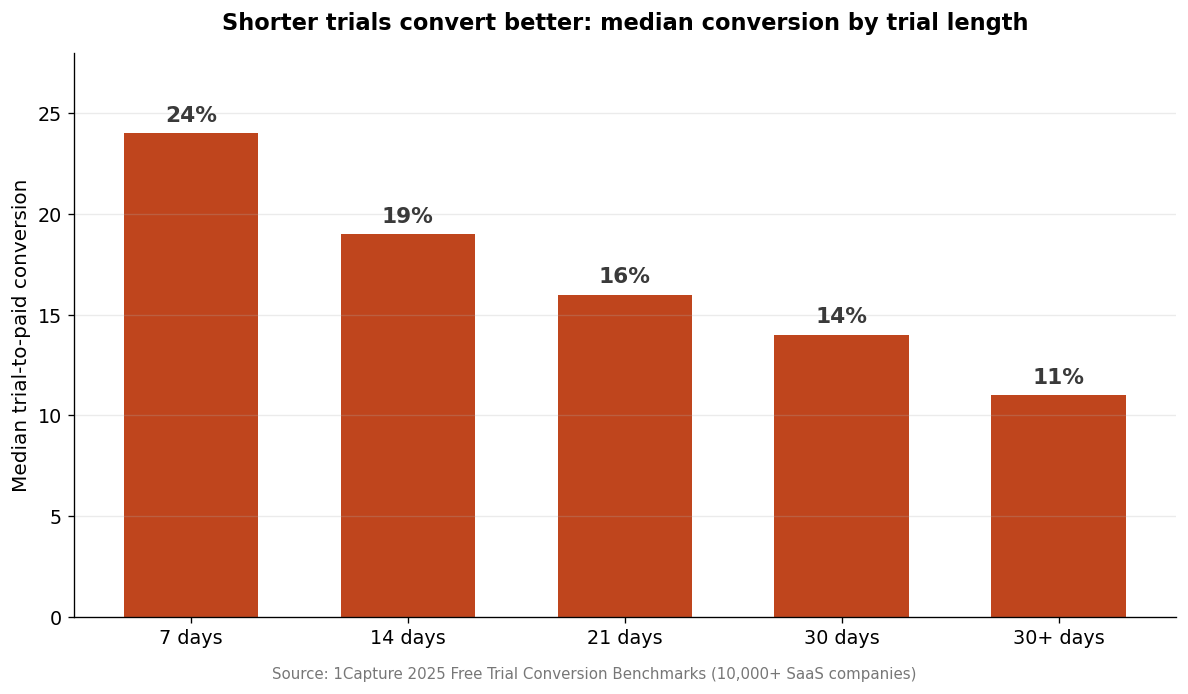
The chart above is the reason your default is a short trial, not a long one — and also the reason extensions are safe. If your trial is 14 days, an extension is not "doubling your giveaway," it is buying back a person who was already at the decision point. You are not being generous at your own expense; you are catching revenue that was about to leak out over a calendar technicality.
There is a brand dimension too. A fast, warm yes to an extension is one of the cheapest trust-building moments you get with a prospect. They braced for a rules-lawyer response and got a human one. That contrast sticks, and it colors how they read your pricing, your support, and your product from then on. I wrote about the compounding value of this kind of founder-led generosity in lessons from running Coding Capybaras support — the through-line is that early-stage trust is worth far more than the marginal cost of a few free days.
The only place "just say yes" breaks is when you scale past the point where you can personally answer each email. That is a good problem, and it has a clean solution.
A policy that runs without you
The goal is a policy that handles the common case automatically and routes the interesting cases to a human. Three tiers do it.
Tier one: self-serve, one click. For anyone who activated, let them extend once themselves — a button in the app or a link in the "your trial is ending" email that grants, say, seven more days without anyone approving it. This handles the bulk of legitimate requests, costs you nothing in support time, and feels great to the user because it is instant. Gate it to a single self-serve extension so it cannot loop.
Tier two: ask a human. For a second extension, or for users who never activated, route the request to you (or support) with the person's activation data attached. This is where judgment lives, and it is a small enough volume that judgment is affordable. You are looking at whether to grant, and more importantly what to offer alongside the days.
Tier three: the conversion conversation. For serial requesters, the policy is not another extension — it is a direct, friendly question about fit and a specific ask. Sometimes the honest answer is that the product is not right for them, and knowing that is more valuable than a fourth free week.
Two operational details make this hold up. First, extensions should be logged, because a rising rate of extension requests is telling you something about your trial length or your onboarding, not just about individual users. If lots of activated people keep running out of time, your trial may be too short or your time-to-value too slow — the exact kind of thing worth watching in your first-month SaaS dashboard. Second, tie the extension into your lifecycle email so the timing is automatic; the sequence design in lifecycle email for indie SaaS shows where the "trial ending" and "trial extended" messages fit.
One thing not to do: hide the extension behind a cancellation-style dark pattern or make people beg for it. That poisons the goodwill you are trying to build. The same honesty that should govern your cancel flow applies here — make the yes easy and the ask human.
The reply that turns an extension into a conversion
The policy decides whether. The reply decides whether the extension actually moves anyone toward paying. A grant with no follow-up is a missed opportunity; a grant that opens a conversation is where extensions earn their keep. Three templates cover the cases.
The activated user with a real blocker. Grant, name the reason, and stay available:
Hi [Name] — done, I've added two weeks to your trial, no problem. Totally get it, [the conference / the migration / a busy stretch] happens. You'd gotten as far as [specific thing they did], so you're close — if [the thing that stalled] is still in the way when you're back, reply here and I'll help you get it sorted directly. — Justin
That reply does three things: it says yes fast, it proves you looked at their account by naming what they did, and it offers to remove the actual blocker. That last part is what converts.
The never-activated user. Grant a short extension, but lead with help, not days:
Hi [Name] — happy to extend you another week. Looking at your account, it seems like you didn't get a chance to [core action] yet — that's the part where [product] actually clicks, and it takes about ten minutes. Want me to walk you through it, or send you the two-minute version? Once you've seen it, the extra week will actually mean something. — Justin
Here the extra time is almost a pretext. The real move is getting them to value, because an unactivated user with seven more idle days converts no better than they did with zero. The customer onboarding flows piece goes deeper on closing that activation gap.
The serial requester. Be warm and direct:
Hi [Name] — I can extend you once more, and I will if you want it. But I'd rather just ask: is [product] the right fit for what you're trying to do? If something's blocking you, tell me and I'll help. If it's not quite right, no hard feelings — I'd just rather know than keep the clock running. — Justin
This respects the person and reclaims your time. Often it surfaces the real objection — price, a missing feature, a competing tool — which is worth far more than another silent week. When the objection is price, the reasoning in SaaS pricing for non-tech founders helps you respond without discounting reflexively.
Frequently asked questions
How long should a trial extension be?
Match it to your trial length — a 14-day trial pairs well with a 7-to-14-day extension. The point is to give enough runway to finish an evaluation, not to reset the whole clock. For a first self-serve extension, seven days is a good default; a human can grant more when the situation warrants it.
Won't people abuse a generous extension policy?
Very few will, and the ones who do cost you almost nothing. Extension requests are a small fraction of trials, and a slice of them are genuine buyers you would otherwise lose. The revenue recovered from real evaluators dwarfs the cost of the occasional freeloader who was never going to pay anyway.
Should I require a credit card to avoid extension requests?
Requiring a card upfront reduces extension requests, but it also cuts trial starts sharply — 1Capture's data shows card-required trials get far fewer signups even though the ones who start convert at a higher rate. For most new SaaS, no-card trials plus a generous extension policy nets more paying customers than a card wall. It is a volume-versus-quality tradeoff covered in free trial vs freemium vs paid.
What if someone asks for a second or third extension?
Grant a second one if they are activated and clearly still evaluating. By the third, stop extending and start a conversation — ask directly whether the product is a fit and what is blocking a decision. Repeated requests without activation are a signal to talk, not to keep the trial open indefinitely.
Should extensions be automatic or approved by a human?
Both, tiered. Let activated users self-serve one extension instantly, and route everything else — second extensions, never-activated users — to a human with the account's activation data attached. This keeps the common case off your plate while preserving judgment where it matters.
Does granting extensions hurt my conversion metrics?
No, if you measure honestly. Track trial-to-paid over a fixed window rather than per-calendar-trial, so an extended trial that converts still counts as a win. Extensions recover revenue that would otherwise leak; the only way they "hurt" metrics is if you let a pile of never-activated extensions inflate your active-trial count without any intent behind them.
The one rule to keep
A trial extension request is one of the clearest buying signals you get, and the right instinct is almost always to say yes — fast, warm, and with a question about what blocked the person. The policy is just plumbing: self-serve the easy yes, route the interesting cases to a human, and have a direct conversation with the serial requester instead of a fourth reflexive grant. What you are really doing every time is trading a few days of free access for information about intent, and that is a trade a new SaaS should take all day.
If you are building a SaaS and want the trial, billing, and lifecycle-email plumbing already wired together, Coding Capybaras is the free boilerplate I built for exactly this — the pricing page shows how the $97 one-time model changes the trial math, too.