How to Record a SaaS Demo Video Without Cringing
A 90-second SaaS demo video you record yourself, in one afternoon. The script structure, the tools, what to show, and where to put it once it's done.
· Justin Boggs
Photo by Orlando García on Unsplash
A SaaS demo video for a solo founder should be about 90 seconds long, screen-recorded rather than filmed, scripted in five beats, and shipped after two or three takes instead of twenty. You do not need a camera, a studio, or your face on screen. You need one real workflow, a quiet room, and a willingness to publish something that is 80% as good as what an agency would make for four thousand dollars. This post is the exact structure I use, the tools worth considering, and the specific reasons a demo video makes founders cringe — plus how to defuse each one.
TL;DR
- 90 seconds, five beats: hook (10s), setup (15s), core demo (45s), result (12s), close (8s). Everything else is cut.
- Screen recording beats a talking head. Show the product doing the thing. Your face is optional; your voice is not.
- Script it, then read it. Improvising is what produces the cringe. A written script is what makes you sound calm.
- Videos under a minute average a 52% engagement rate on Wistia's platform, and engagement falls as length grows — so front-load the payoff.
- About 53% of Product of the Day launches include a video. It helps, but it is not mandatory. Ship a rough one rather than none.
Why 90 seconds and not three minutes
The instinct for a first demo video is to explain everything. You built eleven features and you want credit for all eleven. That instinct is what turns a useful 90-second video into a four-minute tour that nobody finishes.
The data backs the shorter version. Wistia analyzed over 13 million videos on its platform for the 2026 State of Video Report and found that engagement rate — how much of a video people actually watch — is highest for the shortest videos and drops as length increases. Videos under a minute average a 52% engagement rate, meaning the typical viewer watches about half. In the 1–5 minute band, which Wistia recommends for explainer and product walkthrough content, viewers still typically get about halfway through.
Read that carefully, because it changes how you write the script. If the median viewer stops around the halfway mark, then a 90-second demo needs its payoff — the moment where the product visibly does the useful thing — to land before the 45-second mark. In a four-minute video, that same payoff sits at 2:00, and most of your audience never sees it.
There is a counterpoint worth being honest about. Wistia's own data shows that longer videos drive more clicks on in-video calls to action: videos between 30 and 60 minutes see the highest click-through rates, likely because the people still watching at minute 40 are deeply invested. That is real. It is also irrelevant to you right now, because you are not making a webinar. You are making the thing a stranger watches on your landing page for eleven seconds before deciding whether to keep reading.
The 90-second target also has a practical benefit that has nothing to do with viewer psychology: it is short enough that you will actually finish it. A three-minute script is roughly 450 words of narration. A 90-second script is about 220. You can write 220 words, record them badly twice, record them acceptably on the third take, and be done inside an afternoon. The four-minute version becomes a project, and projects get postponed.
I have watched founders spend three weeks on a demo video and launch without one because it was never quite right. That is the failure mode to avoid. A slightly awkward 90-second recording that exists beats a beautiful one that does not.
The 90-second script, beat by beat
Here is the structure. Five beats, fixed durations, written before you press record.
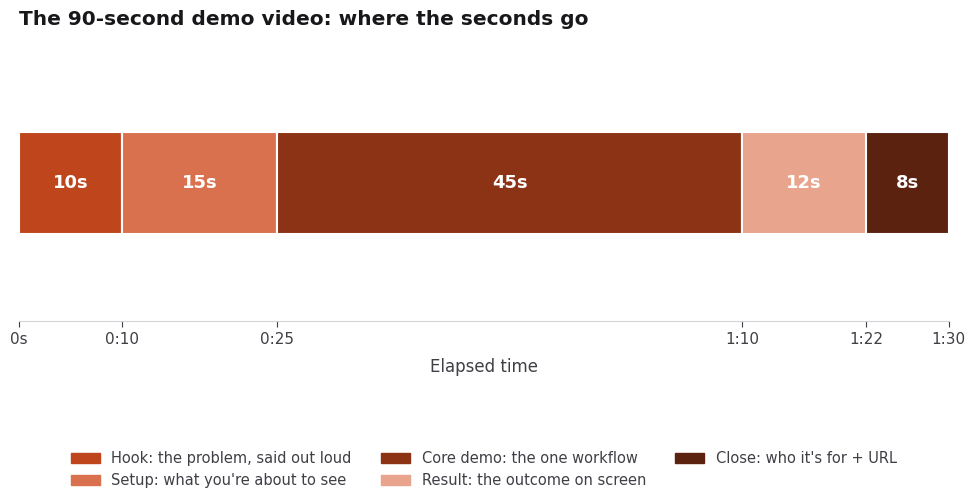
Beat 1 — Hook (0:00–0:10). State the problem out loud, in the words your user would use. Not the category ("project management for creative teams"), the symptom ("you're tracking client feedback in four different email threads"). Ten seconds is roughly 25 words. One sentence, maybe two.
The hook is the only part of the script worth rewriting five times. Everything after it is watched by people who already decided to stay.
Beat 2 — Setup (0:10–0:25). Tell the viewer what they are about to watch, concretely. "I'm going to add a client, send them a review link, and show you what comes back." This is the beat most founders skip, and skipping it is why demos feel disorienting. Fifteen seconds of orientation buys you forty-five seconds of attention.
Beat 3 — Core demo (0:25–1:10). One workflow. Not a tour of the navigation. Pick the single sequence that a new user would perform in their first session and that most clearly proves the product works. Do it at a normal pace, narrating what you are clicking and — more importantly — why.
Forty-five seconds is less time than it sounds. If your core workflow genuinely takes longer than that, cut the recording rather than the workflow: speed up the mechanical parts (typing, loading) to 1.5x or 2x and let the decision points play at real speed. Nobody needs to watch you type an email address in real time.
Beat 4 — Result (1:10–1:22). Show the outcome on screen and say what it means. "That's the client's feedback, threaded, with the version they were looking at." Twelve seconds. This is the beat that converts, because it is the only proof that the previous forty-five seconds went anywhere.
Beat 5 — Close (1:22–1:30). Who it is for, and where to go. "If you're a freelance designer juggling more than three clients, it's at [yourdomain].com." Eight seconds. No music sting, no logo animation, no "thanks for watching." Just the sentence and stop.
Write all five beats out as full sentences before you touch a recording tool. Not bullet points — sentences you will read. This is the single highest-leverage step in the whole process, and I will explain why in the section on cringe.
One structural note: the same five-beat skeleton scales. If you later need a three-minute version for a sales conversation, you add a second and third core-demo beat rather than lengthening the existing ones. The hook, setup, result, and close stay exactly as they are.
What to record, and what to leave out
The default mistake is showing the interface. The correct move is showing a job getting done.
Concretely, that means: seed your account with realistic data before you record. Not "Test Client 1" and "asdf project" — actual plausible names, actual plausible copy, actual plausible dates. A demo of an empty app with placeholder text reads as unfinished no matter how good the product is. Spend twenty minutes creating a believable account state. It is the highest-return prep work in the entire process.
Leave out: your settings page, your billing page, your onboarding flow, your admin panel, and any feature you added last week because it was fun. Leave out sign-up, unless sign-up is the differentiator. Leave out anything that requires you to say "and obviously you'd configure this first."
Show your actual product, not a mockup. If a piece of the product is genuinely not ready, either cut that beat or record around it — do not fake a screen. Faked screens get noticed, and the credibility cost is not worth the polish.
A few mechanical rules that make a screen recording look intentional rather than accidental:
- Record at 1920×1080 or larger, then let the platform downscale. Wistia reports that 1080p is still the most common upload resolution. Recording at your laptop's native retina resolution and exporting to 1080p usually produces the crispest text.
- Hide everything that is not the product. Close your other tabs. Turn off notifications. Use a clean browser profile with no extensions in the toolbar and no bookmarks bar. A Slack notification sliding in mid-demo is the single most common ruined take.
- Zoom the browser to 125% or 150%. Text that is comfortable on your 27-inch monitor is illegible in a video embedded at 600px on someone's phone.
- Move the cursor deliberately. Slow, direct movements. No hunting, no circling. If your tool supports cursor smoothing or click highlights, turn them on.
- Never show real customer data. Even in a private beta. Use seeded accounts.
Which recording tool should you use?
There are three tiers, and the honest answer is that the cheapest tier is fine for a first demo.
| Tool | Cost tier | Best for | Learning curve | | --- | --- | --- | --- | | QuickTime Player (macOS) / Game Bar (Windows) | Free, built in | A first demo you need today | Minutes | | Loom | Free tier, paid plans | Fast recording plus instant shareable link | Minutes | | OBS Studio | Free, open source | Full control, multi-source, scene switching | Hours | | Screen Studio | Paid | Automatic zoom and cursor polish on macOS | About an hour | | Arcade / Storylane / Supademo | Free for Product Hunt launches | Clickable interactive demos, not video | About an hour |
A few notes on that table. Product Hunt's launch preparation guide explicitly suggests a quick Loom demo if you do not have a video budget, and separately lists Arcade, Storylane, Hexus, Supademo, Layerpath, and ScreenSpace as interactive-demo tools that are free for Product Hunt launches. If you are launching there, that free tier is worth using — an interactive demo and a video do different jobs, and having both is better than having a longer video.
OBS is the free tool with a real ceiling. It handles multiple sources, scene switching, and separate audio tracks, which matters if you ever want to record your screen and a webcam feed you can cut between. The tradeoff is a genuine afternoon of setup. Do not learn OBS the day before you launch.
Audio matters more than video quality, and this is the one place where spending money is defensible. A $60 USB microphone on a boom arm, positioned six inches from your mouth in a room with soft furniture, will sound better than a $2,000 camera with laptop-built-in audio. If you own headphones with an inline mic, those beat your laptop too. Record in a small carpeted room with the door closed, and avoid recording next to a hard wall.
You do not need editing software. Trim the start and end in QuickTime or your recording tool, and ship. The urge to add music, transitions, and captions is almost always the urge to procrastinate. Captions are the one exception worth adding later — Wistia's data shows captions are the most common accessibility feature teams add, and YouTube will generate a first pass automatically.
How to record it without cringing
The cringe is real and it is worth taking seriously, because it is the reason most solo founders never ship a demo. Here is what is actually happening and how to work around it.
Cringe source 1: hearing your own voice. This is universal and it does not go away. Your voice sounds different to you through bone conduction than it does through a speaker, so the recording sounds wrong to you and completely normal to everyone else. The fix is not confidence; it is data. Send the first take to one person you trust and ask "does this sound weird?" They will say no. Then proceed.
Cringe source 2: improvising. When you record without a script, you say "um," you circle back, you explain things twice, and you listen to the playback and hear someone who does not know their own product. This is the single largest contributor to the cringe, and the fix is entirely mechanical: write the script, then read it. Reading a script sounds prepared, not robotic — the robotic feeling is in your head, not in the audio.
Put the script in a text file in a window behind the recording area, or on a second monitor, or on paper next to your keyboard. Read it out loud twice before recording to smooth the phrasing.
Cringe source 3: your face. You do not have to be on camera. A screen recording with voiceover is a completely standard, completely respectable format. If you do want a face — and it does help with the founder-story angle — put it in a small circle in the corner for the hook and the close only, and cut it during the demo where it competes with the interface.
Cringe source 4: the product isn't good enough yet. This one is not really about the video. If you feel this, record the demo anyway and then watch it as if you were a stranger. It is the fastest product critique you will ever get. Every awkward pause in your narration marks a place where your UX requires explanation, and every "and then you have to..." is a friction point. I have shipped fixes off my own demo recordings more than once. The video is a diagnostic tool disguised as a marketing asset.
Cringe source 5: the third-take trap. Set a hard limit of five takes. Recording eleven versions does not produce a better video; it produces a more exhausted narrator and a set of takes that all sound flat. Take three is usually the best one. Record five, pick one, ship it.
Where the video goes once it's recorded
Upload to YouTube first, even if YouTube is not your audience. Two reasons: it is free hosting that will not throttle you, and Product Hunt only accepts YouTube links for launch videos — no uploads, no other hosts, and no shortened URLs. Set it to unlisted if you do not want it appearing on your channel, but do not set it to private, because private videos will not embed.
Then place it in these spots, roughly in this order of value:
Your landing page, above the fold or immediately below it. Wistia's data shows homepages, video galleries, and product pages get the highest play rates of any page type — visitors on those pages are actively evaluating and a video is a natural next step. If you are still writing the page itself, the notes in SEO for SaaS landing pages cover how the video fits alongside the copy.
Your Product Hunt launch. About 53% of products that reached Product of the Day since 2021 included a video, per Product Hunt's own guide. That is a meaningful majority but not a requirement — if launch day arrives and the video is not ready, launch without it. The Product Hunt launch playbook has the rest of the day-of sequence.
Your waitlist confirmation email and your onboarding sequence. A 90-second video answers "what did I just sign up for" better than three paragraphs. If you are still building the list, the waitlist page that converts is the piece that comes before this one.
Your pricing page. Not the same video — a shorter cut of just the core demo beat, with no hook and no close. People on the pricing page have already decided what the product is; they want to confirm it does the thing. The patterns in pricing pages that convert apply here.
Cold outreach and X/LinkedIn posts. A native upload usually outperforms a YouTube link on social platforms, so export a separate copy sized for the platform rather than pasting the link. Wistia found 76% of teams adjust aspect ratio depending on where they post.
One thing not to do: gate the video behind an email form. At 90 seconds it is not valuable enough to trade an email address for, and gating it costs you the top-of-funnel plays that make it worth recording.
Frequently asked questions
How long should a SaaS demo video be?
For a landing page or a launch, 90 seconds is the target. Wistia's benchmarks show engagement rate is highest for videos under a minute and declines as length grows, and their guidance puts explainer and product-demo content in the 1–5 minute band. Ninety seconds sits at the front of that band, which is where you want to be for a stranger's first exposure.
Do I need to be on camera?
No. A screen recording with a voiceover is a completely standard demo format and is what most B2B SaaS demos actually are. If you want a face for warmth, add a small picture-in-picture during the hook and the close and drop it during the demo itself.
What if my product isn't finished?
Record the workflow that does work, and only that one. A demo of one polished path is more convincing than a tour of six half-built ones. Do not mock up screens that do not exist — the credibility cost outweighs the polish.
Do I need a real microphone?
Not to start. Headphones with an inline mic in a quiet, soft-furnished room will get you a shippable first version. A $60 USB microphone is the single best upgrade after that, and it matters far more than camera or lighting for this format.
Should I use an interactive demo instead of a video?
They do different jobs. A video controls the narrative and works everywhere, including social and email. An interactive demo lets a visitor click through at their own pace and tends to convert better with technical evaluators. Product Hunt lists several interactive-demo tools as free for launches, so if you are launching there, building both is a reasonable afternoon.
How many takes should I plan for?
Five, maximum. Take three is usually the keeper. Past take five you are not improving the video, you are just getting tired, and tired narration is flatter than slightly imperfect narration.
Recording the demo is the cheapest product research you'll do
The 90-second SaaS demo video is a small piece of work that founders inflate into a large one. Five beats, one workflow, a written script, a quiet room, and five takes. The whole thing fits in an afternoon, and the version that exists is worth more than the version you keep planning.
The part that surprised me was how much the recording taught me about the product. Every place I stumbled narrating a step turned out to be a place the interface needed explaining, and every step I wanted to skip in the demo was a step I should have cut from the product. That feedback arrived free, before a single stranger saw the thing.
If you're shipping a SaaS with AI coding tools and you want the plumbing already handled so you can spend the afternoon on the demo instead, Coding Capybaras is the free boilerplate I built for exactly that workflow.