Stripe Promo Codes Tutorial for Next.js | Coding Capybaras
A Stripe promo codes tutorial for founders: coupons vs promotion codes, duration and redemption limits, launch discount patterns, and an AI prompt to wire it up.
· Justin Boggs

Photo by Sasun Bughdaryan on Unsplash
Adding discounts to a Stripe-powered SaaS takes two objects and one line of code. The coupon defines the discount logic — how much off, for how long, capped at how many redemptions. The promotion code is the customer-facing string that maps to it, the thing someone types into a checkout box. Then you set allow_promotion_codes: true on your Checkout Session and Stripe renders the redemption field for you. That's the whole integration. The hard part of this Stripe promo codes tutorial isn't the API — it's picking a duration that doesn't quietly halve your revenue for the life of every customer who redeems.
TL;DR
- Coupons are backend-driven; promotion codes are customer-facing. Many codes can point at one coupon.
durationis the setting that matters most.once,repeatingwithduration_in_months, orforever— andforeverreally means forever.- Only promotion codes support first-time-order, minimum-spend, and per-customer restrictions. Bare coupons don't.
allow_promotion_codes: trueon a Checkout Session is all the front-end work a hosted checkout needs.- For a launch discount, use
repeatingoronce, neverforever, and setmax_redemptionsand an expiry so the code can't outlive the campaign.
Coupons vs promotion codes: what's the actual difference?
A Stripe coupon is the API object that defines the discount — the percentage or fixed amount off, how long it applies, and any global caps. A promotion code is a customer-facing string that wraps a coupon and adds distribution and control on top of it.
The mental model that made this click for me: the coupon is the discount, the promotion code is the key that unlocks it. You can cut many keys for the same lock. Stripe's own docs use the example of FALLPROMO and SPRINGPROMO both pointing at a single 25% off coupon — same discount, two campaigns, two sets of analytics.
The split matters because the two objects support different things. Stripe's coupons and promotion codes documentation lays out the capability gap directly:
| Capability | Coupon | Promotion code |
| --- | --- | --- |
| Defines the discount amount and duration | Yes | Inherits from its coupon |
| Customer types it in at checkout | No | Yes |
| Restrict to a specific customer | No | Yes |
| First-time purchase only | No | Yes |
| Minimum spend to redeem | No | Yes |
| Deactivate without deleting | No — delete only | Yes, toggle active |
That last row has bitten people. You cannot deactivate a coupon; you can only delete it. Deleting doesn't strip the discount from customers who already have it — it just stops new applications — and it archives every promotion code built on top of it. Promotion codes, by contrast, have an active flag you can flip off and back on.
So the practical rule: if your system decides who gets a discount (a sales negotiation, a support credit, a grandfathered price), apply a coupon directly. If a human types a string, create a promotion code. Most launch discounts are the second kind.
One more constraint worth knowing before you design anything: you can apply up to 20 discounts to a subscription, subscription item, or invoice, and that limit is shared across coupons and promotion codes.
Creating your first coupon and code
You can do all of this in the Stripe Dashboard under Products → Coupons, and for a one-off launch discount that's genuinely the faster path. But the API version is worth seeing because it's what you'll automate later.
A 25% off coupon that applies for three months:
curl https://api.stripe.com/v1/coupons \
  -u "$STRIPE_SECRET_KEY:" \
  -d id=launch25 \
  -d percent_off=25 \
  -d duration=repeating \
  -d duration_in_months=3 \
  -d max_redemptions=200
Then a customer-facing code on top of it, restricted to first-time buyers:
curl https://api.stripe.com/v1/promotion_codes \
  -u "$STRIPE_SECRET_KEY:" \
  -d coupon=launch25 \
  -d code=LAUNCH25 \
  -d "restrictions[first_time_transaction]"=true \
  -d max_redemptions=200
A few things about that second call that aren't obvious from the parameter names.
The code is case-insensitive and must be unique across active promotion codes that any customer can redeem. launch25 and LAUNCH25 are the same string to Stripe. You can, however, create multiple customer-restricted codes sharing one string — useful for personalized codes.
first_time_transaction is stricter than it sounds. It excludes customers who merely initiated a PaymentIntent, even one that never completed, and customers who started a trial they later cancelled. That's usually what you want for a launch code, but it means someone who abandoned checkout last week can't use your new-customer discount, and they will email you about it.
If the underlying coupon already has max_redemptions set, the promotion code's cap can't exceed it. Same rule for expiry: expires_at on the code can't be later than redeem_by on the coupon. If you omit expires_at, Stripe copies the coupon's redeem_by into it automatically.
Both applying a coupon directly and redeeming a promotion code count against the same max_redemptions on the coupon. So if you set max_redemptions=50 and your support team hands out 10 coupons manually, only 40 code redemptions remain.
Duration is the setting that will cost you money
Of everything in this tutorial, duration is the one I'd slow down on. It has three values and the difference between them compounds across every customer who redeems.
once— applies to the first invoice only. This is the default.repeatingwithduration_in_months=N— applies to invoices for N months from first application.forever— applies to every invoice, indefinitely.
forever means what it says. A customer who redeems a 50% off forever coupon in month one pays half price in year four. Stripe's docs make the trap explicit: if you set a coupon to last forever and also give it an expiration date, "any customer given that coupon has this coupon's discount forever. New customers can't apply the coupon after the expiration date." The expiry gates redemption, not the discount.
Here's what those three options do to a single customer's twelve-month revenue on a $29/month plan, with the same 50% off:
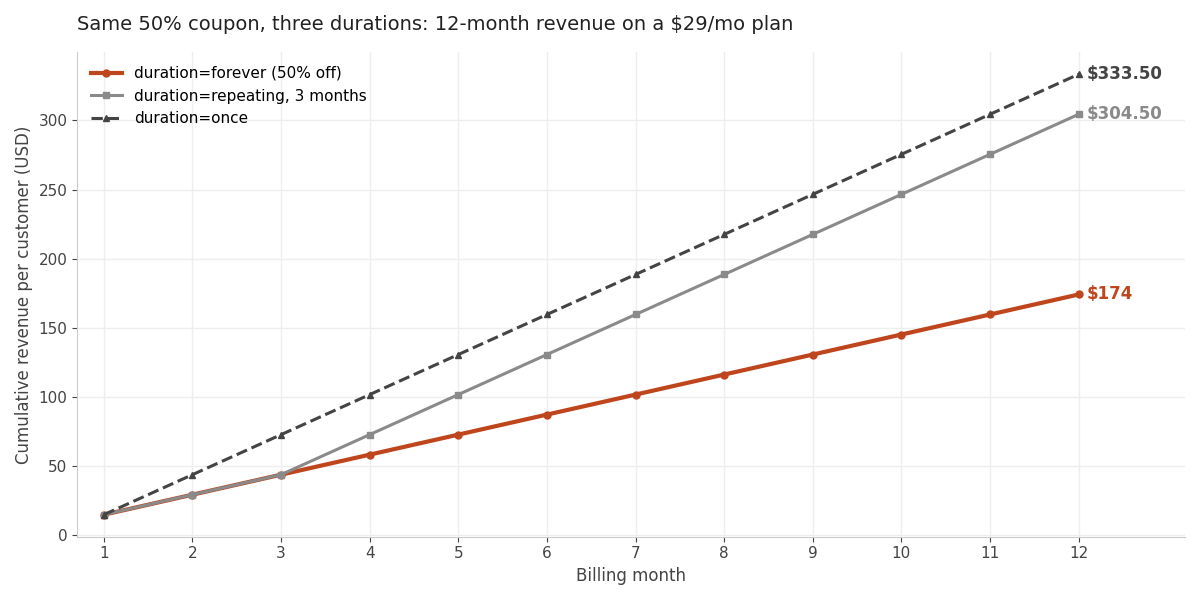
Same headline discount. A $159.50 spread per customer in year one, and the gap keeps widening after that. Multiply by however many people redeem your launch code and it stops being a rounding error.
There's a subtlety with repeating on annual plans that catches people out. duration_in_months counts calendar months from when the coupon is applied, not billing cycles. A 50% coupon with duration_in_months=4 on a yearly subscription discounts the entire first year, because the one invoice in that four-month window is an annual one. On a monthly plan the same coupon discounts four invoices. If you sell both — and the tradeoffs there are worth reading about in annual vs monthly billing — model both before you publish the code.
One more quirk. When a subscription uses a duration=once coupon, Stripe removes the discount from the subscription's discounts array after the invoice finalizes. The subscription will look like it has no discount even though one was applied. The invoice still shows it. If you're reading subscription state to display "you're on a discounted plan," account for that or you'll ship a confusing UI.
Wiring it into Next.js Checkout
If you're using Stripe Checkout — and you should be, for the reasons I walk through in the Next.js Stripe tutorial — the front-end work is one parameter.
const session = await stripe.checkout.sessions.create({
  mode: "subscription",
  customer: externalCustomerId,
  line_items: [{ price: externalPriceId, quantity: 1 }],
  success_url: successUrl,
  cancel_url: cancelUrl,
  allow_promotion_codes: true,
});
Setting allow_promotion_codes: true tells Checkout to render a promotion code field on the hosted page. Stripe validates the code, checks the restrictions, applies the discount, and shows the adjusted total — all of it server-side, none of it your problem.
In the Coding Capybaras boilerplate this is already on. It lives in /platform/lib/payments/stripe.ts inside createCheckoutSession, which is the single place the Stripe SDK gets touched. Every other part of the codebase goes through the PaymentProvider abstraction, so if you ever swap billing providers the promo code handling moves with it.
The other pattern is applying a discount without the customer typing anything — a pre-applied coupon from a partner link, say. Pass it in the discounts array instead:
const session = await stripe.checkout.sessions.create({
  mode: "subscription",
  customer: externalCustomerId,
  line_items: [{ price: externalPriceId, quantity: 1 }],
  discounts: [{ coupon: "launch25" }],
  success_url: successUrl,
  cancel_url: cancelUrl,
});
You can't do both on the same session. discounts and allow_promotion_codes are mutually exclusive — Stripe will reject a session that sets both. Decide per flow: either the customer brings a code, or you supply one.
If you've turned on the Stripe Customer Portal, note that enabling promotion codes there lets customers apply a discount when upgrading or downgrading an existing subscription. That's often what you want, but it does mean a code you meant for new signups can get used on an upgrade. Restrict the code or apply coupons directly if that matters. The portal setup is covered in adding the Stripe customer portal.
Launch discount patterns that don't backfire
Four patterns I've seen work, and the configuration behind each.
The Product Hunt day-of code. duration=once or repeating at 2–3 months, max_redemptions set to something honest, expires_at 48 hours out, first_time_transaction: true. The expiry is doing the real work — it creates the deadline that makes launch-day urgency legitimate rather than manufactured. Pair it with the rest of the Product Hunt launch playbook rather than treating the discount as the campaign.
The founding-customer cohort. A small max_redemptions — 25, 50 — on a forever coupon, given to the people who show up before you have social proof. This is the one case where forever is defensible: you're trading permanent margin for testimonials and early feedback, knowingly, on a capped number of seats. Cap it hard. A forever code with no redemption limit that leaks onto a deals site is a revenue problem you cannot undo, because deleting the coupon doesn't remove discounts already granted.
The individual save-the-customer code. A promotion code restricted to one customer, created when someone is about to churn over price. Because it's customer-restricted, it can't be shared, and you can create several codes with the same string for different customers. This is far better than a public code, which is how "20OFF" ends up on RetailMeNot.
The partner or newsletter code. One coupon, several promotion codes — NEWSLETTER25, PODCAST25, AFFILIATE25 — all pointing at the same 25% off. Same economics, separate redemption counts, so you learn which channel actually converted. If you're already running pricing experiments, this is the cheapest attribution you'll ever set up.
The pattern to avoid: a public, uncapped, forever, no-expiry code, posted once and forgotten. Every one of those four settings is individually reasonable and together they're a permanent discount on unlimited customers with no way to take it back short of deleting the coupon — which, again, doesn't affect anyone who already redeemed.
The AI prompt to wire this up
If you're building with Claude Code, Cursor, or Cowork, here's a prompt that produces a working implementation rather than a plausible-looking one. Adjust paths to your codebase.
I have a Next.js SaaS with Stripe Checkout. Server-side checkout session creation lives in
/platform/lib/payments/stripe.ts. I want to add promotion code support.
- Confirm
allow_promotion_codes: trueis set on the subscription Checkout Session, and tell me the exact line number where it is or should go.- Add a server action that creates a coupon and a promotion code from admin input, validating with Zod first: percent off (1-100), duration (
once|repeating|forever),duration_in_monthsrequired when duration is repeating, max redemptions, expiry date, and a first-time-transaction toggle.- Do not import the Stripe SDK anywhere except
/platform/lib/payments/stripe.ts. Route the new calls through the existing PaymentProvider abstraction and add the methods to its interface.- Show me the diff before you write anything, and list every file you plan to touch.
Do not invent Stripe parameter names. If you are unsure whether a parameter exists, say so instead of guessing.
That last line matters more than the rest of the prompt. Billing parameter names are exactly the sort of thing AI assistants confabulate — plausible, well-formatted, and wrong. I wrote about why that happens and how to catch it in AI hallucinations in code. Check every parameter against Stripe's Promotion Codes API reference before you run it in live mode, and test the whole flow in test mode with a real redemption first.
Frequently asked questions
What's the difference between a Stripe coupon and a promotion code?
The coupon holds the discount logic — amount, duration, global redemption cap. The promotion code is the customer-facing string that maps to a coupon and adds restrictions like first-time-order-only, minimum spend, or a specific customer. Many promotion codes can point at one coupon.
How do I add a promo code field to Stripe Checkout?
Set allow_promotion_codes: true when you create the Checkout Session. Stripe renders and validates the field on the hosted page. You cannot combine it with the discounts parameter on the same session — use one or the other.
Can I delete a Stripe coupon after people have redeemed it?
You can delete it, which stops new applications and archives its promotion codes, but it does not remove the discount from subscriptions or invoices that already have it. Coupons have no deactivate flag — only promotion codes have an active toggle you can switch off.
Does duration=repeating count billing cycles or calendar months?
Calendar months, from when the coupon is first applied. On a monthly plan a four-month coupon discounts four invoices; on an annual plan it discounts the single invoice that falls in that window, which is the whole year.
Can a customer stack two promo codes?
Yes — Stripe supports up to 20 discounts on a subscription or invoice, shared between coupons and promotion codes. You can't stack a coupon with a promotion code created from that same coupon. With mixed amount_off and percent_off discounts the order matters, so check the resulting total rather than assuming.
Should my launch discount be a percentage or a fixed amount?
Percentage for subscriptions, fixed amount for one-time purchases. A percentage scales cleanly across plan tiers and currencies; a fixed amount off a cheap monthly plan can approach 100% in a way you didn't intend. Stripe supports per-currency amounts on fixed coupons if you sell internationally.
What I'd actually do for a launch
Create one coupon, duration=repeating at three months, 25% off, max_redemptions set to a number you'd be happy to honor. Build two promotion codes on it — one for the launch post, one for the newsletter — each with its own cap and a 72-hour expiry. Turn on first_time_transaction. Test a full redemption in test mode, including the second invoice, so you see the discount fall off when it's supposed to.
Then write down somewhere you'll actually look what the code was, when it expires, and what it cost you. The reason discount programs go wrong isn't usually the API — it's that nobody tracked what got promised to whom, and six months later a customer is on a rate you don't remember granting.
If you want the billing layer already assembled, Coding Capybaras is the free Next.js boilerplate I built for founders shipping with AI coding tools, and allow_promotion_codes is on out of the box.