SaaS Rate Limiting: Where Limits Belong in Your Stack
A founder's guide to SaaS rate limiting: which layer enforces limits, per-user vs per-IP, protecting AI endpoints from cost blowups, and what to return.
· Justin Boggs

Photo by Liam Scotchmer on Unsplash
SaaS rate limiting is the practice of capping how many requests a single caller can make in a window of time, and the hard part isn't the algorithm — it's deciding where the cap lives and what it counts. Most indie SaaS apps need three separate limiters, not one: something cheap at the edge that sheds bot traffic, something per-user on expensive routes, and something per-account on anything that spends money downstream. Get the layering right and you never think about it again. Get it wrong and you either lock out real customers or wake up to a $900 bill from a scraper who found your unauthenticated AI endpoint.
TL;DR
- Rate limiting isn't one thing. Put a cheap IP-based limit at the edge, a per-user limit on expensive routes, and a per-account budget on anything that costs you money per call.
- Per-IP is for anonymous traffic; per-user is for authenticated traffic. Using per-IP on signed-in routes breaks office networks, VPNs, and mobile carriers.
- AI and email endpoints need a spend cap, not just a request cap. A request limit doesn't stop 50 requests that each burn 100k tokens.
- Return
429with aRetry-Afterheader and theX-RateLimit-*state headers that GitHub's REST API documents. Silent failures are worse than loud ones.- Your own limits are only half the problem. Every upstream API you call has limits too, and they'll cut you off first.
What rate limiting actually protects you from
I used to think of rate limiting as an anti-abuse feature — something you add when you get big enough to have enemies. That framing is wrong, and it delayed me by about four months.
Rate limiting is a blast radius control. It caps how much damage any single caller can do in a fixed window, regardless of whether that caller is malicious, buggy, or just enthusiastic. The malicious case is the one everybody pictures. It's also the least common one for a small SaaS.
Here's the actual distribution of what hits you, roughly in order of likelihood:
Your own code. A useEffect with a bad dependency array fires a request on every render. A retry loop with no backoff hammers a failing endpoint. A cron job that was supposed to run hourly runs every minute because you typed the cron expression wrong. I have personally shipped all three.
Well-meaning customers. Someone writes a script against your API and loops without a sleep. Someone imports a 40,000-row CSV and your import endpoint fans it out one request per row. Someone leaves your dashboard open on a wall-mounted TV, polling every two seconds, forever.
Bots and scrapers. Not attackers exactly — just crawlers, security scanners, and people harvesting content. They find your public routes fast. If you have an unauthenticated endpoint that calls an LLM, they will find that too, and they will not be gentle with it.
Actual abuse. Credential stuffing on your sign-in route, signup spam to farm free trials, and enumeration attacks against endpoints that leak whether a resource exists. This is real, but for a pre-revenue SaaS it's the fourth thing that hurts you, not the first.
The common thread is that none of these are stopped by "being careful." They're stopped by a limit that exists whether or not you're paying attention. The cheap version installed early beats the sophisticated version installed after an incident — and an incident here is usually measured in dollars, which is why rate limits belong in the same mental bucket as the rest of the hidden costs of SaaS infrastructure.
Which layer should enforce the limit?
This is the question people get wrong, and it's the one that matters most. There isn't one right layer. There are four, and each one is good at something the others are bad at.
flowchart TD
    A[Incoming request] --> B[Layer 1: CDN / WAF<br/>per-IP, no app code runs]
    B -->|passes| C[Layer 2: Middleware<br/>per-IP or per-session, before auth]
    C -->|passes| D[Layer 3: Route handler<br/>per-user, after auth]
    D -->|passes| E[Layer 4: Spend budget<br/>per-account, per-day]
    E -->|passes| F[Upstream API call<br/>LLM, email, payments]
    B -->|blocked| X[429, zero cost]
    C -->|blocked| X
    D -->|blocked| Y[429 with Retry-After]
    E -->|blocked| Z[402 or 429 with upgrade path]
Layer 1 — the edge (CDN or WAF). This is the only layer where a blocked request costs you literally nothing, because your application code never runs. It's also the dumbest layer: it knows an IP address and a path, and nothing about who the user is. Use it for broad ceilings — "no IP gets more than 300 requests a minute to anything" — and for blocking obvious junk. Vercel, Cloudflare, and most hosts give you some version of this without writing code.
Layer 2 — middleware, before authentication. In a Next.js app this is middleware.ts. It runs on every matching request before your route handler, so it's the right place for limits on routes where there is no user yet: sign-in, sign-up, password reset, magic-link requests, public form submissions. Identity here is the IP address, because that's all you have.
Layer 3 — the route handler, after authentication. Once you know who the caller is, limit by user ID or account ID instead of IP. This is where per-user quotas live, where API-key limits live, and where anything tied to a plan tier lives. If you've shipped customer-facing API keys, the key itself is your identifier and the plan attached to it sets the ceiling.
Layer 4 — the spend budget. Not a request limit at all. This is a per-account cap on cost — tokens, emails sent, storage bytes, minutes of compute — checked before you make the expensive downstream call. More on this in a minute, because it's the layer most founders skip and the one that generates the scariest invoices.
You do not need all four on day one. If I were starting over I'd install Layer 2 (auth routes) and Layer 4 (anything that spends money) first, add Layer 3 when I shipped an API, and lean on the host's defaults for Layer 1.
Per-IP or per-user? Pick by whether you know who's calling
The rule is simple once you say it out loud: limit by the strongest identity you have at that point in the request.
Before authentication, the strongest identity is the IP address. After authentication, it's the user or account ID. Using the wrong one in either direction causes a specific, predictable failure.
Per-IP on authenticated routes breaks shared networks. Everyone in one office is one IP. Everyone behind a corporate VPN is one IP. Large chunks of mobile traffic sit behind carrier-grade NAT, which means thousands of unrelated phones share an address. If your dashboard limits by IP, the first customer to roll you out to a 30-person team will file a bug report, and it will read like a ghost story — "it works for me but not for Dave."
Per-user on unauthenticated routes is impossible. There's no user yet. That's the entire point of a sign-in route. Attempting to key a limit on a user ID that doesn't exist yet usually degrades into keying on the submitted email address, which an attacker controls and can vary infinitely.
The practical answer on auth routes is to limit on both independently: a limit per IP (slows a distributed attempt from one source) and a limit per submitted email or account (slows a targeted attempt on one victim across many sources). Two cheap limiters, two different attacks.
| Route type | Identity to key on | Typical shape | Why | | --- | --- | --- | --- | | Sign-in, password reset | IP and submitted email | 5–10 per 10 min | No user yet; two limiters cover two attack shapes | | Sign-up | IP, plus email domain | 3–5 per hour | Trial farming comes from few IPs, many emails | | Public marketing forms | IP | 3–5 per hour | Spam, not scale | | Authenticated dashboard reads | User ID | 60–120 per min | Generous; you're only catching runaway loops | | Authenticated writes | User ID | 20–30 per min | Tighter; writes cost more | | Customer API (by key) | API key, scoped to plan | Plan-dependent | This is a product feature, price it like one | | AI / LLM endpoints | Account ID | 5–20 per min plus a daily token budget | Requests and cost are different units | | Outbound email | Account ID | Daily cap | Protects your sending reputation, not just cost |
Treat these numbers as starting points, not gospel. The right limit is roughly ten times what your heaviest legitimate customer does, which you can only know by measuring. Ship a limit that logs but doesn't block, watch it for a week, then turn on enforcement at a multiple of the highest real number you saw.
The endpoints that cost money need a different kind of limit
Here's the failure mode nobody warns you about. You add a nice sliding-window limiter to your AI endpoint — 20 requests per minute per user. You feel responsible. Then someone sends 20 requests per minute where each one carries a 150,000-token document, and your provider bill for that hour is larger than your MRR.
A request limit and a spend limit are not the same thing, because requests are not uniform in cost. One call to an LLM can cost 1,000x another. One transactional email is cheap; one email blast to a customer's imported 50,000-row contact list is not.
For any endpoint that spends money per call, you want a second limiter that counts the expensive unit:
- LLM endpoints: count input plus output tokens per account per day. Check the estimated cost before the call, and record the actual after. Anthropic's rate limit documentation does exactly this on their side — limits are enforced separately on requests per minute, input tokens per minute, and output tokens per minute, because those are three different resources.
- Email: count sends per account per day, separately from API requests.
- File processing / image transforms: count bytes or seconds of compute, not calls.
- Anything metered by a vendor: count the vendor's unit. Whatever line item shows up on their invoice is what you should be counting.
The check itself is boring. Before the expensive call, read the account's usage for the current period, compare against the plan's budget, and reject with a clear message if they're over. After the call, record actual usage. If you already have usage-based billing wired into Stripe, you have most of this plumbing already — a budget check is the same counter, read instead of written.
The response you return here should be different from a normal 429, because the situation is different. A rate-limited user should retry in 30 seconds. A budget-exhausted user should upgrade or wait until tomorrow. Same HTTP mechanics, completely different message, and one of them is a sales conversation. This is one of the few places where a hard limit improves your revenue instead of just protecting your costs.
What to return when you say no
Rejecting a request is an API design decision, and there's an established convention. Follow it, because the tools your customers use already understand it.
Return 429 Too Many Requests. Per MDN, that's the status code for exactly this. Not 403, not 400, not a 200 with an error body. Client libraries and HTTP tooling have built-in handling for 429 and will do sensible things automatically.
Include Retry-After. It tells the client how many seconds to wait. This single header is the difference between a well-behaved client backing off and a badly-behaved client retrying in a tight loop and making everything worse.
Include the state headers. The de-facto standard set, used by GitHub and most large APIs:
HTTP/1.1 429 Too Many Requests
Retry-After: 24
X-RateLimit-Limit: 60
X-RateLimit-Remaining: 0
X-RateLimit-Reset: 1757356800
Send these on successful responses too, not just rejections. A client that can see it has 3 requests left can slow down before it gets cut off. GitHub documents x-ratelimit-limit, x-ratelimit-remaining, x-ratelimit-used, and x-ratelimit-reset on every response for this reason.
Write a human error body. Somebody is going to read this in a terminal at 11pm:
{
  "error": "rate_limit_exceeded",
  "message": "You've hit the limit of 60 requests per minute. Retry in 24 seconds.",
  "retry_after": 24,
  "docs": "https://yourapp.com/docs/rate-limits"
}
Log every rejection with the identifier and the route. The first week after you turn on limits, this log is the only way to tell "the limiter is working" from "the limiter is locking out my best customer." If one account ID dominates the rejection log, either your limit is too low or that customer has a bug — and both are worth an email from you.
One more thing worth doing early: put your limits in your public docs. Stripe and GitHub both publish exact numbers. It costs you nothing, and it turns a surprise into a spec.
Don't forget the limits pointing the other way
Everything above is about limiting your callers. The mirror image is that every API you call has limits on you, and for a small SaaS those bite first — because you're one account making all your customers' requests.
Stripe publishes theirs plainly:
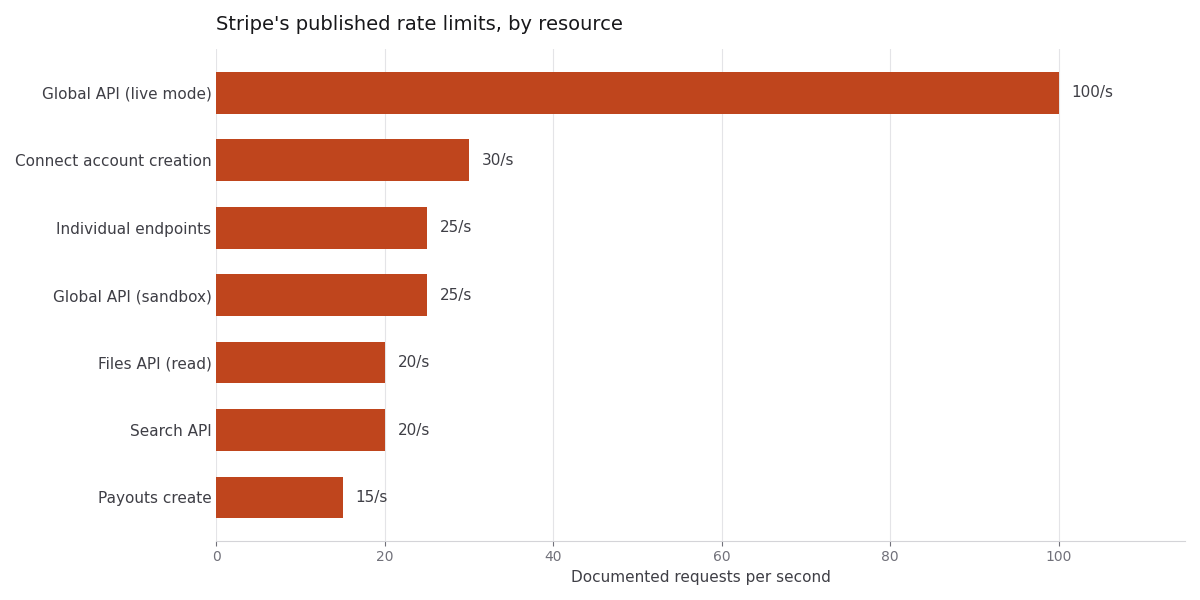
Limits as published on Stripe's rate limits documentation.
A few things jump out of that chart if you're building on Stripe. The global live-mode ceiling is 100 requests per second, but individual endpoints are capped at 25 per second, which is the number that actually constrains you. Sandbox limits are lower than live limits, which is why Stripe explicitly discourages load-testing against a sandbox — you'll hit limits in your test that you'd never hit in production.
There are also resource-specific limits that have nothing to do with per-second rates. Stripe caps the Subscriptions API at 10 new invoices per subscription per minute and 200 quantity updates per subscription per hour. If you're doing a bulk migration or a mass plan change, those are the ones you'll trip.
GitHub's are shaped differently and worth internalizing if you touch their API: 60 requests per hour unauthenticated, 5,000 per hour for an authenticated user, and a separate set of secondary limits — no more than 100 concurrent requests, no more than 900 points per minute to a single REST endpoint — that exist specifically to catch bursty behavior the primary limits miss.
The practical takeaways for your own code:
Retry with exponential backoff and jitter. Stripe's own guidance is to watch for 429, back off exponentially, and add randomness to avoid a thundering herd — every retry firing at the same instant. Most official SDKs do some of this for you; check before you write your own.
Queue instead of fanning out. If you need to make 5,000 API calls, don't make them concurrently. Push them onto a queue with a controlled drain rate. This is the single best use for background jobs in an indie SaaS, and it turns a rate-limit problem into a throughput setting.
Cache reads aggressively. Stripe allocates read requests based on transaction count — an average of 500 read requests per transaction over a rolling 30-day window, with a floor of 10,000 reads per month. If your dashboard fetches a customer's subscription from Stripe on every page load, you're burning that allocation on data that changed zero times. Store what you need locally and let webhooks keep it fresh.
Make your webhook handlers idempotent. When you back off and retry, you will occasionally process the same event twice. That's a correctness issue long before it's a rate-limit issue, and it's the same lesson from Stripe webhook hell.
Frequently asked questions
Do I need rate limiting before I have customers?
Yes, on two categories of route: authentication endpoints and anything that spends money per call. Both are discoverable by scanners within days of your domain going live, and neither requires a single customer to cost you. Everything else can wait until you have real traffic to measure.
Should rate limiting live in middleware or in the route handler?
Both, for different routes. Middleware runs before authentication, so it's the right place for IP-based limits on sign-in, sign-up, and public forms. Route handlers run after authentication and know the user ID, so they're the right place for per-user and per-plan limits. Putting everything in middleware forces you to limit by IP even when you know who the user is.
What's a reasonable default limit for a dashboard API?
Start generous — something like 60 to 120 requests per minute per user — and log rejections without blocking for the first week. Then set the real limit at roughly ten times the heaviest legitimate usage you observed. A limit tuned by guessing either does nothing or pages you at 2am; a limit tuned by measurement does neither.
Is in-memory rate limiting good enough?
Only for a single long-running server. On serverless platforms like Vercel, each function instance has its own memory and instances come and go, so an in-memory counter is effectively per-instance — meaning your "10 per minute" limit is really "10 per minute per instance," which is not a limit. You need shared state, which in practice means Redis or your database.
Can I just use my Postgres database as the counter?
You can, and for low-traffic apps it's fine. The tradeoff is that you're adding a write to your primary database on every single request, including the ones you're about to reject — which is the opposite of what a rate limiter is for. Redis is the standard answer because the operation is cheap and the data is disposable.
What HTTP status code should a budget-exhausted request return?
429 with a clear message is defensible, and so is 402 Payment Required if the fix is an upgrade. What matters more than the code is that the error body distinguishes "you're going too fast, retry shortly" from "you're out of quota for this billing period." Those are different problems with different remedies, and collapsing them into one message confuses everyone.
Where to start
If you take one thing from this: rate limiting isn't a feature you add once. It's a set of limits at different layers, keyed on different identities, counting different units.
Each one covers a gap the others don't. The edge limit keeps junk traffic off your infrastructure, the middleware limit guards routes where nobody is signed in yet, the per-user limit keeps one enthusiastic customer off your database, and the spend budget protects your bank account. They're not substitutes for each other.
The version I'd install first, in order, is: a spend budget on any endpoint that calls a paid API, an IP limit on sign-in and sign-up, and a generous per-user limit on everything else that logs before it blocks. That's a weekend of work and it removes the two failure modes that can actually end a small SaaS — an unbounded vendor bill and a compromised account.
Once you've decided where the limits go, the implementation is short. I wrote a companion post on adding rate limiting to Next.js with Upstash Redis that covers the setup, the algorithm choice, the response headers, and how to actually test the thing. If you're building on the Coding Capybaras boilerplate, the middleware and route-handler structure described here matches what's already in /platform/, so the limiter drops into a spot that already exists.