Indie SaaS Bookkeeping: The Setup That Survives Tax Season
How a one-person SaaS should handle indie SaaS bookkeeping: separate accounts, gross-vs-net Stripe payouts, and the records your accountant actually wants.
· Justin Boggs

Photo by Cht Gsml on Unsplash
Indie SaaS bookkeeping comes down to three habits you can set up in an afternoon: open a business bank account and never mix it with personal spending, record your Stripe revenue at gross rather than at the amount that lands in your bank, and keep every receipt in a folder structure your accountant can navigate without calling you. That's most of it. The part that wrecks people in April isn't complexity — it's that their Stripe deposits went straight into a "Sales" line all year, and now their books say they earned 3% less than they actually did, with no record of where the difference went.
TL;DR
- Open a dedicated business checking account before your first customer pays. The IRS treats your business checkbook as the primary source for your books.
- A Stripe payout is not a sale. Record gross revenue, then record fees, refunds, and disputes as separate lines that reconcile down to the net deposit.
- Stripe's effective fee is 3.21% on a $97 charge and 6.23% on a $9 one, because of the fixed $0.30 per transaction. Small-ticket plans lose more than the headline rate suggests.
- Most solo SaaS founders qualify for the cash method: the 2025 small-business-taxpayer threshold is $31 million in average annual gross receipts.
- Keep supporting records for at least three years after filing, four for anything employment-related.
Why "the money in my bank account" is the wrong number
A Stripe payout is a settlement of many transactions, not a single sale. This is the single most expensive misunderstanding in indie SaaS bookkeeping, and it's easy to fall into because the bank feed makes it look simple. Money arrives. You categorize it as revenue. Done.
Except the amount that arrives has already had processing fees subtracted, refunds netted out, and any disputed charges pulled back. If you post the deposit to Sales, your revenue is understated by exactly the amount of your fees and refunds — and those fees are a deductible business expense you just threw away.
There's a timing problem stacked on top of it. Stripe pays out on a rolling schedule, so a deposit that clears your bank on October 2 can contain charges from September 28 through 30. Book it by the deposit date and you've moved three days of September revenue into October. Do that every month and your monthly P&L is permanently shifted a few days out of phase with reality. It doesn't matter much at $500 a month. It matters a lot when you're trying to figure out whether your subscription billing math actually works.
The fix is a clearing account — sometimes called an undeposited-funds or a Stripe-holding account. The flow looks like this:
flowchart LR
  A["Customer pays $97"] --> B["Gross revenue: $97"]
  B --> C["Stripe clearing account"]
  C --> D["Processing fee: -$3.11"]
  C --> E["Refunds / disputes"]
  C --> F["Net payout to bank"]
  F --> G["Business checking"]
Every charge increases gross revenue and increases the clearing account. Every fee decreases the clearing account and increases a "Payment processing fees" expense line. When the payout lands, it moves money out of the clearing account into checking. If you've recorded everything, the clearing account nets to zero — or to whatever is still sitting in your Stripe balance waiting for the next payout. That balance is a real asset; it belongs on your books.
You don't have to do this by hand. Stripe's payout reconciliation report is built for exactly this. It gives you a balance summary, a breakdown of each automatic payout grouped by reporting category, and an ending-balance section covering transactions that hadn't settled by the report date. You can download it summarized or itemized, and the itemized version carries gross, fee, and net columns per transaction. That's your month-end journal entry, pre-computed.
One caveat worth knowing: the report only works if you're on automatic payouts. Stripe can't tell you which transactions were in an instant payout, because you chose the timing and amount, so reconciling those is on you.
What the fees actually cost you
The headline number everyone quotes is 2.9% + $0.30 per successful card charge on Stripe's standard US pricing. The 2.9% is the part people plan around. The $0.30 is the part that quietly reshapes your pricing.
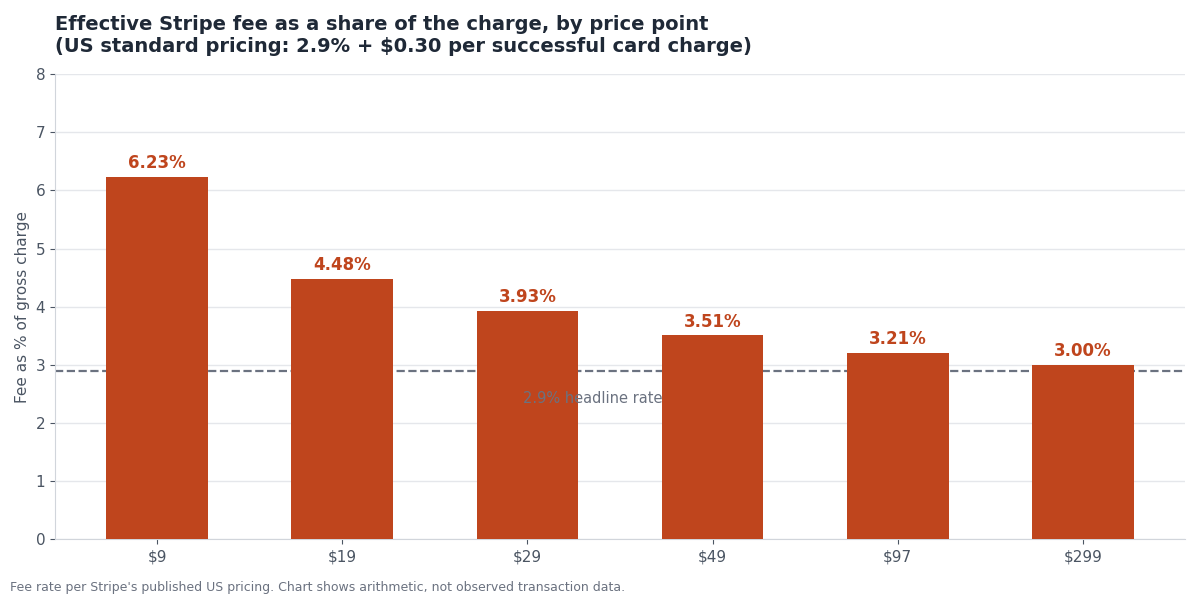
At $299, the fixed component is rounding error and you pay essentially the headline rate. At $9 a month, you pay 6.23% — more than double. That's not a bookkeeping problem so much as a pricing one, but it shows up first in your books, as a fees line that's much larger relative to revenue than you budgeted for.
It's one of the quieter arguments for higher price points and annual billing. An annual plan at $290 costs you one $0.30 charge instead of twelve, and it changes your effective take rate by roughly a third of a percent. I went through this tradeoff in more detail in annual vs monthly billing, but the bookkeeping angle is simple: track the fee line as a percentage of gross revenue every month. If it drifts up, your mix is shifting toward smaller transactions and you'll feel it in margin before you see it anywhere else.
Two more line items that belong in their own categories rather than buried in "fees":
Refunds reduce revenue. They are not an expense. If you refund a $97 charge, your revenue for the period goes down by $97 and Stripe also refunds most of the fee treatment depending on timing — check the balance transaction rather than assuming. Lumping refunds into expenses inflates both your revenue and your costs, which makes every margin calculation wrong in the same direction.
Disputes and chargebacks get their own line, because you want to be able to see them. A dispute pulls the charge amount back and adds a dispute fee on top. If that line grows, you have a product or a fraud problem, not an accounting one, and you want the number visible enough to notice. I wrote about the operational side of this in chargebacks and fraud for indie SaaS.
The account structure that takes an afternoon
Here's the whole setup. It is not sophisticated. It just has to exist before money starts moving.
One business checking account. Open it in the business's name — an LLC if you've formed one, a sole proprietorship with a DBA otherwise. Every dollar of revenue lands here. Every business expense leaves from here. IRS Publication 583 is blunt about why this matters: for most small businesses the business checkbook is the main source for entries in the business books. If that checkbook is also where your groceries come out of, you don't have a business checkbook, you have a mess you'll pay someone to untangle.
One business credit or debit card. Same principle. This is where Vercel, Supabase, Resend, your domain registrar, and your AI tool subscriptions get charged. The card statement becomes a second, cleaner source of expense records, and it makes categorization mostly mechanical.
One owner's-draw path. When you want to pay yourself, transfer from business checking to personal checking. That transfer is a draw, not an expense. Never pay a personal bill directly from the business account. If you do it once by accident, record it as a draw and move on; if you do it habitually, you have lost the separation that made the account worth opening.
One receipts folder. Cloud storage, organized by year and month. Every invoice, every receipt, every annual subscription confirmation. The rule I follow: if a charge is over $20 and doesn't have an obvious paper trail in the card statement, the receipt goes in the folder the same week.
Once those four things exist, the monthly routine is about twenty minutes:
| Task | Frequency | Source | | --- | --- | --- | | Download Stripe payout reconciliation report | Monthly | Stripe Dashboard → Reports | | Post gross revenue, fees, refunds, disputes | Monthly | The itemized CSV | | Reconcile clearing account to $0 (or to Stripe balance) | Monthly | Bank statement + Stripe | | Categorize card expenses | Monthly | Card statement | | File receipts for anything over $20 | Weekly | Email / vendor portals | | Review fees as % of gross revenue | Monthly | Your own P&L |
Pick a bookkeeping tool that connects to both your bank and Stripe. Which one matters less than whether you actually open it every month. The founders I know who stay current use whatever was easiest to set up; the ones who fall six months behind usually picked something powerful and intimidating.
Cash or accrual, and which one you're allowed to use
Cash-basis accounting records income when the money hits your account and expenses when they leave it. Accrual records income when you earn it and expenses when you incur them, regardless of when cash moves.
For most solo SaaS founders, cash basis is both permitted and preferable. IRS Publication 334 sets the bar for being a small business taxpayer at average annual gross receipts of $31 million or less over the three prior tax years, indexed for inflation. If you are reading a post about one-person bookkeeping, you are not near that line. Publication 538 covers the mechanics of choosing and changing methods if you ever need to.
Cash basis is simpler, and it has a real cash-flow advantage: you're taxed on money you've actually received, not on invoices you're still chasing.
But there's a wrinkle specific to SaaS, and it's the reason accrual thinking still matters even when you file on cash basis. When a customer pays $970 for an annual plan in January, cash basis says you earned $970 in January. Economically, you earned about $81 in January and owe the customer eleven more months of service. If you make decisions off your cash-basis P&L, January looks spectacular and February looks like a collapse.
So: file on cash basis, but keep a separate view of monthly recurring revenue that spreads annual plans across the term. That's not a tax document. It's the number you actually run the business on, and it's the one that makes your first-month SaaS dashboard tell you anything useful. Two different numbers for two different purposes is normal, not a sign you've done something wrong.
| | Cash basis | Accrual basis | | --- | --- | --- | | Records revenue when | Money is received | Service is delivered | | Annual plan paid in January | All $970 in January | ~$81/month for 12 months | | Complexity for a solo founder | Low | Moderate to high | | Who can use it | Under $31M avg. gross receipts (2025) | Anyone | | Best for | Tax filing | Understanding the business |
Sales tax deserves its own mention here because founders routinely book it as revenue. It isn't. Tax you collect from a customer is money you're holding on behalf of a state, and it belongs in a liability account until you remit it. If you've turned on tax collection, read through Stripe Tax for indie SaaS for how the collection side works, and make sure your bookkeeping treats the collected amount as a payable rather than as income.
What your accountant actually wants from you
I asked this question directly the first year, expecting a long list. It was short.
A profit and loss statement for the year. Revenue at gross, expenses categorized, net at the bottom. If your bookkeeping tool can produce this in one click, you're in good shape. If you're handing over a spreadsheet you built by hand, that's fine too, as long as the categories are consistent.
A balance sheet, or at least a year-end cash position. What's in business checking on December 31, what's still sitting in your Stripe balance, what you owe on the business card. For a one-person SaaS this fits on half a page.
The Stripe annual summary. Gross volume, fees, refunds, disputes for the full year. Pull the same payout reconciliation report with a January-to-December date range and hand over the summary CSV.
A list of anything unusual. Equipment you bought, a contractor you paid, a business trip, a state you registered in for sales tax, the month you switched from sole proprietor to LLC. These are the things that change the return, and they're the things only you know about.
Receipts for anything you'd have trouble defending. You don't send the whole folder. You keep it, in case anyone ever asks. On that point: the IRS guidance on how long to keep records is generally three years from the date you filed for records supporting income or deductions, with employment tax records kept at least four years, and property records held until the limitations period runs out for the year you dispose of the property.
What your accountant does not want: your Stripe login, a folder of 900 unsorted PDFs, or a bank account where the business and your mortgage share a statement. Every hour they spend untangling that is an hour you pay for at their rate rather than yours.
Two things worth doing before you hand anything over. First, make sure your Stripe gross volume for the year and your bookkeeping revenue number agree — if they don't, the gap is almost always fees or refunds miscategorized, and it's easier to find in January than in April. Second, note your accounting method in writing so next year's filing is consistent with this year's. Switching methods isn't free, and doing it accidentally is worse than doing it deliberately.
Frequently asked questions
Do I need an LLC before I start doing bookkeeping?
No. A sole proprietor files a Schedule C and still needs clean books, a separate business account, and organized receipts. Forming an LLC changes your liability exposure and may change how you file, but the bookkeeping habits are the same either way. Open the separate account regardless.
Should I record revenue at gross or net of Stripe fees?
Gross. Record the full charge amount as revenue and the processing fee as a separate expense line. Recording net understates both your revenue and your costs, hides a legitimate deduction, and makes your margin math wrong. It also makes your books disagree with Stripe's own reports, which is the first thing an accountant checks.
How do I handle the Stripe balance that hasn't paid out yet?
It's an asset on your books, sitting in your clearing account. Stripe's payout reconciliation report has an ending-balance reconciliation section covering exactly these unsettled transactions. At year-end, that balance should appear on your balance sheet alongside your bank cash — it's your money, it just hasn't moved yet.
Can I do this with a spreadsheet instead of accounting software?
Yes, for a while. A spreadsheet with a monthly row per category works fine below roughly a hundred transactions a month. The point at which it stops working is usually when reconciliation takes longer than the software would have cost. Most founders switch somewhere in their first year, and the switch is easier if the spreadsheet categories already match the software's chart of accounts.
What about the AI tools and hosting I pay for — are those deductible?
Ordinary and necessary business expenses generally are, and your Supabase, Vercel, Resend, and AI coding subscriptions are about as ordinary and necessary as a software business gets. Keep the receipts, categorize them consistently, and talk to your accountant about anything with mixed personal use. I track what these actually run in what I spend money on running a SaaS.
How often should I actually do this?
Monthly, on a set day. The compounding cost of falling behind is worse than the task itself — three months of backlog takes more than three times as long as one month, because you've lost the context for every ambiguous charge. Put it on the calendar the same way you'd put a customer call on it.
The unglamorous part is the part that compounds
Indie SaaS bookkeeping is not hard. It is just unrewarded. Nobody congratulates you for a reconciled clearing account, and no customer ever churned because your fee categorization was sloppy. So it slides, and then it slides for eleven months, and then you spend a weekend in April reconstructing a year of transactions from memory and bank feeds.
The version that survives tax season is boring on purpose: one business account, gross revenue recorded separately from fees, refunds and disputes in their own lines, receipts filed weekly, twenty minutes at month-end. Set it up before your first customer pays and it stays easy. Set it up in month fourteen and you're doing archaeology.
If you're building the SaaS these books describe, Coding Capybaras is the free Next.js and Stripe boilerplate I built for non-technical founders — the billing layer ships wired up, so the revenue side of your books starts out clean rather than getting cleaned up later.