Every Dollar I Spend Running Coding Capybaras | Indie SaaS
A full line-item breakdown of what I actually pay to run a SaaS: hosting, database, email, payments, and the tools I refuse to cut. Real numbers, 2026.
· Justin Boggs

Photo by Mediamodifier on Unsplash
I run Coding Capybaras on roughly $66 a month in fixed software costs, plus Stripe's per-transaction fee of 2.9% + 30 cents whenever someone buys Pro. That is the whole bill. Not $66 plus a mystery AWS invoice, not $66 plus three annual charges I forgot about — $66, most months, for a live SaaS that hosts a marketing site, an auth-gated product, a payments flow, transactional email, and a blog. This post is the full line-item list: what each tool costs, why I pay for it, what I cut, and the two things I would never cut even if money got tight.
TL;DR
- My fixed monthly stack runs about $66: Vercel Pro ($20), Supabase Pro ($25), Resend Pro ($20), and a domain amortized to roughly $1.25/mo.
- GitHub and Cloudflare sit at $0 on plans that cover everything a solo SaaS needs.
- Stripe is the only variable cost — 2.9% + 30c per sale, so it scales with revenue, not with time.
- The things I refuse to cut are the database and the payment processor. Everything else is negotiable.
What the fixed monthly bill actually looks like
Here is the honest version, tool by tool. These are published list prices as of August 2026, for the solo tier — the plan a one-person SaaS actually lands on, not the free tier you outgrow in week three.
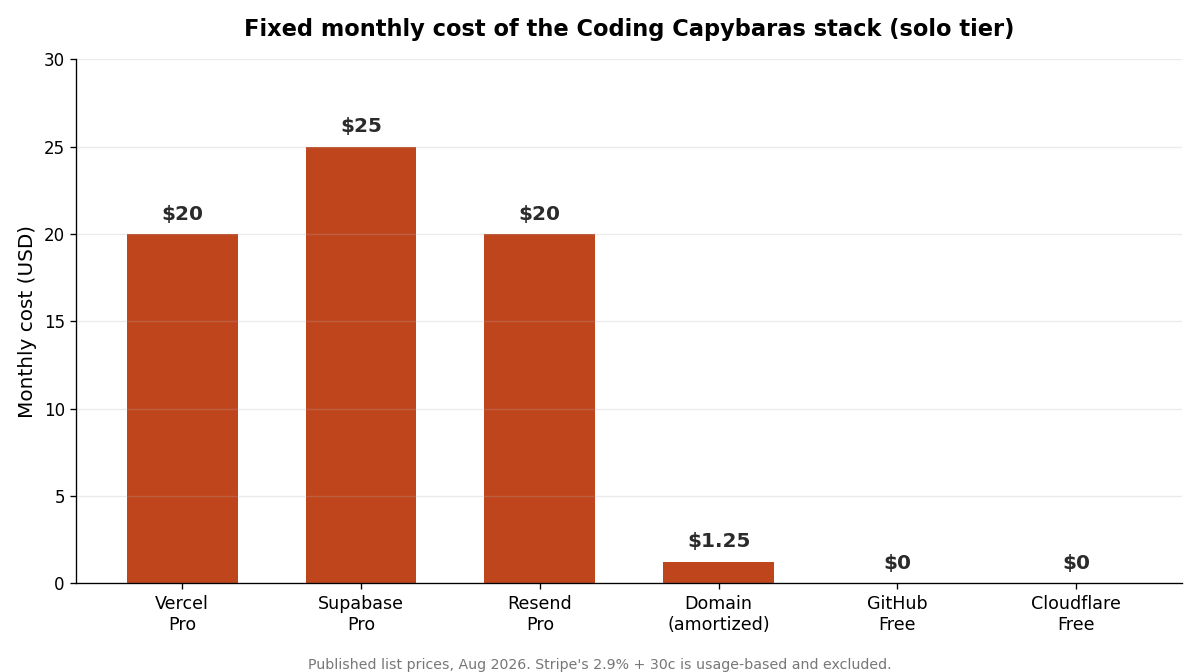
The number that surprises people is how flat it is. There is no per-seat creep because I am the only seat. There is no "we'll circle back on pricing at scale" because I am not at scale. The stack was chosen so that the boring parts stay cheap and predictable, and the only line that grows is the one tied directly to money coming in.
That flatness is a design choice, not luck. I wrote about the version of this that bites people who don't plan for it in the hidden costs of SaaS infrastructure — the charges that don't show up until month four. The whole point of picking this stack was to have as few of those as possible.
Hosting: Vercel Pro, $20/month
Coding Capybaras is a Next.js app, and it deploys to Vercel. The Pro plan is $20 per month per member, and since Vercel moved to a credit model in late 2025, that $20 includes $20 of flexible usage credit plus allowances that a solo SaaS rarely exhausts — on the order of a terabyte of fast data transfer and millions of edge requests before the meter moves.
Could I self-host on a $6 VPS? Technically, yes. But then I own the deploy pipeline, the SSL renewal, the CDN config, and the 2 a.m. page when a build breaks. I am a non-technical founder. The $14 difference between a cheap VPS and Vercel buys back the entire category of "infrastructure I have to babysit," and that is the best money in the whole budget.
The honest tradeoff: Vercel's bill can spike if you get a traffic surge, because data transfer above the included tier is metered. For a content-heavy site that could matter someday. It hasn't yet, and I'd rather solve that problem when I have the traffic to cause it.
Database and auth: Supabase Pro, $25/month
Supabase is the most expensive line, and it is the one I'd defend the hardest. The Pro plan is $25 per month per organization, and it bundles Postgres, authentication, row-level security, storage, and a management API into one bill.
The reason I moved off the free tier fast: the free Supabase project pauses after a week of inactivity, and a paused database on a live product is not a risk you take. Twenty-five dollars buys a database that stays awake, daily backups, and enough included compute that a small SaaS never thinks about it.
What I get for that $25 is not just "a database." It is auth I didn't have to build, RLS policies that keep one customer's data away from another's, and file storage for anything users upload — all under one provider, one dashboard, one invoice. If you're weighing this decision yourself, I broke down the alternatives in Supabase vs Firebase. For a non-technical founder, the consolidation is worth more than the raw feature count.
Email: Resend Pro, $20/month
Every transactional email — password resets, receipts, the lifecycle drip — goes through Resend. The free tier gives you 3,000 emails a month capped at 100 a day, and that daily cap is what pushes you to Pro faster than the monthly number suggests. Pro is $20/month for 50,000 emails.
I could argue I don't send 50,000 emails yet, and I'd be right. But email is the one system where "it silently stopped working" is a disaster you find out about from an angry customer, not a dashboard. The Pro plan gives me a verified domain, better deliverability, and headroom I don't have to monitor. I wrote about wiring the whole lifecycle flow in lifecycle email for indie SaaS — email is cheap insurance against the churn you never see coming.
Payments: Stripe, 2.9% + 30c per sale
Stripe is the only line with no monthly fee and the only one I actively want to grow. The standard rate is 2.9% + 30 cents per successful card charge in the US, with no setup or subscription cost.
On a $97 Pro sale, Stripe takes about $3.11. That's it. I don't pay Stripe for the privilege of having an account; I pay them a slice of money that only exists because they processed it. That is exactly the cost structure a bootstrapped founder wants — the expense shows up only when revenue does.
This is why I don't obsess over the percentage. A 2.9% fee on a sale I wouldn't have closed without a working checkout is not a cost to minimize; it's a cost of doing business that pays for itself on contact. If you want the mechanics of why this line is safer than a flat monthly SaaS fee, subscription billing math walks through it.
The $0 lines that do real work
Two of the most important tools in the stack cost nothing, and leaving them off the list would be dishonest about how the whole thing hangs together.
GitHub hosts every line of code, runs the version history, and is free for what a solo founder needs. Private repos, unlimited collaborators on the free plan, and Actions minutes I've never come close to exhausting.
Cloudflare handles DNS and sits in front of the domain. The free plan covers DNS, basic caching, and SSL — the things I'd otherwise pay for or configure by hand.
Neither of these is a trial that expires. They are genuinely free at my scale, and I keep an eye on them the same way I watch the paid lines, because "free until you're not" is a real pattern. I went deep on which free tiers actually hold up in the free-tier SaaS stack.
What I cut, and what I'd never cut
The budget is short because I was ruthless about the middle tier — the tools that feel productive but don't touch the product or the customer.
Here's the framework I use when a new subscription tempts me:
| Category | Example | My call | | --- | --- | --- | | Runs the product | Supabase, Vercel | Pay without hesitating | | Takes the money | Stripe | Pay per transaction, gladly | | Reaches the customer | Resend | Pay for headroom | | Watches the product | Analytics, error tracking | Free tier until it hurts | | Makes me feel productive | Project tools, extra AI seats, design suites | Cut |
I cut a paid analytics plan and run the free tier of PostHog instead — at my traffic, the free allowance is plenty. I cut a second AI coding subscription because one good assistant does the job. I cut every "team" plan, because there is no team.
What I would never cut, in order: the database, because a SaaS without a reliable data layer isn't a business, it's a liability. Then the payment processor, because the entire point is to get paid, and a broken checkout costs infinitely more than $0/month saves. Everything else — hosting could move, email could downgrade, the extras could vanish — but those two are load-bearing.
The deeper lesson is that cheap infrastructure isn't the goal. Predictable infrastructure is. I can tell you my bill to the dollar three months out, and that certainty is worth more to a bootstrapper than shaving another $10 off the total. If you want the reasoning behind pricing Pro the way I did given these costs, I wrote it up in why Coding Capybaras Pro is $97 one-time.
Frequently asked questions
How much does it really cost to run a small SaaS in 2026?
For a solo, bootstrapped SaaS on a modern stack, expect roughly $50 to $80 a month in fixed software costs — hosting, database, and email — plus per-transaction payment fees. Mine runs about $66 fixed. Costs climb with traffic and email volume, not with time, so a low-traffic product stays cheap for a long while.
Can you run a SaaS entirely on free tiers?
For a prototype or a pre-launch build, yes. For a live product with real customers, no — free database tiers pause on inactivity, free email tiers have daily caps, and "free until you scale" becomes a reliability risk the moment someone depends on you. Pay for the database and email before you launch.
What is the single most expensive part of the stack?
The database. Supabase Pro at $25/month is my largest fixed line, and it's the one I'd defend first because it bundles auth, storage, and Postgres into one reliable service. The data layer is where "cheap" turns into "downtime" fastest, so it's the wrong place to economize.
Why not self-host to save money?
Self-hosting can shave the monthly bill, but it moves the cost from dollars to hours — deploys, SSL, backups, security patches, and the 2 a.m. pages. For a non-technical founder, managed platforms buy back the entire category of work I'm least equipped to do, and the savings rarely justify the time.
How do you keep costs from creeping up?
I sort every tool by whether it runs the product, takes the money, reaches the customer, or just makes me feel productive. The first three get paid. The last category gets cut or capped at a free tier. New subscriptions have to clear that bar before they touch the budget.
The point isn't the small number
I don't run Coding Capybaras cheaply to brag about a $66 bill. I run it cheaply so that revenue doesn't have to clear a high bar before the business makes sense — every Pro sale is mostly margin, and that changes what I can afford to be patient about.
If you're building a SaaS with AI coding tools and want a stack where the costs stay this predictable, Coding Capybaras is the free boilerplate I built on exactly these tools — the same Vercel, Supabase, Stripe, and Resend setup, wired together and documented, so your bill looks like mine from day one.